Instagram
  by
by 
 9 min read

How to view your Instagram history? If you're here today, it's because you'd like to check out all the activity on your profile, right? Well, the good news is that you can do this within the Instagram app itself, with just a few clicks to reach the "Your Activity" option . So, with this tool, you can have more control over everything you do and what content you consume on Instagram. In today's article, we'll teach you how to view your Instagram history in a practical tutorial with images, as well as present other important tips on the uses and benefits of this tool. Also, check out how to update Instagram to ensure you get the most out of the tips in this post, which refer to the most current version of Instagram!
How to view your Instagram history step by step.
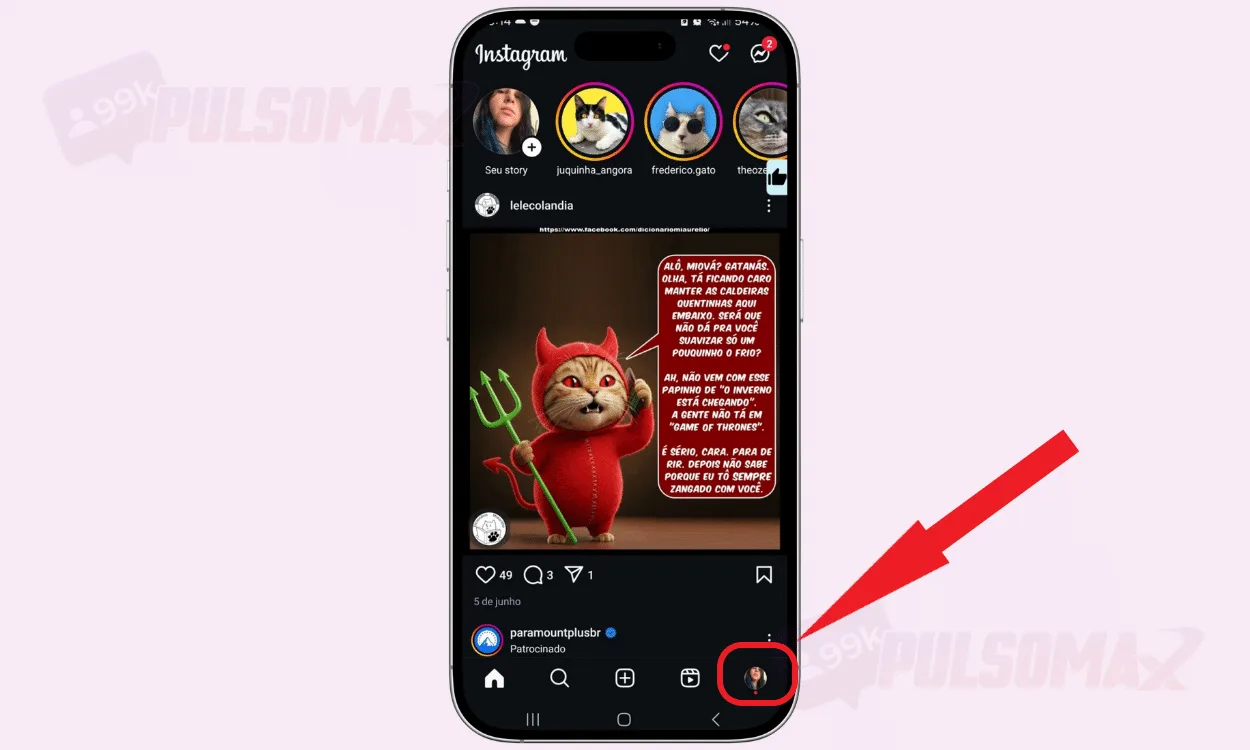
Discovering how to view your Instagram history step-by-step is simple, just like other Instagram functions we've already presented here on our blog. For example, in our step-by-step guide on how to change your Instagram profile picture . To begin, first access your Instagram through the Android or iOS app on your phone, then:
-
Tap on the thumbnail of your profile picture.
-
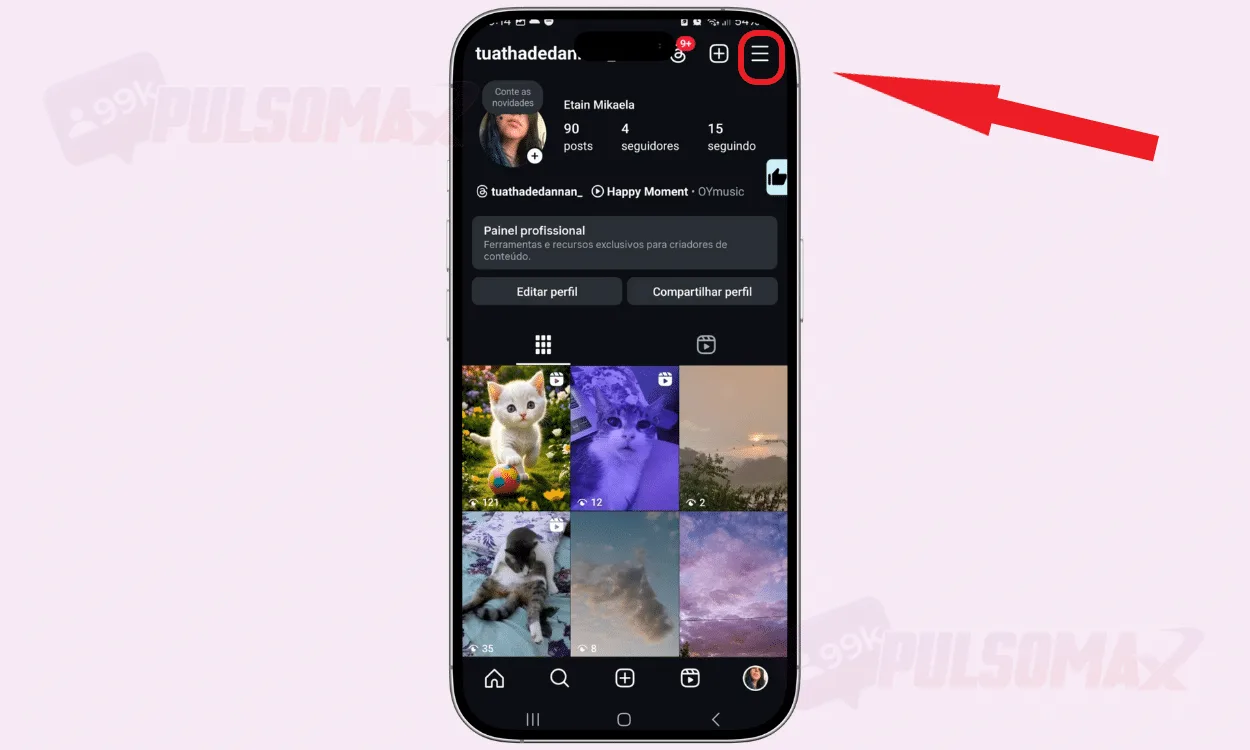
Now, tap the 3-line button in the upper corner of the screen.
-
Next, tap on your activity.
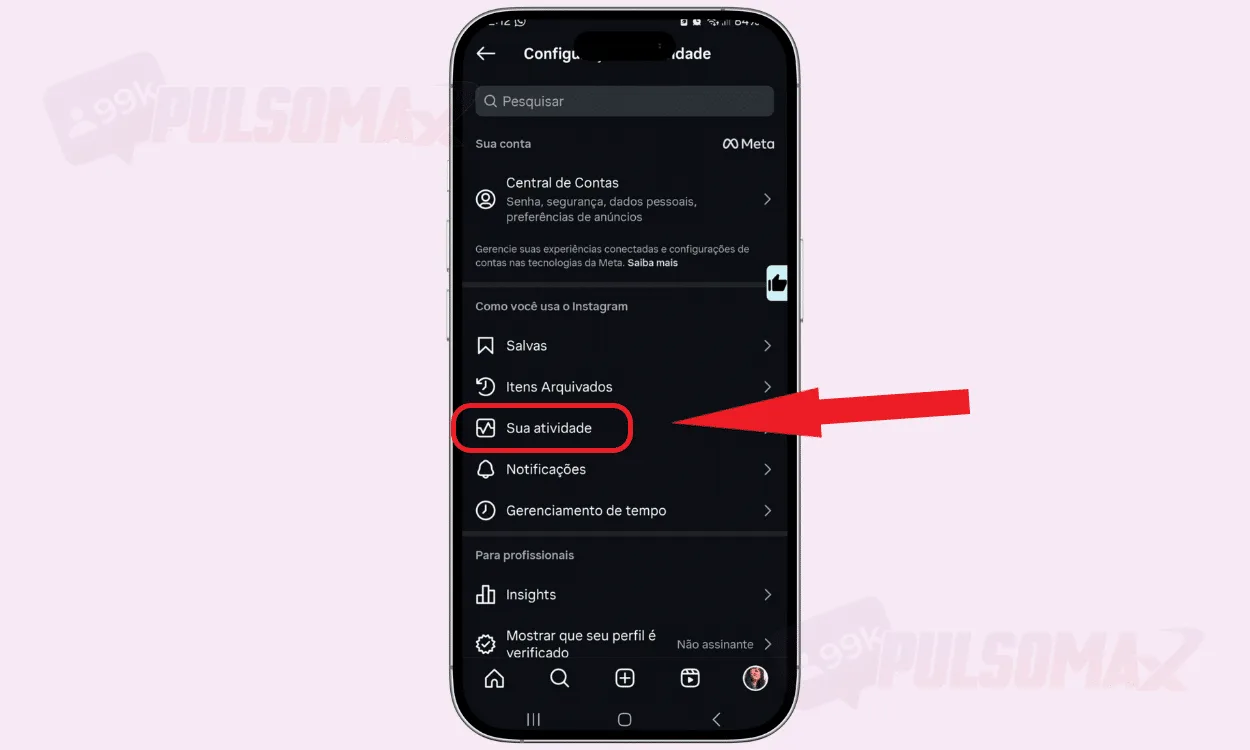 Done! You now know how to view your Instagram history. Now you can check all the information on your profile in detail. And since it's a large volume of information, there are several categories for you to select which data you want to check first. Do you post content regularly, but it's taking too long to grow? See how buying real Instagram followers can speed up this process.
What should you look for in your Instagram history?
Now that you know how to view your Instagram history, let's better understand what types of information are displayed in this history. The information presented goes far beyond your Instagram account settings and can be useful in various ways, including helping you better manage the amount of time you spend online.
-
Time spent, history, and recent research.
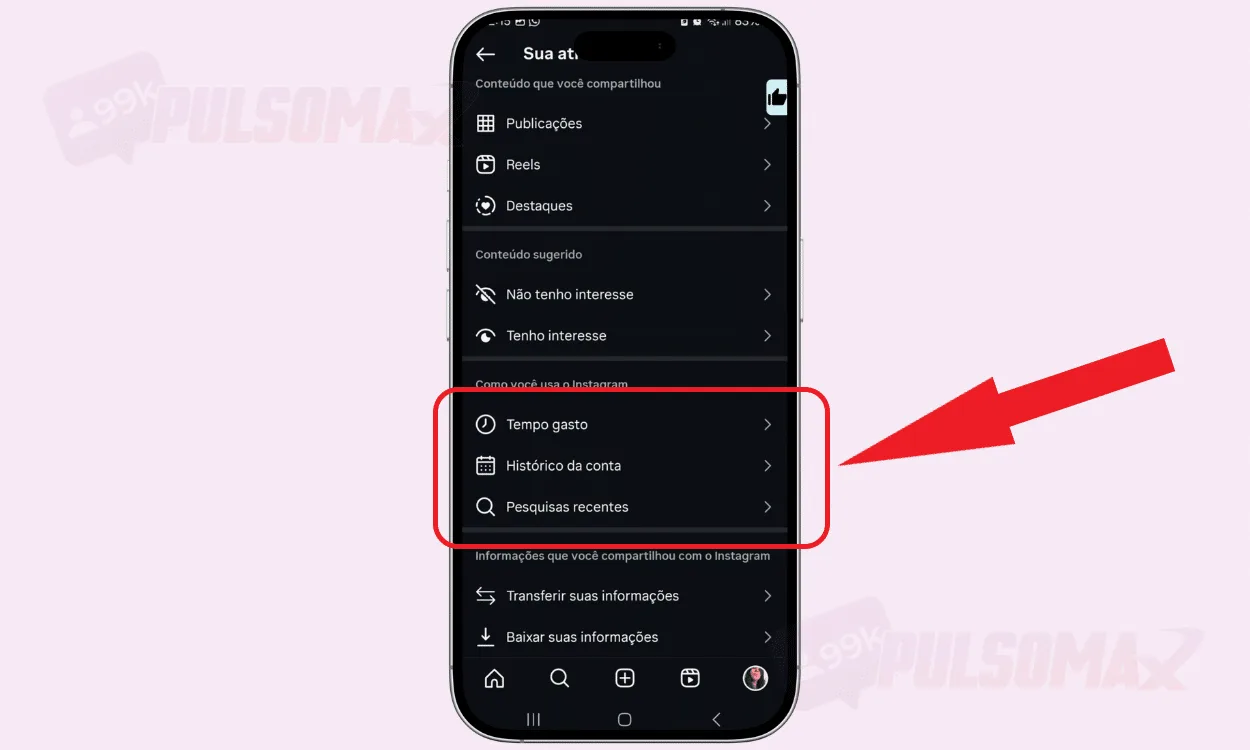 The "Time Spent" feature lets you track how much time you've spent on the social network in the last 7 days. The app displays a graph showing your screen time per day and an overall average of how much time you've spent online. The settings also allow you to set a daily limit and directly activate the sleep mode function if you find it necessary. Below, you can check your account history, where you'll find information regarding changes such as changes to your Instagram bio , name and username changes, email changes, privacy data, websites, and phone numbers associated with your profile. You can check each change made, going back to the date the account was created. In recent searches, you can see everything that has been searched on Instagram's Explore page recently. You can see terms you typed into the search, profiles you accessed, and any other content searched on Explore. If you want, you can delete all this information by clicking "clear all." A really useful feature for those who know how to view their Instagram history. (Note: The last sentence about "Declaração de amor infantil " is unrelated and should be omitted.)
-
Posts, reels and highlights
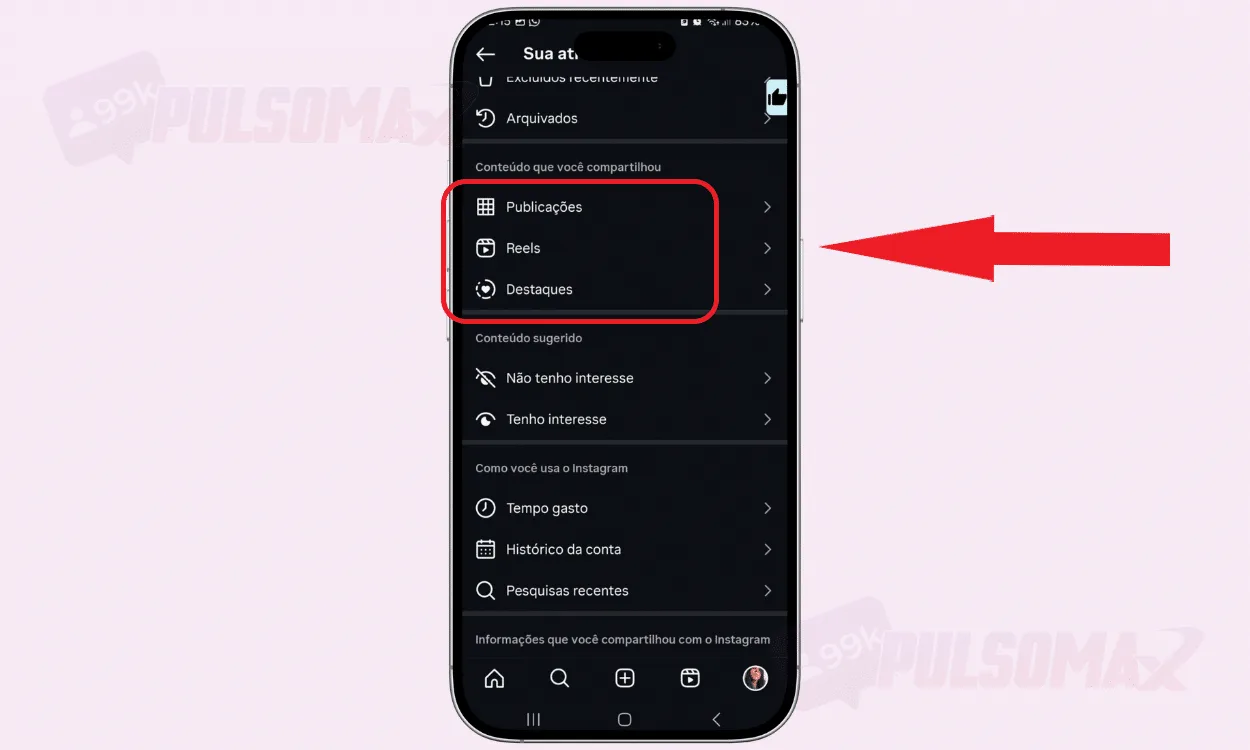 Knowing how to view your Instagram history also allows you to control your posts. After all, in these sessions, you can check all your publications, from yourInstagram feed , Reels videos, and created highlights. It's a very simple way to easily manage your content. You can choose the display order between oldest or newest, and also select which dates you want to view, choosing between all, last week, last month, last year, or a date range. If you don't know what to post on Instagram, this is also a way to choose content to repost and keep your profile active, even on those days when you lack creativity to think of new content.
-
Interactions, recently deleted, and archived items
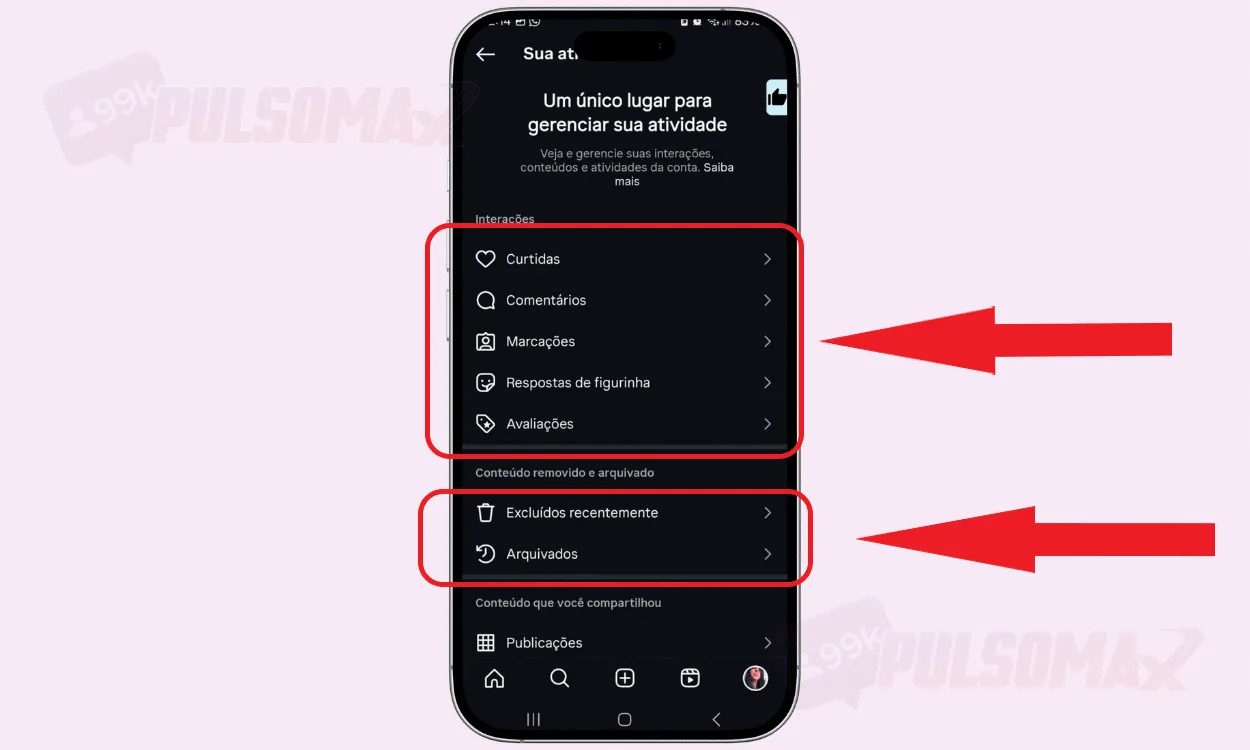 In the interactions section, you have access to your activity such as likes, comments, tags, sticker replies, and ratings . So, if someone tagged you on Instagram , or if you changed your mind about likes, comments, and other interactions, such as products reviewed on Instagram, you can delete everything here. Right below this section, you also have access to recently deleted content and your archived items . Therefore, if you changed your mind about something you deleted, or want to unarchive something, you can check everything in one place without having to search for the content on your profile. Are your posts not getting the comments you expect? Discover how to buy comments from real users and increase the popularity of your content.
-
Control what interests you.
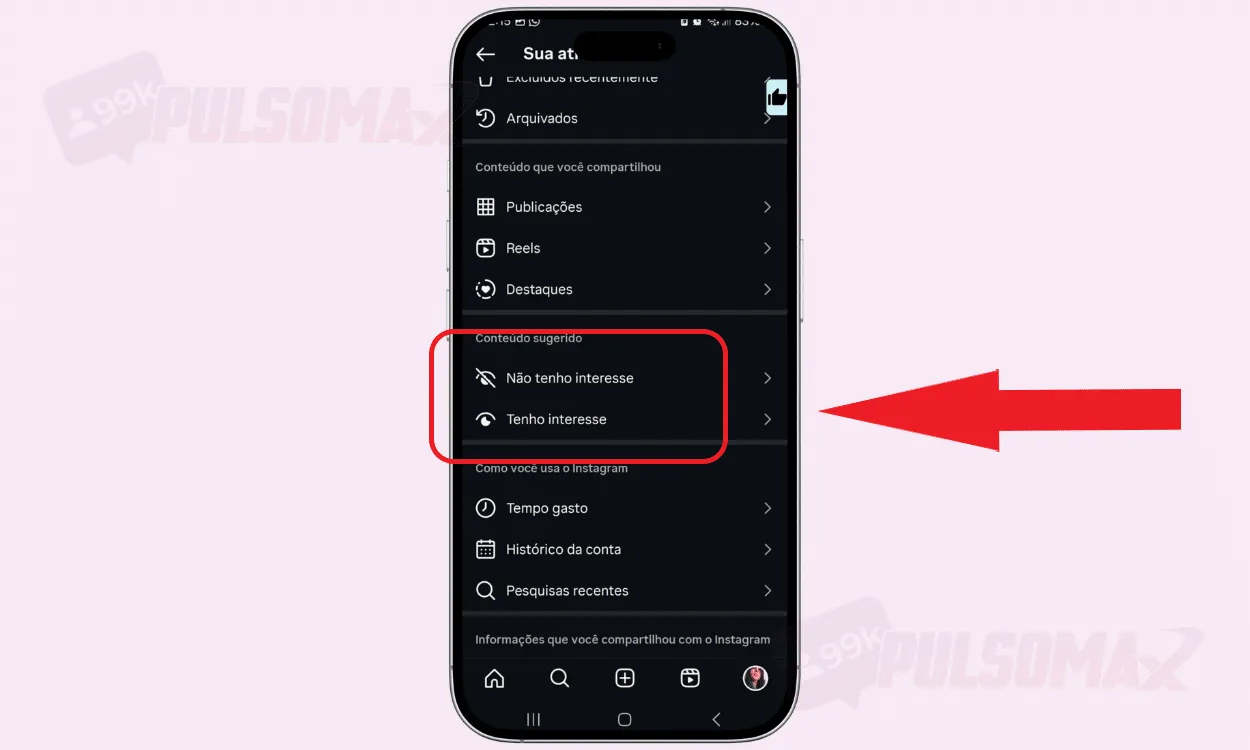 Learning how to view your Instagram history also gives you access to the "not interested" and "interested" functions, which are directly related to how the Instagram algorithm works. Here, you can check what you've marked as being of interest or not on the platform, and change it if you wish. This information is directly related to the content that the platform's algorithm shows you in places like the Instagram feed and explorer. This is a way to signal to the algorithm that you are more interested in certain types of content and not others. Want to learn more about Pulsomax's service? Try our free trial package for Instagram reel views and see for yourself.
-
Download your information
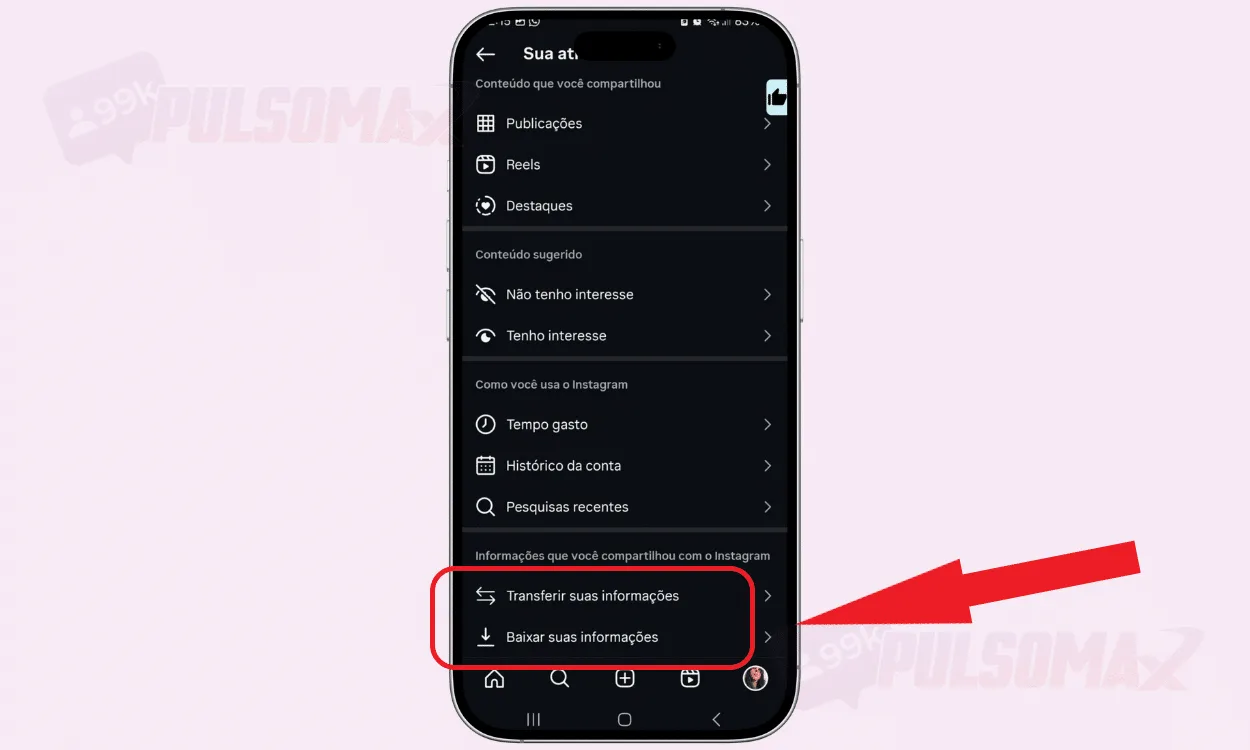 Discovering how to view your Instagram history also allows you to download your information from the platform. It's quite simple, and when your document is ready, Instagram will send you an email notifying you. This can even be a good way to recover deleted Instagram messages , especially if the user has blocked you. You can also choose whether you want to download all your information or just some of it. This can be useful for users with older accounts or those with a lot of profile activity, since the larger the report, the longer it will take to be ready. You can learn more about this at this Instagram help link .
How do I view my Instagram Stories history?
Have you ever wanted to review the stories you recently viewed on Instagram? When checking how to view your Instagram history, you may have noticed that there isn't a specific section visible for stories , and this may have left you a little frustrated. Now, the fact that there isn't a section called "Instagram stories" or something similar doesn't mean they aren't saved in your activity. By default, all the stories you publish are saved in the archived items section. Therefore, you can access this tab and check each story your profile has ever published on Instagram. You can also check your location history, which is recorded whenever you add a location sticker to a story. Now, if what you want is to improve the performance of your stories, then read this article here: 7 strategies to increase Instagram story views .
Use your browsing history to improve your Instagram performance.
If you're a digital influencer or business owner, knowing how to view your Instagram history can help you assess what's working on your profile. For example, by reviewing your older posts, you can identify themes and formats that had the most engagement. The history function also allows you to check your posting frequency and details about your interaction with your audience. Then, you can analyze this data along with insights from your professional Instagram account , if you have one, to get an even more detailed overview of your performance on the social network. With this information, you can adjust your posting schedule, decide to repost content that performed well, and even modify your Instagram bio to make it more attractive. Therefore, the possibilities are numerous, and your decisions should be based on careful analysis, always considering your goals on the platform and the interests of your target audience. Another possibility is to align your content strategies with the purchase of followers, comments, or likes for Instagram to accelerate your growth on the platform or improve the performance of specific campaigns.
Can I see the history of an account that isn't mine?
You know how to view your own Instagram history , but if for any reason you need to check information from another profile's history, know that this is not possible. Instagram only allows the account owner to verify this information, as you need to be logged into the Instagram app to check. If you are an account to which you have access, with the owner's permission, then you can check this information, following the same step-by-step instructions from the beginning of this article. However, sharing your Instagram password is not a recommended practice for security reasons. In fact, depending on the circumstances, sharing your password may violate Instagram's community guidelines and result in penalties for your account on the social network. Don't know what to do to make your videos go viral on Reels? Check out how to buy views for quality Instagram Reels videos and boost your videos!
Protect your Instagram account with history.
Knowing how to view your Instagram history allows you to control all the information on your account . This includes every modification made to your profile. For example, changes to names, emails, phone numbers – everything can be monitored. As a rule, Instagram has mechanisms that make it difficult to steal your information, such as two-factor authentication . But, through the history, you can closely monitor this, in case someone has managed to access your profile without your knowledge. If you notice any sign of something not being as it should be, the best thing to do is change your password immediately. To do this, check out how to change your Instagram password step by step . In this way, you protect the integrity of your profile, which can be especially important if you are a digital influencer with many followers, since these profiles are usually more targeted by scammers, who use the reach of the account and the influencer's authority with the public to carry out their scams after stealing the profile. That's it! We've reached the end of this content. So, did you learn how to view your Instagram history with our tips? Share your experience in the comments; this is important for our team and can also help other users with similar questions. Before you go, take advantage and check out Pulsomax's essential Instagram download tools , and start downloading your favorite content from the photo and video social network right now. It's free.