Instagram
  by
by 
 9 min read

Are you unsure how to change your Instagram profile picture? New Instagram users may face difficulties, such as not knowing how to change their profile picture. This is perfectly normal. Even older users who don't use the platform as frequently may encounter this same problem. For many people, especially brands and influencers who invest in the platform, regularly publish content, and even buy Instagram likes , followers, and comments, keeping their profile picture updated is a very important detail. After all, this is a fundamental part of their relationship with their audience and can directly impact their profile's performance. But even for ordinary people without an Instagram business account , this is relevant. An updated profile picture is also important so that your contacts can find you on the social network and recognize you. So, if you don't know how to change your Instagram profile picture, keep reading and enjoy our step-by-step guide with images.
How to change your Instagram profile picture step by step.
Learning how to change your Instagram profile picture is a great way to give your social media a fresh look. And making this change is simpler than many people imagine. Instagram allows you to upload photos directly from your device's gallery, making it easy for those who want a more elaborate profile picture. But, if you prefer, you can also take a photo on the spot, which can be useful if your goal is to highlight a special moment in your life that's happening now. To begin, first log into your Instagram account through your Android or iOS app, then:
-
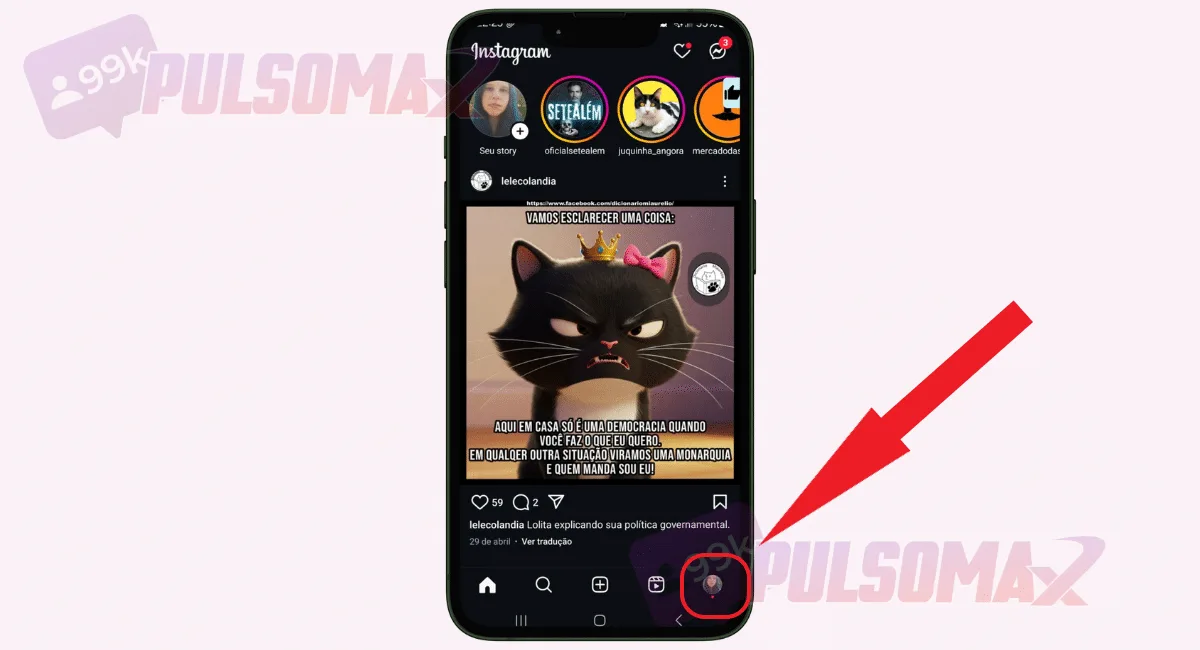
Tap on the thumbnail of your profile picture.
-
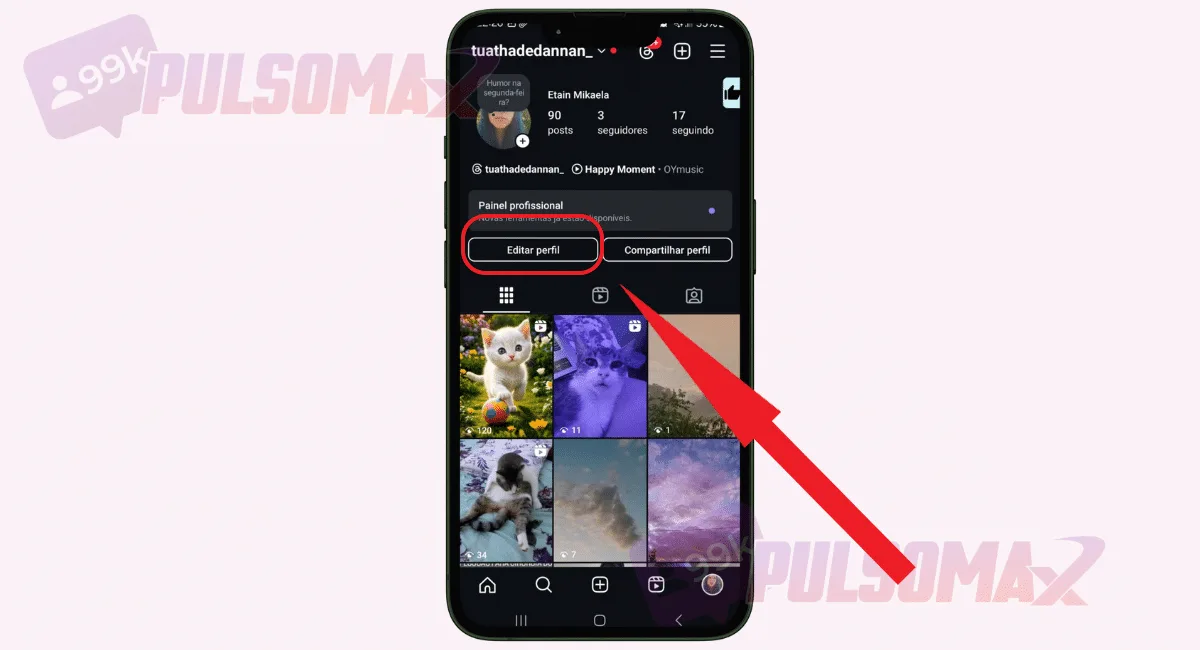
Now, tap on edit profile.
-
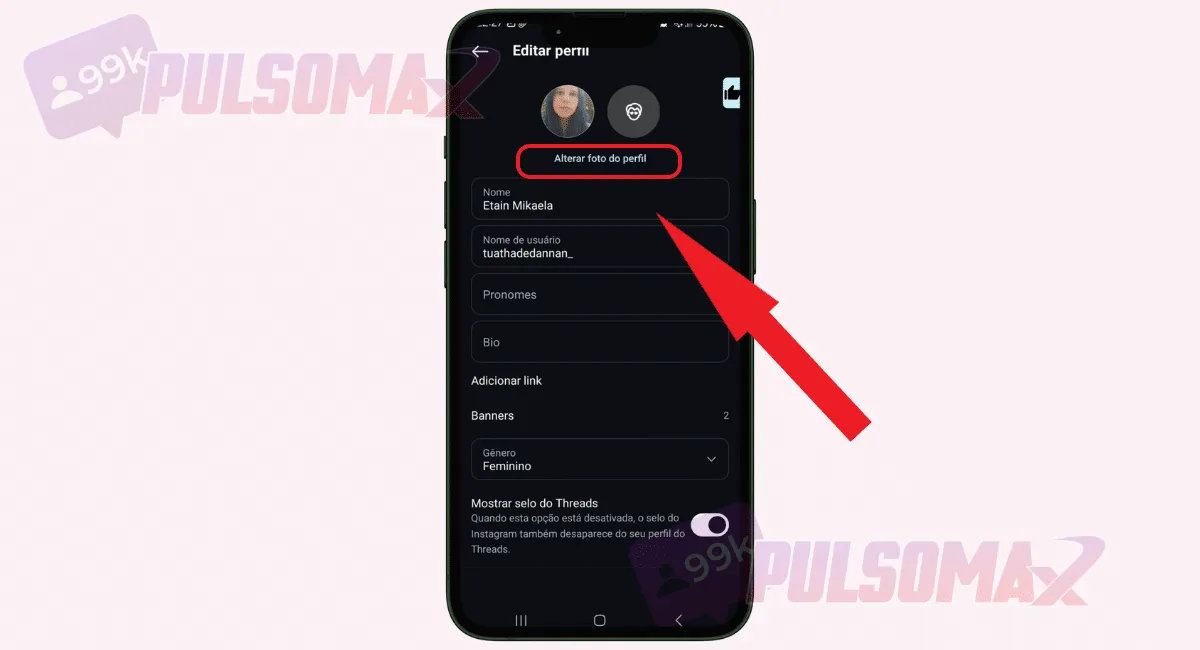
Tap on change profile picture.
-
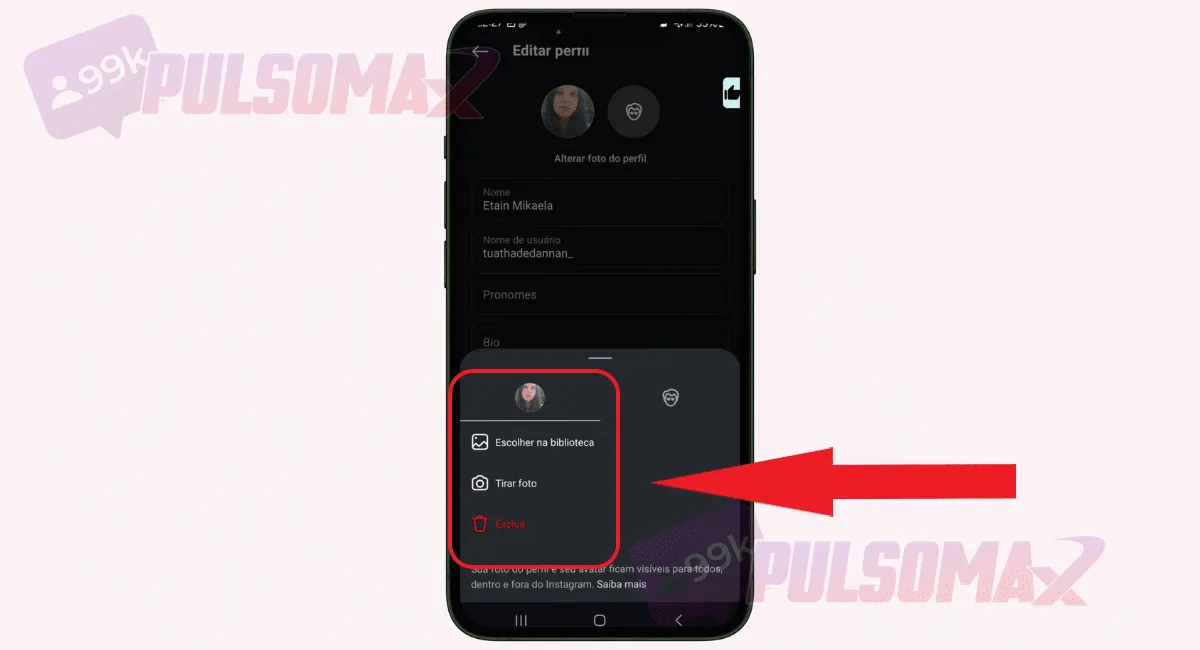
Choose whether you want to import a photo from your library or take a photo.
-
Select the desired image or take your own photo.
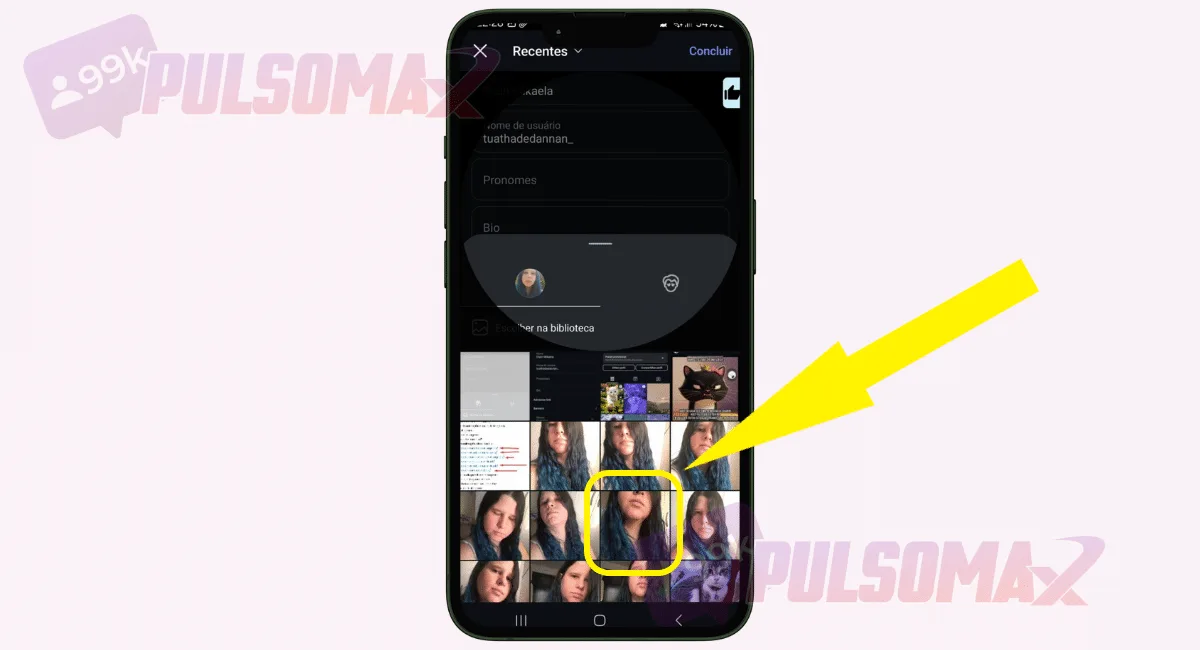
-
After adjusting your preview, click finish to complete.
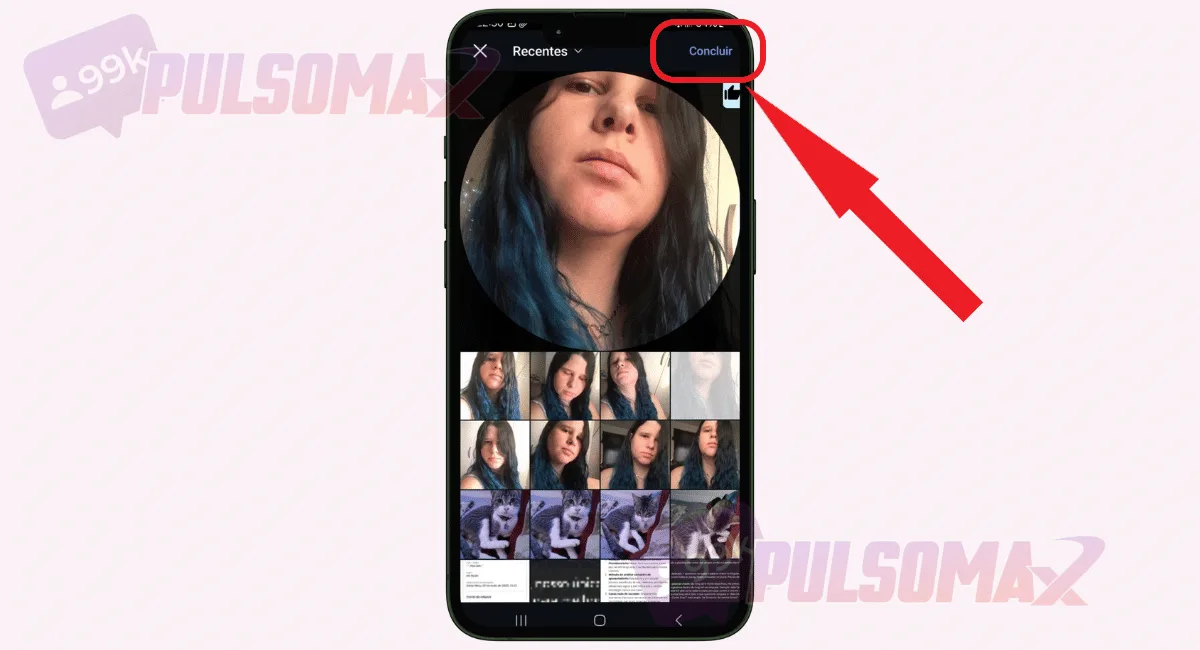 Done! You've learned how to change your Instagram profile picture. Remember that if you've linked your Facebook account to your Instagram, then this change will alter your photo on both social networks. And don't forget: the process of changing your profile picture on the social network may change when the app updates. Therefore, see how to update Instagram quickly and keep your app updated to always enjoy the latest features of the social network.
How do I create an avatar for my Instagram profile picture?
When learning how to change your Instagram profile picture , users realize it's possible to use an avatar created within the social network itself. This update is one of the most recent changes to Meta's social media, and many users still don't know how to create their avatar. However, creating one isn't complicated. To begin, you just need to enter your Android or iOS app, follow the previous step-by-step instructions until you reach the option to change your profile picture, then tap the smiley face symbol that appears next to your photo thumbnail. From there, you can take a selfie to use as the basis for creating your avatar, or do the whole process manually, choosing each detail, such as skin tone, hairstyle, and more. Once the process is finished, simply tap " customize" on your profile , right below your avatar photo thumbnail, to define how you want it to appear on your Instagram profile. When you want to change your avatar, click "edit avatar" in the same location and make the desired modifications. Are you enjoying this content? Then learn how the order in which stories are displayed works , and discover even more about Instagram's features.
Can everyone see my Instagram profile picture?
Yes, when you learn how to change your Instagram profile picture and do it, anyone can see that you've updated your photo. This includes your contacts in Instagram DMs . Some people, especially those accustomed to WhatsApp, have this question. After all, in the messaging app it's possible to hide your profile picture if you want to maintain your privacy. But on Instagram, this doesn't happen. Your profile picture will always be public, even if you have a private account on the social network. Even those who don't follow you will be able to see this photo, as well as other information from your Instagram bio , even with this type of account. And this is another reason why choosing a profile picture is a very important detail, because this photo, along with other bio data, acts as your business card on the social network. Thinking about upgrading your Reels videos, but don't know how? Try our free trial package for Instagram Reels views , understand how the service works, and see how your video can become much more popular with this strategy!
How to choose the best profile picture for Instagram?
When learning how to change your Instagram profile picture, many users start wondering how to choose the best photo for this purpose. After all, this image will be the first visual reference most people see when accessing your profile, even if your account is public. Users typically look at the profile picture first, and then check other images in your posts. For those who want to grow on the social network, and even those who invest in buying Brazilian Instagram followers , being careful with the choice of profile picture is even more important. No brand or influencer wants to make a bad impression on new users and followers. With that in mind, we've prepared the following tips to help you choose the best photo for your Instagram profile.
1. Choose an updated photo.
If you work with the public, or even if your account is just for personal use, using an updated profile picture is recommended. For example, if your company has made a change that impacts its image, keeping your profile picture updated on social media is a differentiating factor that conveys professionalism. This could be the case for a store renovation, or even a change of address. You can also take the opportunity to update your bio, including new information if necessary, and even using different fonts for Instagram to make your profile even more unique and personalized. Keeping your profile picture updated is also important if you want people to easily recognize you outside of social media. For example, in a job interview. Or, if you are a digital influencer and have changed your appearance, to keep your audience updated and engaged with your profile.
2. When in doubt, opt for simplicity.
If you're unsure which image to use now that you know how to change your Instagram profile picture, always opt for the simplest one. After all, the chances of regretting your choice of photo later are lower when you choose a more basic image that simply shows your smiling face, like a selfie, for example. This also applies to your business. If in doubt, you can use an image of your logo or your storefront, making it easier for people to identify your brand, without worrying too much about the image's meaning. Just make sure the image has the necessary quality and sharpness so that all the information in it is visible to users. Is your profile not very engaging? Try buying genuine Instagram comments and discover the secret of digital influencers to boost your posts on the social network!
3. Think about unique photos for your profiles.
When you learn how to change your Instagram profile picture, you can also maintain a more unique identity for your social media . To do this, you can think about creating exclusive photos for your networks, investing in a more sophisticated setting, planning ahead, choosing appropriate attire, and controlling factors like light and shadow to achieve higher quality photographs. Think of it like choosing captions for your Instagram notes . Finding the ideal caption might take a little work, but the result will be worth it. If you feel it's necessary, you can hire a photographer and have a photoshoot. This is a great idea if you intend to promote your personal image or your business image. Of course, it might seem like a bit much. But the truth is, you'll have a whole selection of high-quality photos afterward, even to change your profile picture again if you want.
4. Don't strike forced poses or smiles.
Most people, when learning how to change their Instagram profile picture, want a smiling photo on the social network. However, a forced smile or pose can ruin the authenticity of your image. Always prefer natural photos that capture your facial expression and body posture in a more relaxed moment, even if formal. Although many believe that a smiling photo is always ideal, a photo where you appear more serious can also look good, even in business contexts. So, if you're not in the mood to smile, don't try to do it just because you think it's the right thing to do. A natural pose is much more valuable for representing your identity and the identity of your business. After all, people can easily tell when a smile isn't genuine or a pose isn't natural. Don't know how to make your video go viral on Instagram? See how to buy views for Instagram reels and make your video much more popular on the social network!
5. Think of a visual pattern for your photos.
Learning how to change your Instagram profile picture and keep it updated is also part of building your brand's visual identity, or personal image. Therefore, for those who want to create a strong presence on the social network, maintaining an easily identifiable visual standard in their profile pictures is a necessary strategy. To do this, you can consider prioritizing elements such as your brand colors, your company uniform, or formal attire in the case of some businesses, your logo, and any other details you consider essential to be associated with the business image. In this way, it will be much easier for any user to recognize you, your brand, or your company on the platform.
Choose a photo with your face centered.
For some time now, Facebook and Instagram have used a round image as a profile picture. So, when thinking about how to change your Instagram profile picture, it's important that you choose an image where your face, logo, or any relevant information is centered. It's possible to drag the thumbnail to one of the corners, but this can make your profile picture look strange. Remember: some users even click on the profile picture to see the entire photo, but not everyone does, settling for what's centered in the thumbnail, similar to what happens with Instagram Reels covers . So, don't neglect the quality of the round thumbnail that appears in your profile picture! Thank you for getting this far. Did you learn how to change your Instagram profile picture in practice? Leave your comment! Oh, before you go, check out our Instagram download tools ; it's free and you can download your favorite content from the social network.