Instagram
  by
by 
 9 min read

How to add music to your Instagram bio? Instagram now allows users to add music to their profile bios. This makes it possible to personalize and create a fun bio. The feature is available to all profiles on the social network and was launched in a campaign with Sabrina Carpenter, who was the first Instagram user to use the feature on her profile. The function is similar to the "status" feature on MSN, which older readers of this post will remember. We've already discussed the importance of the Instagram bio in other posts here. The truth is, the bio is a space where brands and content creators can grab the attention of their followers, convey their personality, and even innovate in marketing campaigns. In today's post, we'll teach you, with a step-by-step guide and images, how to add music to your Instagram bio, as well as clarify other questions about the feature, so you can make the most of it in your daily life. Happy reading!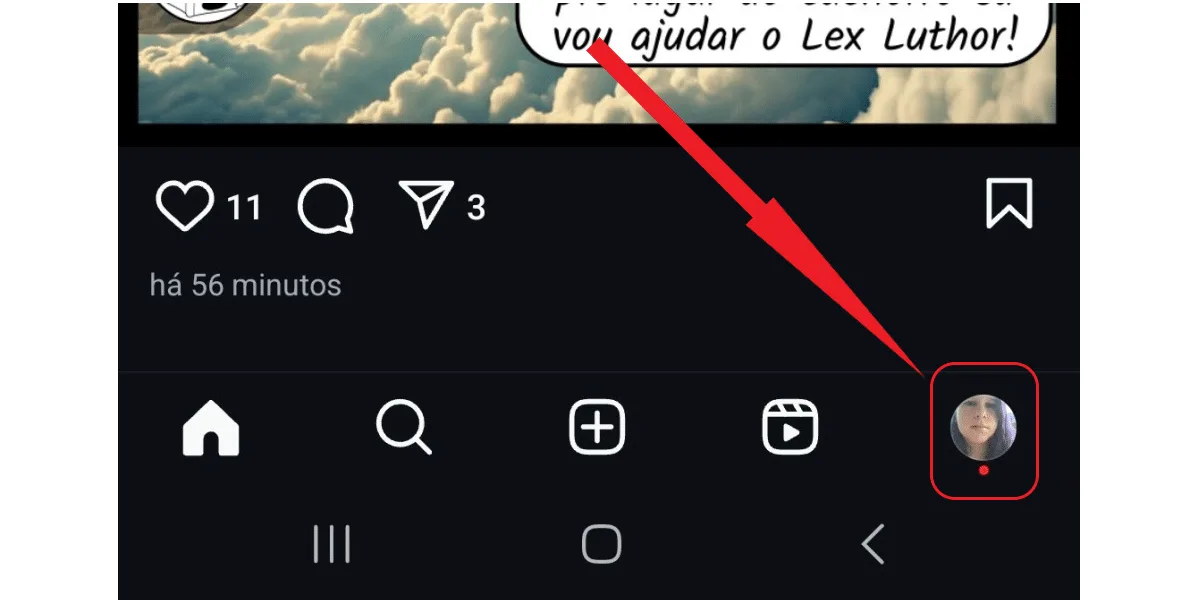
 Great, you've learned how to add music to your Instagram bio. And whenever you want to change it, just follow these steps again and choose your new song!
How to add music to your Instagram bio step by step
Previously, Instagram users could already add music tracks to theirInstagram feed posts and stories. This feature made Instagram posts much more dynamic. Now, the social network is much more interactive, allowing people to personalize their profiles with a specific song. And doing this is very simple. To begin, open your Instagram app (Android or iOS). Then:Tap the thumbnail button for your profile picture.
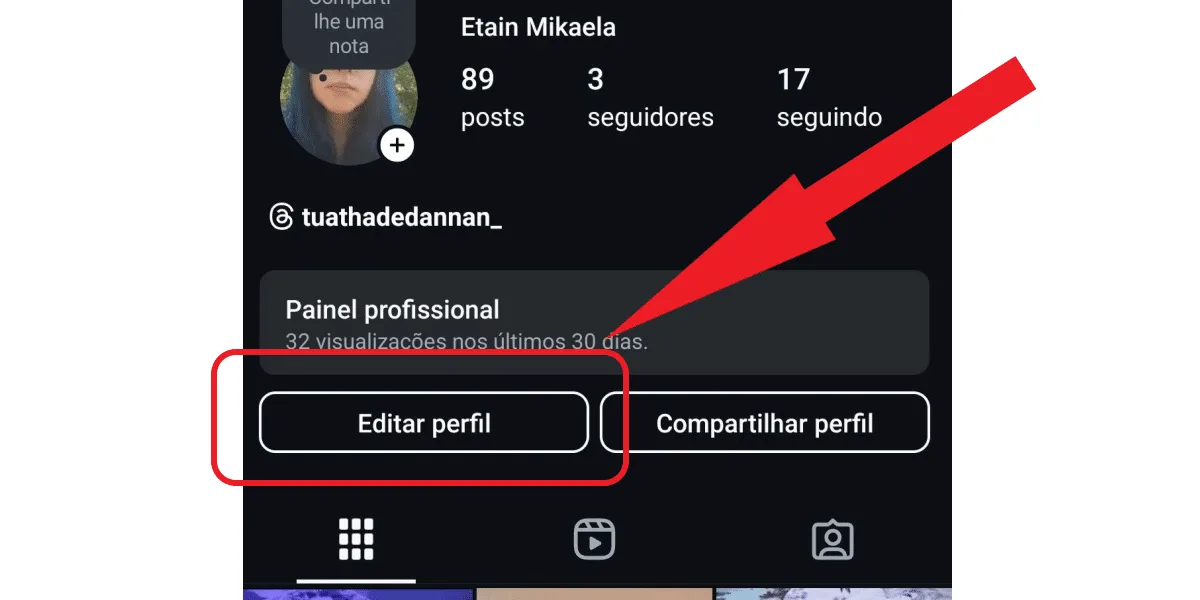
Then click on edit profile.
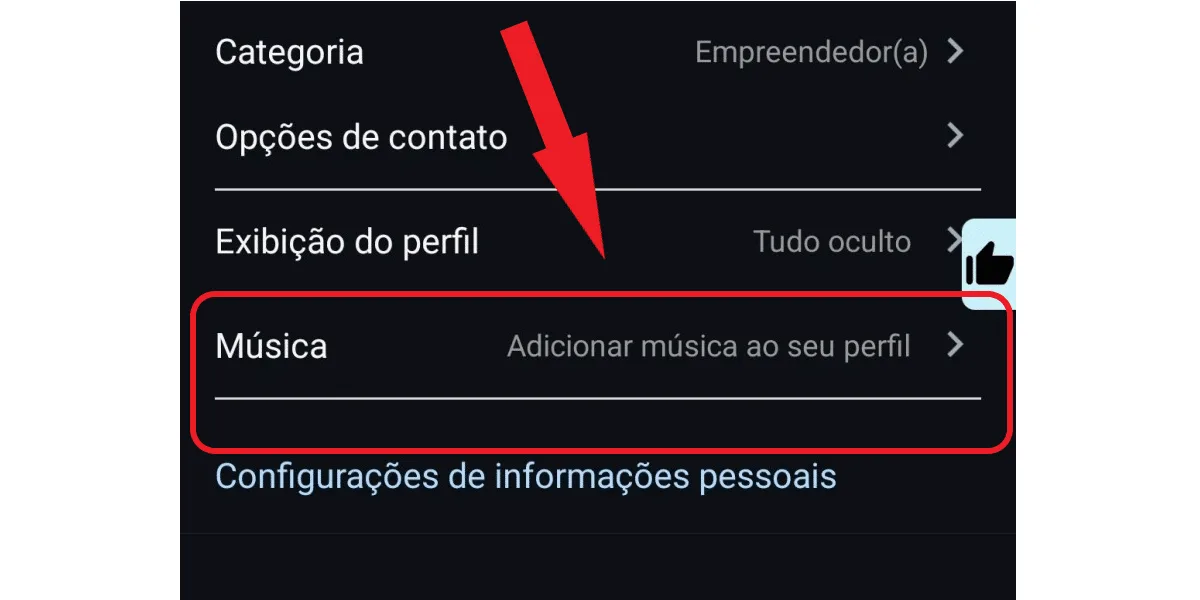
Next, tap on "add music" in your profile.
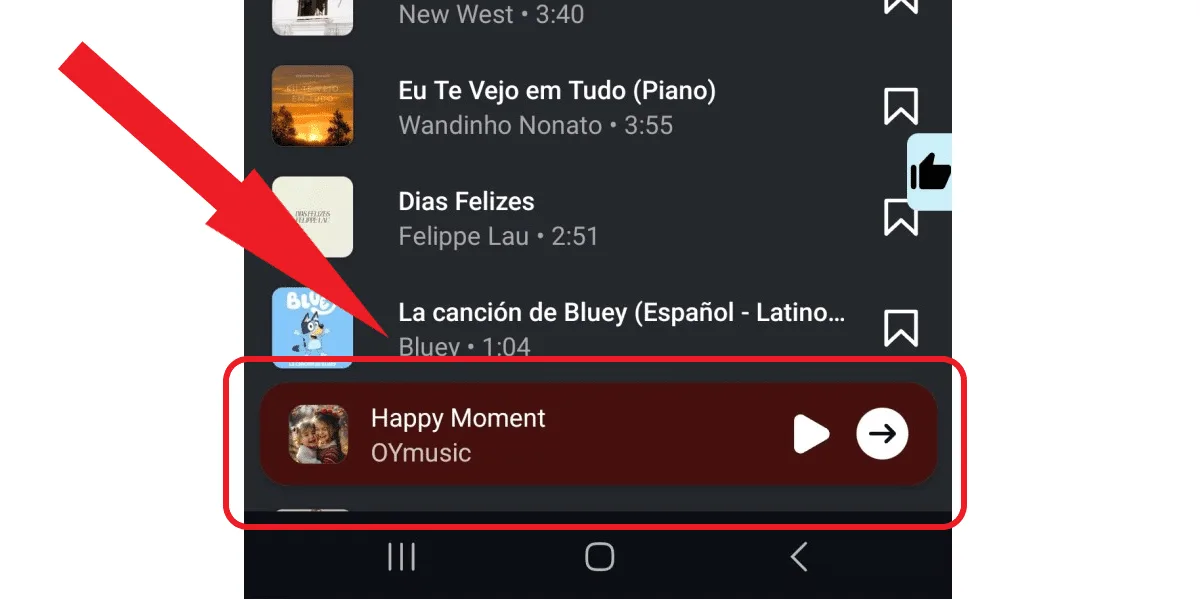
Select the song by clicking on it and then click on the little arrow.
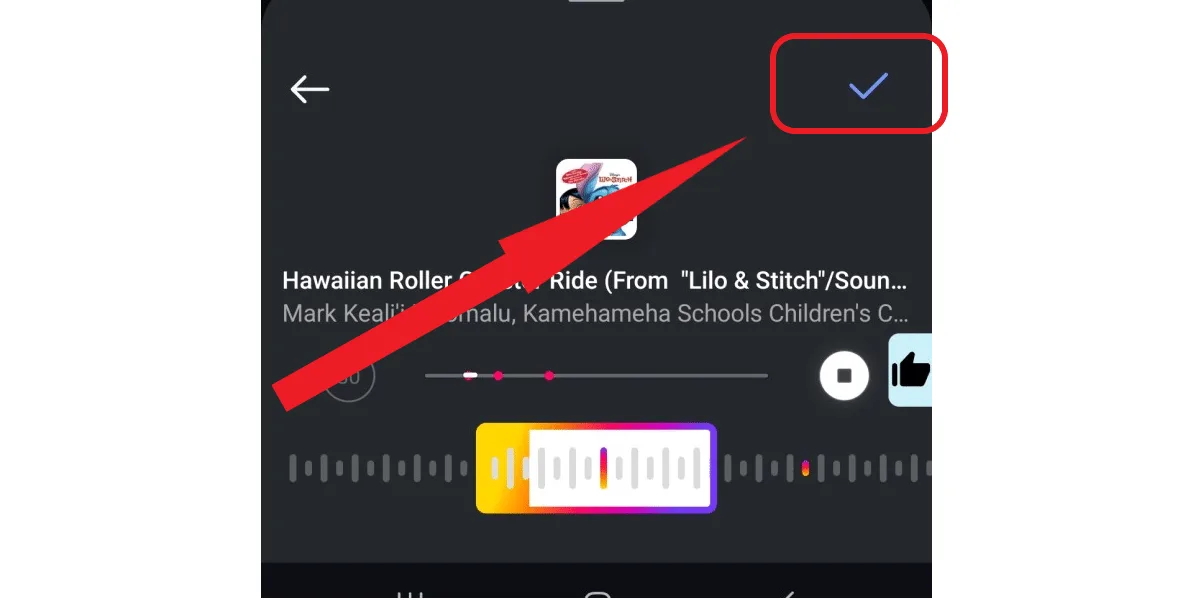
Tap the blue checkmark to confirm.
Great, you've learned how to add music to your Instagram bio. And whenever you want to change it, just follow these steps again and choose your new song!Can I add music to my Instagram bio using a PC?
No, you can't add music to your bio via Instagram Web . Many users prefer using Instagram on their computers, as it's a convenient way to perform various actions on the platform, such as replying to comments, liking posts, checking your status, and even posting stories. However, Instagram Web doesn't have all the features of the Instagram app. And learning how to add music to your Instagram bio is one of those activities you can't do on a computer. So, you'll need to use the mobile app if you want to personalize your profile with your favorite music.Can I remove the music from my Instagram profile?
Yes, you can remove the music from your Instagram bio at any time. So, use the step-by-step guide on how to add music to your Instagram bio whenever you want. Because, if you regret it, you can simply remove the audio at any time. To do this, go back to your Instagram profile page, click on edit profile and then tap on the music in your bio. Finally, click on "remove music from profile". That's it! If you change your mind, you can add new music at any time. Want to boost your profile? See how buying Instagram followers is quick and safe, and you can boost your growth and content creation strategies.Where else can I add music to Instagram?
Now that you know how to add music to your Instagram bio , you might be wondering where else the social network lets you add your favorite songs. Well, that's possible! You can add music to virtually any post on the social network, including:- Music in Instagram feed posts.
- Music in stories.
- Music in Reels videos.
- Notes.
7 Music Ideas to Put in Your Instagram Bio
Many users are curious about how to add music to their Instagram bio, after all, the feature is relatively new. But when it comes to choosing a song snippet to put in their bio, they're unsure which song to select. That's normal! To help you make a good decision, especially if your main goal is to engage your followers, we've compiled some music ideas for your Instagram bio below, enjoy!1. Moments to Memories – Adeline Hill
The song "Moments to Memories – Adeline Hill" is very popular on Instagram, and an excellent music choice for those who are connected to the present moment and want to make that connection clear to their followers. After all, the song talks precisely about how each instant can be transformed into an unforgettable memory, reinforcing the idea of living the present more intensely.2. Every Second – Mina Okabe
Have you learned how to add music to your Instagram bio and are you in love in real life? Then the song "Every Second – Mina Okabe" might be a good choice, as it reinforces the idea of appreciating the relationship in the present moment. You can choose this song to highlight the importance of your relationship in your life, and how you wish time would stop so you can fully enjoy every moment in this relationship, without worrying about the future.3. Who's Hooking Up With? – Murilo Huff featuring Wesley Safadão
The song "Quem tá pegando – Murilo Huff featuring Wesley Safadão" is a good choice for anyone going through the difficult time of a breakup and wanting to share this moment with their followers without saying much, just with a song. In fact, some users even use the song to subtly hint at a special someone, showing they know what's going on simply by having the song on their profile. If this is your case, and you're feeling heartbroken, you can take advantage of this opportunity.4. Black Hat – Fiduma & Jeca
The song "Chapéu Preto – Fiduma & Jeca" is another good choice for users who have learned how to add music to their Instagram bio but are undecided. It's a fun, upbeat country music song that can clearly show how excited, happy, or even in a country music club mood you are. It all depends on the message you want to convey to your followers.5. Memories – Josephine Alexandra
Are you in a relaxed, serene mood and want to make that clear? Then the song "Memories – Josephine Alexandra" is a great choice for your Instagram bio. This guitar solo from the original Maroon 5 song of the same name is perfect for those who are at peace and want to reflect that tranquility on their social media.6 Tá OK – Dennis, MC Kevin O Chris
Are you heading to a party or simply looking to enjoy life? Then you can share that moment with your followers by adding the song "Tá OK – Dennis, MC Kevin O Chris" to your profile. After all, the song is all about freedom and fun, inviting listeners to simply enjoy the moment.7. Put Your Records On – Corinne Bailey Rae
The song "Put Your Records On – Corinne Bailey Rae" is also a great choice for those who have just discovered how to add music to their Instagram bio but don't know which one to select. This song is fun, motivating, and perfect for those moments when you want to demonstrate all your willpower to be yourself and achieve your dreams. Need tips to boost your growth? Read also:how to grow on Instagram, simple strategies .Tips for choosing which song to put in your Instagram bio.
If the suggestions above didn't appeal to you and you're still undecided about which song to put in your Instagram bio, don't worry. Ideally, you should take your time, without rushing to select a song, so you can better explore the options available in the app's library. And to help with this choice, we've also prepared the following tips:- Instagram's music library is extensive, so take a few minutes to listen to some of the available options; you might just find a song you like.
- Think about your mood. Are you happy? Sad? How do you feel? Perhaps you'd like the idea of putting on some music that expresses the feeling you're experiencing right now.
- What's your goal in figuring out how to add music to your Instagram bio? Do you want to send a message to your followers? Do you want to send a message to someone specific, a subtle hint? Then choose a song that expresses what you want to say.
- Think about your identity, about the music you like and identify with. Then, find the right sound from the list of options, the music that matches you.
- Take your time searching for songs by your favorite artists, and choose one.