Instagram
  by
by 
 11 min read
![Como desbloquear uma pessoa no Instagram [Fácil]](https://pulsomax.com.br/assets/uploads/blog_ai/wordpress-featured-como-desbloquear-uma-pessoa-no-instagram-ecd86cdaad.webp)
Blocked someone on social media but don't know how to unblock them on Instagram? Blocking on Instagram is a solution many users adopt when someone disturbs their online peace. Although there are other options to get rid of this type of disturbance, for example, learning how to restrict on Instagram , blocking is still a very common alternative. However, for various reasons, people regret blocking certain profiles. For example, it could be someone they no longer spoke to, but they reconnected. Or even a coworker/family member who discovered the block, and to avoid strained relationships offline, the user may decide to unblock that person. Regardless of the case, know that it is possible to unblock someone on Instagram. Keep reading and see how with our step-by-step guide!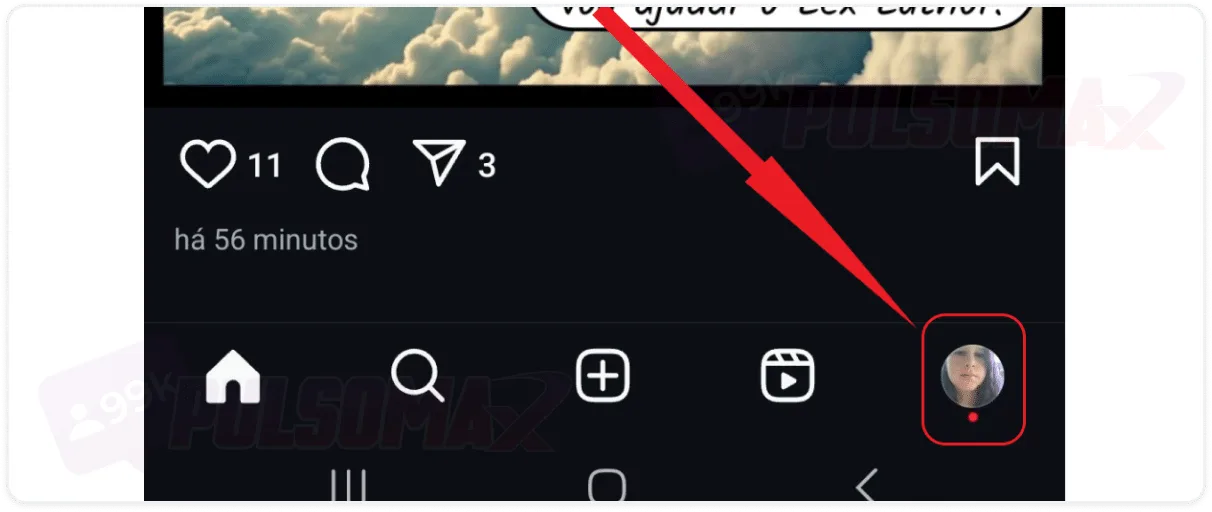
 Done! You've discovered how to unblock someone on Instagram! It's worth mentioning that the Instagram unblocking process works for both Android and iOS. Therefore, iPhone users can also benefit from this step-by-step guide. However, if you want more tips about Instagram for iPhone, check out our other post: how to hide likes on Instagram iPhone .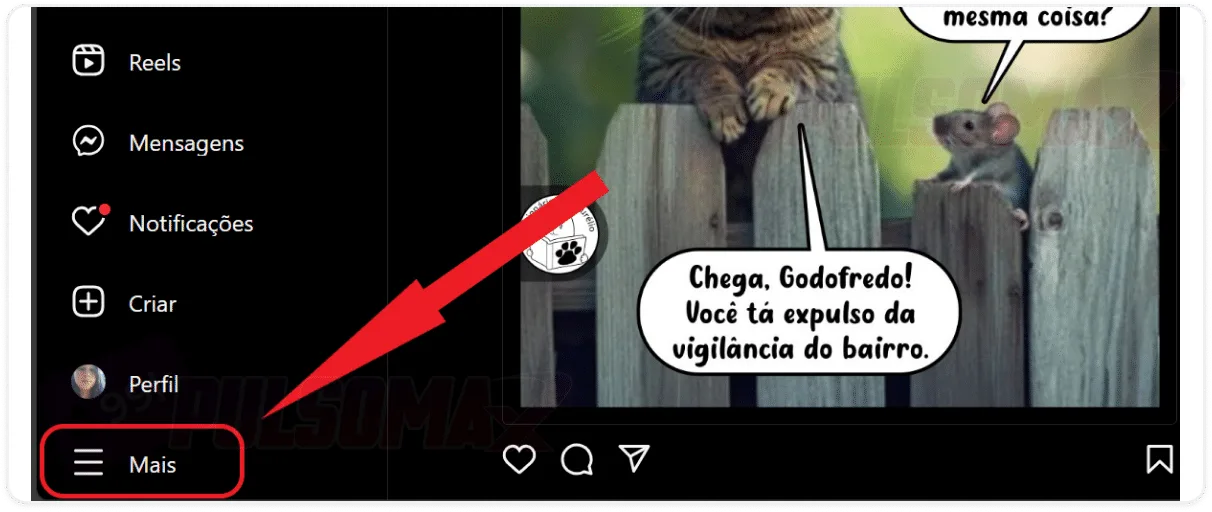
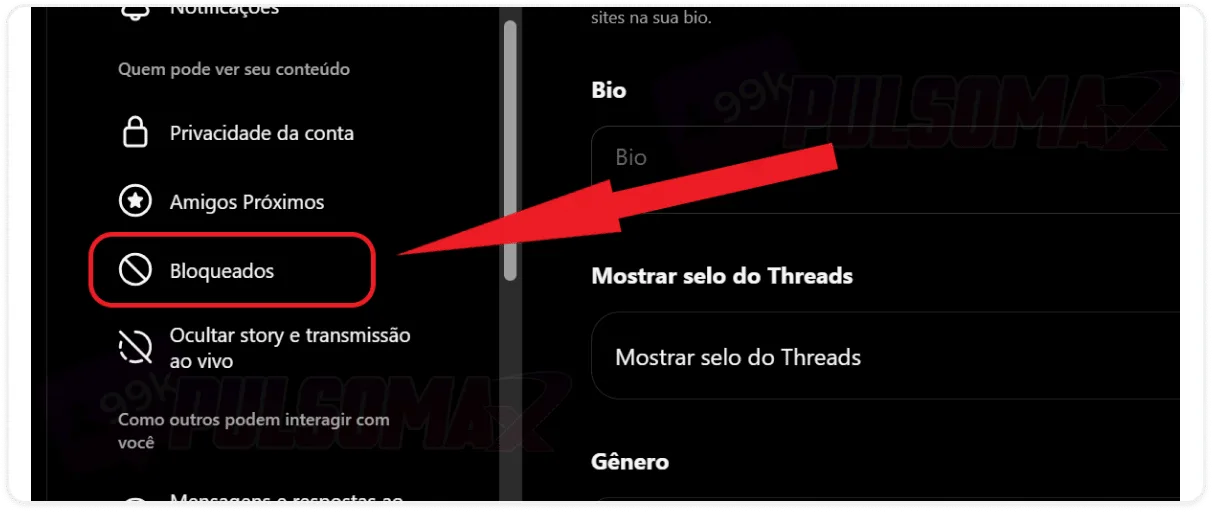
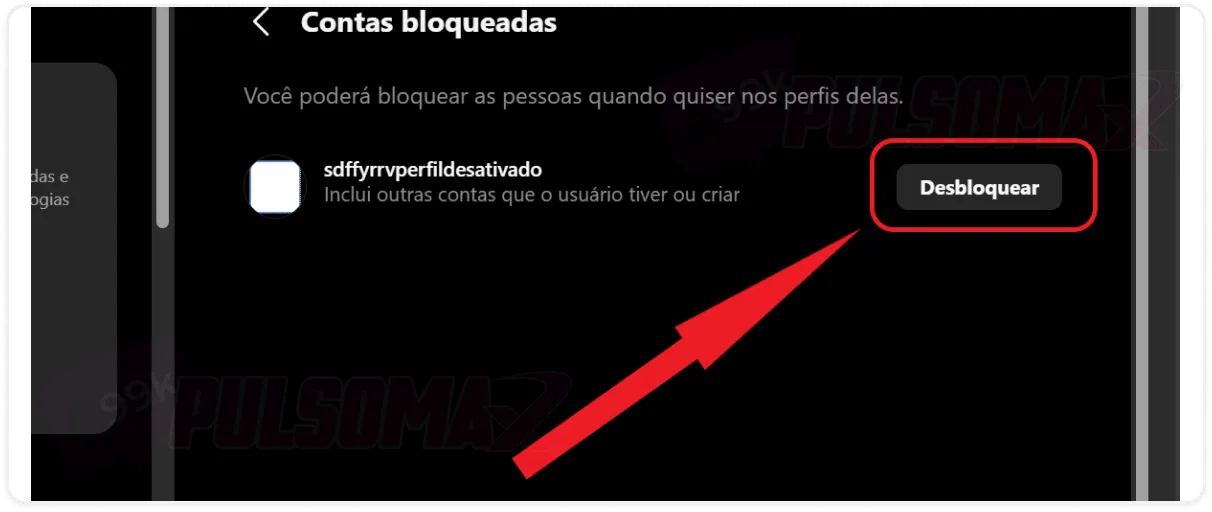
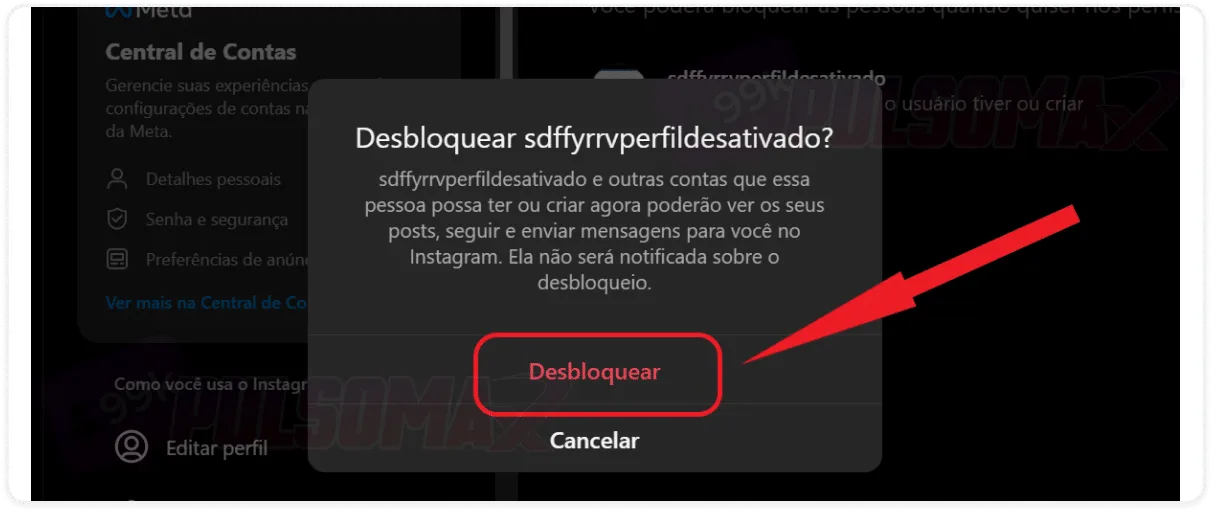 Done! You now know how to unblock someone on Instagram Web without any difficulty. And, in general, we can say that the process is similar to unblocking via the app.
How to easily unblock someone on Instagram
When you block someone on Instagram, all interactions with the blocked account cease. It's no longer possible to exchange messages via direct message or see posts from that profile in yourInstagram feed , for example. You also don't need to worry abouthow to delete Instagram conversations with the blocked user, because the messages will disappear from your Direct. The same rule applies to the blocked person; they won't be able to interact with any content you post, view that content, or find your profile on the social network. But if you regret this for any reason, know that it's easy to fix. To begin:In the Instagram app, tap the icon with your photo.
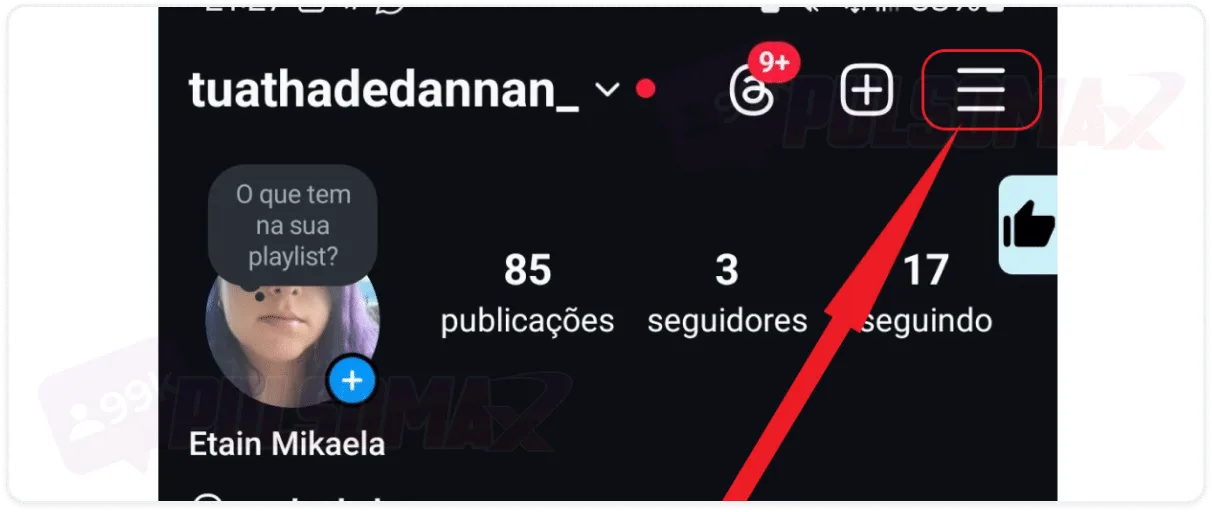
Next, tap the 3-line button.
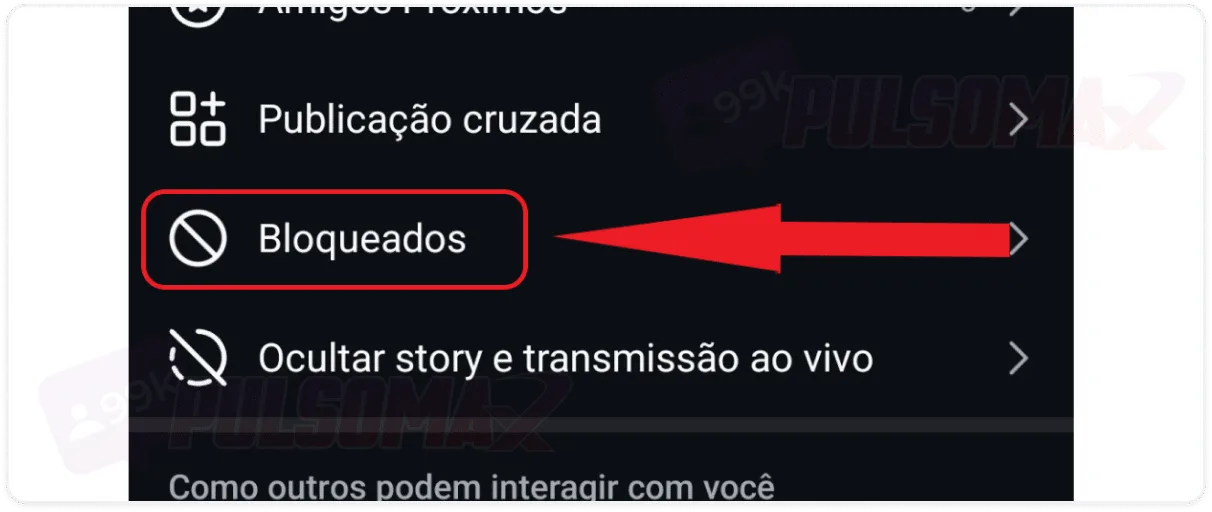
Scroll down until you find the "locked" option.
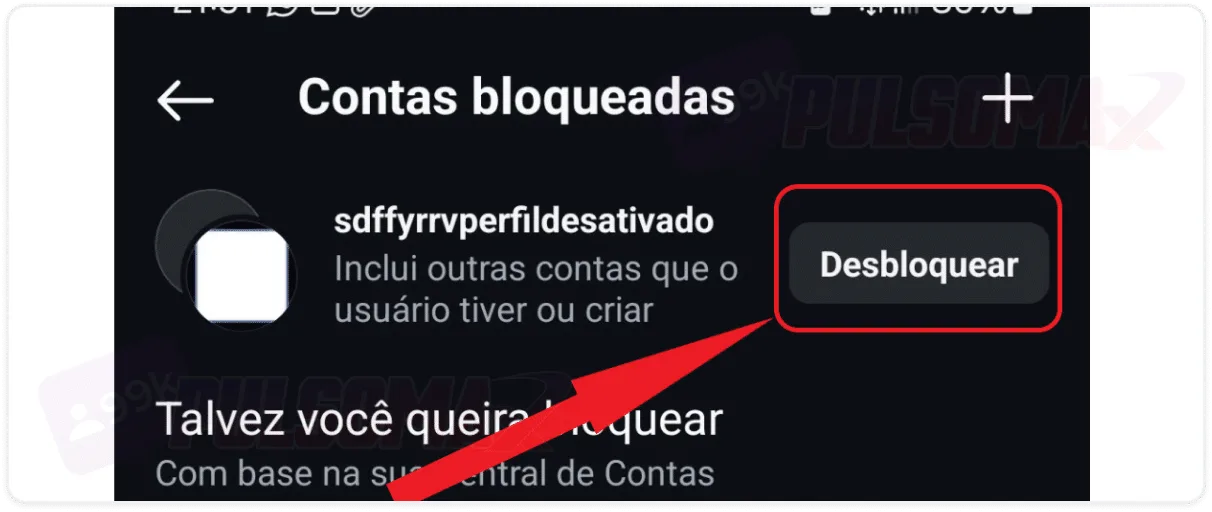
On the next screen, click "unlock" next to the profile name.
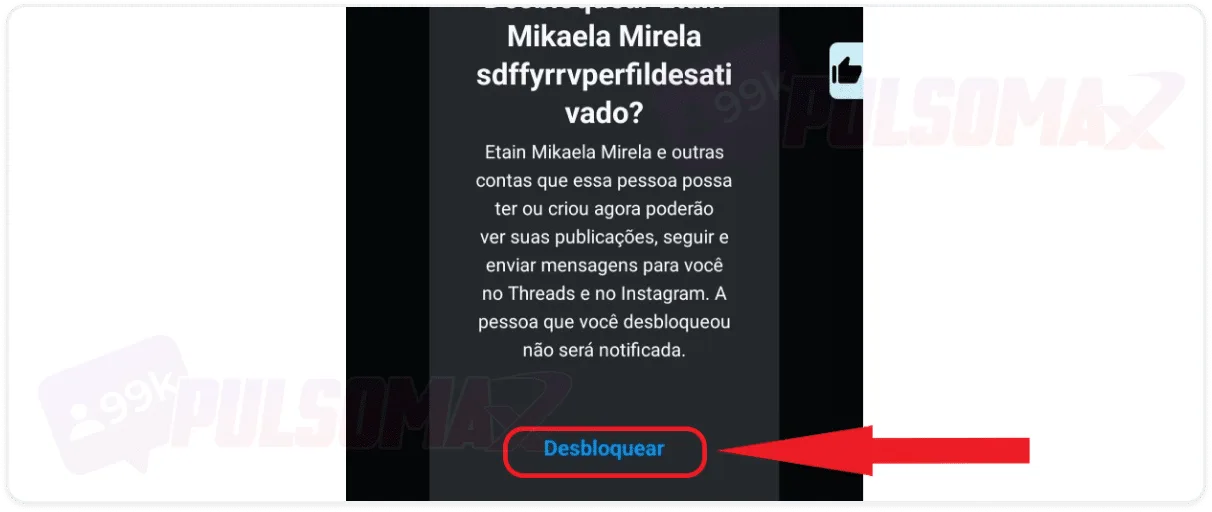
Confirm the unlock by tapping unlock again.
Done! You've discovered how to unblock someone on Instagram! It's worth mentioning that the Instagram unblocking process works for both Android and iOS. Therefore, iPhone users can also benefit from this step-by-step guide. However, if you want more tips about Instagram for iPhone, check out our other post: how to hide likes on Instagram iPhone .How do I unblock someone on Instagram Web?
For those who use the photo and video social network on their computer and want to know if it's possible to unblock someone on Instagram Web , the answer is yes! So, if you're on a PC, start by logging into Instagram Web with your credentials and then:Tap on "More" in the bottom corner of the screen.
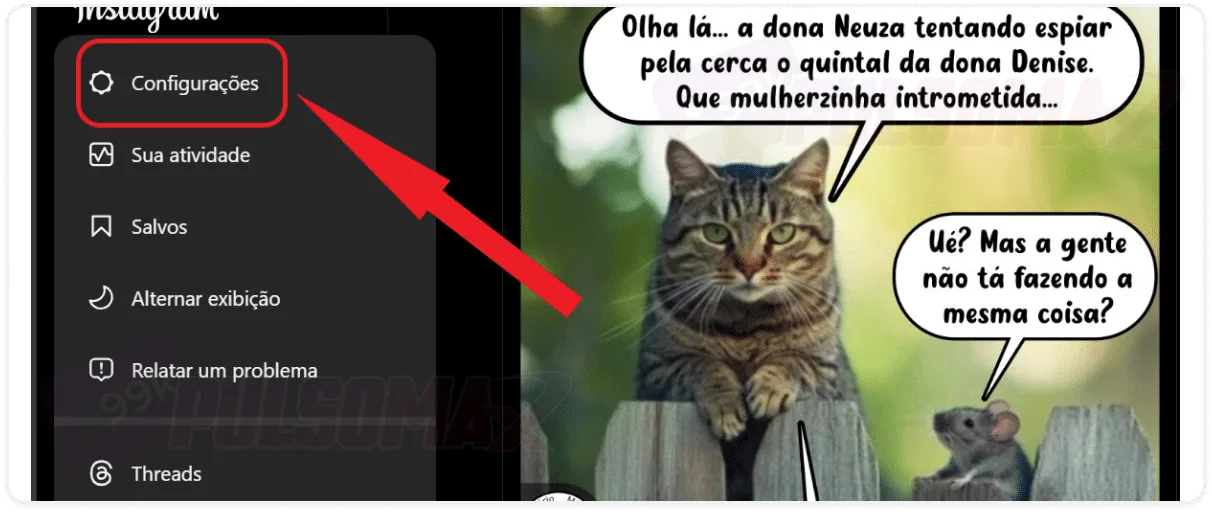
Next, click on settings.
Look for the "blocked" option and tap on it.
Tap "unlock" next to the account name.
Confirm your decision.
Done! You now know how to unblock someone on Instagram Web without any difficulty. And, in general, we can say that the process is similar to unblocking via the app.What happens when I unblock someone on Instagram?
By learning how to unblock someone on Instagram and remove the block you placed on them, that user will be able to find your profile on the social network again. Even if your account is a public profile, they can interact normally with posts, liking and commenting, even without being in your contact list. Now, if the person you blocked was an account you followed, or a follower of yours, unblocking them on Instagram will not make that account reappear in your social network contacts. In other words, if the person followed you, they will need to follow you back, or send a friend request if your profile is private. This is why, for some people, especially those who invest in the social network, choose to buy real Instagram followers , and deal with many people on their profiles, not all of them always friendly, blocking all annoying users is not the best option. After all, they would lose many followers doing so. For these cases, restricting the account, or learning how to mute Instagram , are better options. Since blocking an account cuts off all contact between profiles, and the person does not automatically resume the friendship when unblocked.Can I view the list of blocked accounts on my computer?
Yes, you can! As we showed in the step-by-step guide on how to unblock someone on Instagram Web, in the "Blocked" section you can check all the accounts you've blocked on the social network. It's in this same section that you can choose to unblock a user, if you wish. This feature offers greater convenience for Instagram users, since the browser version of the photo and video social network is known for not having all the features that the mobile app has. You can also see this same list through your app, whether on Android or iOS.When I block someone on Instagram, are they notified?
No! The person you block on Instagram will not receive any notification from the social network. And even if you find out how to unblock someone on Instagram and do so, the user will not be notified that you have unblocked them. Similarly, when you unfollow, restrict, or mute a user on Instagram, the person does not receive any notification. This is because Instagram protects user privacy. For example, even when tagging someone on Instagram as a collaborator on a post, the person needs to accept the invitation for the post to appear with their name on their profile.How do I unblock someone on Instagram who has also blocked me?
Learning how to unblock someone on Instagram who has blocked you is also simple: you should follow the same step-by-step instructions we explained in this article, either through the Instagram app or your PC browser. Now, it's worth mentioning that this situation is very unlikely to happen in practice. This is because you and the other person would have to block each other at the same time. Otherwise, you wouldn't be able to find the profile of the person who blocked you to block them, and vice versa. So, just know that if the name appears in your blocked list, you can unblock them, and the process is the same for all blocked people.Is it possible to unlock an account that I reported?
Yes, that's possible. Reporting a profile and blocking it are different things . Even if you've reported a user for any offense they've committed, you can learn how to unblock someone on Instagram and remove the block from that account. Regarding the report, if it's valid, Instagram will apply the necessary measures according to the severity of the situation. Regardless of what those measures are, the user's name will remain on your account's blocked users list if you don't unblock them. Furthermore, if that person commits another offense after being unblocked, you can report their account again, and even block them once more if you wish.What happens if the blocked person creates a new account using the same email address?
When learning how to unblock someone on Instagram, you don't need to worry about other user accounts you keep on your blocked list. Because if someone you've blocked creates a new account with the same email, that user's block will remain. This means they will continue to be prevented from connecting with you and finding your profile on the platform. Therefore, the only way for that user to interact with you again on the platform is if you unblock them. Saw some cool content on Instagram and want to have it offline on your device? Check out our essential Instagram download tools !If I change the @ symbol on the account, will the block remain?
Yes! Even if someone changes their username and any other profile information on Instagram, it won't affect any blocks they may have on the platform. If someone blocked them on Instagram, they will remain blocked. And, since the user who blocked them can no longer see their profile, they won't even know about these changes. Keep this in mind when learning how to unblock someone on Instagram.What happens if the person deletes the blocked profile?
When someone you've blocked deletes that blocked account, all other profiles that person has on the social network will remain blocked for you. Therefore, you don't need to worry, as you won't be bothered by that user on your other accounts. The only way to unblock someone on Instagram is for you to access your blocked list and remove the block from the user's profile. Then, even if that account has been deleted, they will be able to find your profile again and interact with you through other profiles they have.How do I know if someone has unblocked me on Instagram?
Now that you know how to unblock someone on Instagram, you also know that the social network doesn't notify you about it. And it also doesn't notify you when a user is blocked. Therefore, to know if someone has unblocked you on Instagram, you would first need to know if that person had blocked you. We have an article about this, so take a look here: how to know if I've been blocked on Instagram . If you find out that someone has blocked you, you can tell that they removed the block when their profile becomes accessible to you again on the social network. Now, even if you're not sure if you've been blocked, there are some signs that can indicate this, and that the person has already unblocked you:- You started seeing the user again after some time: the person had completely disappeared, you never saw any of their content in your Instagram feed, stories, or notes again. But now, the content is appearing for you again.
- You used to follow the user, but you don't anymore: an account you were following disappeared for a while, and when the content reappeared, you realized you're no longer on their follower list. If you weren't the one who unfollowed them, then this indicates that you were unfollowed by the user.
- The user used to follow you, and they don't anymore: the same applies to a person who followed you, disappeared from your view on the social network, and when they returned, they were no longer following your profile. Now, this could also indicate that the person simply unfollowed you on Instagram.
- You can't exchange messages in direct messages: as a rule, Instagram doesn't allow direct messaging between people who aren't connected. It's only possible to send a single message requesting a conversation, which the other user needs to accept for interaction to occur. So, if you were normally exchanging messages with the person in your contacts, the conversation disappeared, and now you can't exchange messages with them because you're not connected, it's because they blocked you and then unblocked you.