Instagram
  by
by 
 11 min read

So, is there any way to know if I've been blocked on Instagram? Blocking someone on Instagram isn't that uncommon, as we saw in our other post, how to unblock someone on Instagram . However, when you block someone, you are aware of your action. On the other hand, if someone has blocked you, the social network won't send you a notification! Therefore, one of the most common questions among Instagram users is how to find out if someone has blocked their account on the social network. This can be a complicated task, especially for people with many followers who follow many accounts. So, if you suspect you may have been blocked or simply want to learn how to know if you've been blocked on Instagram to keep an eye on your contacts on the social network from now on, take advantage of the tips in this post!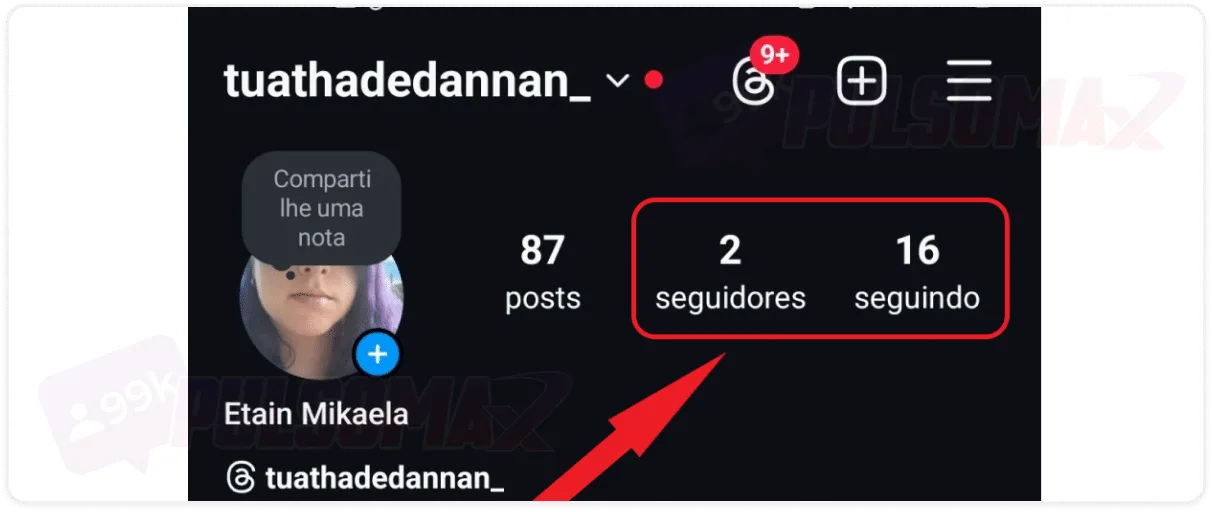 If you're unsure who might have blocked you, check your follower and following lists to see if anyone you remember is missing. It's very likely someone blocked you if your following list has fewer people and you haven't unfollowed anyone on Instagram. The same applies to your followers, although they may have simply stopped following your profile without blocking you. If you remember the person's name after checking the lists, follow the tip from the previous section and search for their name in Instagram's explorer to confirm.
How do I know if I've been blocked on Instagram?
Instagram is a social network developed with the goal of generating genuine interactions and offering the best experience for all users. For these reasons, but also for privacy reasons, the social network does not inform users when someone blocks their profile. Similarly, it doesn't inform you if you restrict a user on Instagram who bothers you. Therefore, there's no official way to know if you've been blocked on Instagram. You won't receive any notification about it within the platform, and you won't find any tool on the social network that allows you to obtain this information. So, does this mean there's no way to know if I've been blocked on Instagram? Not exactly! In fact, just like finding out who unfollowed you on Instagram , there are some steps you can take to check if you've been blocked, as you'll see below.How to find out if I've been blocked on Instagram by searching for the user.
One of the best ways to find out if you've been blocked on Instagram is to search for the profile of the person you suspect blocked you in the Instagram Explorer. To do this, you need to know the username, or part of it, to try and find their profile in the Explorer. Just click the magnifying glass button and type the name in the search bar. Then, look at the options that appear. If the user you're looking for doesn't appear among these options, and you're sure they're on Instagram, it's because they've blocked you. How about optimizing your posts to reach more people on Instagram? Discover what Instagram's invisible space is and how to use it!Check the "followers" and "following" tabs on Instagram.
If you're unsure who might have blocked you, check your follower and following lists to see if anyone you remember is missing. It's very likely someone blocked you if your following list has fewer people and you haven't unfollowed anyone on Instagram. The same applies to your followers, although they may have simply stopped following your profile without blocking you. If you remember the person's name after checking the lists, follow the tip from the previous section and search for their name in Instagram's explorer to confirm.Access the profile using an incognito tab in your browser.
Another way that might work to find out if you've been blocked on Instagram is to use an incognito tab in your computer's browser, via Instagram Web . The process for opening incognito tabs may vary slightly depending on the browser, for example:- In Microsoft's Edge browser, tap the three dots in the upper right corner (in some versions, it may be the settings button), and then click on new inPrivate window .
- In Google Chrome , also tap the button with three dots in the upper right corner and select "New incognito window ." You can also set up an anonymous user profile in the Google browser.
Try tagging the profile on Instagram.
In our article on how to tag someone on Instagram, we teach you step-by-step how to tag your contacts in posts, stories, and other places on Instagram. So, you can use these tips to try and tag the profile that may have blocked you. This is because accounts that have blocked you on Instagram cannot be tagged in any of your posts. If you try to mention this user in posts, comments, and stories, and find that their profile doesn't appear to be tagged, and even when you try their username you can't tag them, you may have been blocked by that person!Check out the likes and comments on your posts.
When wondering how to find out if you've been blocked on Instagram , some users miss a specific person. If that's the case, you can check if that user's likes and comments are still on your posts. If you notice that the content where that person interacted with you no longer has their likes and comments, it's because you've been blocked on Instagram. It's also important to mention that even if the user unblocks you in the future, their likes and comments on your posts will not be restored.How to know if I've been blocked on Instagram via direct message?
A blocked user cannot interact in any way with the user who blocked them on the platform. Therefore, one of the best ways to know for sure if you've been blocked on Instagram is through Instagram Direct . Go to Instagram Direct and try sending a message to that person. If your conversation with the person continues there, try sending a new message. If it is not delivered, you have probably been blocked. Another strong indication of being blocked, in this case, is if the user's profile picture has disappeared. If the conversation has disappeared, and you haven't deleted the conversation from Instagram, it also means you have been blocked.Ask someone else to look for the profile.
You can also ask a friend with an Instagram account to search for the profile you suspect has been blocked. In fact, this is one of the best ways to answer the question of how to know if you've been blocked on Instagram. It's quite simple: if the person can find the profile in question using Instagram's search function, proving that the account is still on the social network and hasn't been blocked by Instagram, while you can't find it, then you've been blocked. If you don't want to ask someone else to do it, you can use a secondary account, not linked to your main profile, to do this yourself. If you can find the user with the secondary account, but not with your main account, you've been blocked on that account.Apps to find out who blocked you on Instagram
Even though Instagram doesn't offer any tool to find out who blocked you, there are third-party apps that can answer the question of how to know if I've been blocked on Instagram more accurately. Check out some good ones:- Instrack: available for iOS , the app analyzes your follower list to find out who has blocked you and offers other features, such as data about posts;
- Reports+ Followers Analytics: available for Android and iOS , the app reveals who has blocked your profile and offers other analytics features about your followers.
- Reports Pro : This app reveals who has blocked you and offers advanced statistics about your profile. Available for Android and iOS .
- InstaFollow: available for Android , this app lets you see who has blocked you and offers other analytics features for your followers.
- Followers+ Stalker: available for Android , this app is perfect for finding out who blocked you on Instagram, and also who your stalkers are on the social network.