Instagram
  by
by 
 10 min read
Discovering what restricting users means on Instagram can be very useful when you don't want to, or can't, block a particular user. But you'd like that person to interact less with your profile, for whatever reason. After all, a restricted Instagram account will have less access to your account and will see fewer details about you. Instagram is a very important platform for businesses and people who aspire to become digital influencers. Many of these people buy Instagram followers to grow their profiles and need to maintain a good relationship with their audience. However, not everything is perfect on social media. Often, there are cases of "hate," which is the practice of negative, and even aggressive, comments, usually for no reason. Hate tends to repeat itself frequently, causing stress to many Instagram users and other social media users. It's not always possible to block everyone, especially since a blocked person is one less follower. So, what to do? Keep reading and find out what restricting users means on Instagram and how to do it! For those who want to limit certain users' interactions with their profiles, but don't want to block that user, Instagram has a feature called "restrict ." But what does "restrict" mean on Instagram? Simply put, when you restrict someone on Instagram, that profile's interactions with yours are limited, including restrictions on comments and other functions. The best part is that the restricted user isn't notified of the restriction and can continue to view and find your profile on the social network normally. This way, the person might not even realize they're restricted, while the user who imposed the restriction will have greater privacy and peace of mind on the social network.
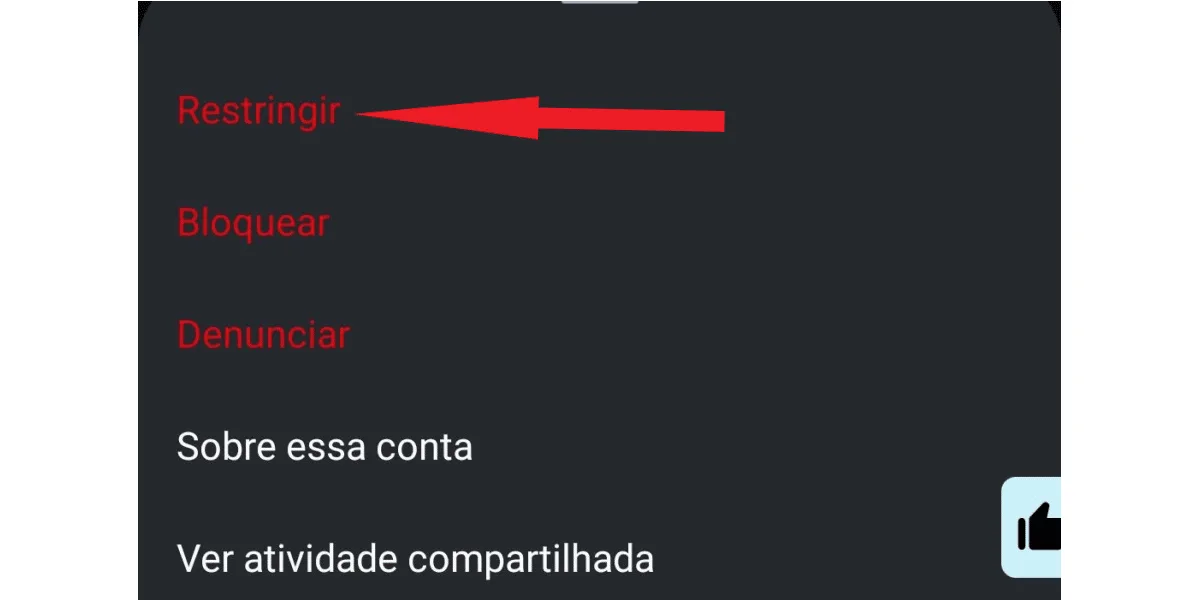
 In the options that appear, click on restrict .
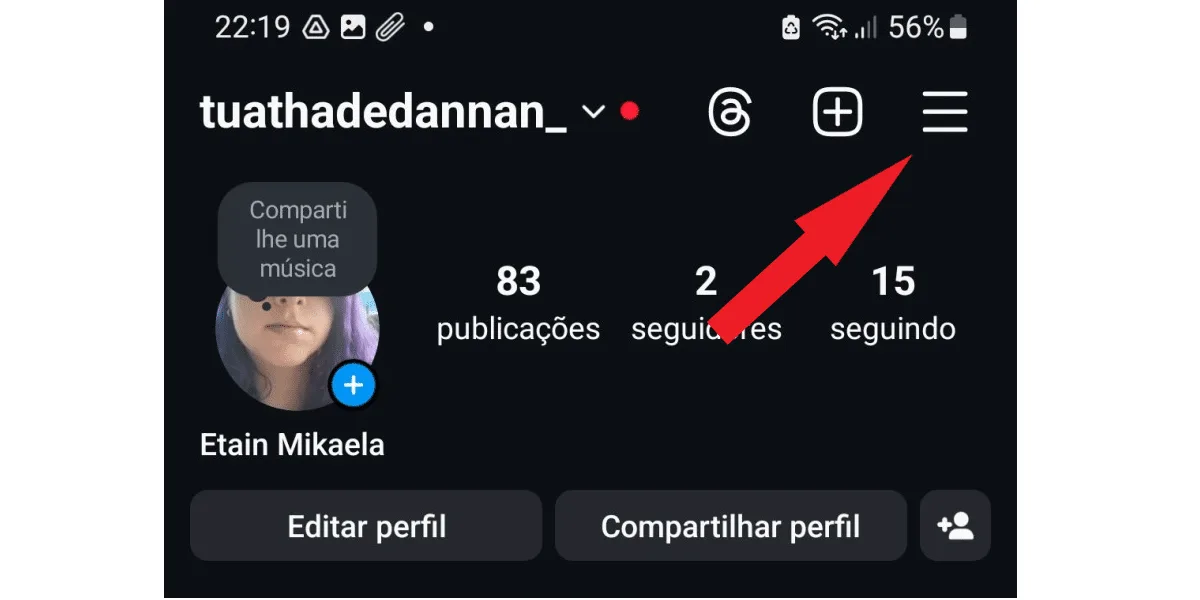
  But if you prefer, you can access your Instagram profile and tap the three-line button:
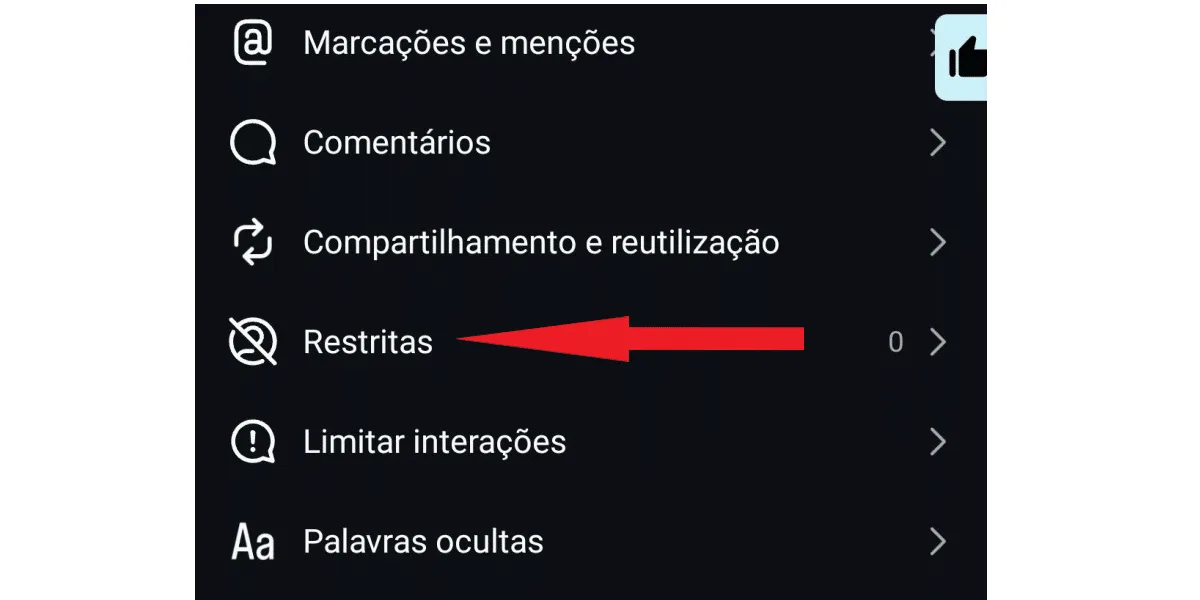
  Next, access the restricted session:
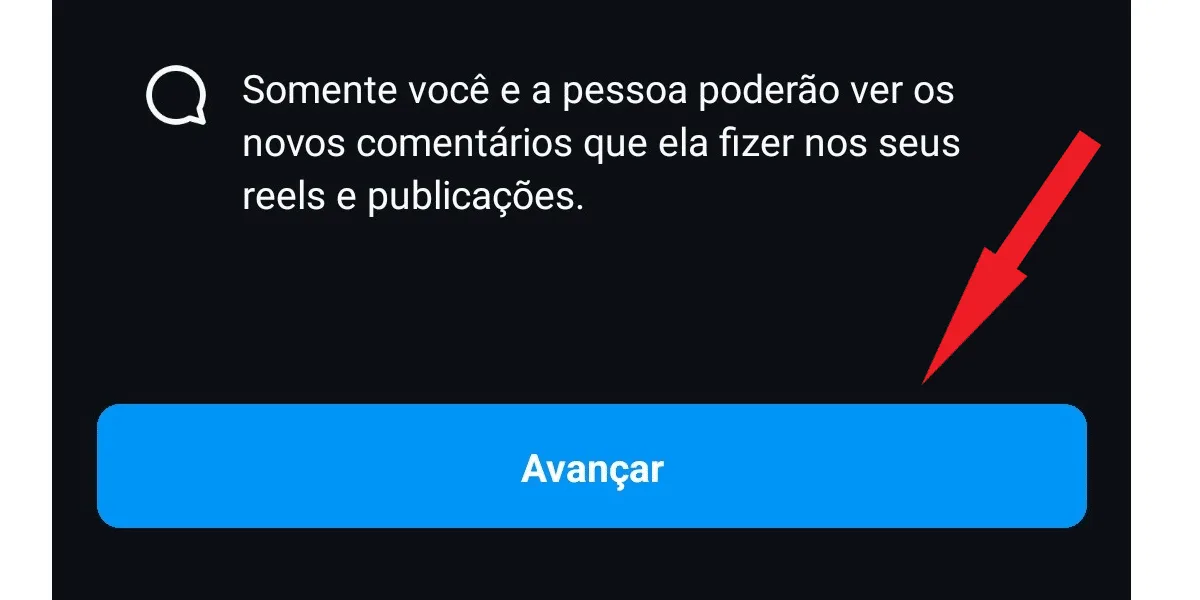
  On the next page , click the blue "next" button:
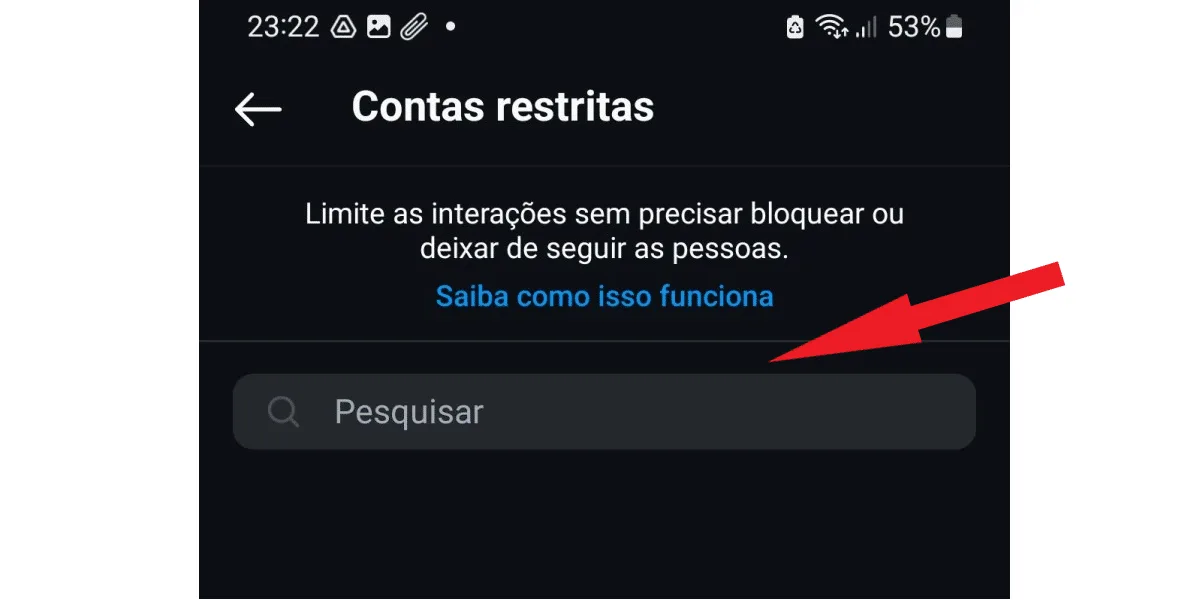
  On the next tab , tap the search bar and type the name of the account you want to restrict. In this section, you will also see the restricted accounts below the search bar, if you have restricted anyone:
  After finding the account you want, click the blue "restrict" button next to the profile name.
 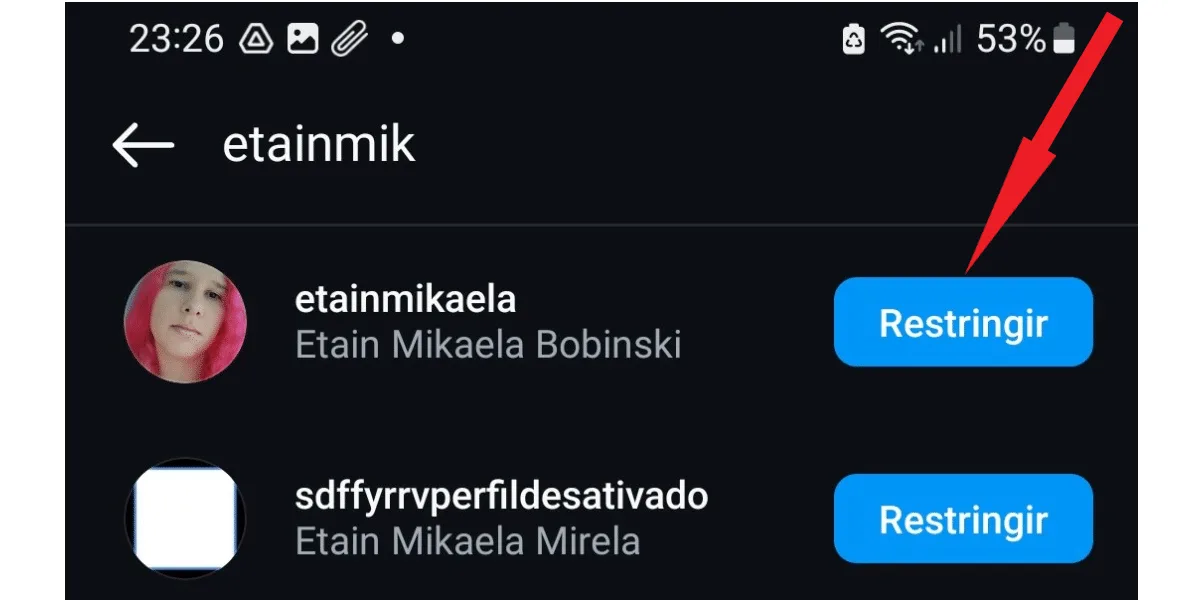 Use your Instagram app on Android or iOS to restrict users. The restriction function isn't available on the Instagram web version . And that's it! Those people will no longer be able to interact with you like other users!
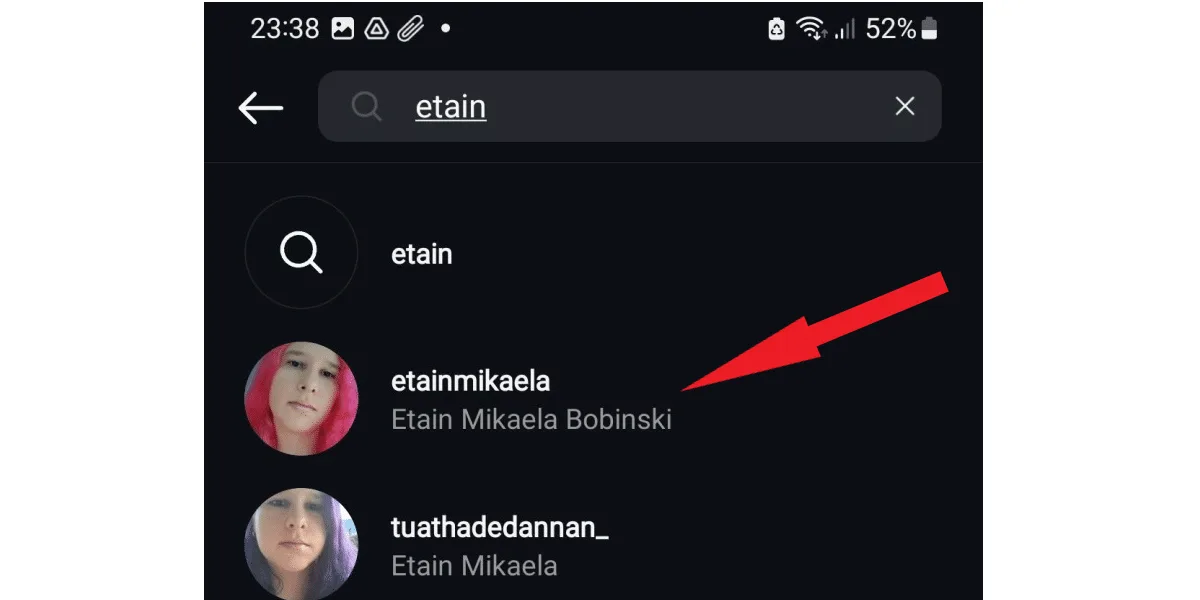
 Next, type the profile name and access the account in the user list by clicking on it:
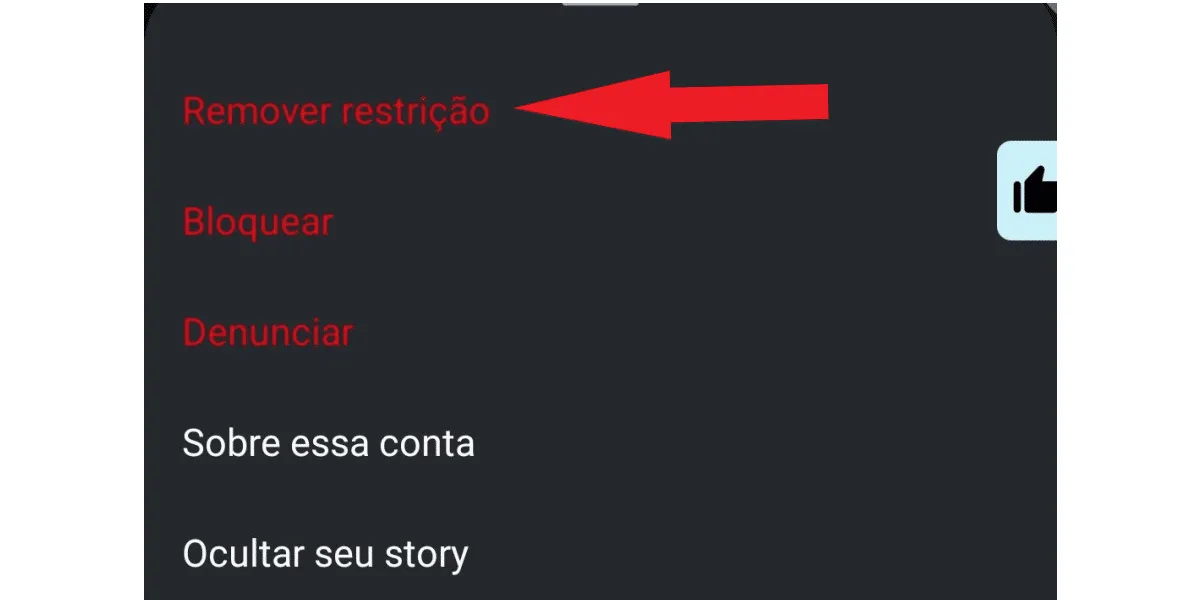
  Finally, just tap the three-dot icon, which you already know where it is, and then tap "remove restriction":
  But think carefully before doing that. After all, if you restricted that profile, you must have had a good reason. And once you remove the restriction, the user will be able to follow you normally again on social media, which means:
 Yes, you will still see posts from a restricted account on Instagram. Restricting someone on Instagram limits that user's interactions with your content, but not your interactions with the content they post on their profile. That's why it's important to understand what restricting on Instagram means. Some people searching for this information are actually bothered by other users' posts in their feed or stories. In this case, you need to mute the account that bothers you, since the restrict function won't prevent you from seeing that user's content. On the other hand, their comments and likes on your posts and stories will not be visible to anyone else, only to you and those who commented.
What does "restricting" mean on Instagram?
For those who want to limit certain users' interactions with their profiles, but don't want to block that user, Instagram has a feature called "restrict ." But what does "restrict" mean on Instagram? Simply put, when you restrict someone on Instagram, that profile's interactions with yours are limited, including restrictions on comments and other functions. The best part is that the restricted user isn't notified of the restriction and can continue to view and find your profile on the social network normally. This way, the person might not even realize they're restricted, while the user who imposed the restriction will have greater privacy and peace of mind on the social network.What happens to a restricted Instagram account?
To better understand what restricting accounts means on Instagram, it's important to understand what happens to restricted accounts on the social network. After all, restricting is not the same as blocking. A restricted Instagram account will have the following limitations on interactions with the profile that restricted it:- The comments will not be visible to other people, only to the profile that commented and to the owner of the commented profile;
- The owner of a profile that receives comments from restricted accounts can choose between viewing and approving the comments, or simply deleting them immediately.
- The restricted account will not be able to see if the profile owner is online, nor if they have viewed sent messages;
- Messages sent via Direct from a restricted Instagram account go directly to the message request inbox.
- The profile owner will no longer receive notifications from restricted accounts on Instagram.
What does "restricting" mean on Instagram and how do I restrict it?
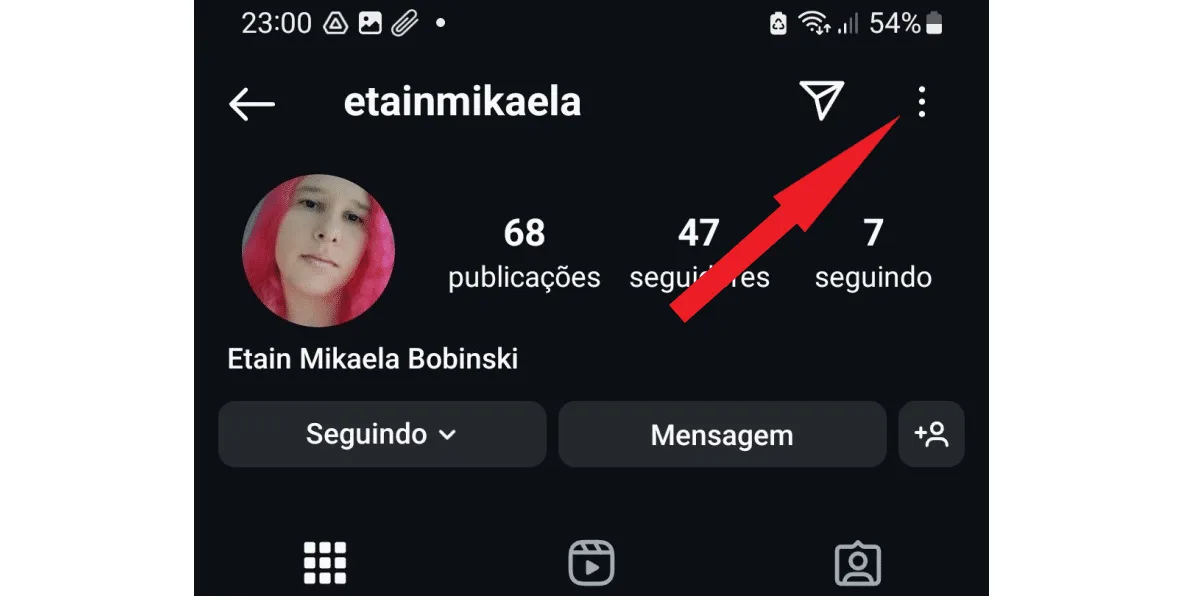
Now that you know what restricting an account on Instagram means, you're probably wondering how to do it, right? It's quite easy to restrict an Instagram account, and there are two ways to do it. The simplest way to restrict an Instagram account is to access the profile you want, tap the three-dot button , and open the options menu, as follows: In the options that appear, click on restrict . But if you prefer, you can access your Instagram profile and tap the three-line button: Next, access the restricted session: On the next page , click the blue "next" button: On the next tab , tap the search bar and type the name of the account you want to restrict. In this section, you will also see the restricted accounts below the search bar, if you have restricted anyone: After finding the account you want, click the blue "restrict" button next to the profile name. Use your Instagram app on Android or iOS to restrict users. The restriction function isn't available on the Instagram web version . And that's it! Those people will no longer be able to interact with you like other users!How do I remove a restriction from an Instagram account?
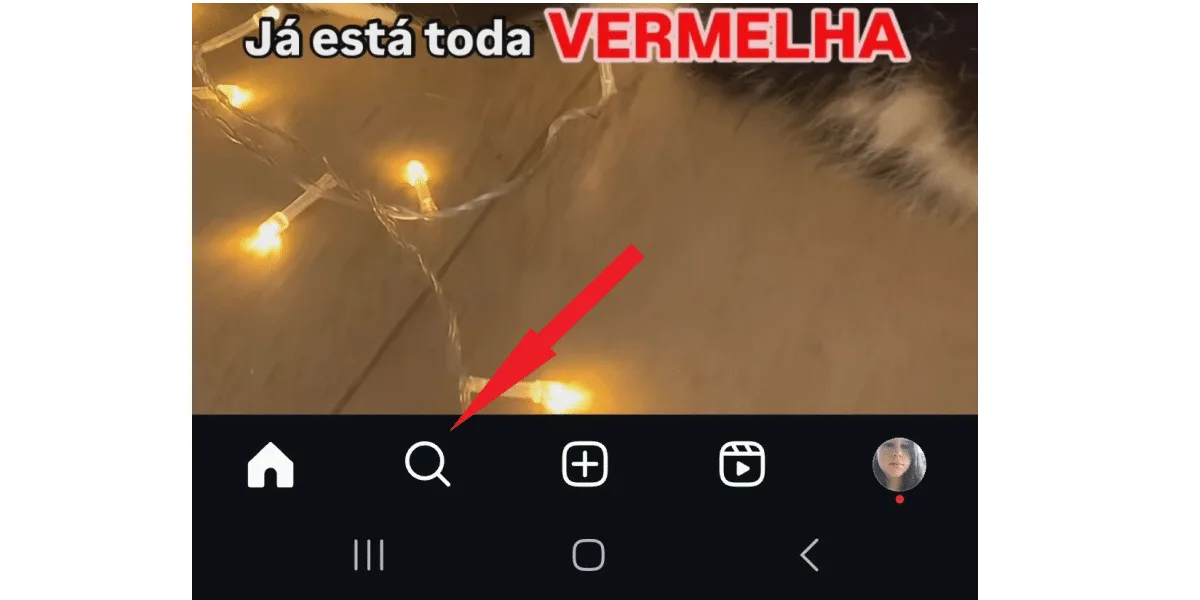
After learning what restricting an account means on Instagram and how to do it, you don't need to worry if you restrict an account and regret it later. This process can be undone at any time. To do this, start by clicking on the magnifying glass icon near the center of the screen: Next, type the profile name and access the account in the user list by clicking on it: Finally, just tap the three-dot icon, which you already know where it is, and then tap "remove restriction": But think carefully before doing that. After all, if you restricted that profile, you must have had a good reason. And once you remove the restriction, the user will be able to follow you normally again on social media, which means:- He will be able to comment, and the comments will be visible to everyone;
- He will be able to see you online;
- You can see if you've viewed the messages in Direct.
Why restrict on Instagram instead of blocking?
When you block a user on Instagram, they can no longer find your profile on the social network. In other words, it's as if your account doesn't exist for the blocked user. Therefore, people usually find out at some point that they've been blocked. This typically happens when they remember you, realize they haven't seen your posts in ages, and decide to search for your account. If you blocked a stranger who was bothering you, or some followers who occasionally posted hateful comments on your profile, this is usually not a problem. But if the person is someone you know outside of social media, blocking them might not be the best option.Restricting on Instagram is a more user-friendly option than blocking.
Often, the people who leave negative comments on your posts and keep an eye on everything you do online to criticize might be family members, colleagues or superiors at work, college classmates, or acquaintances. If these people realized they'd been blocked on Instagram , it could cause problems for you outside of the social network. But you have the right to maintain your peace on social media and not be bothered by negative comments that add no value or offer constructive criticism. This is precisely where understanding what restricting accounts on Instagram and how to do it becomes useful. A restricted Instagram account will continue to access your profile normally and will not have any indication that it has been restricted. Similarly, this can be useful for digital influencers and any owners of profiles with many followers who simply don't want to block all accounts that make unpleasant comments. Another good way to ensure your peace and success on the social network is to buy Instagram comments from verified accounts to guarantee the quality of the comments, generating hooks that can yield good engagement for your account.What is the difference between restricting and muting on Instagram?
Those who learn about restricting accounts on Instagram often have questions about the difference between a restricted account and a muted account . The difference lies in the fact that restricting an account limits that profile's interactions with yours. Muting an account, on the other hand, prevents you from seeing that person's stories and posts, without them knowing that their content is no longer being shown to you. So, if you feel bothered by a profile's posts and don't want to block the person, you can simply mute their Instagram account. You can even choose whether you want to stop seeing only the posts that appear in your feed, or whether you want to mute both those posts and the stories from the profile that bothers you. Therefore, just like the restrict function, the mute option is useful for various situations where it's not possible to block someone on Instagram.How do I know if I've been restricted on Instagram?
There's no way to know if you've been restricted on Instagram . After all, as we explained above about what restricting on Instagram means, the social network doesn't notify profiles that are restricted by other users. In practice, therefore, you won't have any proof that your account is restricted on Instagram. And it can be a little difficult to find out, since the comments you make on the profile that restricts you are visible to you, although they may be invisible to all other users. Despite this, there are some signs that may indicate that a particular profile has restricted you on Instagram, check them out:- Nobody ever replies to or likes the comments you make on that user's posts;
- Interactions between you and that person have decreased significantly on Instagram;
- You never see the person online again; they appear offline even after they've just finished posting.
- Your messages on Direct are never answered.
Will I still see posts from a restricted Instagram account?
Yes, you will still see posts from a restricted account on Instagram. Restricting someone on Instagram limits that user's interactions with your content, but not your interactions with the content they post on their profile. That's why it's important to understand what restricting on Instagram means. Some people searching for this information are actually bothered by other users' posts in their feed or stories. In this case, you need to mute the account that bothers you, since the restrict function won't prevent you from seeing that user's content. On the other hand, their comments and likes on your posts and stories will not be visible to anyone else, only to you and those who commented.