Instagram
  by
by 
 11 min read
Many people ask what "direct" means on Instagram . After all, it's common to hear this term among Instagram users, but not everyone knows exactly what it means, since it's not possible to figure it out just from the function's name. All social networks have their own communication tools. They are essential for users to chat and interact on the network. Each chat can even have unique features not found in the messaging chats of other social media platforms. And Instagram is no different! Therefore, buying Instagram comments , investing in quality content to gain likes, and acquiring followers are key points for growth on Instagram. But it's also necessary to know how to use the tools Instagram offers, so you don't miss any opportunities in your daily life! So, if you want to know what "direct" means on Instagram, how to use this tool, and learn about its main features, read this post to the end and enjoy the tips! Direct is Instagram's personal messaging chat . It's similar to Facebook Messenger and functions as a means of communication between Instagram users. With it, you can exchange text messages, audio, images, videos, posts, and Reels videos with your contacts on the social network. This way, you can send messages to family members, work contacts, new friends you meet online, and even strangers.
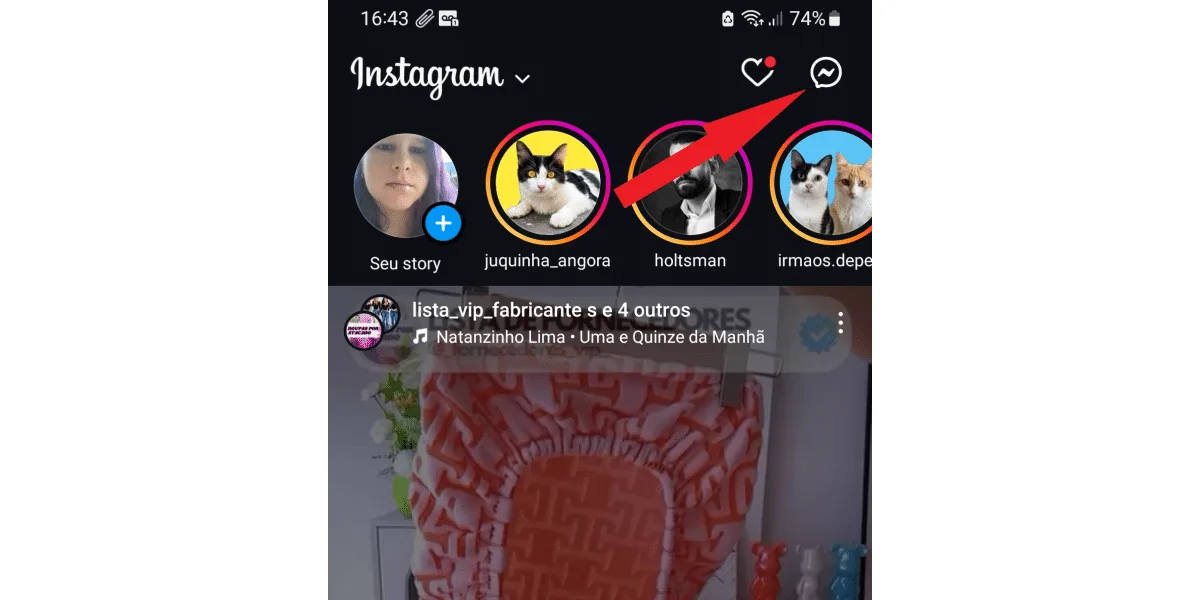 In some accounts, depending on the Instagram version and the account's connection to Facebook Messenger, the traditional airplane icon may appear instead, but the function is the same. If that's the case, click on it; it will be in the same place as the message icon, as in the image below.
 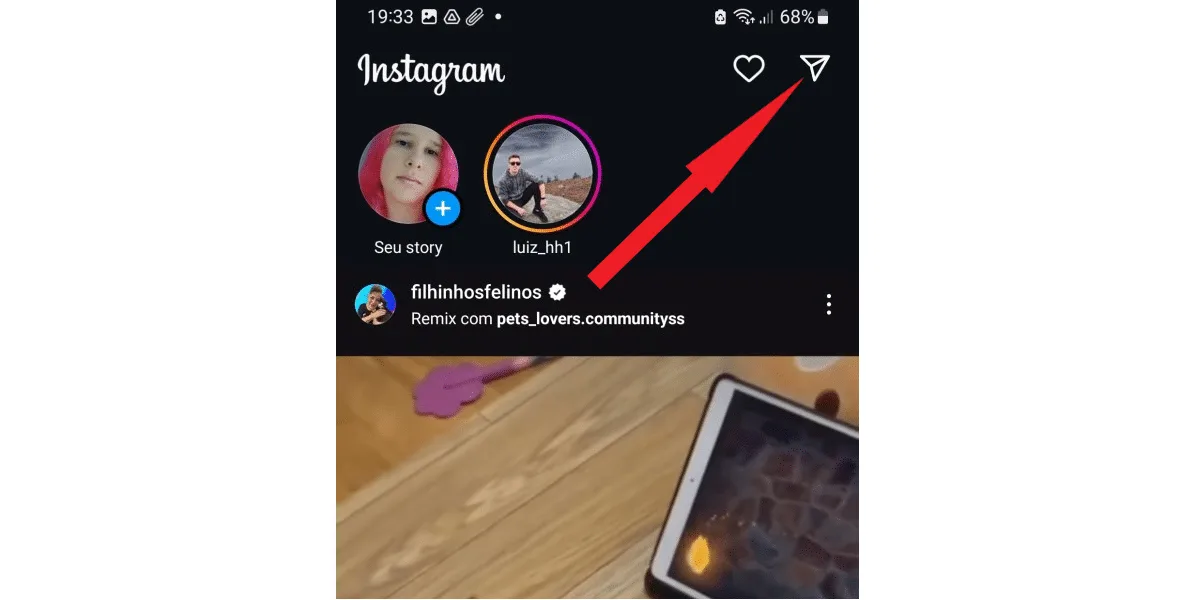 Done! This is your private space for sending and receiving messages on Instagram. All conversations you have with other users on the social network will be stored in this tab, and you can resume any conversation or check what was said whenever you want. Do you invest time publishing quality content on Instagram and get few likes? Upgrade your profile, invest in buying Brazilian Instagram likes from real users!
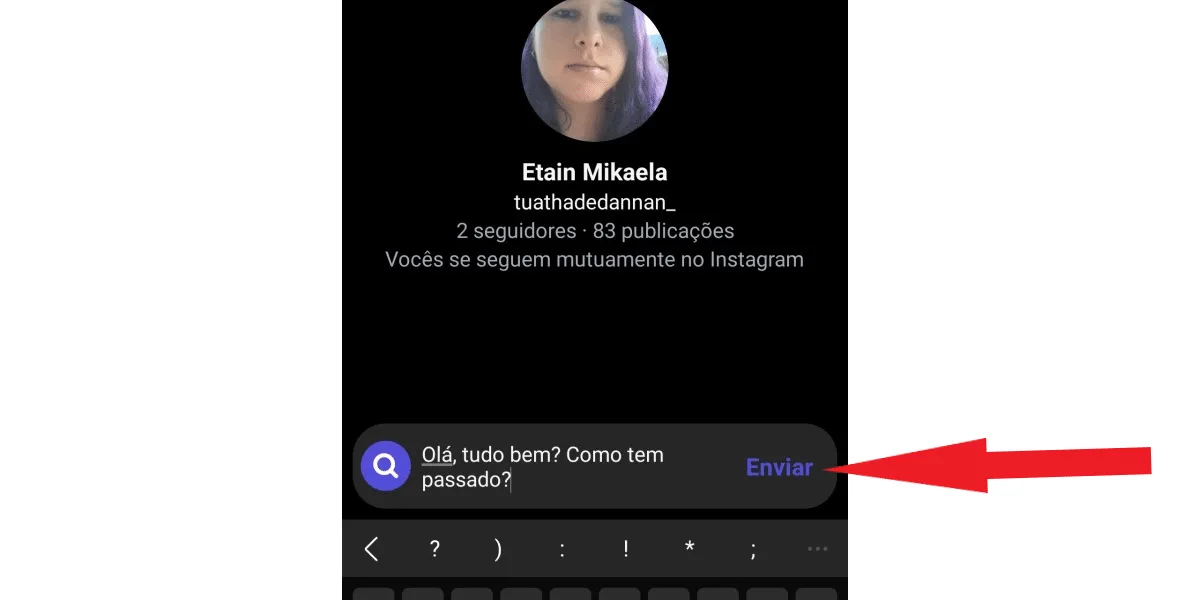
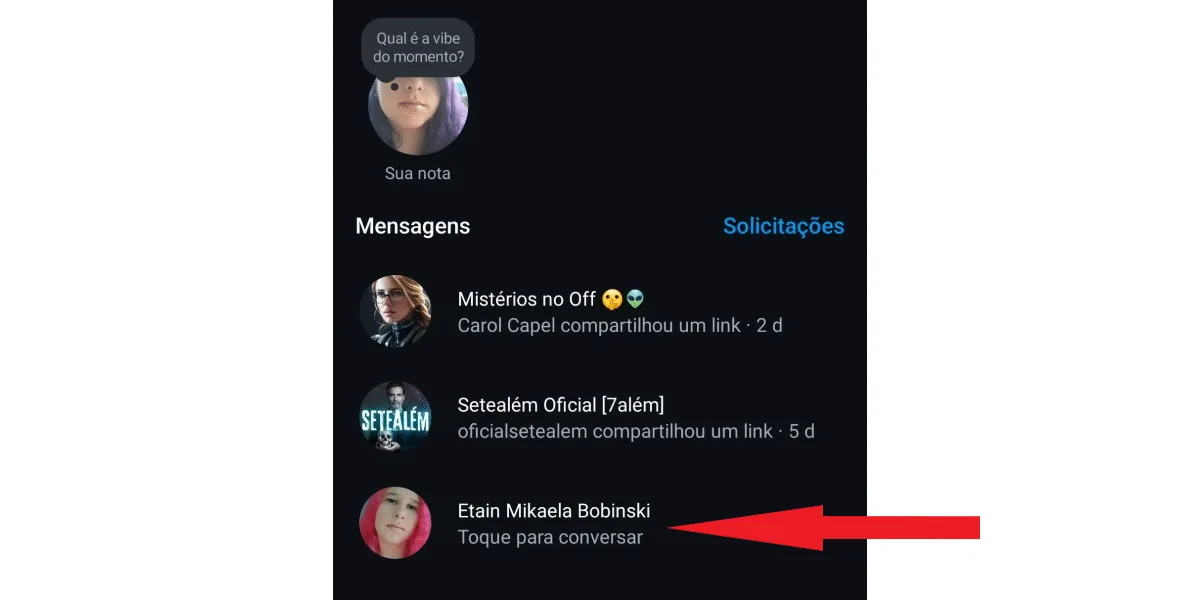 Then, type your message to reply. And tap send in the left corner of the typing box.
  But if you want to send a message to a specific user who isn't already in your direct message list, follow these steps: First, tap the search tab at the top of the chat, as shown in the image below:
 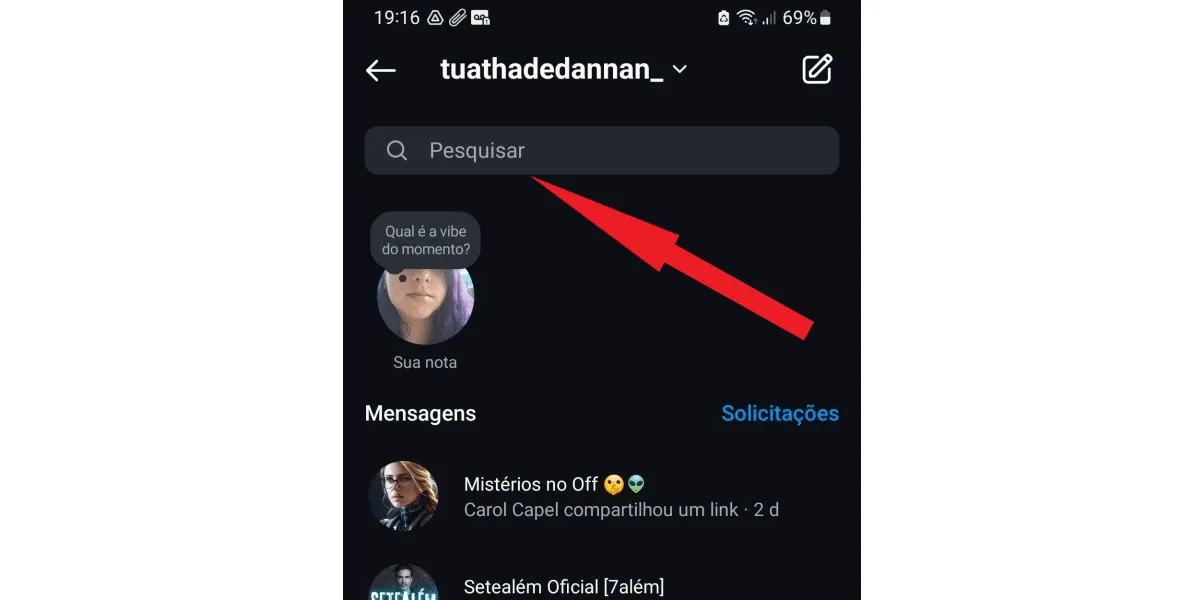 In this tab, search for the user you want to message by name or @. Then tap on the chosen profile .
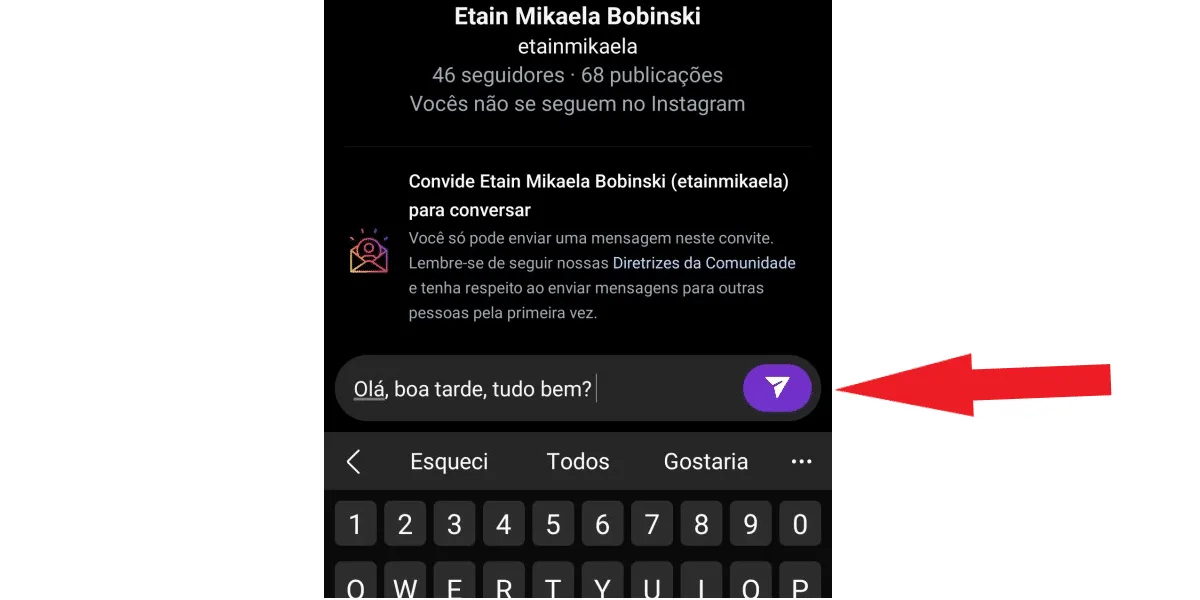
 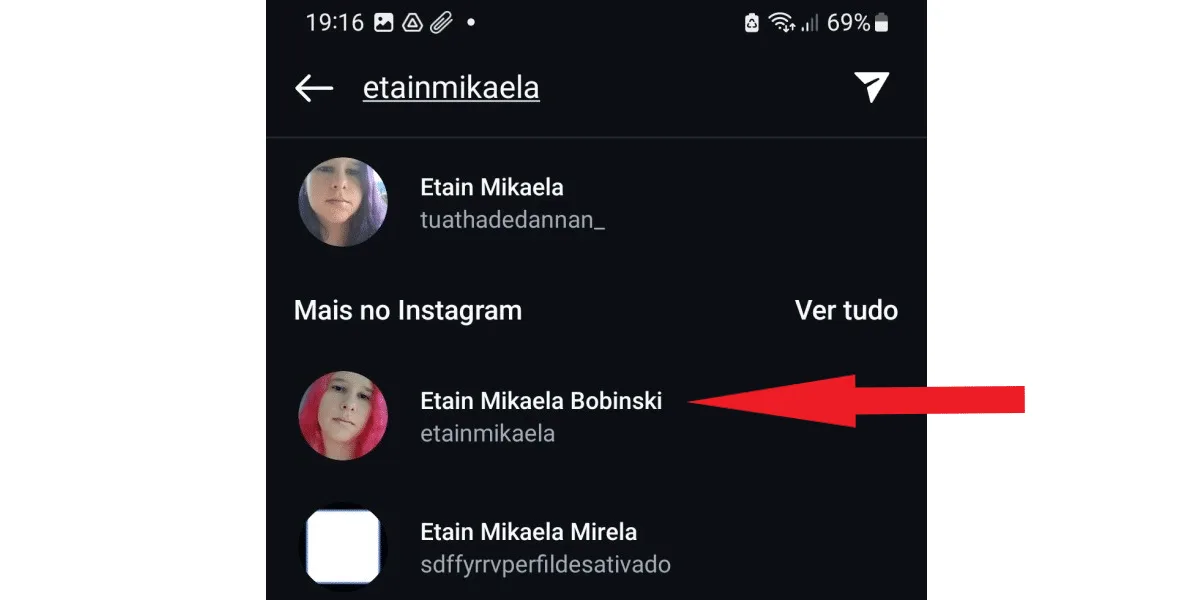 Now, simply type your message as usual, and click the purple icon in the upper right corner of the chat to send your message to the recipient.
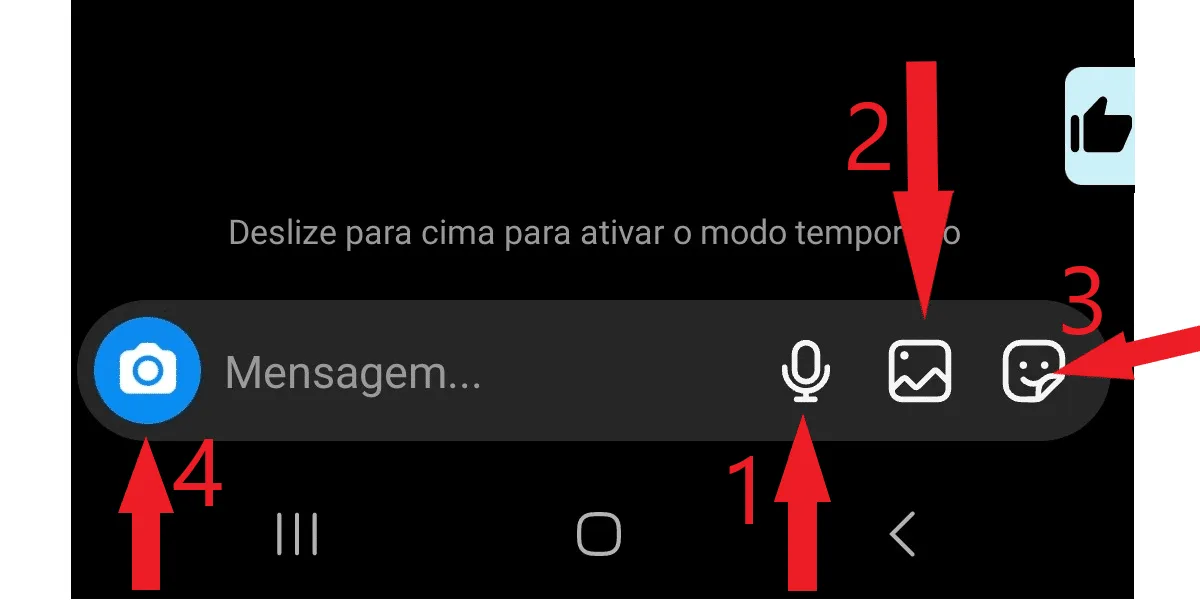
  If you want to send other media, not just text, that's also possible, as long as you're connected on Instagram. To record audio, tap the microphone-shaped button (1) in the bottom bar, hold it down and speak, similar to WhatsApp. To send photos and videos, tap the image icon (2) , choose one or more, and click send. If you want, you can also send animated stickers with the smiley face button (3), or take a photo on the spot by clicking the blue camera-shaped button (3) in the left corner of the chat. See the image below:
  You can also share posts and reels via direct message. Just tap the airplane icon below the post or in the bottom right corner of the video, select the recipient, and click send.
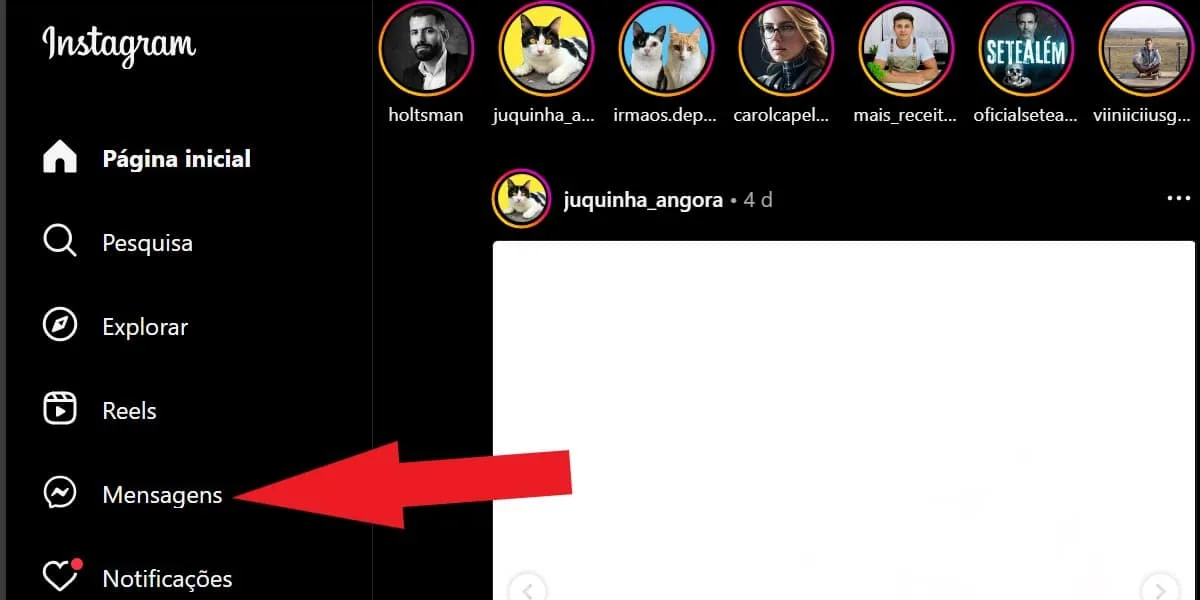
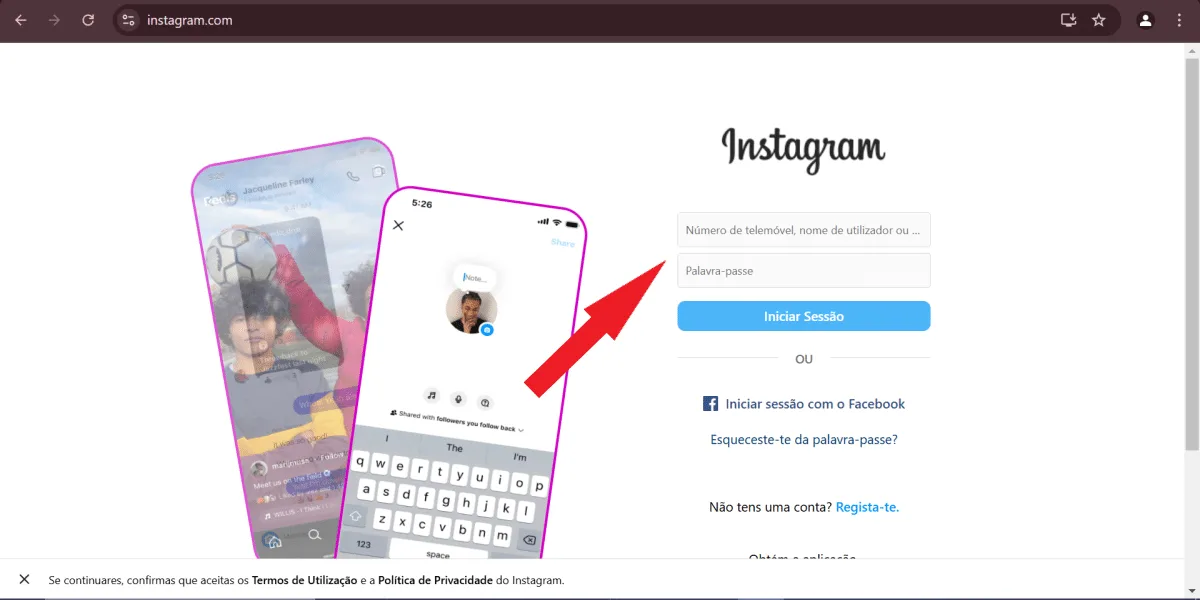 Then, click on messages in the sidebar on the left side of the screen.
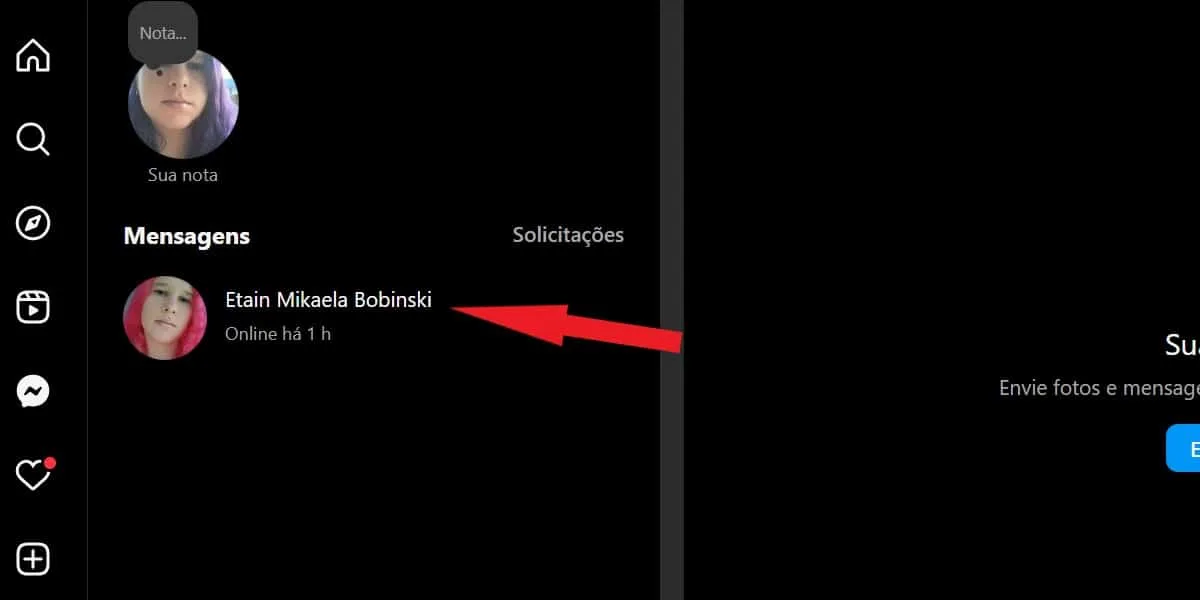
  Select the conversation you want.
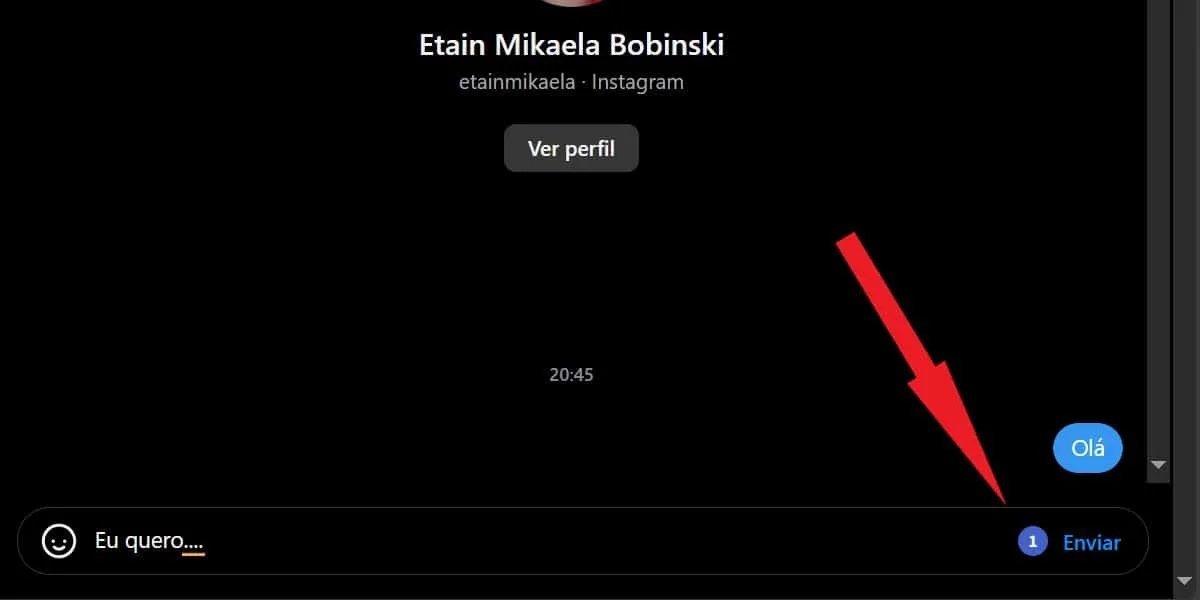
  The conversation will open in the space next to the screen, then type your message and click send.
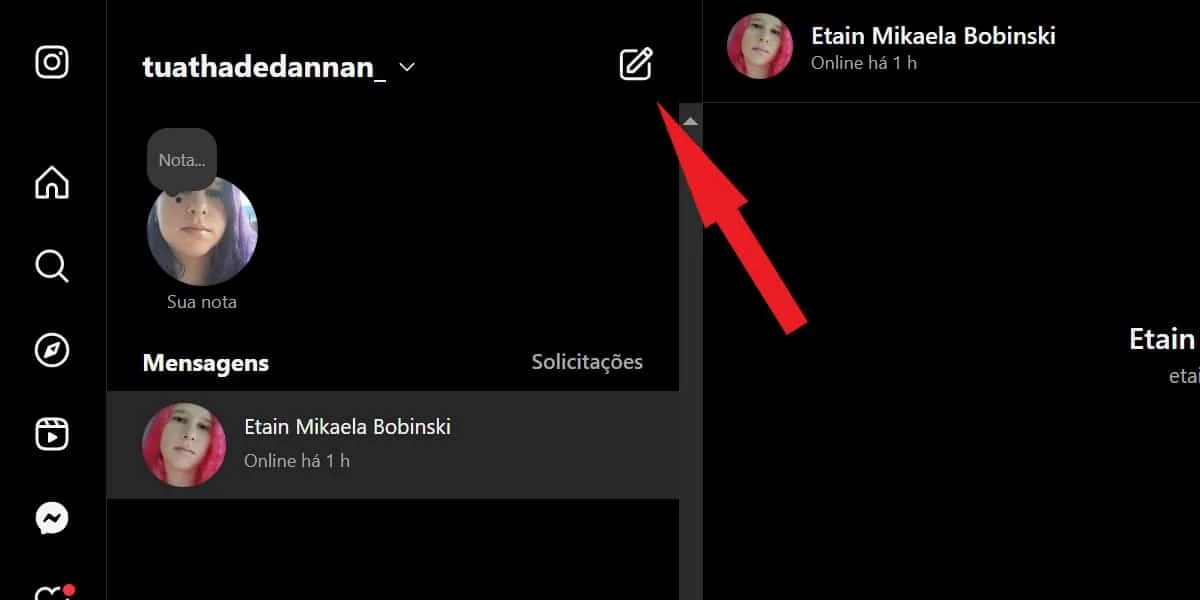
  To send a message to a contact who is not in your direct messages list on Instagram Web, go to the Messages tab and click the square icon with a pencil in the middle in the upper left corner of the Direct messages tab.
  A search box will open; tap on " for" and find the user by name or @, then check the box next to the desired profile and click the blue "chat" button below.
 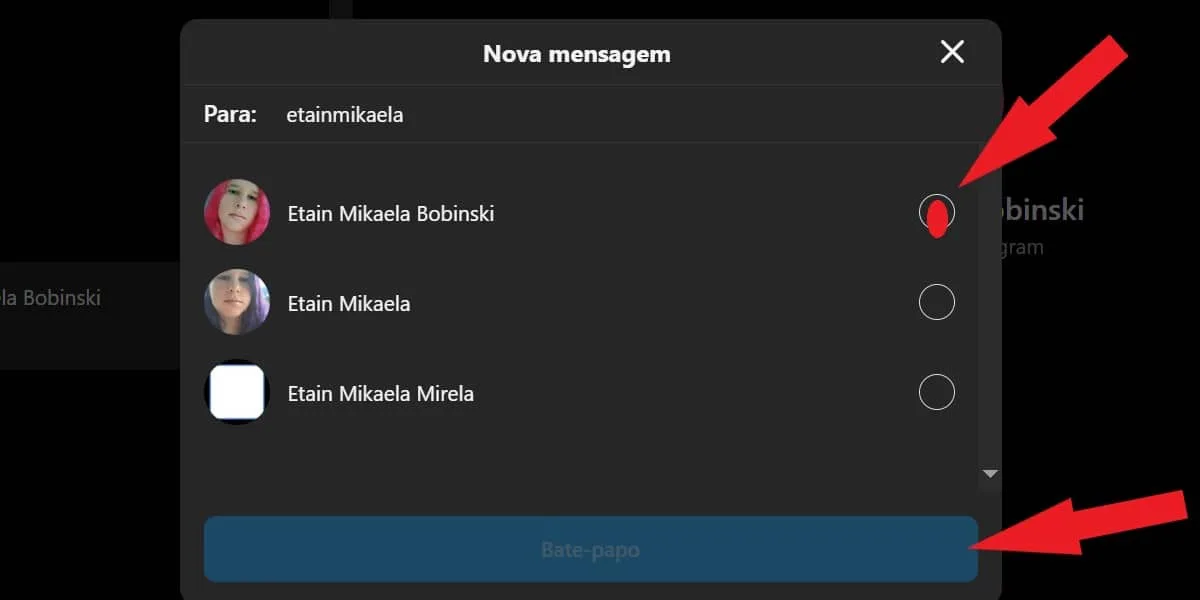 Now, just write your message and click send as usual.
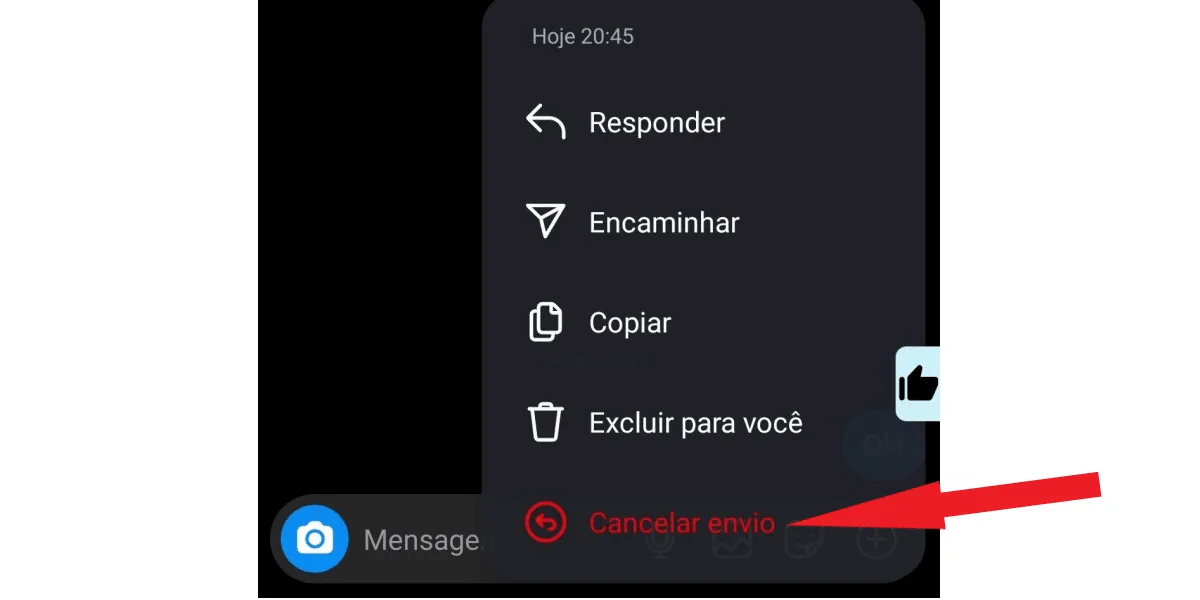 To delete the message for yourself, select "delete for yourself". To edit the message, click "edit". When you select the "undo send" option, the message will disappear from the conversation for both you and the recipient. This will happen even if the message has already been delivered and viewed. However, you still have the option to edit the message and make any changes you want. For this, however, the message must have been sent less than 15 minutes ago. And, when you choose to edit, Instagram will display the "edited" label over the content you changed.
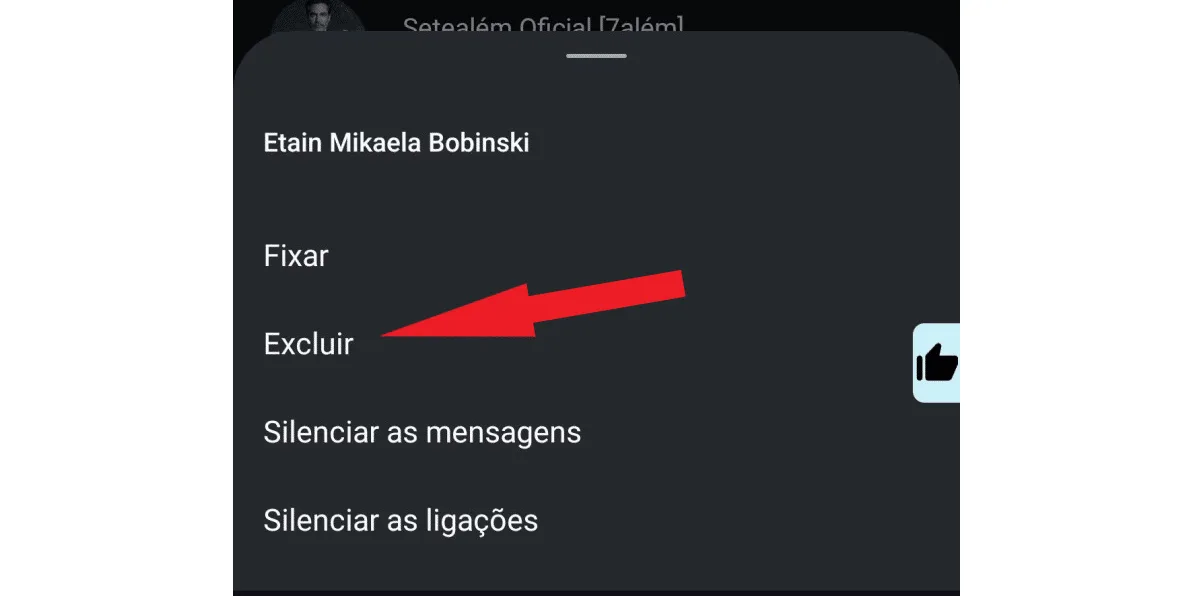 Once you've done that, the conversation will disappear from your direct messages. However, it will still be visible to the recipient if they haven't deleted it.
What is direct on Instagram?
Direct is Instagram's personal messaging chat . It's similar to Facebook Messenger and functions as a means of communication between Instagram users. With it, you can exchange text messages, audio, images, videos, posts, and Reels videos with your contacts on the social network. This way, you can send messages to family members, work contacts, new friends you meet online, and even strangers.What is DM on Instagram?
The abbreviation DM stands for Direct Message , which can be translated as direct message . Direct Message is simply the full name of Instagram's Direct feature, and it refers to its main function: sending direct messages to other users on the social network. Therefore, many users and Instagram itself call the social network's chat "DM." The abbreviation is also used to refer to messages received or sent; for example, you might hear someone say "I received a DM on Instagram," or "I'm going to check my DMs on Insta." Therefore, what "direct" means on Instagram is directly related to the meaning of "DM" on Insta. Because they mean the same thing!Why is it important to know what direct messages are on Instagram?
This is a necessary question, and its answer is directly related to the relevance of Instagram for different audiences. In this context, many people dedicate themselves to Instagram; for example, they learn how to solve the problem of Instagram closing itself , publish quality content to interact with these followers, generate engagement, and obtain partnerships with brands. Companies and businesses of all types also tend to do the same, to increase their brand authority in the market, make their business better known, and increase sales. Ordinary users, who use the social network in their daily lives, may have a wide variety of objectives. For example, they may be focused on seeingwhat's trending on Instagram and posting their personal content, such as family photos and things they like. Or even using Instagram to chat with colleagues, family, and acquaintances. Regardless of the reason, it's important to understand what Instagram Direct is and how to use its main features, because messages from people and companies you know on the social network will reach you through Direct. And this can include everything from important notices, messages from loved ones, job offers, and even partnership proposals with brands!Where is the direct message function on Instagram?
After understanding what direct messaging is on Instagram, the next step is to find out where it is located. It's not difficult to find, but for people who are just getting familiar with the social network, direct messaging isn't such an obvious feature. To find DMs, open your Instagram app on your Android or iOS device. And click on the message icon in the upper right corner, as shown in the image below. In some accounts, depending on the Instagram version and the account's connection to Facebook Messenger, the traditional airplane icon may appear instead, but the function is the same. If that's the case, click on it; it will be in the same place as the message icon, as in the image below. Done! This is your private space for sending and receiving messages on Instagram. All conversations you have with other users on the social network will be stored in this tab, and you can resume any conversation or check what was said whenever you want. Do you invest time publishing quality content on Instagram and get few likes? Upgrade your profile, invest in buying Brazilian Instagram likes from real users!How do I send a direct message on Instagram?
After discovering what direct messages are on Instagram and where to find this function in the Instagram app, sending a message is very simple. First, click on the conversation you want to reply to or send a new message to, as in the example image below. Then, type your message to reply. And tap send in the left corner of the typing box. But if you want to send a message to a specific user who isn't already in your direct message list, follow these steps: First, tap the search tab at the top of the chat, as shown in the image below: In this tab, search for the user you want to message by name or @. Then tap on the chosen profile . Now, simply type your message as usual, and click the purple icon in the upper right corner of the chat to send your message to the recipient. If you want to send other media, not just text, that's also possible, as long as you're connected on Instagram. To record audio, tap the microphone-shaped button (1) in the bottom bar, hold it down and speak, similar to WhatsApp. To send photos and videos, tap the image icon (2) , choose one or more, and click send. If you want, you can also send animated stickers with the smiley face button (3), or take a photo on the spot by clicking the blue camera-shaped button (3) in the left corner of the chat. See the image below: You can also share posts and reels via direct message. Just tap the airplane icon below the post or in the bottom right corner of the video, select the recipient, and click send.How do I send direct messages on Instagram using Insta Web?
You already know what Instagram Direct is, but you don't have access to the Instagram app right now ? This can happen, but there's a solution: you can use Instagram Web to view your messages, reply, and send whatever you want via Direct to other users. To do this: first, access Instagram Web on your PC and log in to your account. Then, click on messages in the sidebar on the left side of the screen. Select the conversation you want. The conversation will open in the space next to the screen, then type your message and click send. To send a message to a contact who is not in your direct messages list on Instagram Web, go to the Messages tab and click the square icon with a pencil in the middle in the upper left corner of the Direct messages tab. A search box will open; tap on " for" and find the user by name or @, then check the box next to the desired profile and click the blue "chat" button below. Now, just write your message and click send as usual.What is a message request on Instagram?
Now that you know what Instagram Direct is, where DM is located, and how to send messages on Instagram Direct, there's one more important thing you need to know: messages sent to contacts who don't follow you go to the message request folder . Similarly, if you send a message to an account you follow but that doesn't follow you back, the message will go to the same folder. And, of course, messages from any unknown contacts will also end up in the message request folder. This folder contains messages from everyone who isn't on your follower list. To access it, simply click on "requests" in Direct and check. It's worth noting that users who send messages that end up in the request folder won't know if you've read their messages or not. To find out, you first need to click "accept." Then, the user will see that you've read the content, and you can reply, starting a conversation. Also read: what does POV mean on Instagram, find out now .What is the message invitation feature on Instagram?
More and more people understand what Instagram Direct is, learn how to use this feature, and want to connect with others . However, among all these users, unfortunately, there are those who are not well-intentioned and disturb other people. For example, by sending spam, inappropriate content, or offensive messages in the Direct messages of profiles that are not in their contact list. To prevent this practice, Instagram created the message invitation feature , or conversation invitation. It's very simple: when you go to send a message to a user who is not your follower, Instagram will display a warning that it is only possible to send one message in that invitation. Then, simply type your message, which must contain only text, as it is not possible to send videos, audios, images, or documents in the message invitation.How do I delete direct messages on Instagram?
Did you discover what direct messages are on Instagram and end up sending a message you regretted? Don't worry! Enter the desired conversation in direct messages via the message icon, and locate the message you want to delete. Then, click and hold on it. After that, tap "undo send" to delete it for everyone. See the image below: To delete the message for yourself, select "delete for yourself". To edit the message, click "edit". When you select the "undo send" option, the message will disappear from the conversation for both you and the recipient. This will happen even if the message has already been delivered and viewed. However, you still have the option to edit the message and make any changes you want. For this, however, the message must have been sent less than 15 minutes ago. And, when you choose to edit, Instagram will display the "edited" label over the content you changed.How do I delete a conversation in Direct Messages?
You don't need to keep conversations you no longer want in your DMs. That's a cool thing about Instagram's direct messaging. And deleting a conversation is very simple. First, open Instagram through the app on your Android or iOS device. Then, tap the message icon in the upper left corner. Now, hold and drag the conversation you want to delete from the right to the left, then tap delete , and confirm the action by tapping "delete" again. See the image below: Once you've done that, the conversation will disappear from your direct messages. However, it will still be visible to the recipient if they haven't deleted it.How do I delete multiple conversations at once in Direct Messages?
What constitutes a direct message on a personal Instagram account is different from what constitutes a direct message on a professional Instagram account. This is because a business account has features that regular profiles don't have. One of these features is the ability to delete multiple conversations from your direct messages at once. In other words, if you don't have a professional Instagram profile, you'll need to delete each unwanted conversation one by one, following the tips in the previous section. Now, if your account is a business account, follow these steps:- Log in to your professional Instagram account and click on the message icon;
- Tap the 3-line button located in the upper right corner;
- Select the conversations you want to delete;
- When you're finished, click "delete";
- Click "delete" again to confirm.
How do I start a group Direct Message on Instagram?
Finally, one last tip about what Direct is on Instagram: you can participate in group conversations on Direct, and you can create your own conversations with other people. To join an existing group:- Enter via direct message;
- Go to search and find the group by name;
- Click on the group chat;
- Tap "join" to enter (administrator approval may be required).
- Open the Instagram app and tap the message icon;
- Click on the square icon with a pencil in the middle;
- Tap on "create group chat";
- Select who you want to include in this direct message;
- Create a name for the group chat;
- Start interacting with your members; you are the administrator.