 Instagram
  by
by 
 11 min read

Is it possible to mute Instagram ? Instagram is truly very popular. According to data from We Are Social and Hootsuite, it has over 120 million active users in Brazil and 2 billion active users globally. That's a lot of people. And each of them can follow another 5,000 users on the social network. However, whether for digital influencers who invest in their profiles, buy Instagram followers for their accounts, and publish quality content, or for ordinary users who use the network for personal purposes, there is content that ends up being annoying when it appears in the Instagram feed. It's not always possible to unfollow these accounts that publish such content. So, how to solve the problem and make yourInstagram feed more pleasant? The solution lies in learning how to mute Instagram! Keep reading and see how with our step-by-step guide!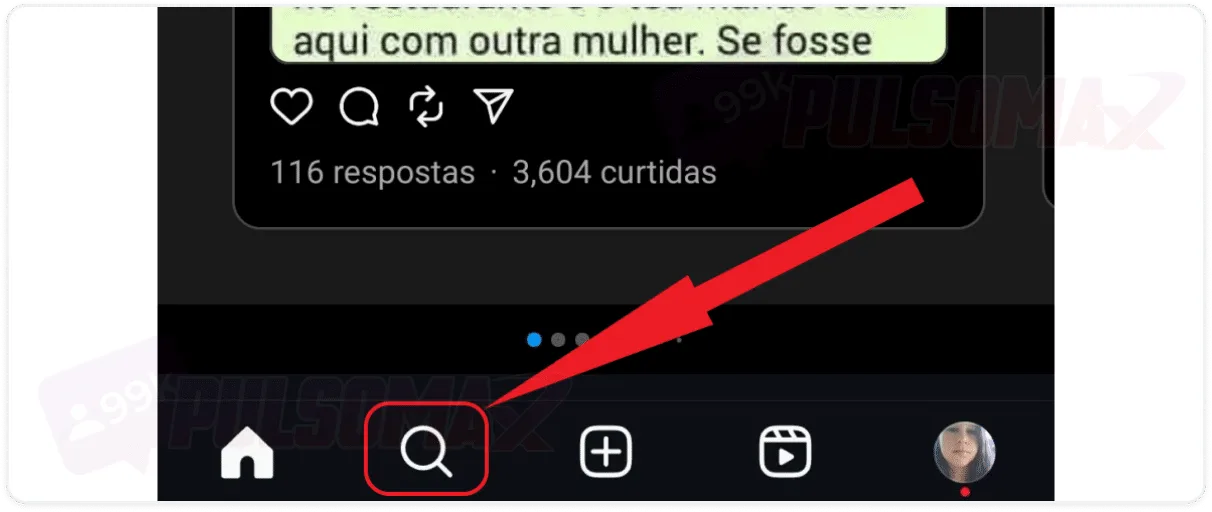
 Done! You've learned how to mute someone on Instagram, and none of their posts will appear to you anymore. Note that you can choose to mute all types of content from that person or just certain types. Remember that if you don't select all options, only the type of content you choose to mute will stop being displayed to you.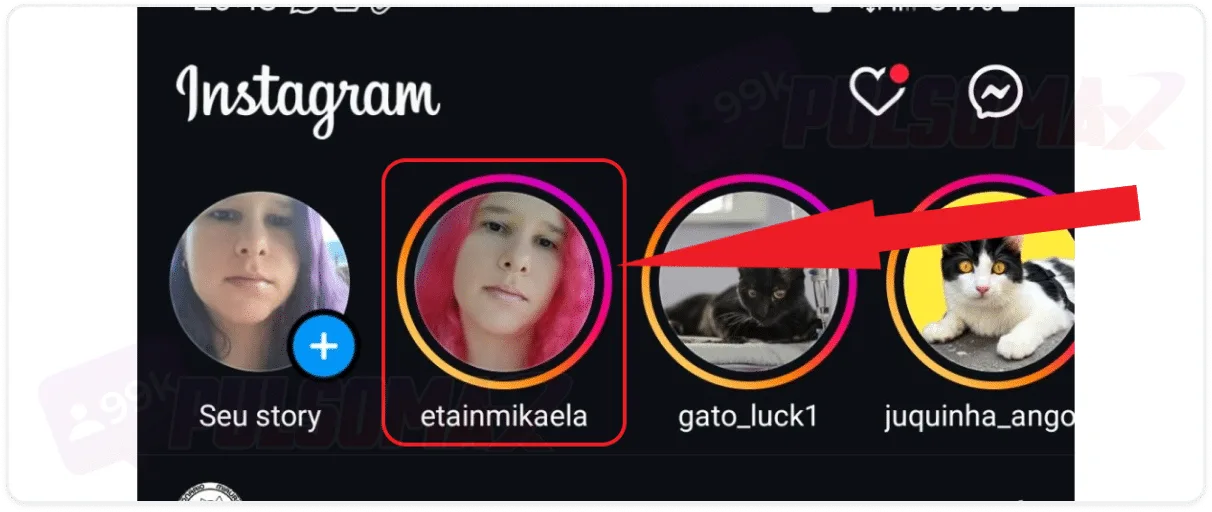
 Done! You've learned how to mute someone's Instagram Story! You can do this whenever another user's stories bother you or you simply feel that the content no longer interests you. The decision is yours. Want to anonymously peek at someone's story? Take a look at this: how to view stories anonymously on Instagram .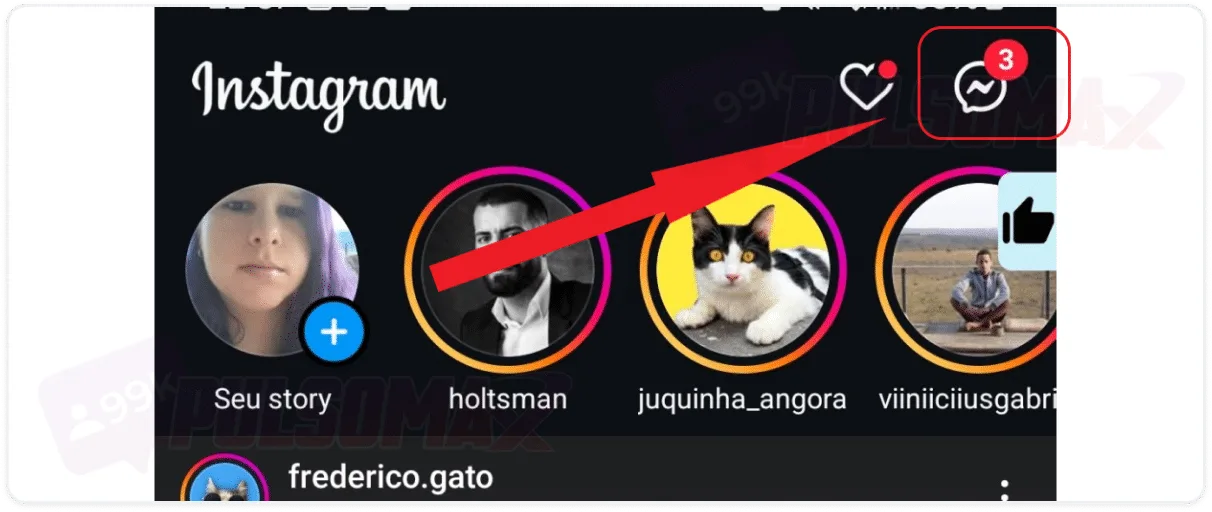
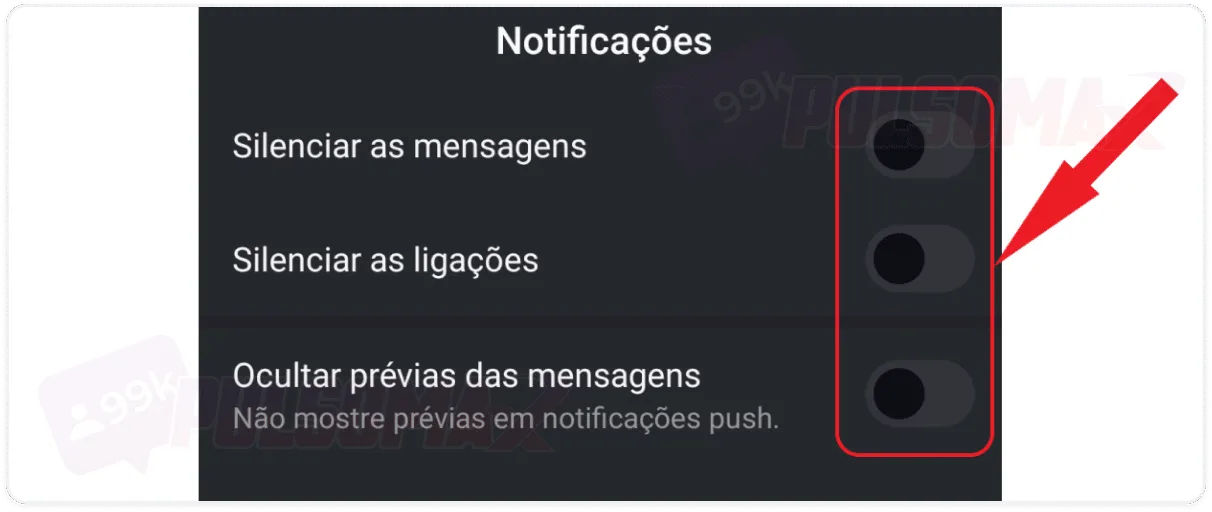
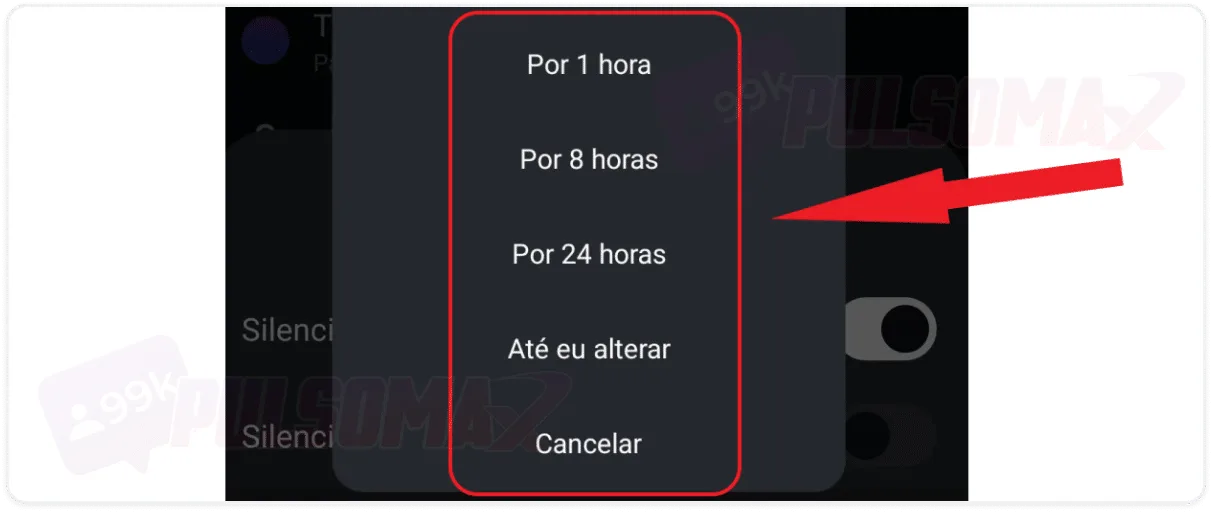 Done! Message and call notifications from the muted user will no longer bother you on Instagram. And whenever you want, just access Instagram Direct to check if that account has sent new messages or not. After all, the user can still send messages and try to call if they want, but it's up to you to decide if you want to respond, and when to do so!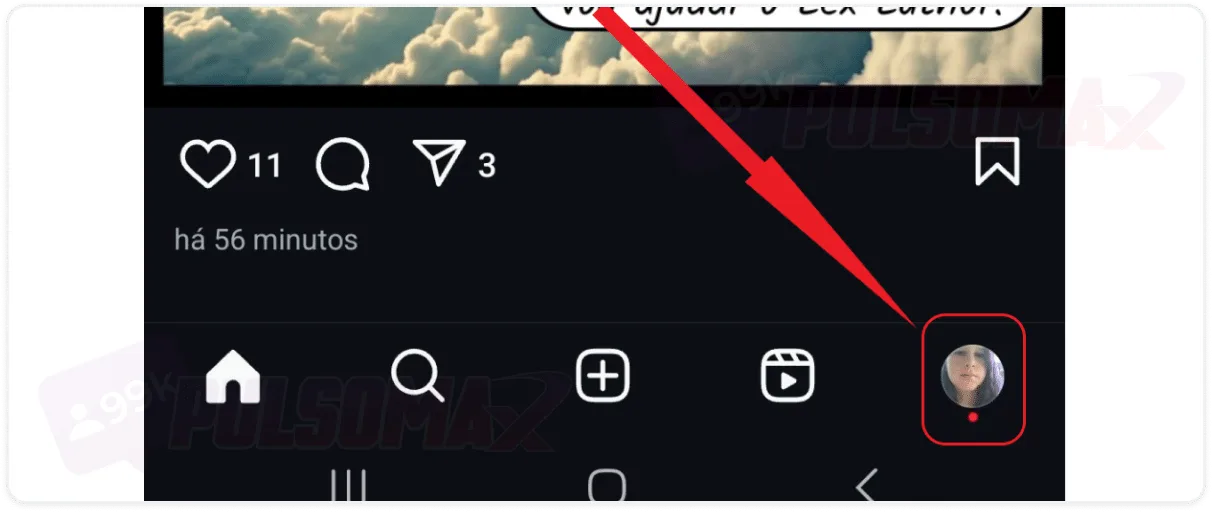
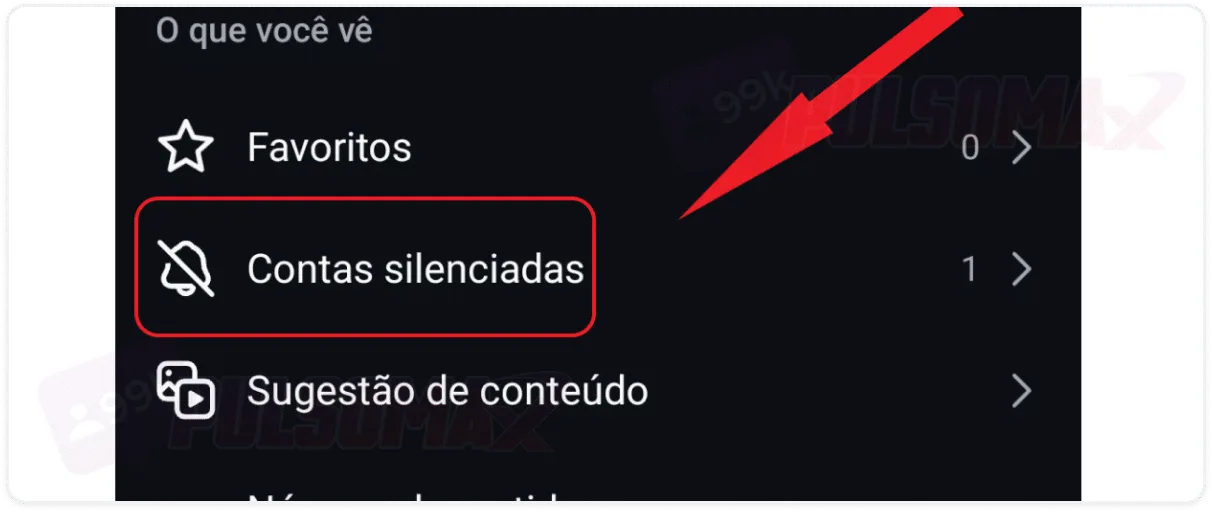
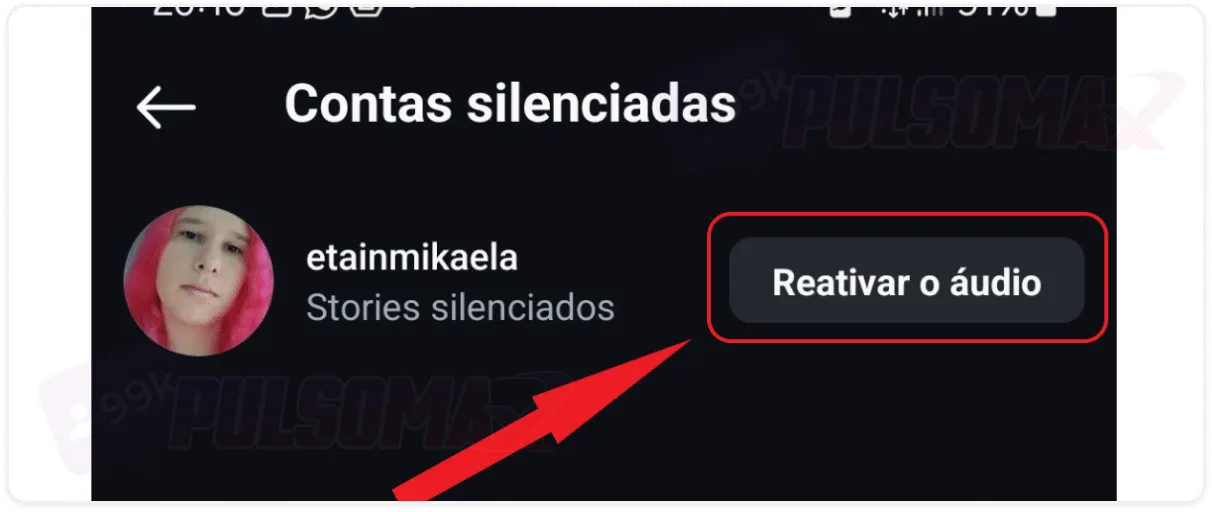
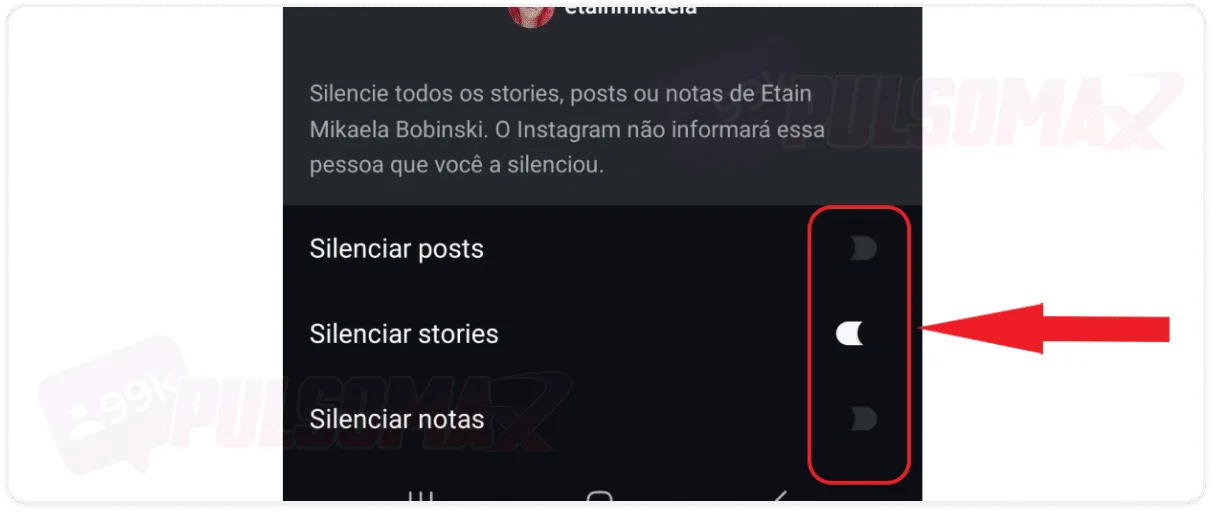 Done! The user is no longer muted, and you will now see their posts, stories, or notes normally, according to the unmute options you selected. Important: if you muted a user's DM notifications, the notifications will remain muted for the time you scheduled, or indefinitely if you chose the "until I change" option. To unmute a direct message, return to the muted chat, identified by a bell with a line through it , and repeat the steps from the previous section, clicking "reactivate" at the end.
How to mute Instagram step by step
Learning how to mute on Instagram allows you to choose whether or not you want to see a specific user's content in your feed. It's also possible to mute a user's Instagram story, thus avoiding any content they post. So, if someone is bothered by another person's posts but doesn't want to unfollow or block that user, the mute function solves the problem! To learn how to mute on Instagram, first open your Instagram app on your Android or iOS device, then:Tap the magnifying glass icon in the bottom left corner of the screen.
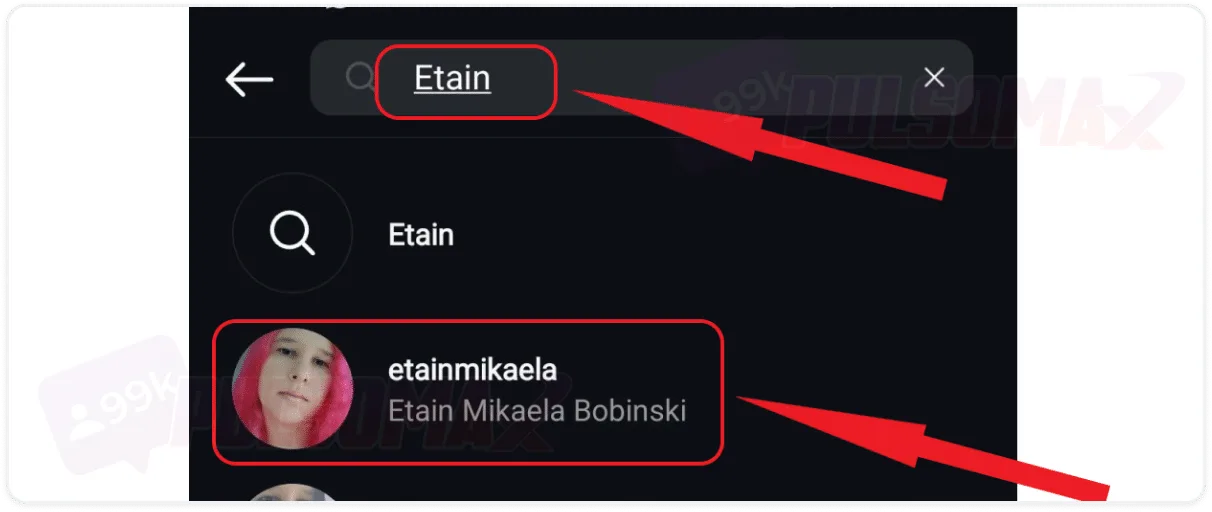
Type the username you want to mute and click on the correct profile.
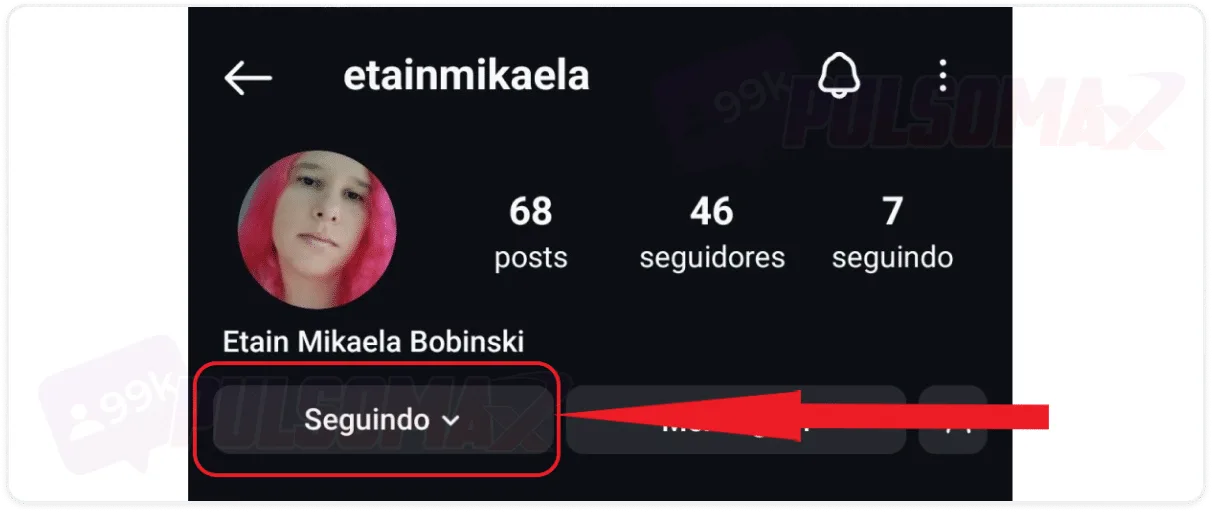
Click on "following," located below the user's profile picture.
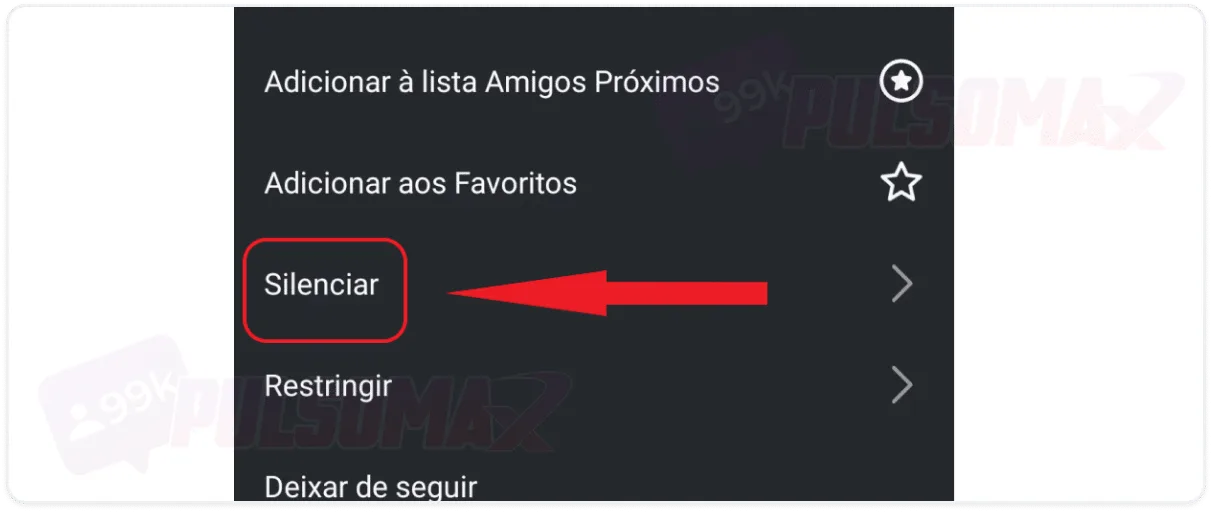
In the list of options, select mute.
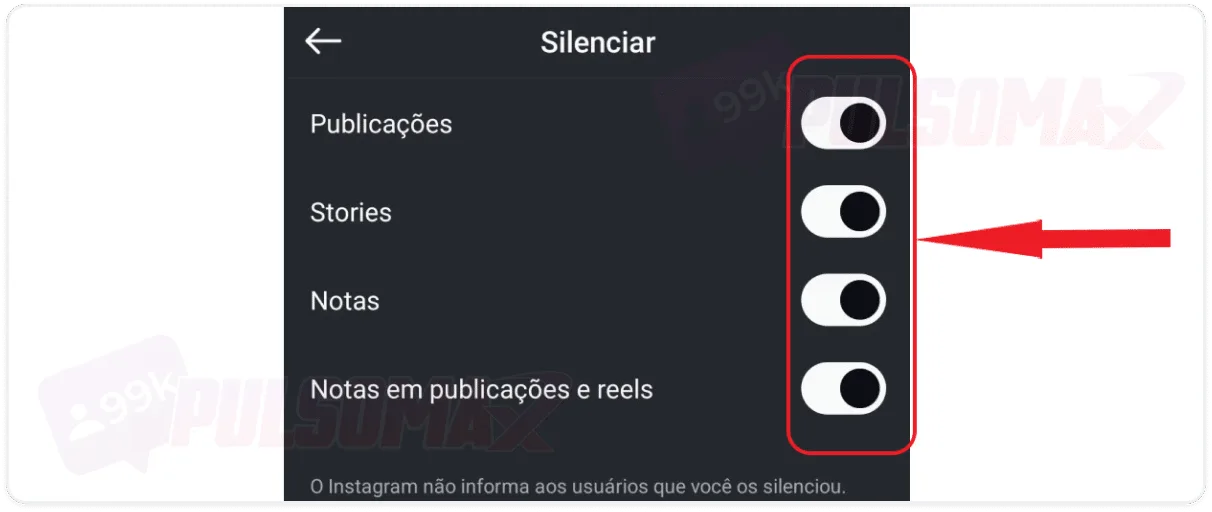
Enable the options you want to mute. See:
Done! You've learned how to mute someone on Instagram, and none of their posts will appear to you anymore. Note that you can choose to mute all types of content from that person or just certain types. Remember that if you don't select all options, only the type of content you choose to mute will stop being displayed to you.How to mute someone's story on Instagram step by step
Now, if what bothers you is the content of someone's stories, know that it's possible to directly mute that person's Instagram Story. This way, the rest of the content that user posts may still appear in your feed and other places on the social network, but their story will disappear completely from your view! To begin, first open your Instagram app (Android or iOS) and:Tap and hold on the story you want to mute.
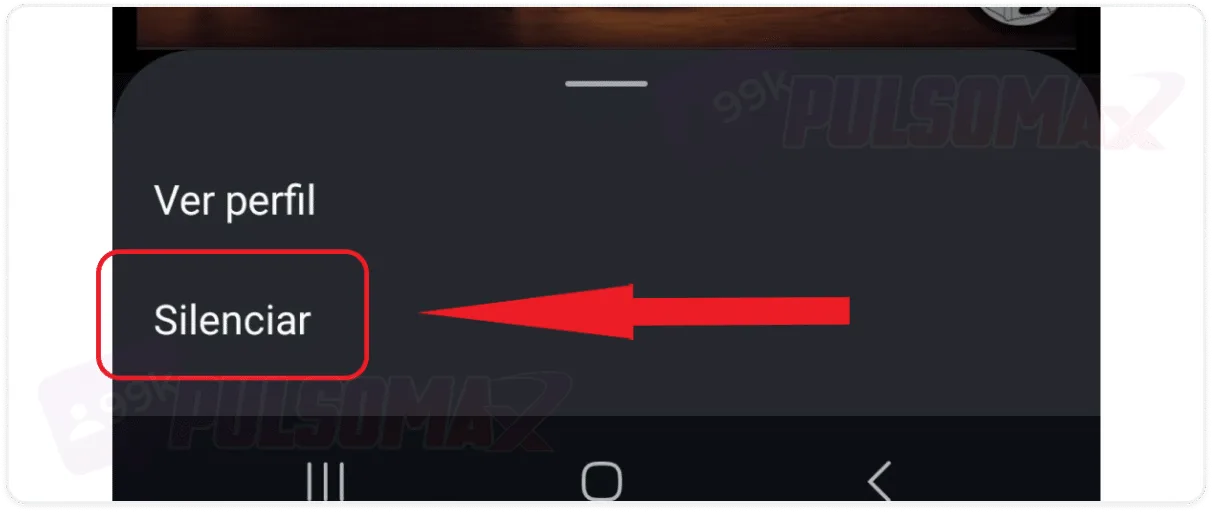
Tap to mute.
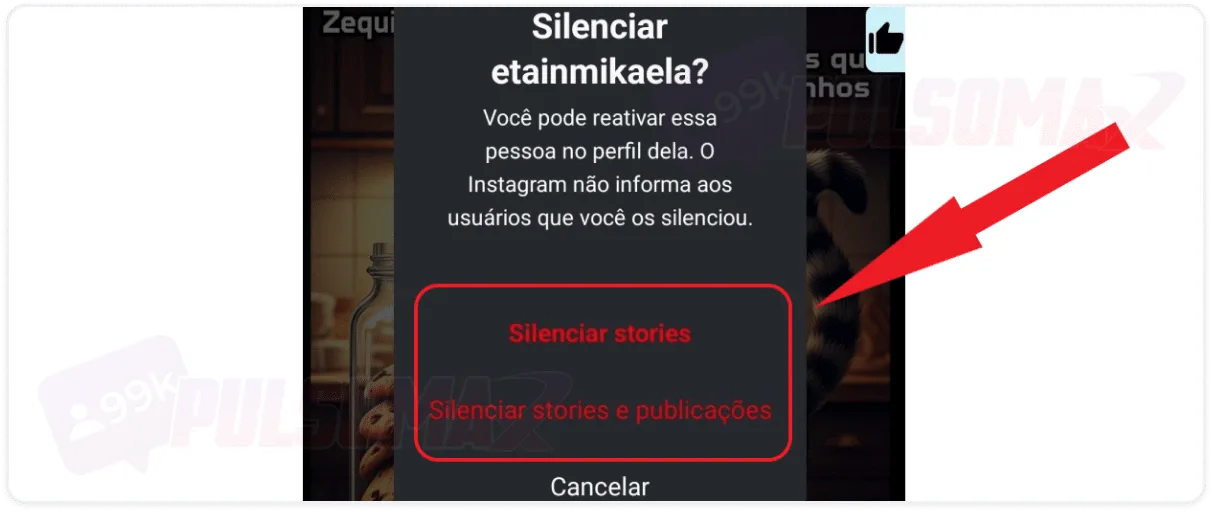
Choose between muting stories or muting both stories and posts.
Done! You've learned how to mute someone's Instagram Story! You can do this whenever another user's stories bother you or you simply feel that the content no longer interests you. The decision is yours. Want to anonymously peek at someone's story? Take a look at this: how to view stories anonymously on Instagram .How to mute Instagram DMs and calls?
Instagram Direct is where you can chat with other people and even make calls through the chat. The options we've learned so far about how to mute on Instagram don't apply to DMs (direct chat), nor to voice or video calls from DM users. The good news is that it's possible to mute people whose messages are bothering you in Direct. This won't stop the muted account from continuing to send messages, but you will no longer receive notifications of those messages. And the profile you mute will appear with a crossed-out bell symbol, indicating that it's muted in the chat. To learn how to mute someone's Instagram Direct, follow these steps:Tap the speech bubble or airplane button on Instagram.
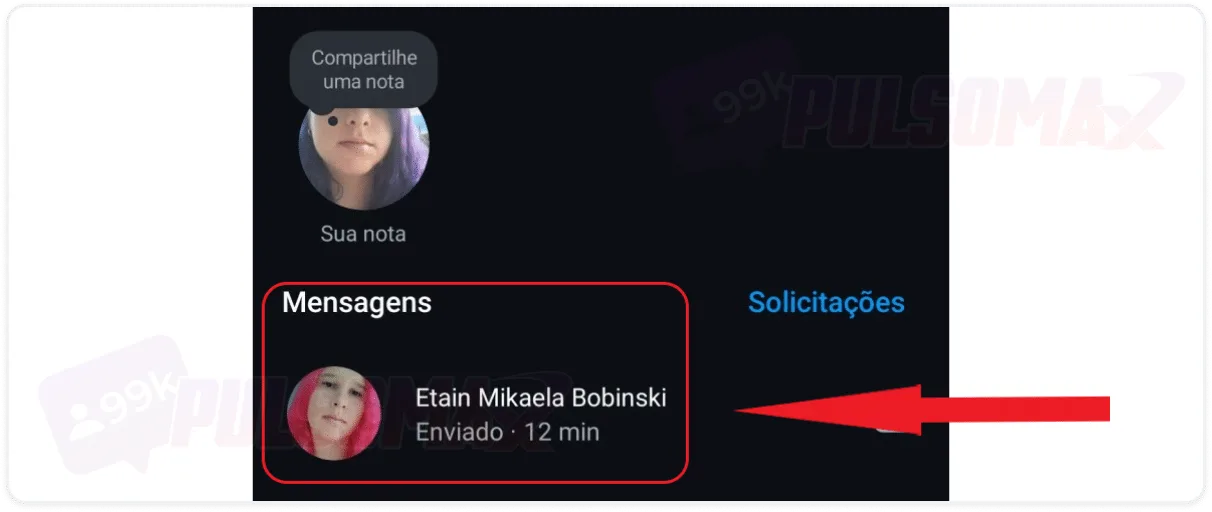
Click on the conversation you want to mute.
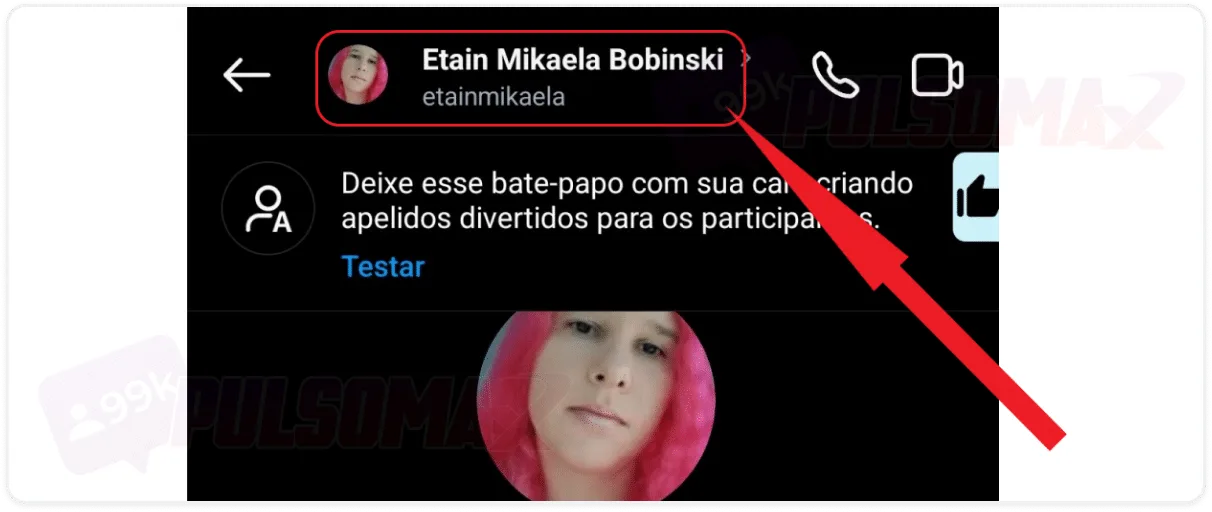
Tap the username at the top of the chat.
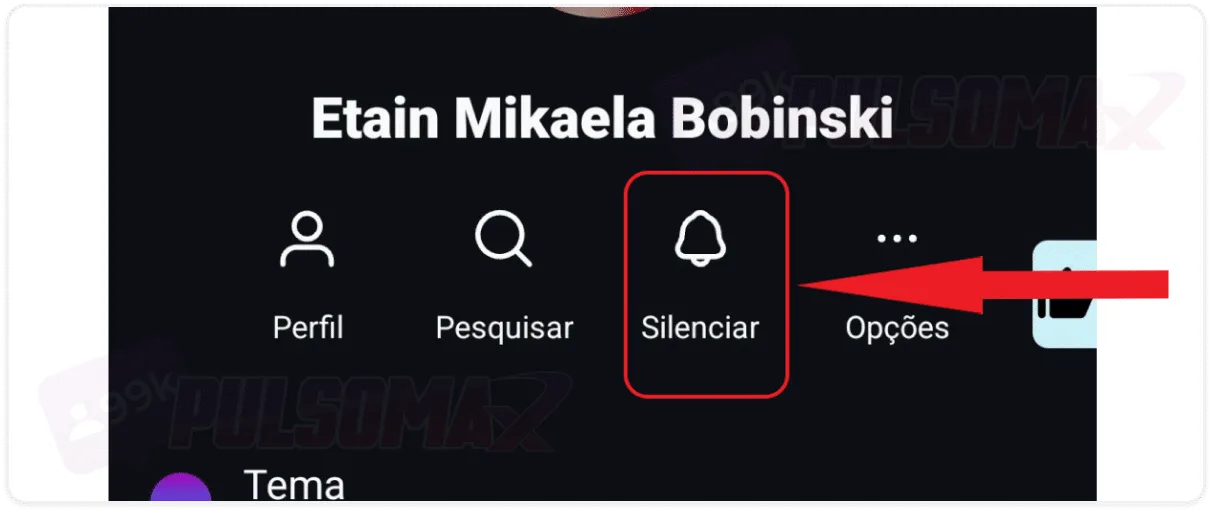
Next, click on mute.
Choose whether you want to silence messages, calls, or both.
Confirm each option by selecting the silence period.
Done! Message and call notifications from the muted user will no longer bother you on Instagram. And whenever you want, just access Instagram Direct to check if that account has sent new messages or not. After all, the user can still send messages and try to call if they want, but it's up to you to decide if you want to respond, and when to do so!How do I unmute myself on Instagram?
Now that you've learned how to mute Instagram, you don't need to worry if you regret muting a profile. You can remove the mute restrictions at any time by doing so:Tap on the thumbnail of your profile picture.
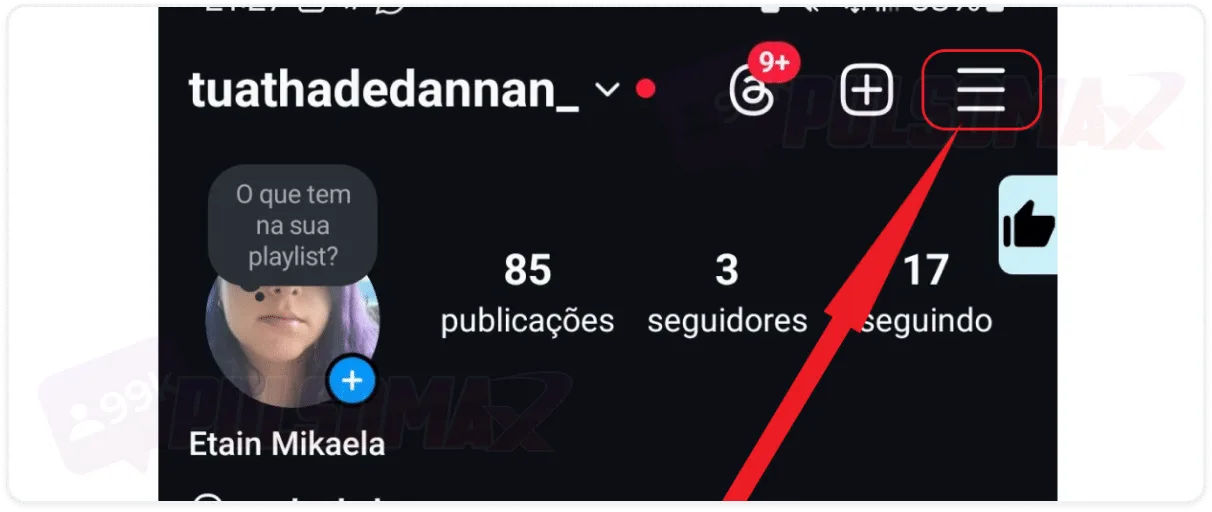
Tap the button with 3 lines.
Search for muted accounts and click on them.
Tap to reactivate audio.
Select which options you want to remove the silence from.
Done! The user is no longer muted, and you will now see their posts, stories, or notes normally, according to the unmute options you selected. Important: if you muted a user's DM notifications, the notifications will remain muted for the time you scheduled, or indefinitely if you chose the "until I change" option. To unmute a direct message, return to the muted chat, identified by a bell with a line through it , and repeat the steps from the previous section, clicking "reactivate" at the end.What happens when I mute someone on Instagram?
Learning how to mute Instagram and do so with profiles that bother you will prevent you from seeing the content those profiles publish. If you apply all the mute settings that Instagram allows, you will no longer see posts, stories, and notes from the muted account. Therefore, you will probably forget that user exists. But what about direct messages? You can mute direct message notifications and learn how to delete Instagram conversations to clear your chat of messages from the muted user. Of course, muting the person doesn't prevent them from sending new messages, but you won't be notified by the app. Now, if you want to prevent the person from sending you messages in your inbox, you can also learn what restricting accounts means on Instagram and how to do it. Messages from restricted accounts go to the message request box, remaining out of your view in the direct chat list. It's worth mentioning that the changes to the mute function apply to both the Instagram app and Instagram Web , if you access your account through a browser.Can the muted person see my posts and stories?
Yes, a muted person can still see your posts and stories . So, know that learning how to mute someone on Instagram won't stop them from seeing your content. Even restricting their Instagram account won't prevent them from seeing your posts. Restricting only prevents them from interacting publicly with you and from seeing their comments on your posts and stories if you don't want them to. It's the profile owner who decides whether or not to see the comments of people they've restricted, and whether or not to make those comments public. The only way a muted person won't see your content is if they also mute your account. Otherwise, you would need to block that person or have a private account where they aren't following you to prevent them from seeing your posts.Can I mute an Instagram profile for a specific period of time?
No, that's not possible, except for direct messages and calls. Even then, you need to choose one of the options provided by Instagram; you can't choose a specific time period yourself. Keep this in mind when understanding how to mute someone on Instagram. Because if you decide to see the muted person's posts and stories again, you'll need to unmute them manually.Is it possible to see all the accounts I've muted on Instagram?
Yes, that's possible. To see which accounts you've muted on Instagram, go to the muted accounts section, which you learned how to access with our step-by-step guide on how to mute Instagram. In that section, you'll find a list of the profiles you've muted, and you can unmute them, or even add muting for features you hadn't muted before, for each person on the list.What's the difference between blocking someone and muting them on Instagram?
The main difference is that when you block someone, the blocked user will no longer be able to find your profile on the social network. However, by simply muting them, this remains possible. This way, you will be completely hidden from them. Therefore, the blocked person will not be able to like, comment on, or have any kind of interaction with your content. The same happens to you; you will no longer find the blocked profile, nor will you be able to interact with that profile's content. For people who invest in Instagram, buying Instagram likes , comments, and even followers, blocking someone means losing that follower. And for several other reasons, blocking the user may not be the best choice, since all contact between the accounts is blocked. When you mute a profile on Instagram, that person remains your follower or an account you follow, if that's the case. And they won't notice any significant difference. Because they won't be notified by Instagram about the mute and can continue to see your content. So, by learning how to mute on Instagram, you learn a way to no longer see content you don't want to see, without having to block the user. Would you like to download audio, images, and videos from Instagram? Check out our Instagram download tools and never miss your favorite content again. It's free!Why mute instead of blocking on Instagram?
You've figured out how to mute someone on Instagram, but you might be wondering: why not just block the user, since their content bothers you so much? Well, muting is recommended for all situations where you can't or don't want to block the person. For example, when the user is someone you know outside of the social network, and blocking them could create conflicts outside the platform. There are also situations involving work colleagues, or profiles with whom you need to maintain some contact periodically, such as clients or business partners. Therefore, blocking the user in these cases wouldn't be a good choice either. The reasons vary. But, in general, they involve contexts where blocking would cause problems for the person blocking. Or situations where, even occasionally, the person still wants to take a peek at the user's posts, for their own reasons. For these situations, there's the mute function, which helps these bothered users have a better experience on the social network.What is the difference between silencing someone and letting them follow you?
Unfollowing someone on Instagram removes them from your contact list. Therefore, unfollowing is similar to learning how to mute on Instagram. Because when you no longer follow someone, you stop receiving updates on the content they publish. You will no longer see posts, notes, or stories from that user. Thus, the mute function is a milder option , recommended for situations where the user doesn't want to completely cut off contact with the account that bothers them. Another important point concerns private accounts. Unfollowing a private account will cause you to lose all access to that profile's posts. However, if you only mute them, you can still see the posts by accessing the user's profile or removing the mute. To learn more about this topic, read our other post: how to find out who unfollowed me on Instagram .How do I know if I've been muted on Instagram?
There's no way to be sure if someone has muted you. After all, as we explained, Instagram doesn't notify muted users. However, there are some signs that might indicate this:- The person stopped liking and commenting on your posts: the user never commented on or liked anything of yours, however, you notice that they post regularly and continue to react to posts from other users, especially mutual friends.
- The person doesn't see your stories: when someone views a story on Instagram, it appears in the view count for the profile owner. So, if you notice that the user has disappeared from all your stories, they may have muted you.
- There are no replies in direct messages: your messages are never, or rarely, answered in direct messages. And most of the time, they aren't even seen, even when the person appears online to you.
![Como desbloquear uma pessoa no Instagram [Fácil]](https://pulsomax.com.br/assets/uploads/blog_ai/wordpress-featured-como-desbloquear-uma-pessoa-no-instagram-ecd86cdaad.webp)