Instagram
  by
by 
 10 min read
![Como ver stories anonimamente Instagram [Rápido]](https://pulsomax.com.br/assets/uploads/blog_ai/wordpress-featured-ver-story-anonimamente-no-instagram-76dfe3765b.webp)
Have you ever wondered how to view Instagram stories anonymously? For various reasons, most people have wished, at least once, to view Instagram stories anonymously. This is normal. After all, humans are truly curious. So, if you have this desire, know that you're not alone! However, Instagram doesn't have any setting that allows anonymous viewing of stories. Therefore, even users who know how the social network works, understand what theInstagram feed is, what Direct is, and other important functions, don't know how to solve the problem of anonymously viewing stories on Instagram. Is it possible to view stories anonymously on Instagram? And if so, how do you do it? If you want to find out how to peek at Instagram profiles' stories without being noticed, keep reading!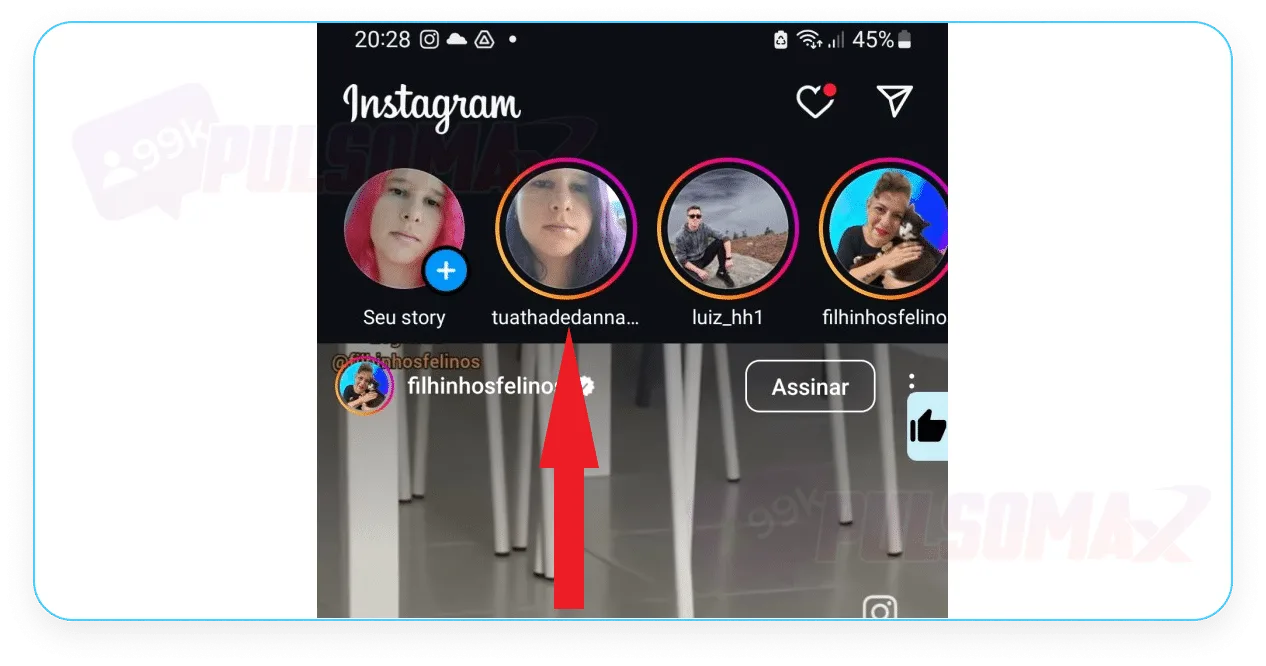 Now, access your phone's quick settings tab by swiping down from the top of the screen and activate airplane mode . Then, return to Instagram with airplane mode activated and click on the story . See the image below.
 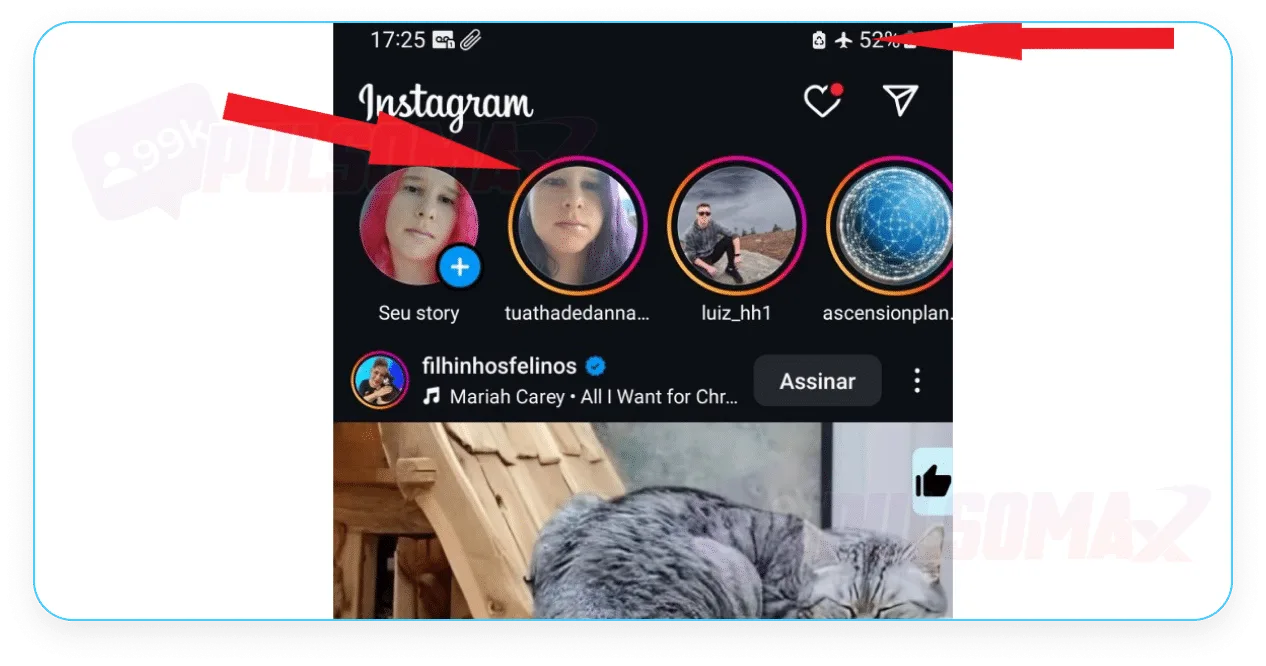 You've just learned how to view Instagram stories anonymously! Now, you can view the stories without worry , because with your internet connection disabled, Instagram won't register your action!
 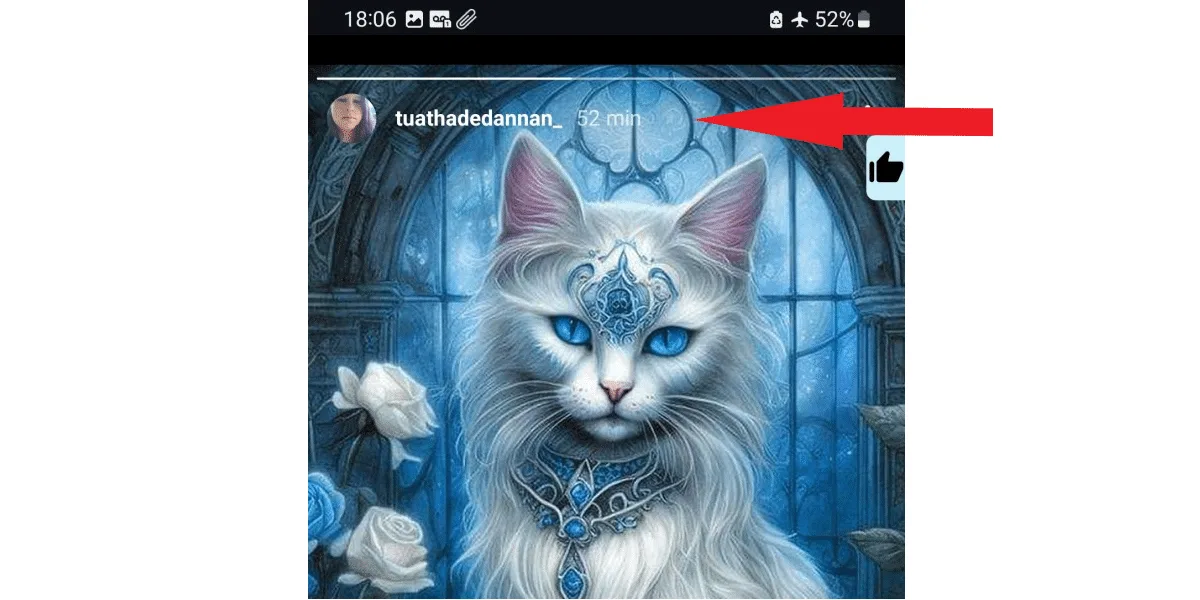 After viewing the content, exit the person's story and close the Instagram app before turning off airplane mode and reactivating your internet connection. Otherwise, as soon as your profile comes online again, your visit to the user's story will be recorded. With this method, you can even anonymously view the private Instagram accounts of other profiles. However, remember that if the person with the private account is not on your follower list, you will not be able to see their story in airplane mode.
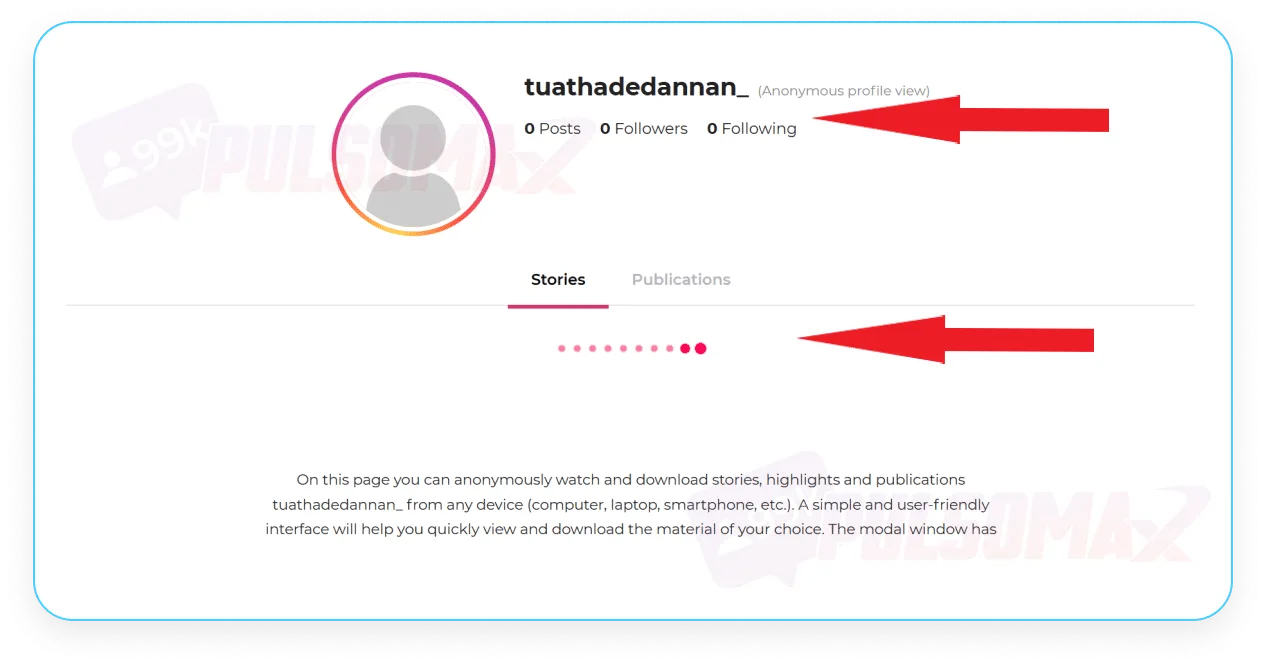
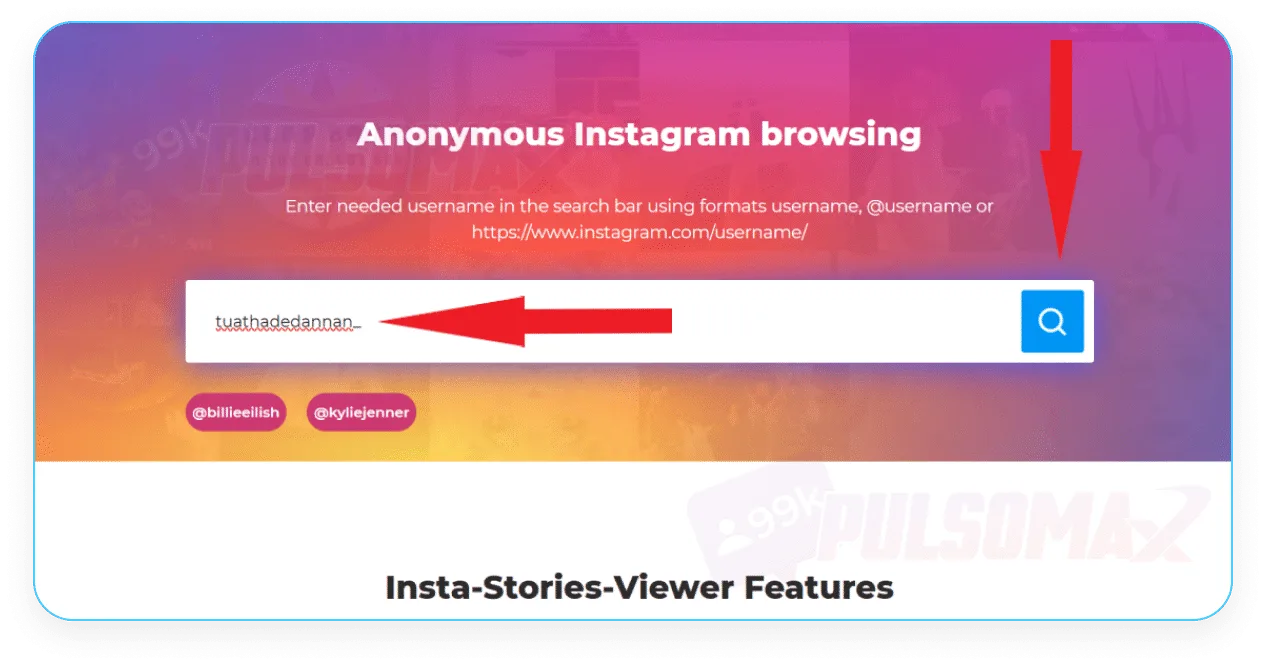 However, on the next screen, the site shows that the account in question has zero posts, stories, and followers, and in the section where the stories and posts should appear for viewing, the page keeps loading and nothing shows up.
  But, as you can see in this other screenshot here, the account we tried to access has several posts.
 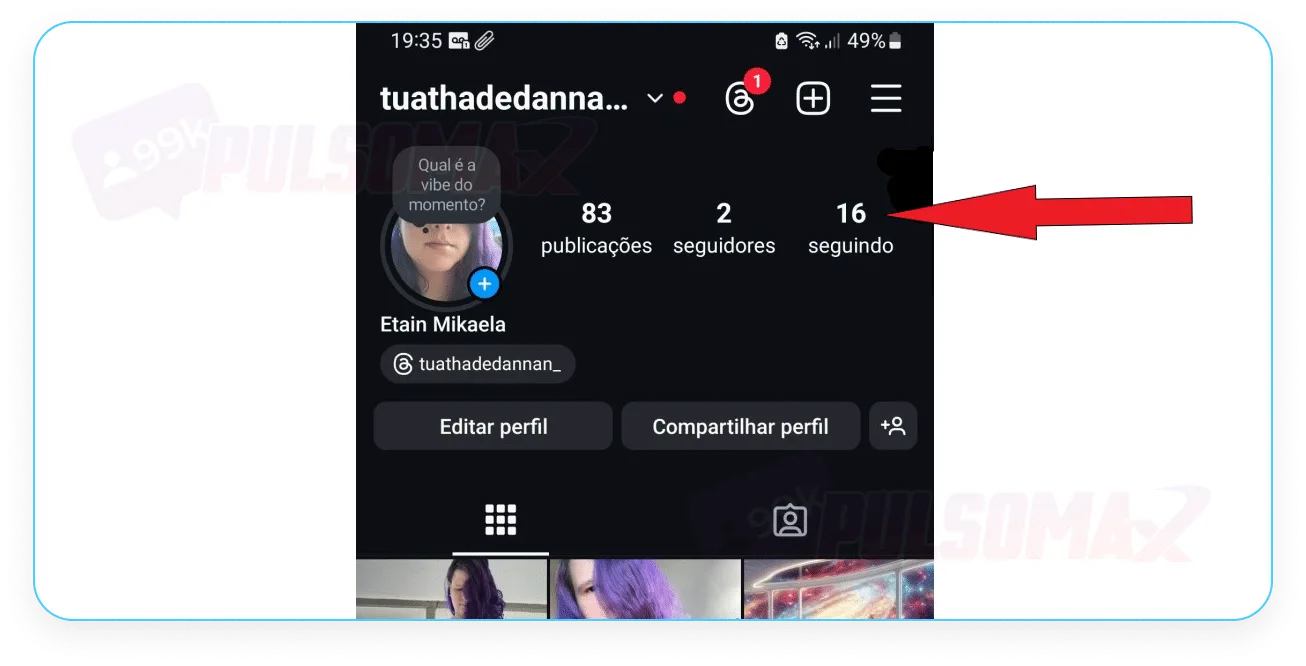 We tested it with other accounts, and the result is the same. In some, the Insta Stories Viewer even displays the correct number of posts, stories, and followers, but it doesn't load any content for anonymous viewing. So, you can try using the site yourself, following the step-by-step instructions we provided above, but it's likely that it won't work. In fact, there are reports that after several attempts, the site displays a message requiring the addition of credits worth R$ 4.99 for the searches to continue.
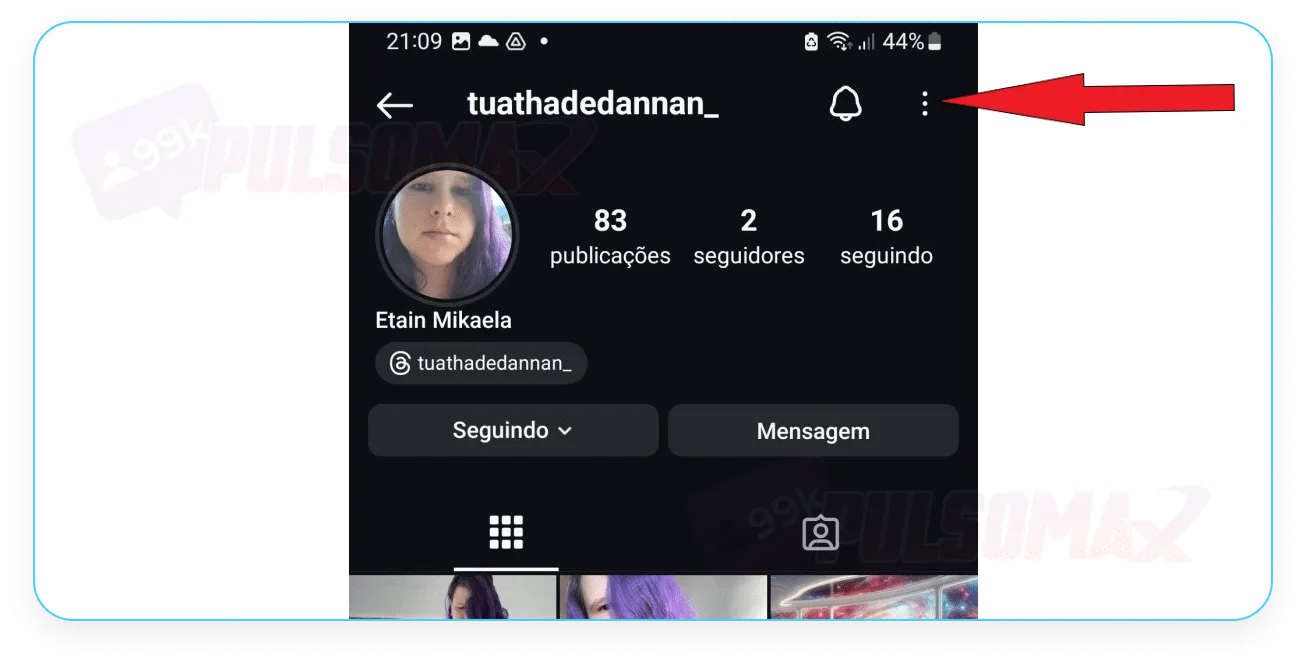 Before proceeding, if you're wondering if the person will know you've visited their profile, take a look at our other article: how to know who visited my Instagram profile , and clear up your doubts! Next, click on "copy profile URL ".
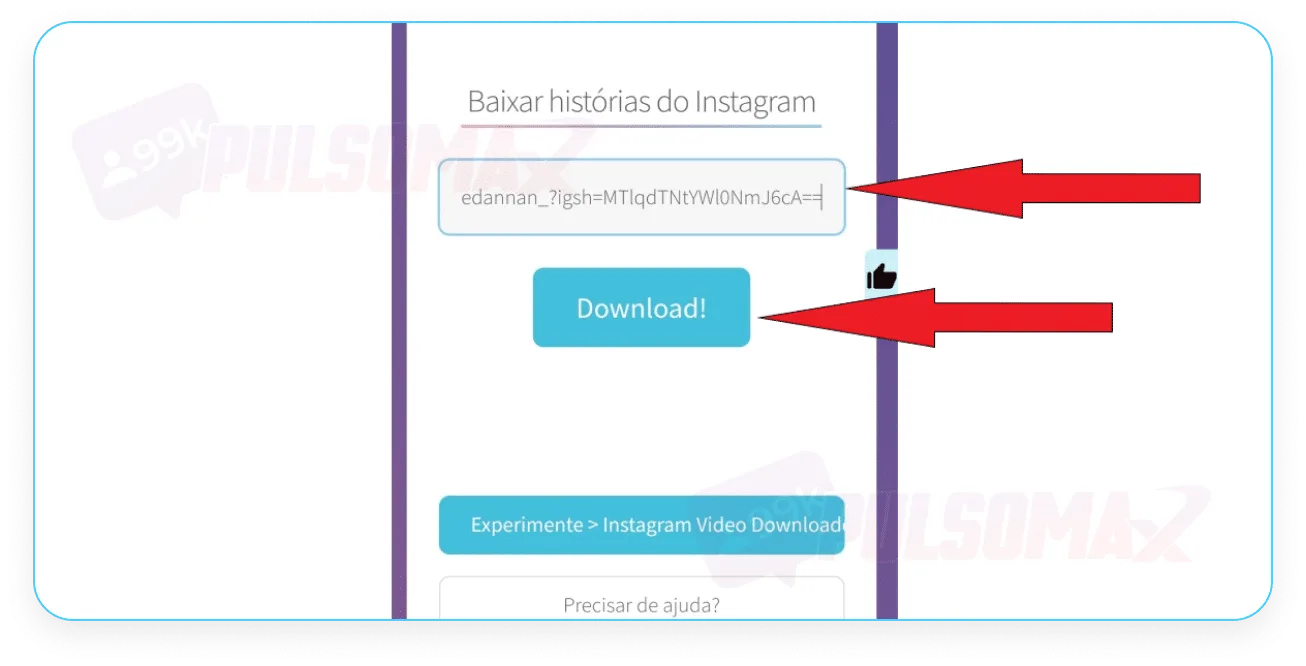
 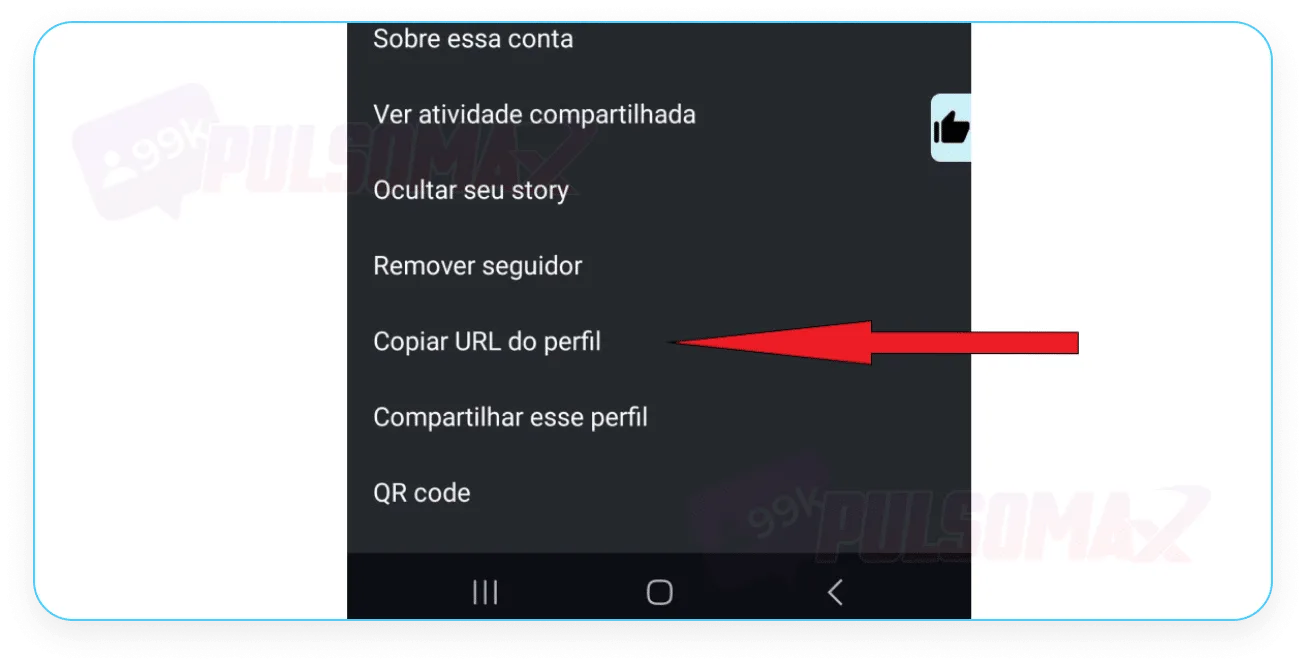 Open your mobile browser and go to the StorySaver.net website, scroll down until you find the option to download Instagram stories. Then, paste the link into the text box and click download, as shown in the next image.
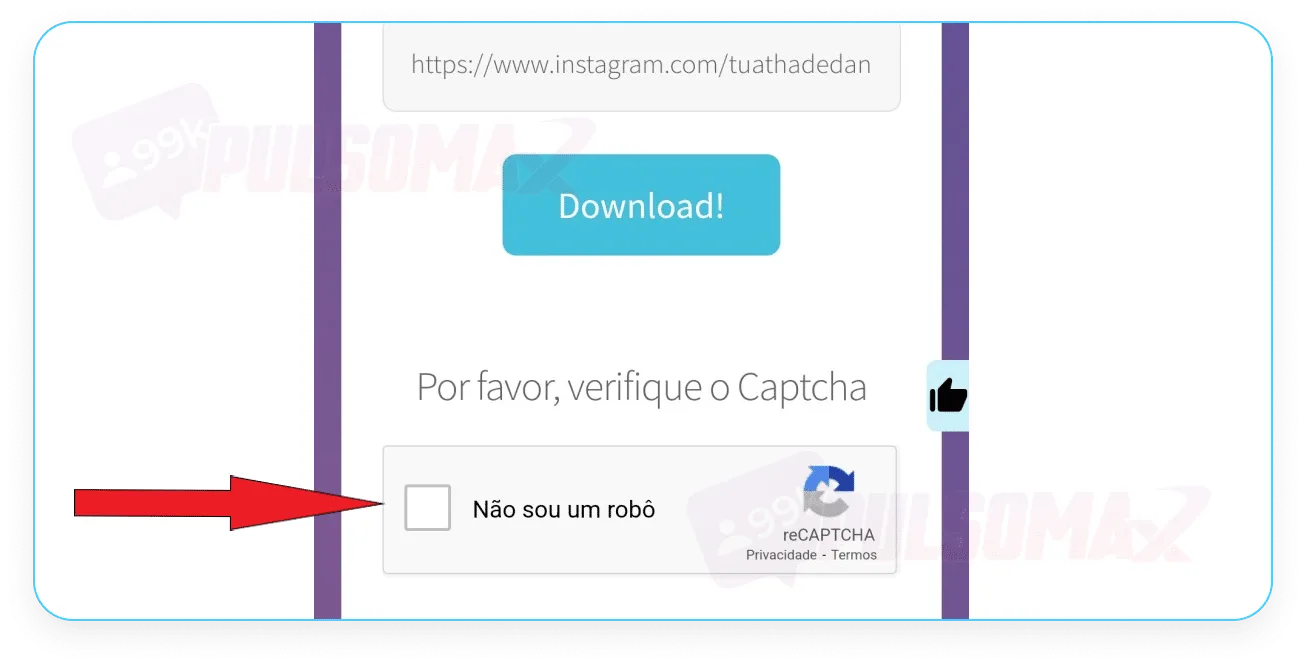
  Get past the captcha by clicking the box next to "I'm not a robot."
  That's it! Just view the stories. And you can download the content, if you want, by clicking " save as photo".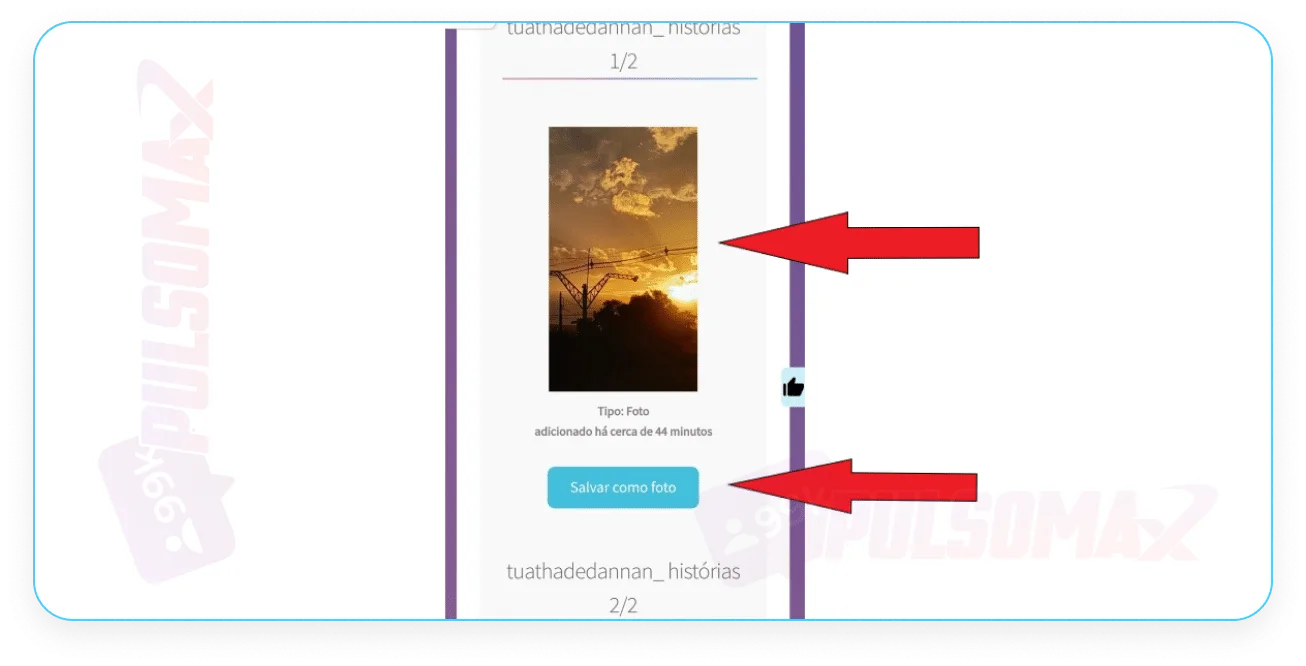
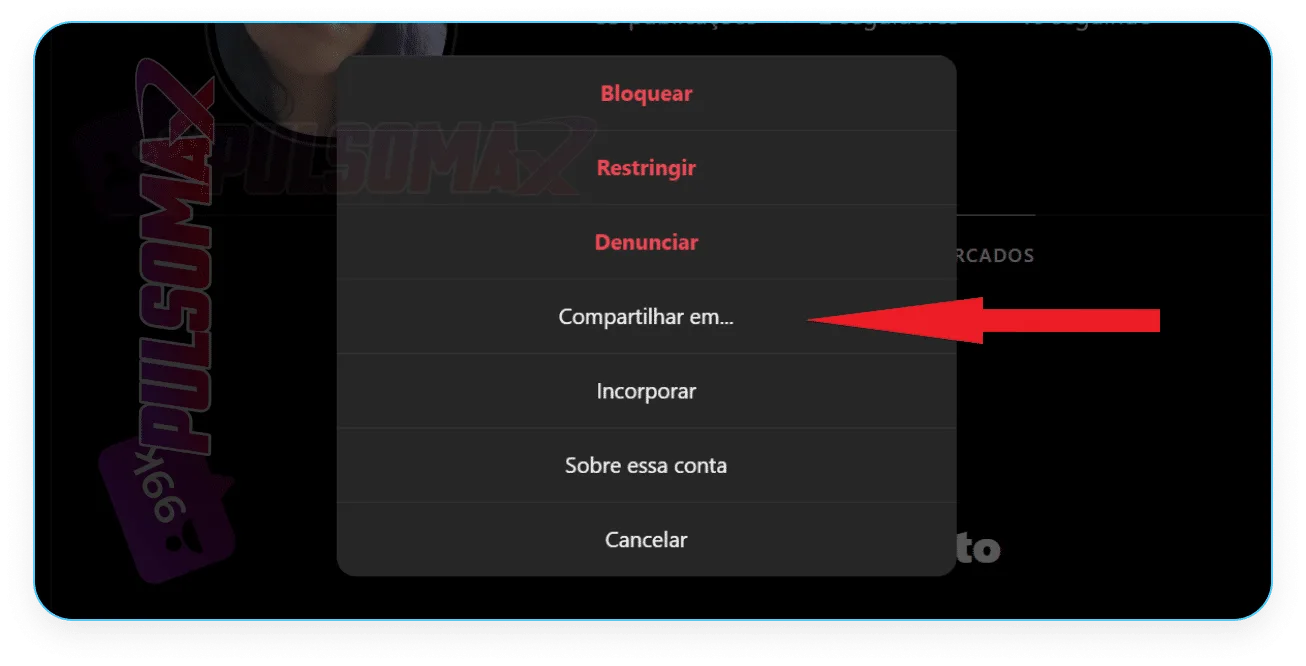
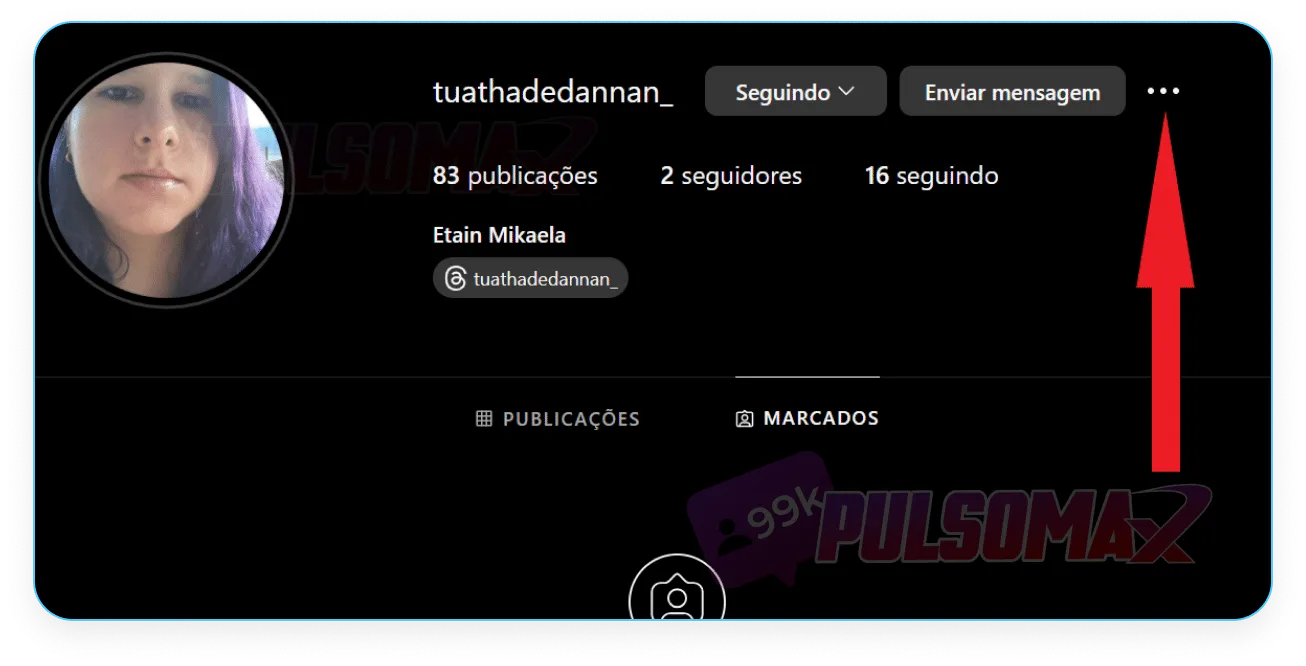 Next, tap "share to".
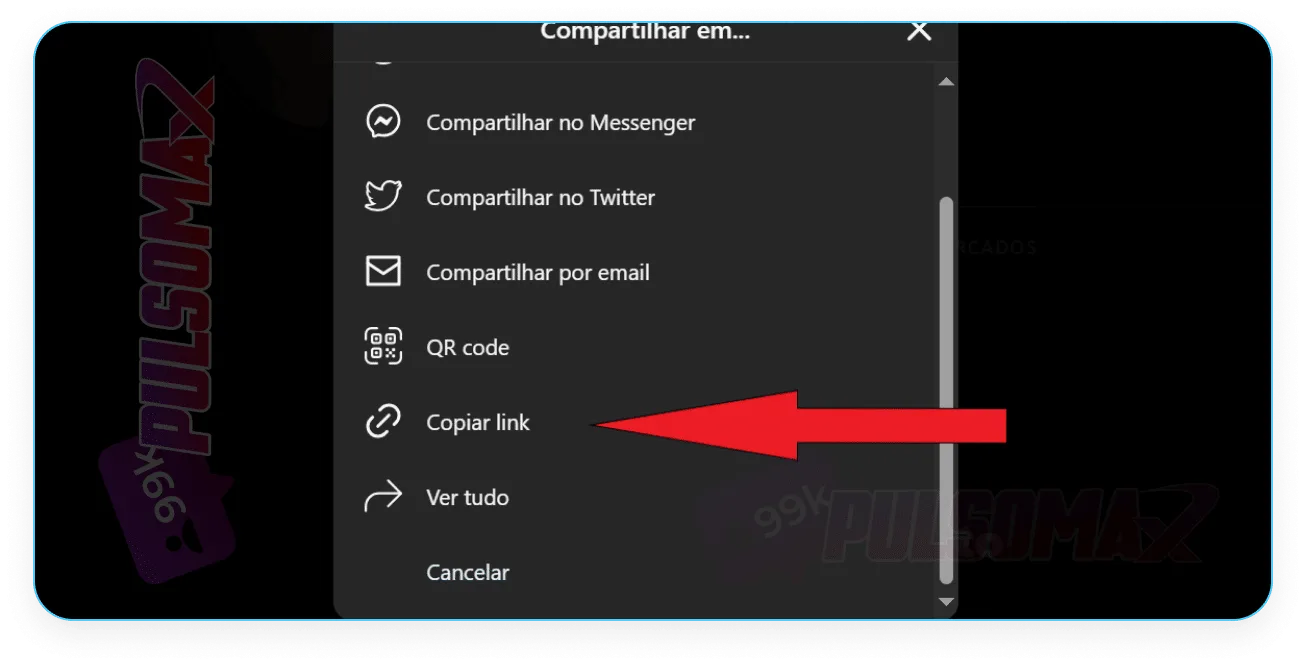
  Then, click on copy link.
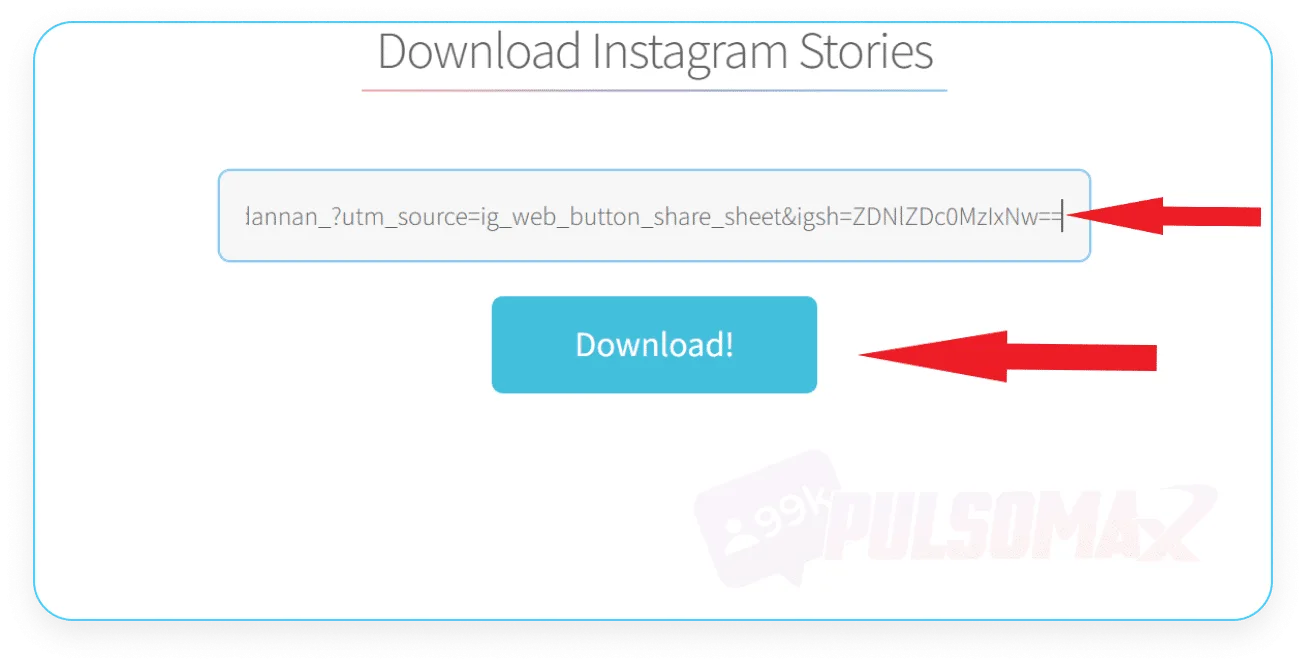
  Now, open the Story Saver website, paste the link into the text box, and then click the download button , as shown in the image below.
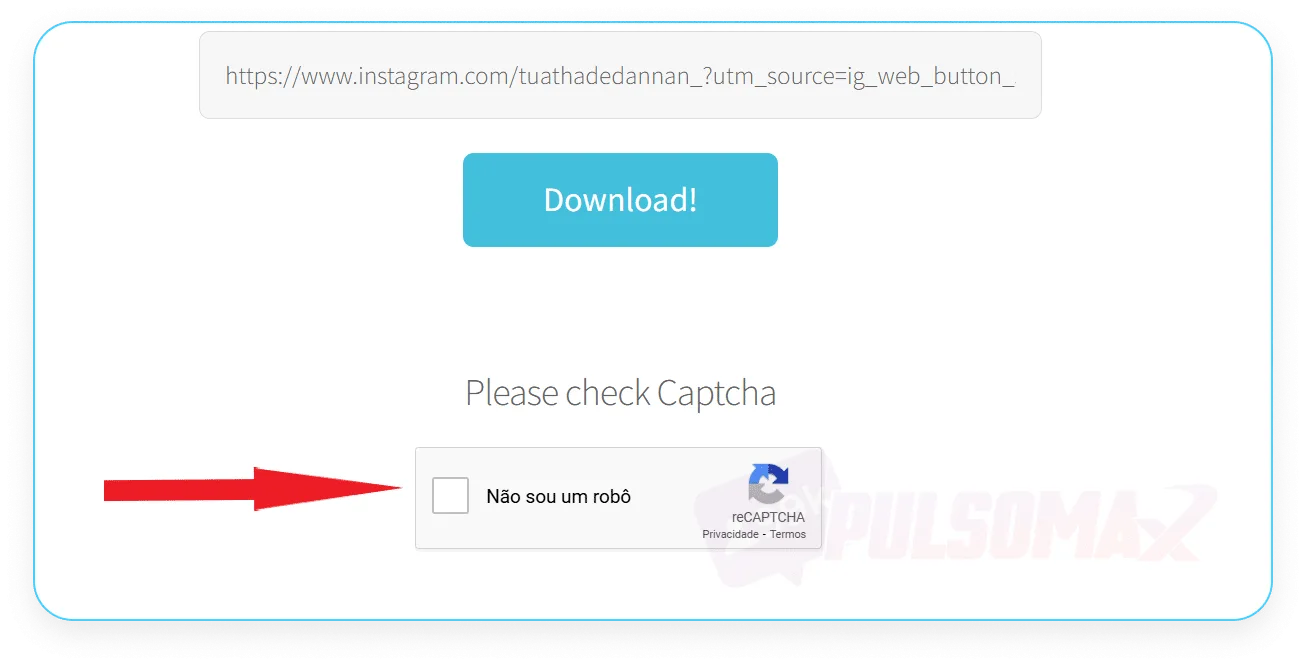
  Now, complete the captcha by clicking on the box, as shown in the image below.
  Done! You've learned how to view Instagram stories anonymously from your PC! To download, simply click download . See the image below.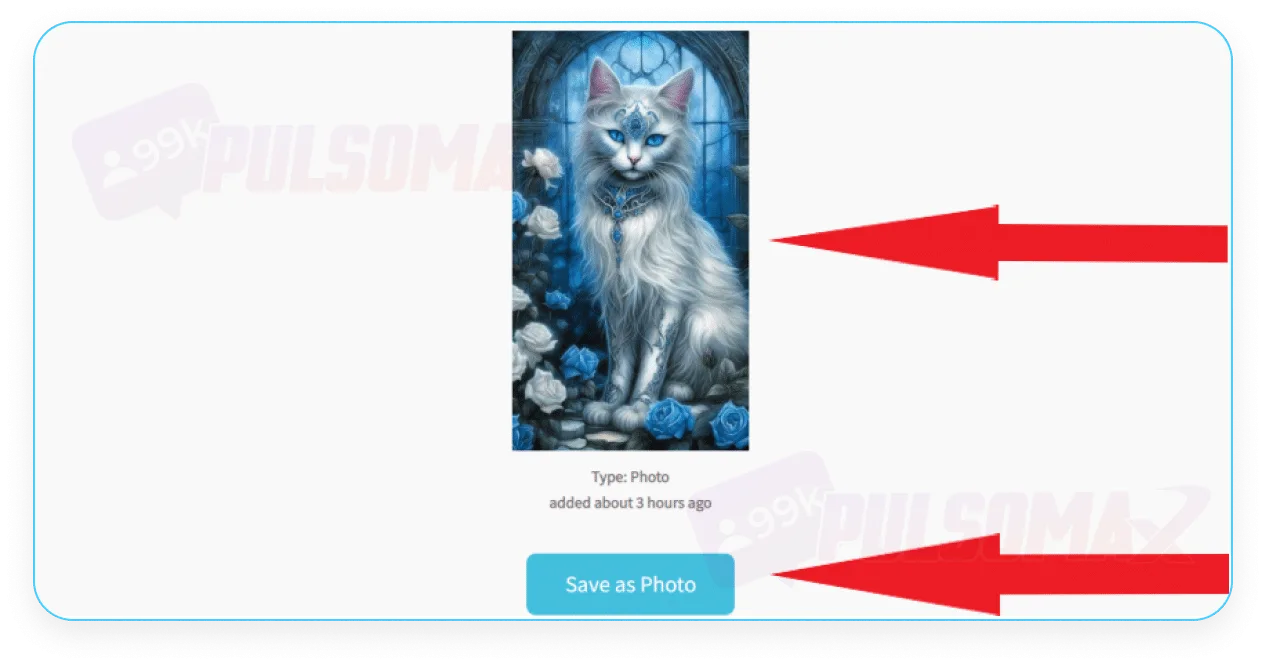
So, how do you view Instagram stories anonymously?
Many people who ask how to view Instagram stories anonymously are surprised by the simplicity of the easiest method: using airplane mode on your cell phone! To use airplane mode on your Android or iOS phone and view stories anonymously, follow these steps. Open your Instagram app and scroll through the stories until you find the one you want to view anonymously. Now, access your phone's quick settings tab by swiping down from the top of the screen and activate airplane mode . Then, return to Instagram with airplane mode activated and click on the story . See the image below. You've just learned how to view Instagram stories anonymously! Now, you can view the stories without worry , because with your internet connection disabled, Instagram won't register your action! After viewing the content, exit the person's story and close the Instagram app before turning off airplane mode and reactivating your internet connection. Otherwise, as soon as your profile comes online again, your visit to the user's story will be recorded. With this method, you can even anonymously view the private Instagram accounts of other profiles. However, remember that if the person with the private account is not on your follower list, you will not be able to see their story in airplane mode.Does Insta Stories Viewer work for viewing anonymous Instagram stories?
If you want to know how to view Instagram stories anonymously without using airplane mode, you may have come across Insta Stories Viewer. Initially, this is a secure website that doesn't require your password or even your account login to use. It promises to show stories and posts from the target account for anonymous viewing. To access it, you only need the male or female username of the account whose stories you want to view anonymously. However, we tested the site and it doesn't work as it should; see below. First, we accessed Insta Stories Viewer. Then, we entered the username of the account to view the stories anonymously and tapped the blue button with the magnifying glass. However, on the next screen, the site shows that the account in question has zero posts, stories, and followers, and in the section where the stories and posts should appear for viewing, the page keeps loading and nothing shows up. But, as you can see in this other screenshot here, the account we tried to access has several posts. We tested it with other accounts, and the result is the same. In some, the Insta Stories Viewer even displays the correct number of posts, stories, and followers, but it doesn't load any content for anonymous viewing. So, you can try using the site yourself, following the step-by-step instructions we provided above, but it's likely that it won't work. In fact, there are reports that after several attempts, the site displays a message requiring the addition of credits worth R$ 4.99 for the searches to continue.Use the Story Saver
For those still wondering how to view Instagram stories anonymously without putting their phone on airplane mode, we've found the solution: the Story Saver website . Similar to Insta Stories Viewer, this site doesn't require your username or password, only the link to the Instagram profile you want to anonymously view. To use the site and discover how to view Instagram stories anonymously, follow these steps. First, open your Instagram app, access the profile whose stories you want to view without being detected, and click the three dots in the upper left corner of the screen, as shown in the image below. Before proceeding, if you're wondering if the person will know you've visited their profile, take a look at our other article: how to know who visited my Instagram profile , and clear up your doubts! Next, click on "copy profile URL ". Open your mobile browser and go to the StorySaver.net website, scroll down until you find the option to download Instagram stories. Then, paste the link into the text box and click download, as shown in the next image. Get past the captcha by clicking the box next to "I'm not a robot." That's it! Just view the stories. And you can download the content, if you want, by clicking " save as photo". Step-by-step guide to using Story Saver in your browser.
If you don't have access to the Instagram app, or prefer to use your PC for this task, you can view Instagram stories anonymously using Story Saver through your computer's browser. To do this, first log into your Instagram account in your browser, access the profile whose stories you want to view, and click on the three dots in the upper corner of the screen . Next, tap "share to". Then, click on copy link. Now, open the Story Saver website, paste the link into the text box, and then click the download button , as shown in the image below. Now, complete the captcha by clicking on the box, as shown in the image below. Done! You've learned how to view Instagram stories anonymously from your PC! To download, simply click download . See the image below. Can I view Instagram's featured stories anonymously?
Some people also want to know if it's possible to view Instagram stories anonymously, specifically featured stories. These stories are posts that users can pin below their profile bio and that remain online for more than 24 hours. Yes, it's possible to view these stories anonymously. Just look with your phone's airplane mode activated. However, if you don't want to risk it, simply wait two days before viewing. After 48 hours, the view count will no longer be visible to the content creator, so they won't know you viewed their story. If you prefer, you can also use Saver Story to view the account's highlights anonymously, as it also allows viewing! And, if in addition to knowing how to view Instagram stories anonymously, you want to download content from Instagram, you can use our tools to download audio, video, and images from Instagram for free, and even download content from featured stories if you wish. All you need is the post link.Is it safe to use apps to view stories anonymously on Instagram?
It's not safe to use apps to find out how to view Instagram stories anonymously. You cannot give third parties access to your Instagram data, or you will be violating Instagram's community guidelines. This means your account could be penalized on the social network if Instagram identifies access via third-party apps. However, this isn't the only risk. There's no way to know if these platforms that ask for your Instagram login and password will actually take good care of your data and respect the confidentiality of your account. In practice, if the app isn't reputable , third parties could access your Instagram profile, putting you at risk of having your account stolen! This is a threat to any user. But those who invest in Instagram, buy Instagram followers , and have a profile with many followers are at even greater risk. These accounts are often targeted by malicious individuals who steal profiles to spread scams, due to the wide reach of digital influencers.Can I prevent other people from seeing my anonymous Instagram story?
There's no way to completely prevent other people from seeing your anonymous Instagram story. An alternative, now that you know how to view stories anonymously on Instagram and understand how it works, is to make your profile private on the social network. This way, only your followers will be able to see your stories. Even so, they can still view them anonymously using airplane mode. However, at least you can be sure that no one who doesn't follow you can do it. Now, if your account is a business profile, then it can't be private. In that case, you don't have that option, and people can use websites and apps to view your stories anonymously on Instagram.Can I see the stories of a blocked Instagram account?
No, you can't see the stories of a blocked Instagram account. Nor can you see the stories of profiles that have blocked you on the social network. This is an important point about how to view stories anonymously on Instagram: it's only possible to do this with profiles that you can find on Instagram. When you block someone, or are blocked by that person, all interactions between you and that user end. This means that conversations in Direct are deleted, it's no longer possible to find the profile in Instagram user search, and it's not possible to view any content from that account, whether stories or feed posts. But there is a solution: if you are thinking of blocking someone, but don't want to lose access to their stories, you can simply restrict the account on Instagram . With the restriction:- The restricted user will no longer be able to publicly comment on your posts and stories;
- You won't see if you've viewed their messages in Direct;
- The private messages he sends will go to your message requests folder. And you decide whether you want to see the content or not.
Websites to view Instagram stories anonymously.
There are several tools that allow you to view Instagram stories anonymously. Here are four of the most recommended:- Instanônimo : This website allows you to view stories from public profiles without your viewing being recorded. You don't need to provide your Instagram password or install any app. In addition to watching, you can download the stories to your device.
- StoriesIG : An online platform that allows you to view and download Instagram stories, posts, and photos anonymously. It's free and doesn't require you to log in to your Instagram account.
- Insta Story Viewer (AnonyIG) : An online tool that allows you to browse and download Instagram content, such as photos, videos, and IGTV, while maintaining your anonymity. Compatible with various devices and browsers.
- IGram : This anonymous Instagram story viewer allows you to view stories without being identified. It works on PCs, tablets, and smartphones, and is compatible with major browsers.
- Snapinsta : This free service allows you to watch and download Instagram stories, videos, and photos anonymously. It's compatible with various browsers and devices, offering high-quality downloads.
- SSStory : A platform that allows you to view and download Instagram stories without your knowledge. It's an effective way to follow content without revealing your identity.