Instagram
  by
by 
 9 min read

What does the Professional Dashboard mean on Instagram? Content creators, brands, and businesses that want to stand out on Instagram need tools that allow them to track the performance of their posts and make more assertive decisions about whatcontent to post on Instagram . And these tools exist in the Professional Dashboard, and in today's article you'll see in detail the benefits of this feature. The Professional Dashboard is a tab in the Instagram business profile settings that provides valuable insights into the performance of that profile's posts and the profile's performance as a whole. Metrics such as view rates and interactions with your posts, among other advanced features, allow you to manage your account's performance more precisely. In today's article, we'll look in detail at what the Professional Dashboard means on Instagram, understand how this tool works, and learn about its main features. We'll also talk about why it's important to use this dashboard, how to configure it correctly, and how to make the most of the features it offers. Read to the end to take advantage of all the tips!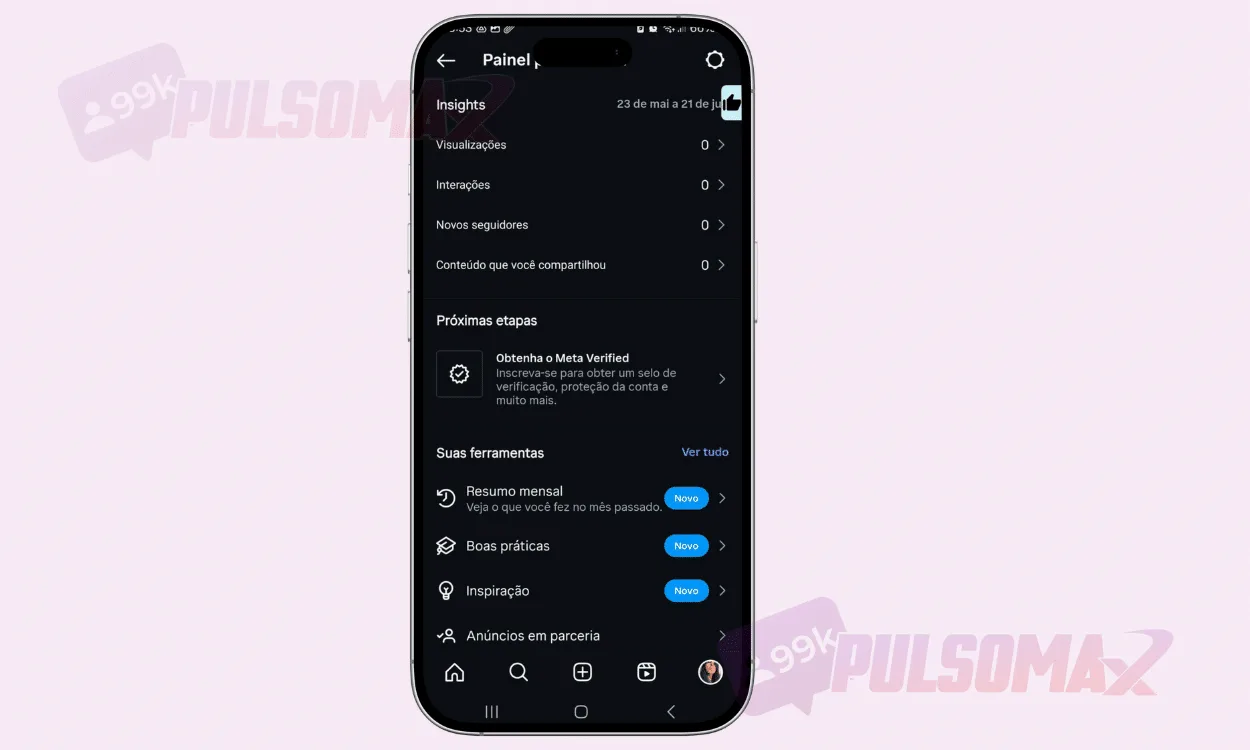 The professional dashboard isn't available to all users. To access it, you need an Instagram business account . This type of account is recommended for content creators who want to become influencers, brands, and companies in different sectors. Therefore, it's not available to users who use the social network only for personal purposes, as these people don't need professional features like those available in a business account. Creating a business profile on Instagram is very simple, and you can find a complete step-by-step guide at this link . However, we can tell you upfront that a business account is completely free, and you can transform your personal account into a professional one at any time. If you don't have an Instagram profile, just create one normally and then configure it as a business account. Simple! Once you're using a business profile, just click on your profile picture thumbnail , then tap the three-line button and then click on insights . You can also access the dashboard directly through a button located just below your profile picture. That's it, you've found your professional dashboard on Instagram.
So, what does "professional panel" mean on Instagram?
Formerly known as the Business Dashboard, the Instagram Professional Dashboard is a comprehensive, free resource that provides valuable insights into your social media profile. You know when you're thinking about the best strategies to increase views on your Stories , Reels videos, or feed posts? Well, with the Professional Dashboard, finding those strategies becomes much easier. This dashboard provides detailed statistics on each post , such as post reach, engagement details like interactions and new followers, and the number of views your content receives. So, by carefully analyzing these metrics and comparing results from different posts, you can make more informed decisions and invest in the strategies that truly work for yourgrowth on Instagram .- The professional panel on Instagram also allows this.
- Follow monthly summaries of your content.
- Discover inspirational ideas selected by Instagram's algorithm for your content creation, based on your activity and performance on the platform.
- Gain better control over your branded content and ads in partnerships with other brands.
- Check out trending audio.
- Manage comments.
- Gain access to advertising tools.
- Create AIs to interact with your audience or just with you.
- Report spam or abuse.
- Save answers to common questions.
- And easily follow other content creators.
How does the professional dashboard work on Instagram?
The professional dashboard works by offering a range of statistics about your account. It's very simple, and its appearance is like any other Instagram setting. You can easily navigate by clicking on the different options, and then use your phone's back button to go back. It's a very intuitive feature to use in practice. Therefore, it's highly recommended that you take a few minutes to get to know your professional dashboard on Instagram. Don't be afraid to click and explore the different settings available. It's important that you learn how to use this dashboard well, as it will become part of your routine if you really intend to develop serious work on Instagram. Also, check out how to buy Instagram Reels views and discover the secret to making your video go viral!How do I access the professional dashboard on Instagram?
The professional dashboard isn't available to all users. To access it, you need an Instagram business account . This type of account is recommended for content creators who want to become influencers, brands, and companies in different sectors. Therefore, it's not available to users who use the social network only for personal purposes, as these people don't need professional features like those available in a business account. Creating a business profile on Instagram is very simple, and you can find a complete step-by-step guide at this link . However, we can tell you upfront that a business account is completely free, and you can transform your personal account into a professional one at any time. If you don't have an Instagram profile, just create one normally and then configure it as a business account. Simple! Once you're using a business profile, just click on your profile picture thumbnail , then tap the three-line button and then click on insights . You can also access the dashboard directly through a button located just below your profile picture. That's it, you've found your professional dashboard on Instagram.