Instagram
  by
by 
 10 min read
Do you know what an Instagram feed is? Even users who already use the social network daily can be confused by this question. It's one thing to use Instagram to see photos and videos, but understanding the meaning of words like "feed," "direct," and other terms specific to the social network is quite another. However, this understanding is very important! This way, you can better value the investments made in your account, such as buying Instagram followers , and you can also make better use of your time on the social network. This also means having more time to focus on publishing good content to maintain engagement on your profile. With that in mind, we've prepared this post about what an Instagram feed is and useful tips on its main functionalities. Keep reading until the end to get the most out of it and not miss any important tips! The Instagram feed is the place that displays all the posts you see when you open the Instagram app, on the home screen. Therefore, when asking what the Instagram feed is, it's necessary to understand that the feed mixes:
 Now, if you're accessing your Instagram via Instagram Web, simply click on "home" in the upper left corner of the page.
  How about upgrading your account to grow faster on Instagram? Invest in buying Instagram comments from verified accounts and watch your profile take off on the social network!
 Next, tap on favorites .
 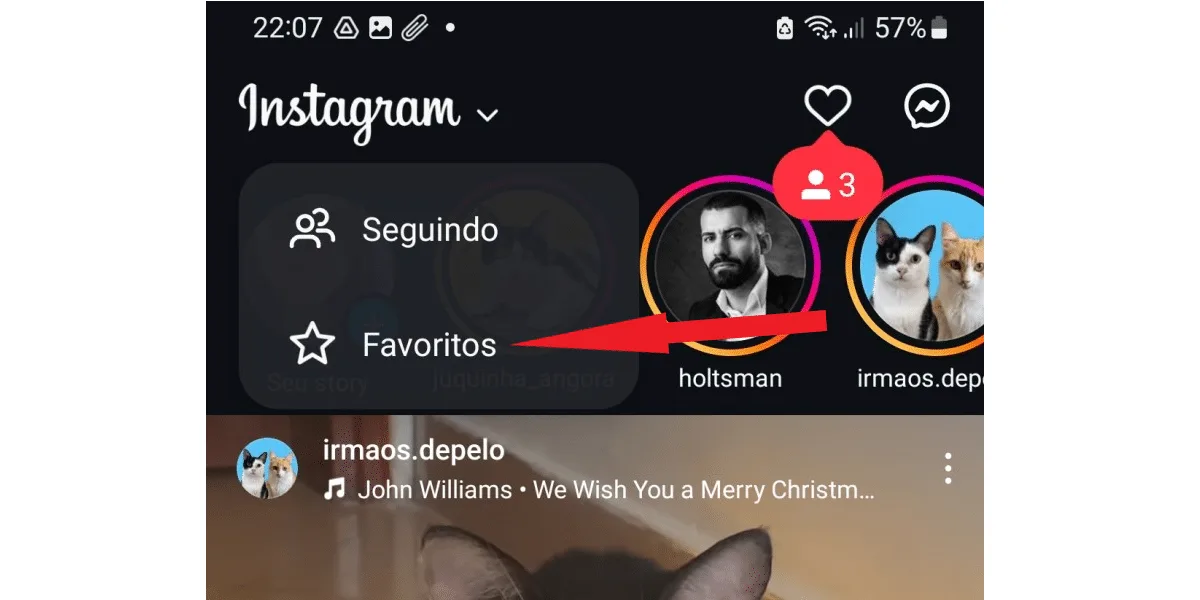 Now, simply add the profiles you want to your favorites section. You can also manage them in this tab.
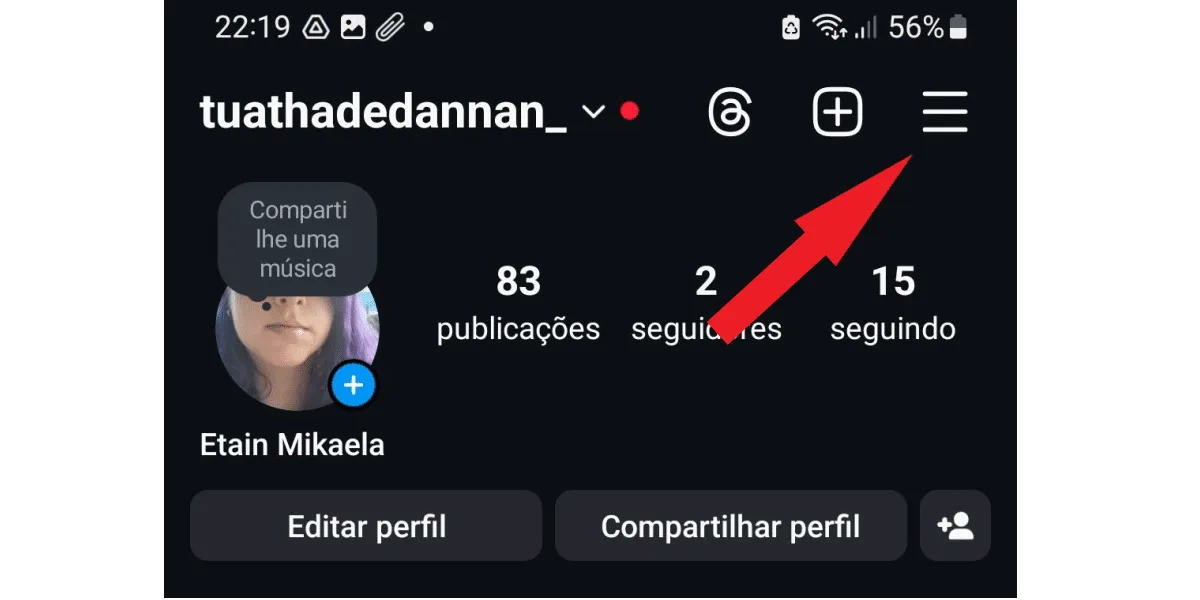
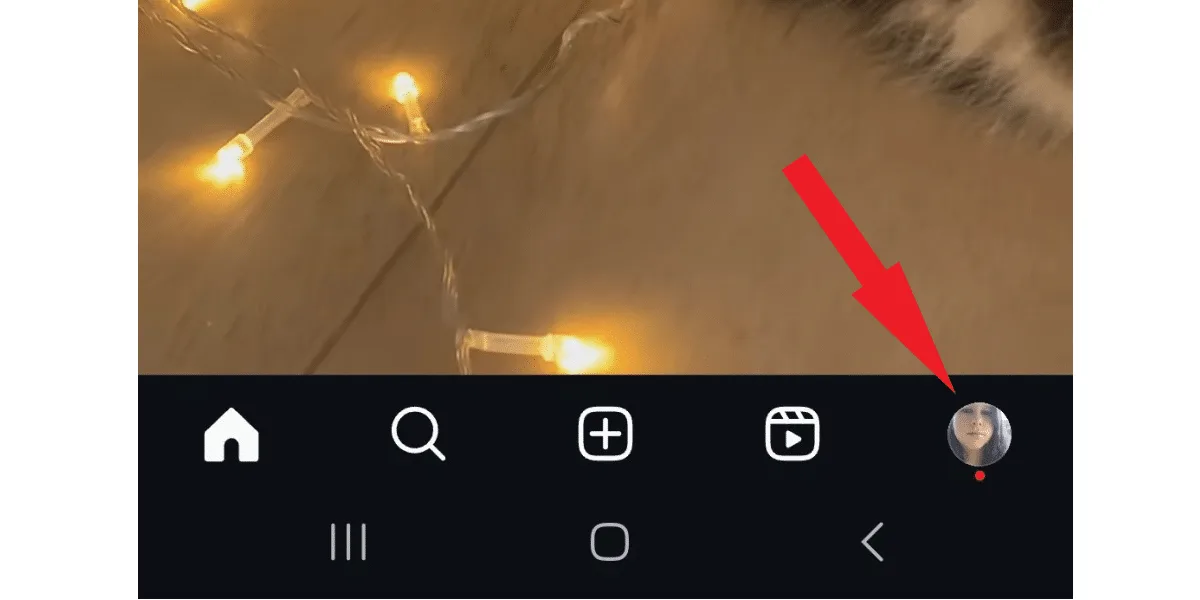 Click the three-line button in the upper right corner.
  Scroll down to the comments section .
 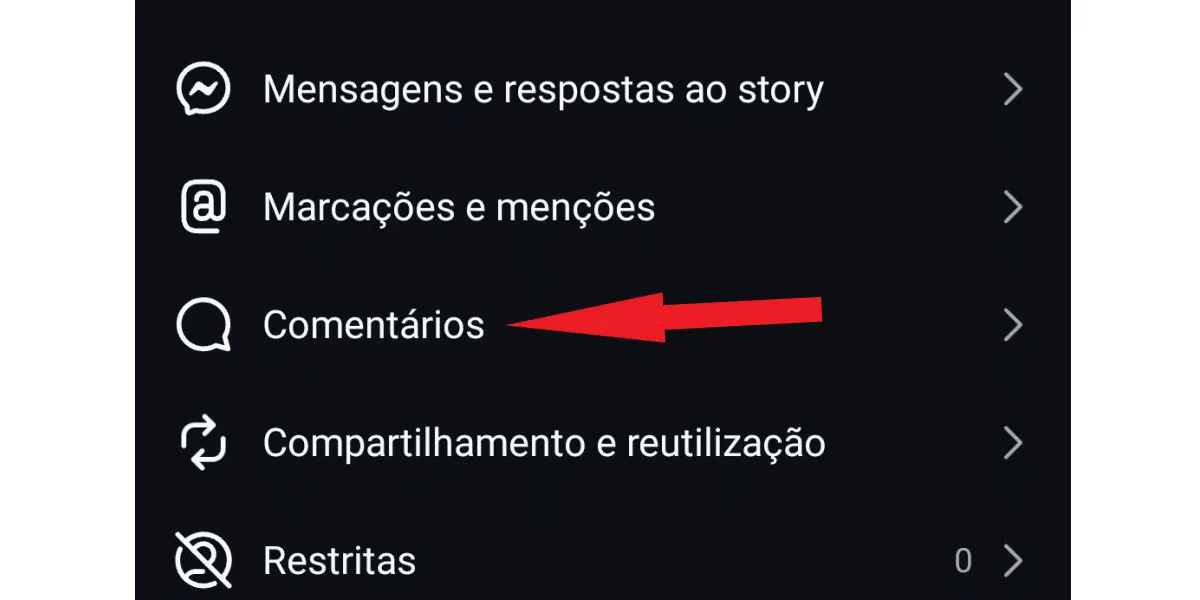 In this section, tap on posts and reels to control who can comment on your posts, tap on stories to control who can comment on your story, and tap on allow comments with GIFs to allow or block comments with stickers. See the image below:
 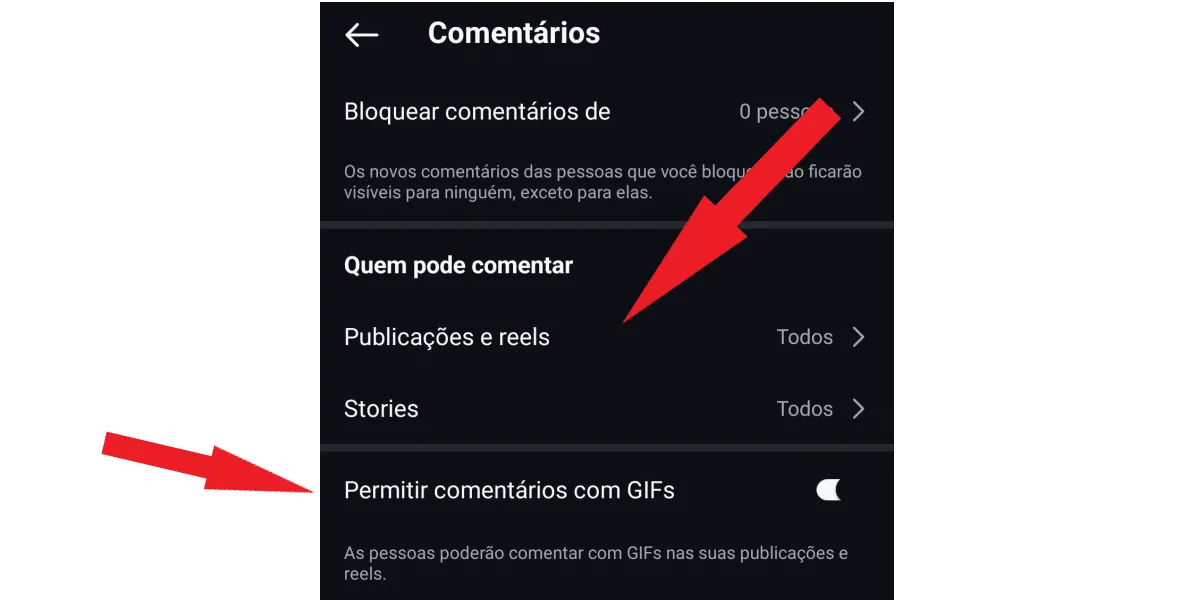 To complete this step-by-step process, you must access Instagram via the app on your mobile phone. It's not possible to do this on Instagram Web.
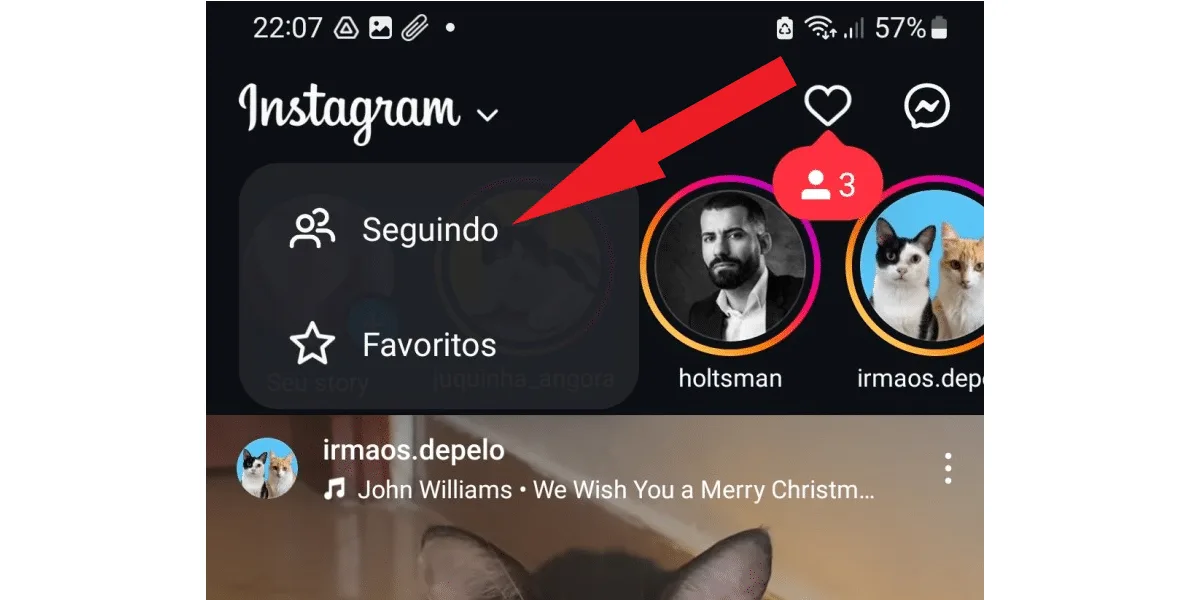 By doing this, you can view all content updates posted by all the accounts you follow, in chronological order, just like the Instagram timeline used to work.
What is a feed on Instagram?
The Instagram feed is the place that displays all the posts you see when you open the Instagram app, on the home screen. Therefore, when asking what the Instagram feed is, it's necessary to understand that the feed mixes:- Content posted by people you follow, including photos, videos, and carousels (multiple photos or videos together);
- Posts recommended by Instagram's algorithm, based on your interests;
- Your favorites (the latest posts from accounts you've marked as favorites);
- Sponsored ads, in image or video format.
Where is the feed on Instagram?
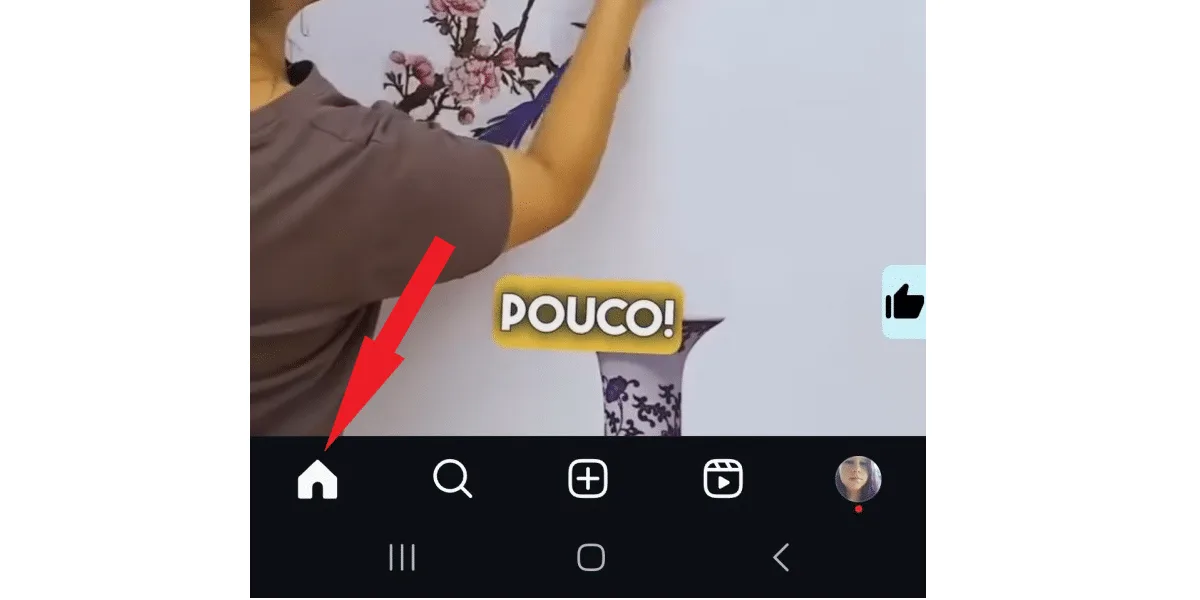
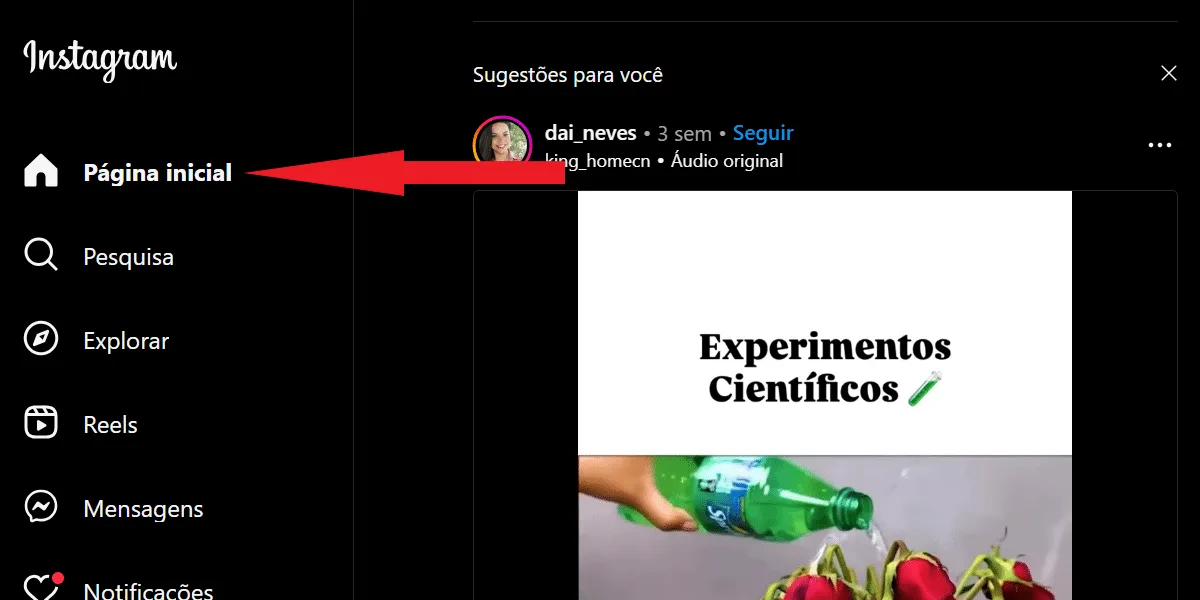
You already know what the Instagram feed is, but where is it located ? As mentioned, the feed is your Instagram home screen. But, if you're in another part of the social network, for example, checking outwhat's trending on Instagram Reels , and you want to return to your standard feed, just click on the house-shaped icon in the lower left corner of the screen. That's where the Instagram feed is located. Now, if you're accessing your Instagram via Instagram Web, simply click on "home" in the upper left corner of the page. How about upgrading your account to grow faster on Instagram? Invest in buying Instagram comments from verified accounts and watch your profile take off on the social network!Where are the favorites located on Instagram?
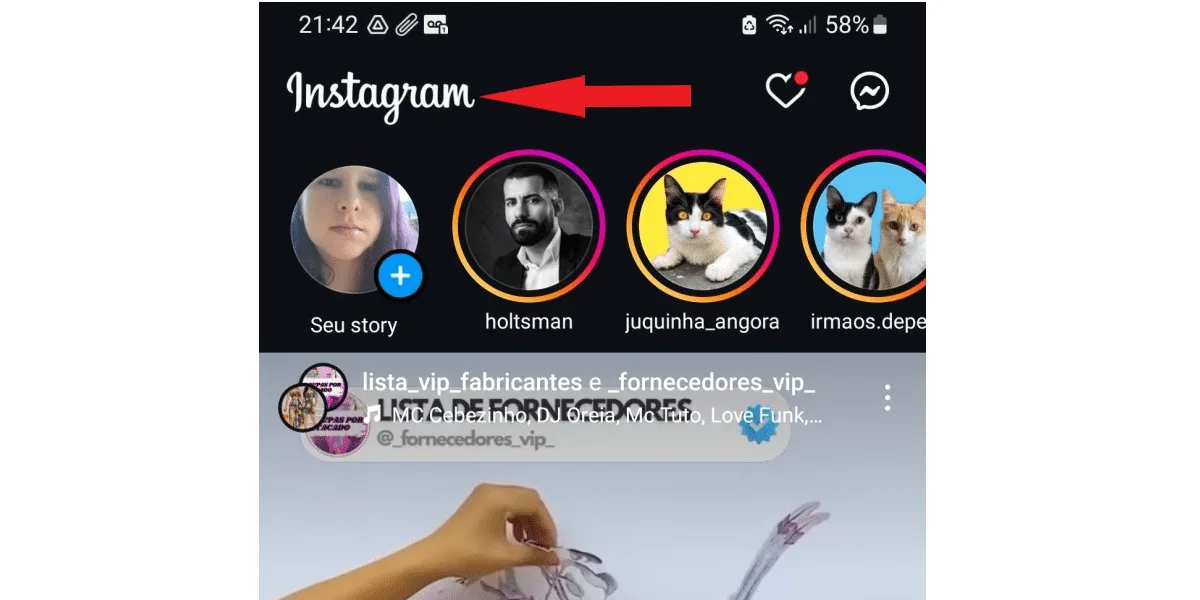
Instagram favorites are in their own tab , and once you understand what an Instagram feed is, you'll realize they're in different locations, although favorites appear in the standard feed. To access your favorites, first go to the app's home screen by tapping the house-shaped button in the bottom left corner. On the home screen, tap the word Instagram in the top left corner, like this: Next, tap on favorites . Now, simply add the profiles you want to your favorites section. You can also manage them in this tab.What is a feed on Instagram and how can I interact with the posts?
Unlike other social media platforms, you cannot share other users' posts on your Instagram profile. By default, you can:- Like by tapping the heart icon;
- Comment by tapping the speech bubble icon;
- Share the post in someone's direct messages by tapping the airplane icon;
- Save posts you like.
Can I block comments from specific users on Instagram?
It's not possible to block comments from specific users on Instagram. However, you can control who comments on your posts by choosing from:- Everyone can comment;
- Allow comments only from people you follow:
- Allow comments only from your followers;
- Allow comments only from people you follow and their followers.
- All;
- People you follow;
- Disabled (to disable comments on the story).
Click the three-line button in the upper right corner. Scroll down to the comments section . In this section, tap on posts and reels to control who can comment on your posts, tap on stories to control who can comment on your story, and tap on allow comments with GIFs to allow or block comments with stickers. See the image below: To complete this step-by-step process, you must access Instagram via the app on your mobile phone. It's not possible to do this on Instagram Web.How does the Instagram Feed work?
According to CNN Brazil , Instagram surpassed TikTok as the most downloaded app worldwide, and in the last semester of 2023, the number of active users on the network already totaled 1.47 billion people. Therefore, for anyone on the social network who wants to stand out, understanding what an Instagram feed is and how it works is essential. The functioning of the feed is not random. As we explained in the first topic of this article about what an Instagram feed is, there is an order to the posts you see in your feed. But it's much more than that: the Instagram algorithm controls everything that each user sees first, in a personalized way. And this is done based on thousands of signals , according to Instagram itself. In other words, in practice, it is virtually impossible to determine everything that the network's algorithm takes into account to assemble your feed. Despite this, there is some basic information that is part of this package.Important signals for the Instagram algorithm
When you're on Instagram, you want to grow, and you dedicate yourself to understanding how the social network works, for example, discovering what "POV" means on Instagram and other important hashtags. Everything you do online counts. The social network's algorithm considers several elements to decide what to show in your feed, and also in the feeds of your followers. This mainly includes:- Likes and comments;
- Number of interactions per post;
- Publication time and location;
- Content is viewed even if the user does not interact with it;
- Standard activity, such as the type of content the user likes and comments on most;
- The history of interactions with other users.
Instagram's chronological feed still works.
Some people who ask what an Instagram feed is, upon discovering the answer, conclude that this new dynamic feed isn't complete enough. Although it was implemented precisely because it was impossible for most users to see everything their contacts posted on the network, there are still those who want to see all the posts from the accounts they follow, even if there are many. For these people, there's good news: the chronological Instagram feed still exists! To access it, simply go to the Instagram home screen in your app, tap the Instagram logo in the upper left corner, and click on "Following" in the options that appear, as follows: By doing this, you can view all content updates posted by all the accounts you follow, in chronological order, just like the Instagram timeline used to work.How do I choose the content for my Instagram feed?
Now that you understand what an Instagram feed is, it's clear that many elements determine the content you see on your social media profile. While you can't control everything you see, you can take some actions to better choose which content will, or won't, appear in your feed. Check it out:- You can add up to 50 profiles to your favorites list , ensuring that your preferred content appears first;
- It is possible to mute user accounts whose content you don't want to see. To do this, you don't need to unfollow the account in question, nor block or restrict it;
- You can disable recommended posts from users you don't follow on Instagram, which will prevent the algorithm from showing that content again for 30 days.
- It's possible to block post suggestions from accounts you don't follow on the social network, which prompts the algorithm to show you more of that type of content;
- You can use the favorites feed, or "following" feed, to stop seeing ads and posts suggested by Instagram;
- You can mark suggested posts as "not interested". Just click on the three dots in the upper left corner of the post and choose that option.
What is the difference between the Instagram feed and stories?
The Instagram feed displays posts shared by you and other users that don't expire. Therefore, everything you post to your feed is saved in your feed grid on your profile page, another relevant detail about what the Instagram feed is. Stories, on the other hand, are posts that include photos and videos and remain online for only 24 hours . After that time, they disappear, as do the comments and views.What is the difference between the Instagram feed and reels?
The feed displays posts from accounts you follow and your own posts in video, photo, or carousel format. Reels, on the other hand, are short videos , up to 90 seconds long, presented in the "reels" tab in an infinite scrolling system, similar to the TikTok and Kwai apps. The main purpose of reels is to present new content to the user. Another important point is that reel videos and feed content have different editing tools. Despite this, any video up to 15 minutes long published in the feed can use the reels editing tools.How can I better organize my Instagram feed?
Brands and digital influencers who understand what an Instagram feed is quickly realize they need to pay special attention to this part of their Instagram. After all, it's their business card, and their posts can't be random, poorly planned, or disorganized. To keep your feed organized, it's recommended to:- Define your own style, with a visual theme that identifies you, your brand or business, and provides a visual identity for your account;
- Use visual tools to see how your posts will appear together, and to use grids and creative layouts in a planned way;
- Use captions intelligently, and choose the right hashtags for each post;
- Vary your content with different types of posts, mixing photos, videos, and carousels, to generate more engagement and offer a dynamic experience to your followers.