Instagram
  by
by 
 10 min read
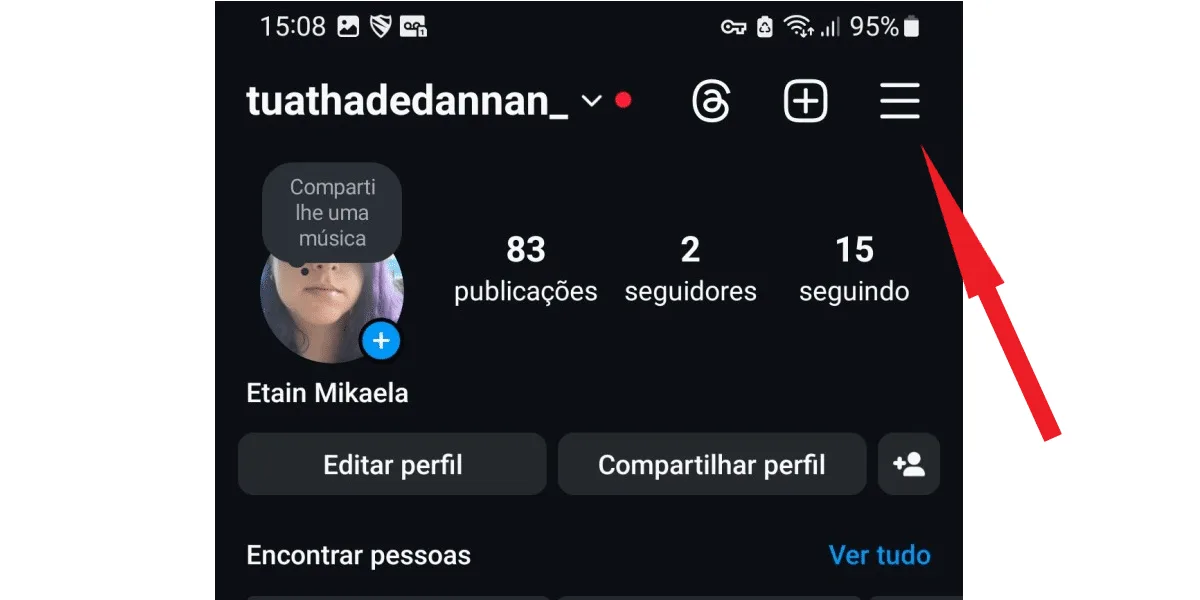
Is it possible to recover deleted Instagram conversations ? There's no denying that messaging apps have become a constant presence in our lives. After all, social networks, like Instagram, play an increasingly important role in our daily lives, and chatting online with other people has become a common activity. For example, sending messages on Instagram Direct is normal for Instagram users. In this way, Direct chat becomes a meeting point to talk with acquaintances, family, and friends. But also to discuss serious matters, such as work, business, and even partnerships with brands. So what to do when one of these important conversations is deleted and you need it back? If you've reached this post today, you're probably looking for the answer to this question, right? The good news is that it is possible to recover deleted Instagram conversations, although it may be a little laborious. Keep reading and find out!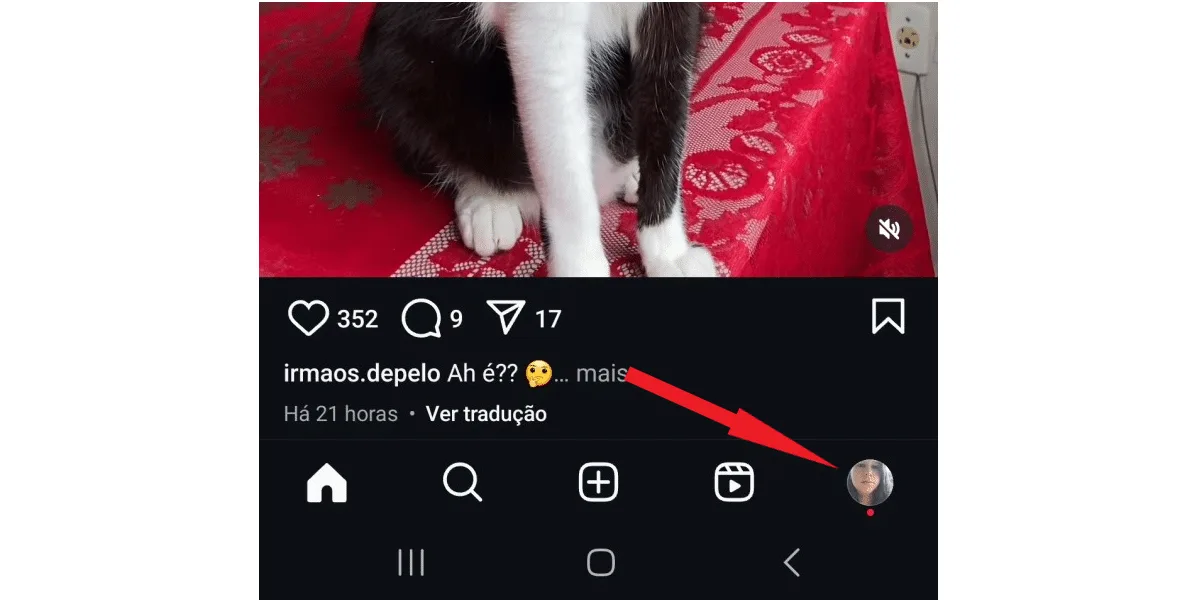 Next, tap the three-line button to open Instagram's settings.
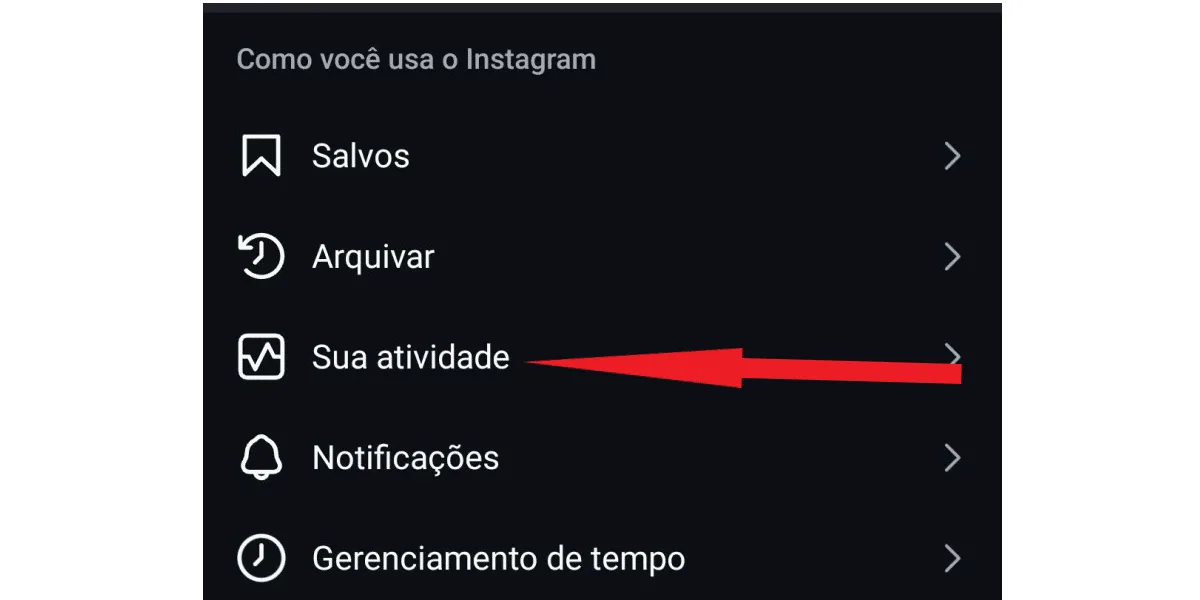
  Now, click on your activity .
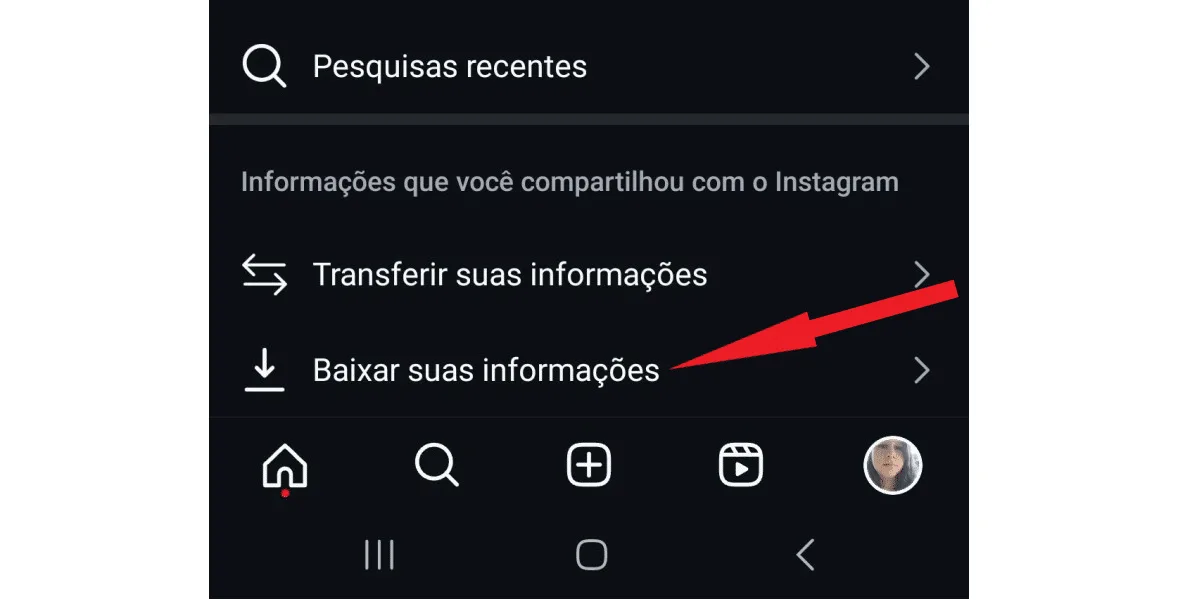
  On the next tab, click on download your information .
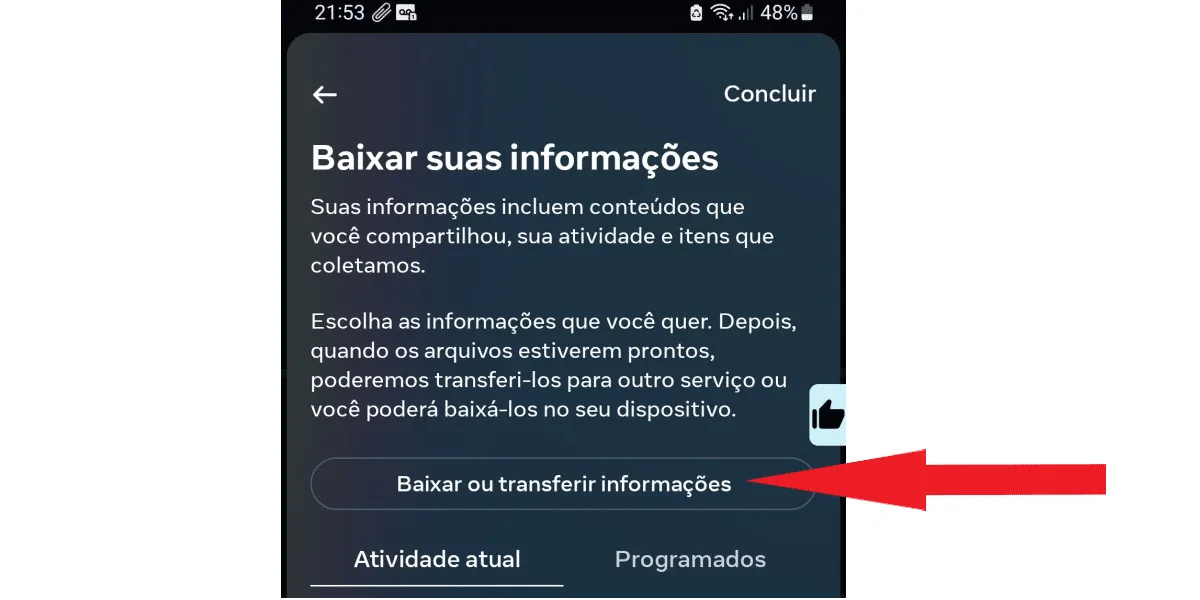
  Then, on the next screen, tap download or transfer information .
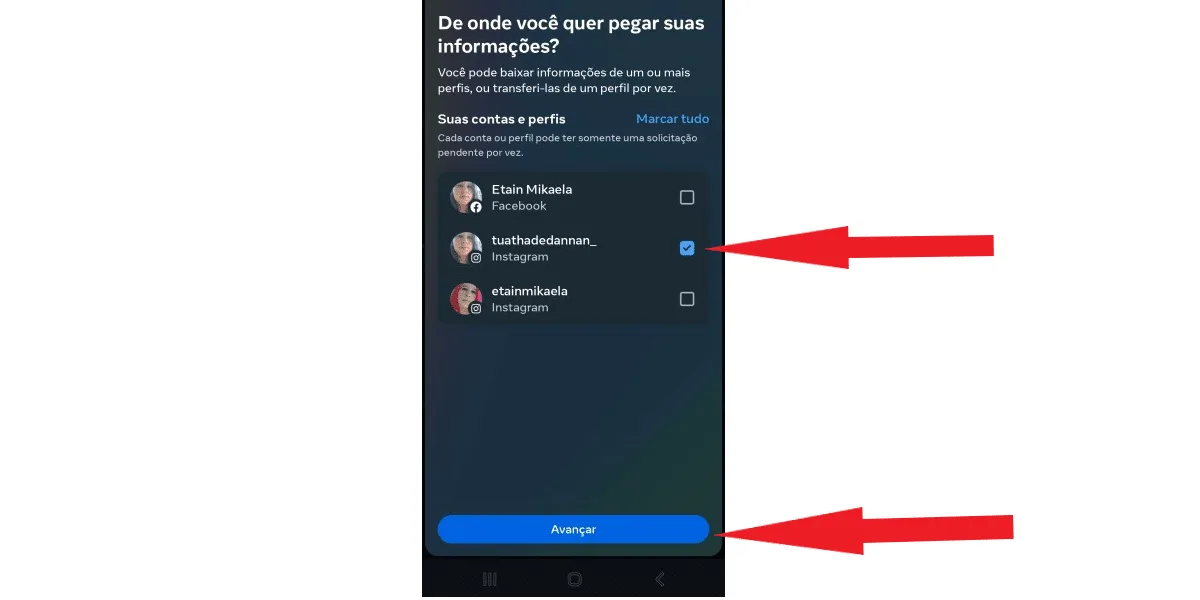
  Select the profile from which you want to download your Direct conversations, and click the next button . Don't be surprised if your Facebook profile also appears here; after all, Meta owns both social networks, and with Meta's Account Center, it's possible to connect your Facebook and Instagram profiles. Just pay attention and check the box with the correct Instagram profile, as in the image below:
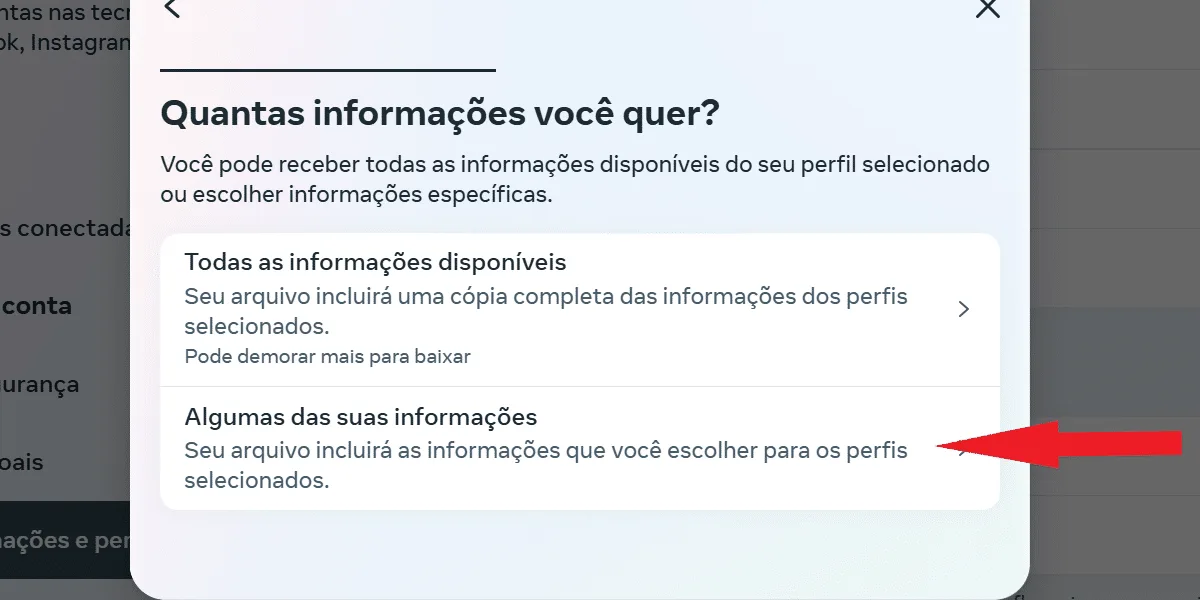
  Now, you can proceed in two ways, as you can choose to download all of your information , or just some of it . Click on "download some of your information" to speed up the download:
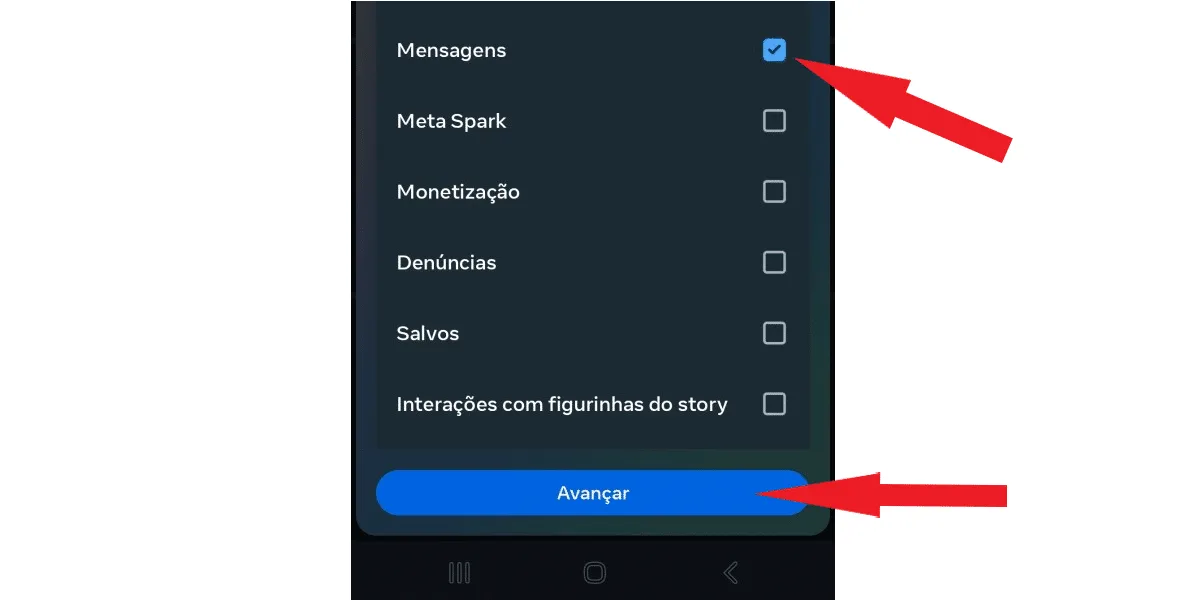
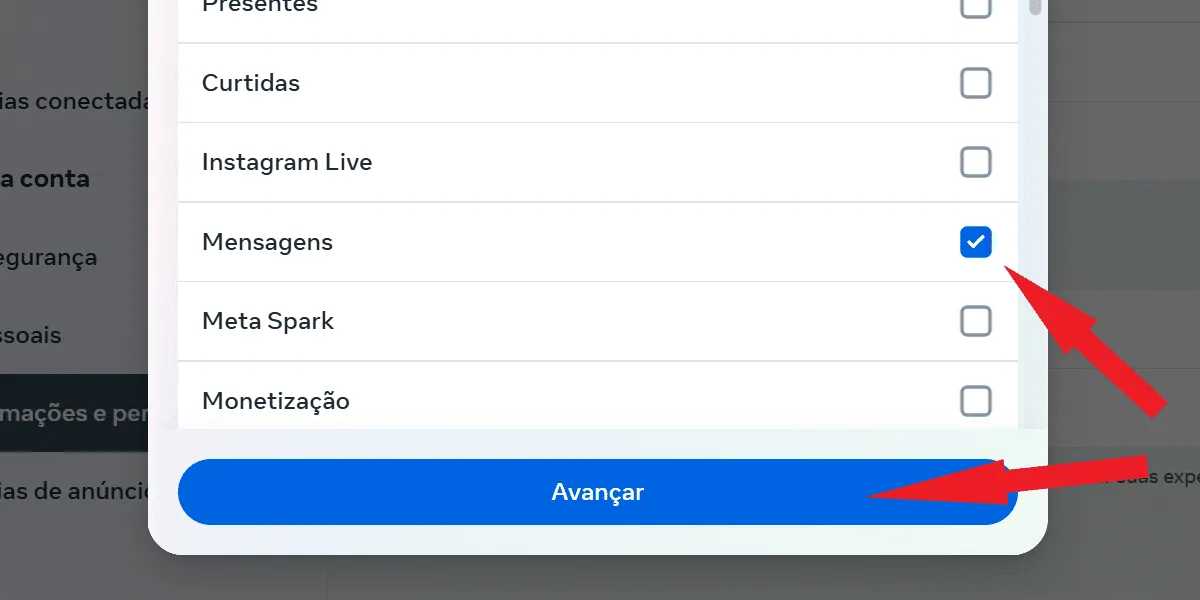
 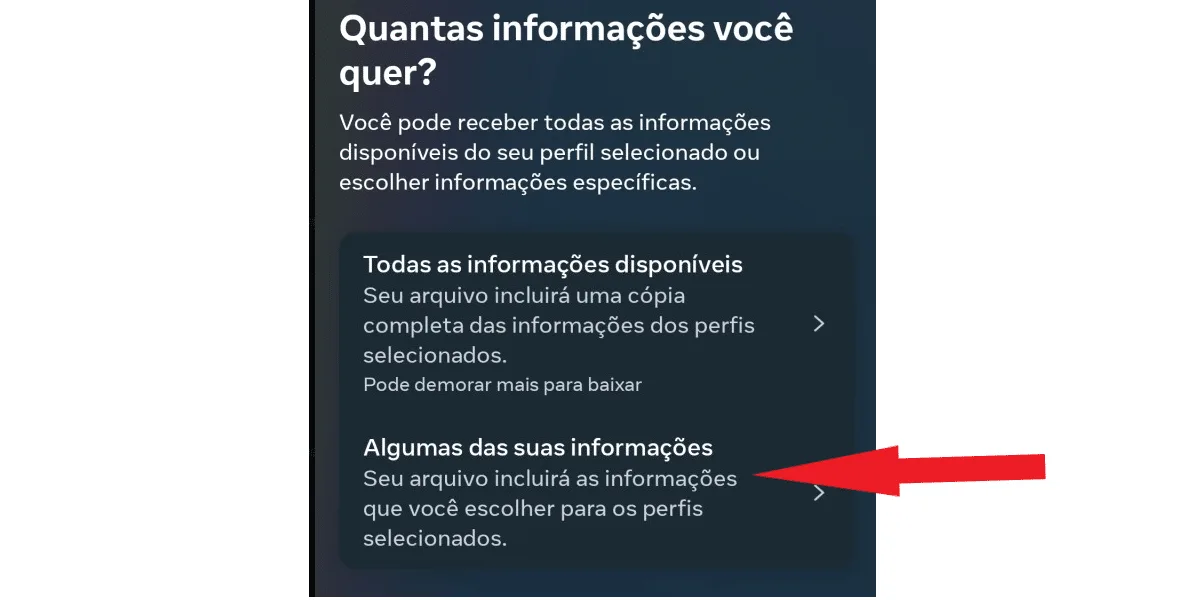 On the next screen, select messages and click next .
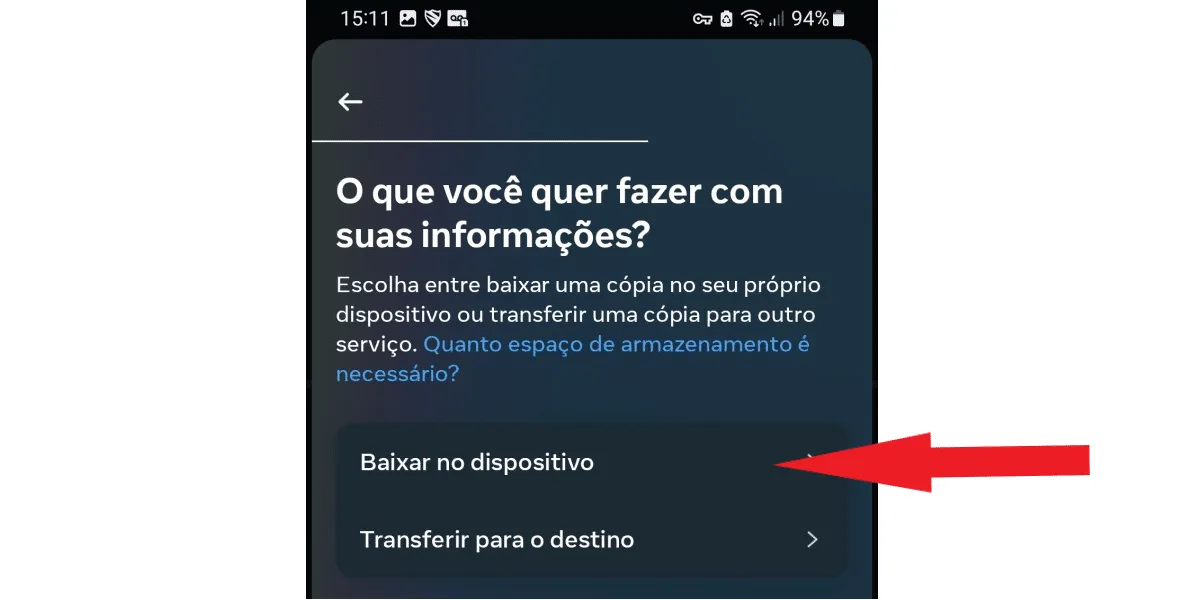
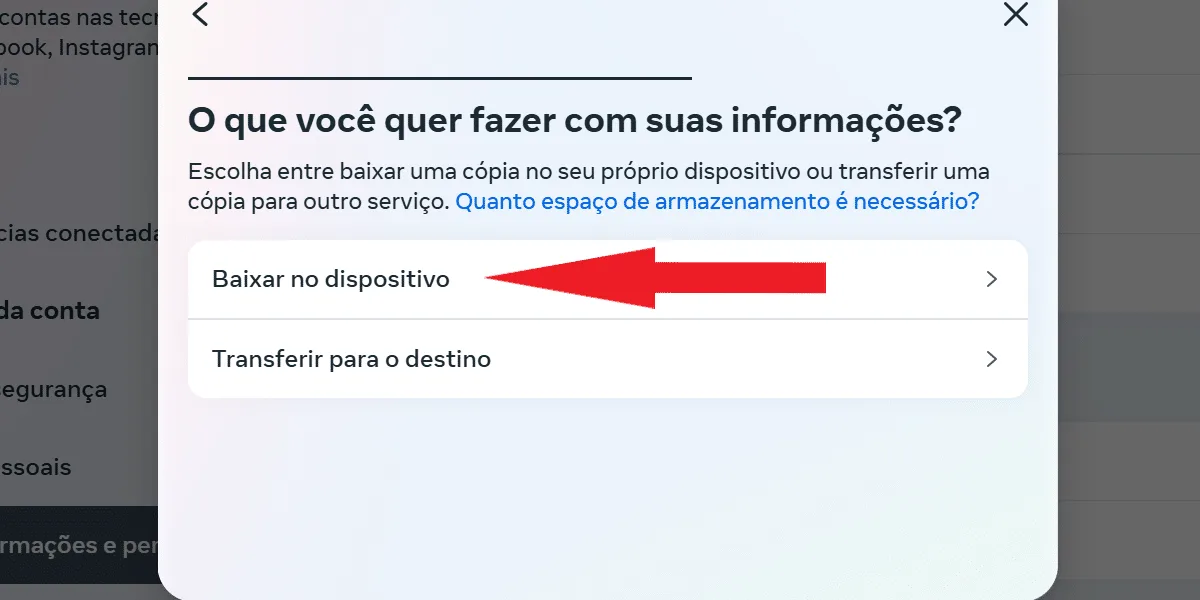
  Next, you can choose between downloading to your device or transferring to the destination . The latter option allows you to save your file to Google Drive or Dropbox, if you have an account with one of these services and prefer that method of saving. To simplify, tap " Download to your device" as shown in the following screen:
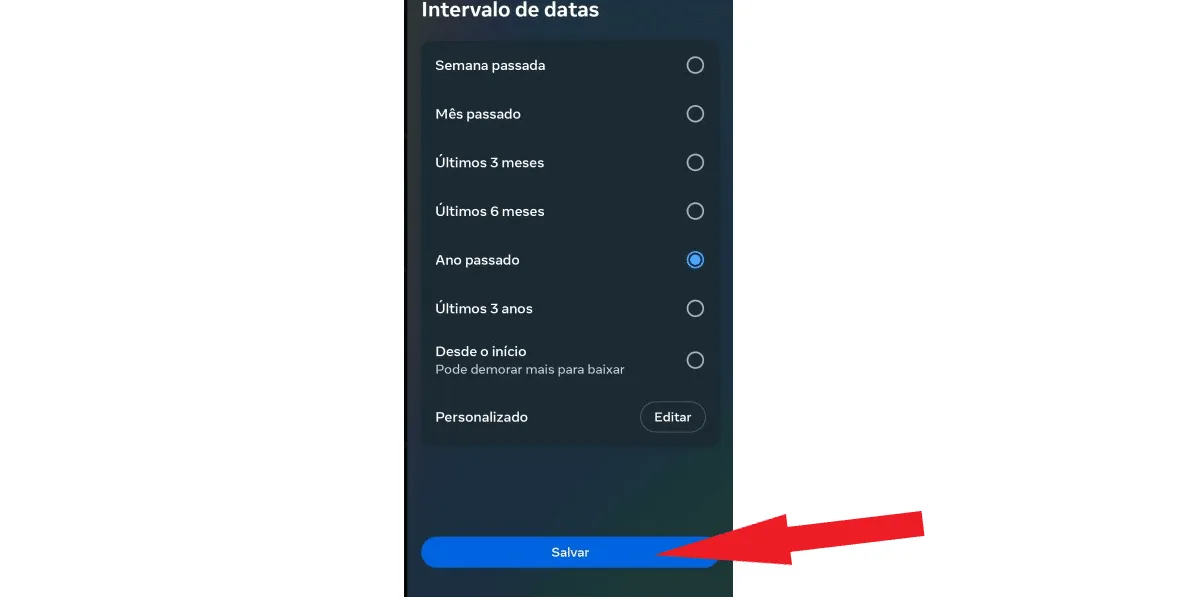
  Now, you can choose the time range from which you want to download your information. If you don't need the deleted Instagram conversations from the beginning of your account, select the time range that best suits you and tap save . See: First, click on date range .
 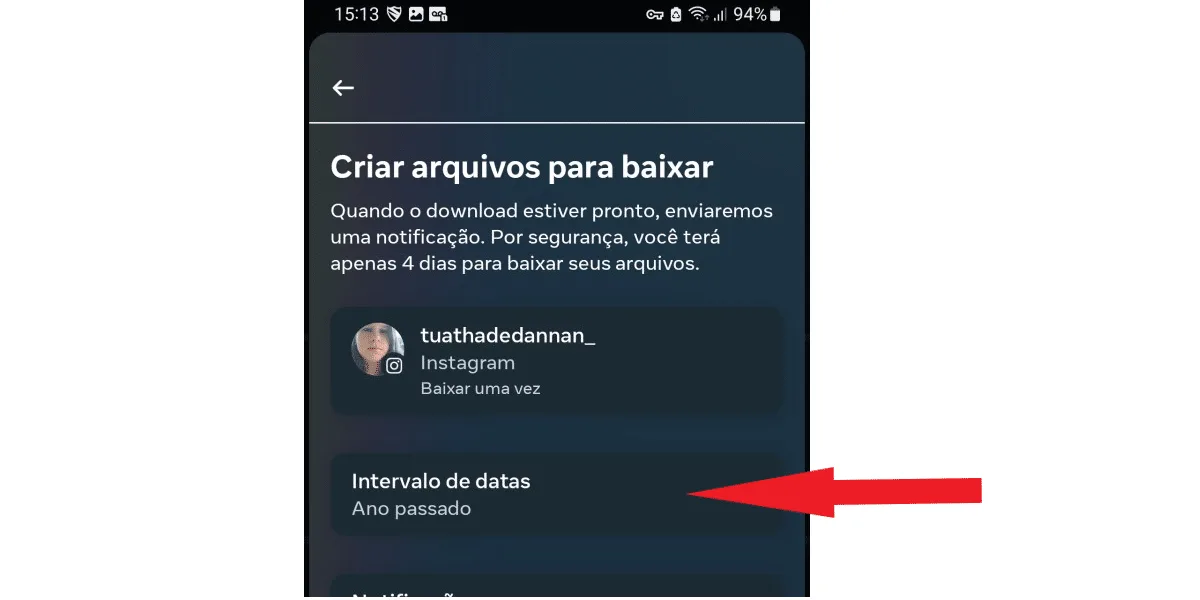 Now, select your preferred time range and click save .
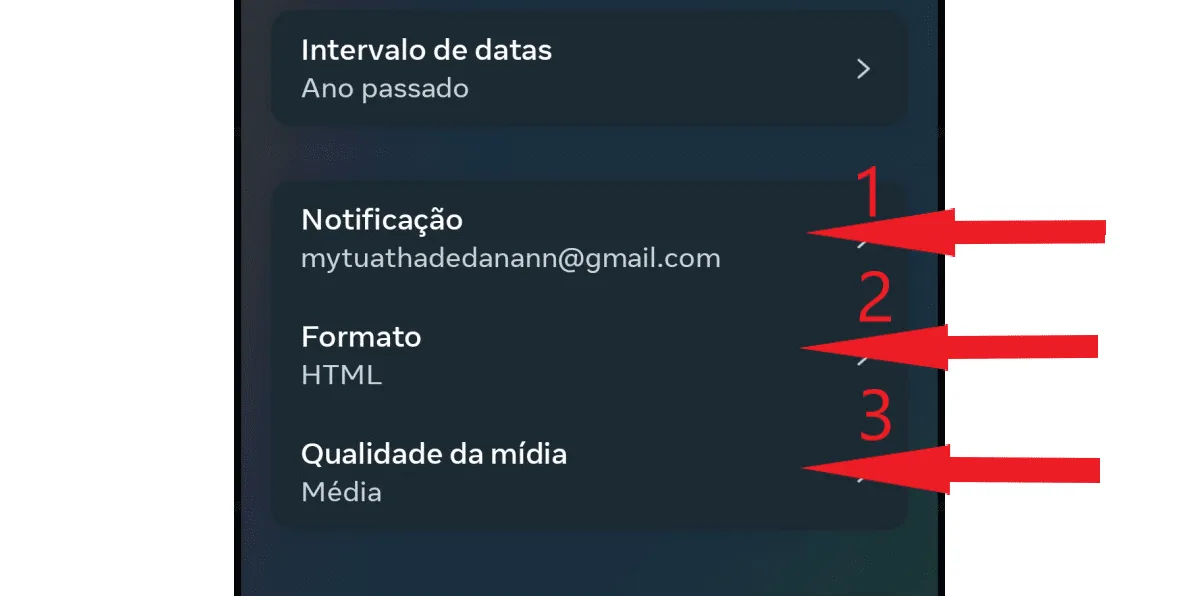
  On the next screen, you can still adjust some more attributes, such as notification email (1) , format (2) , and media quality (3). Regarding the email, you can only change it to another email registered to the account, and if you prefer, you can select the Jason data format instead of HTML. As for file quality, you can choose between low, medium, or high. The most recommended option is medium. This way, you will receive a file with good resolution to recover deleted Instagram conversations, but it won't be as large as downloading your data in high quality. See:
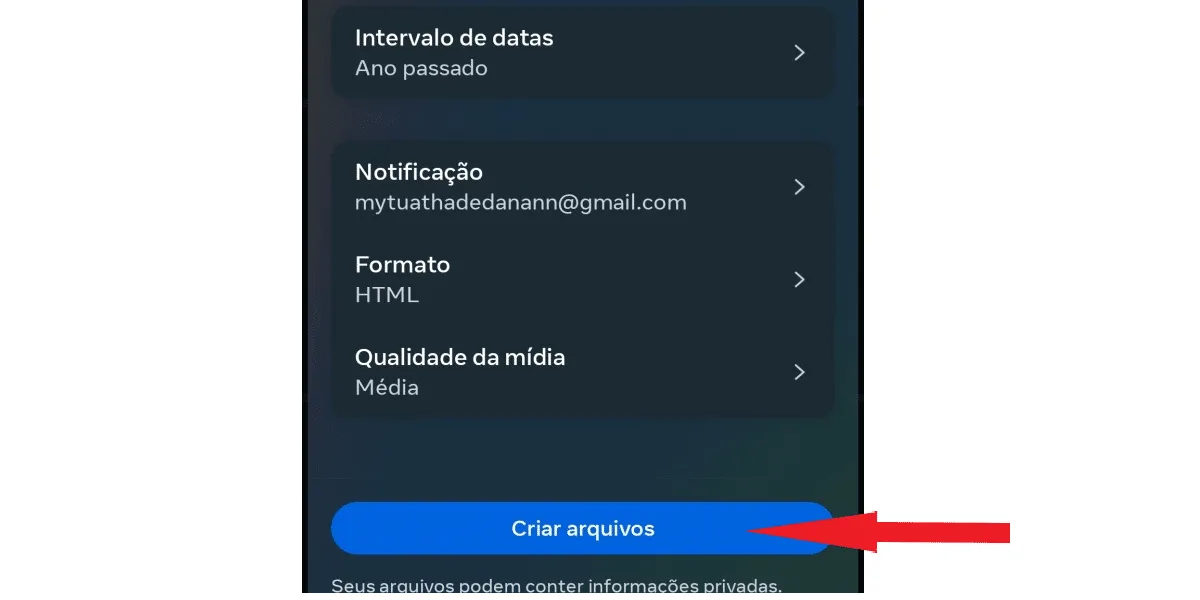
  After making the desired modifications, click save , as seen on the time interval adjustment screen. On the next screen, tap create files , as shown in the following image:
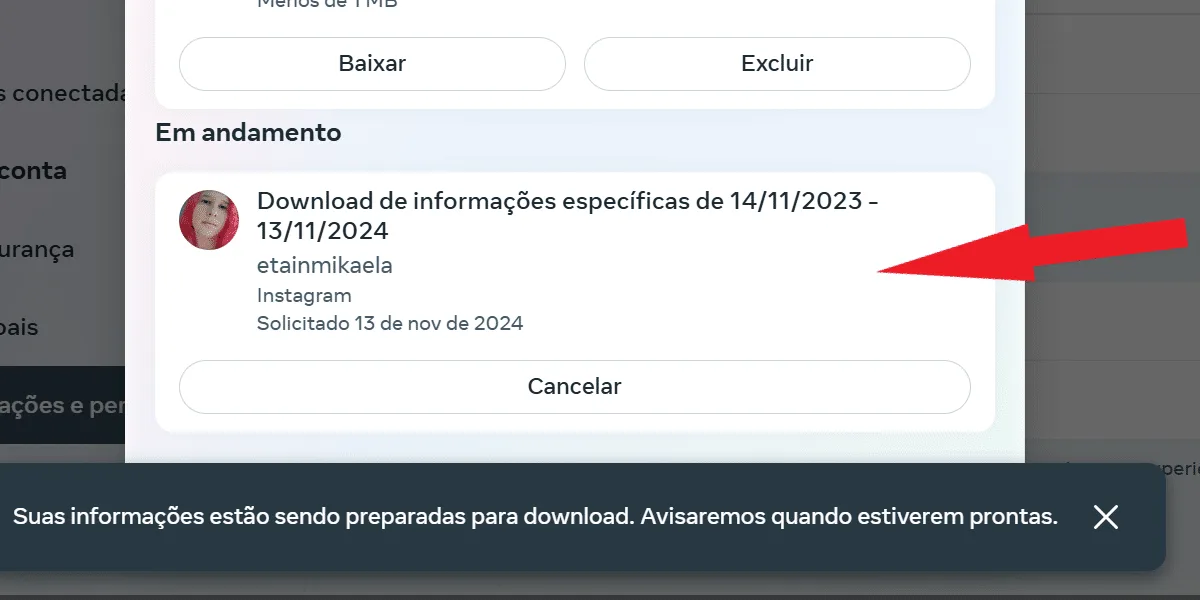
  Done! Now just wait, your file will be saved on Instagram itself, as shown in the next image.
 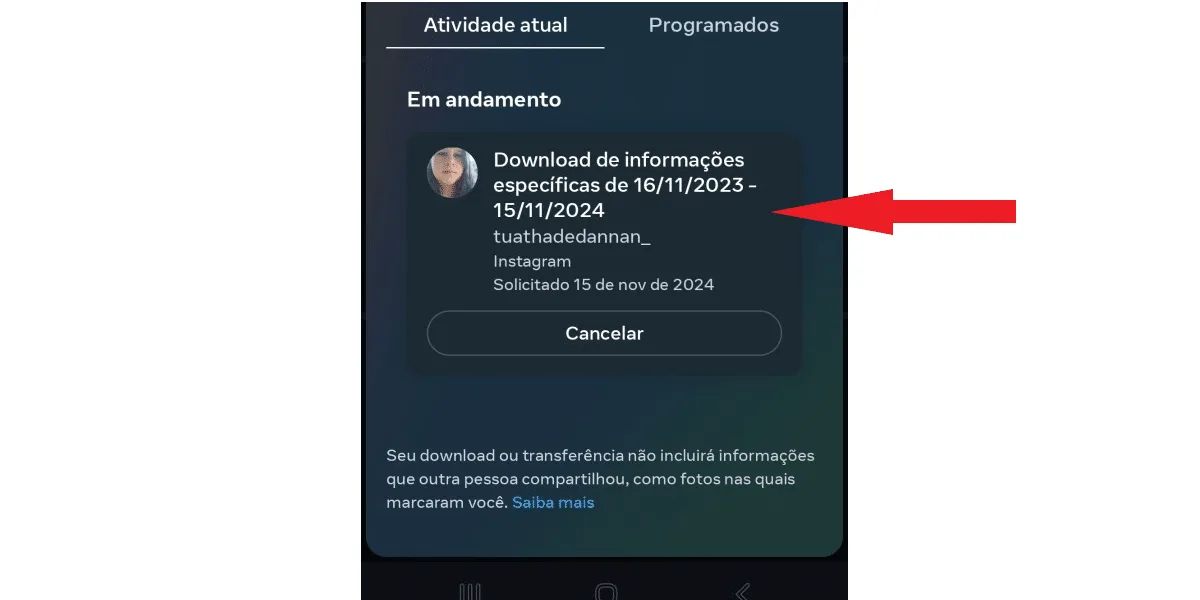 To access this screen again, simply return to your activity session and click on download your information .
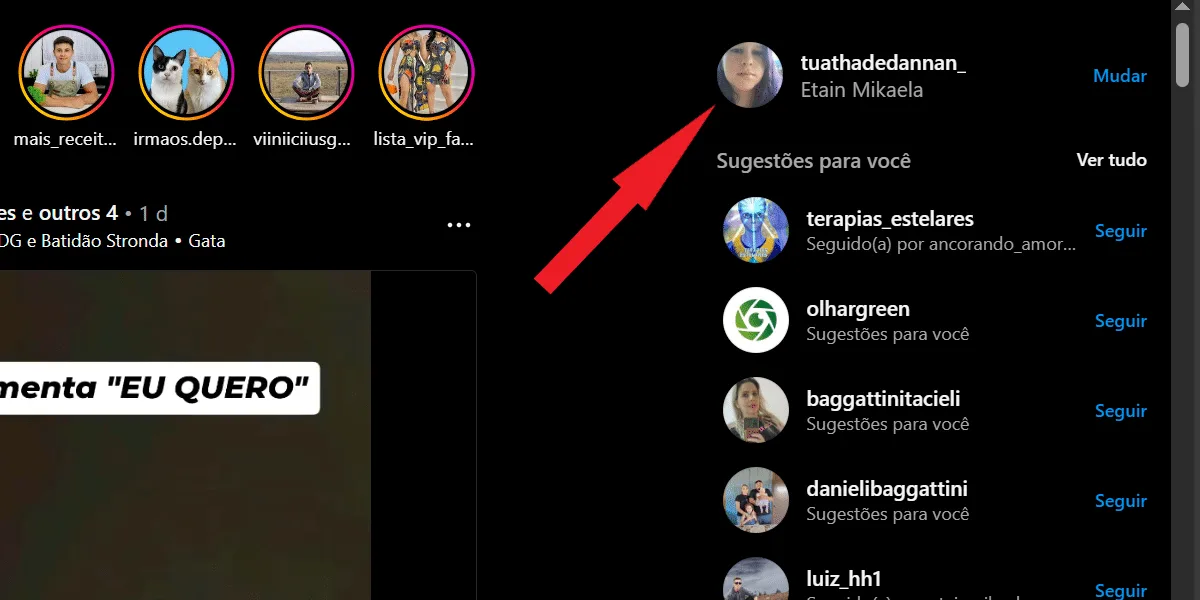 On the next page, click on settings , on the gear-shaped icon, as shown in the image below.
 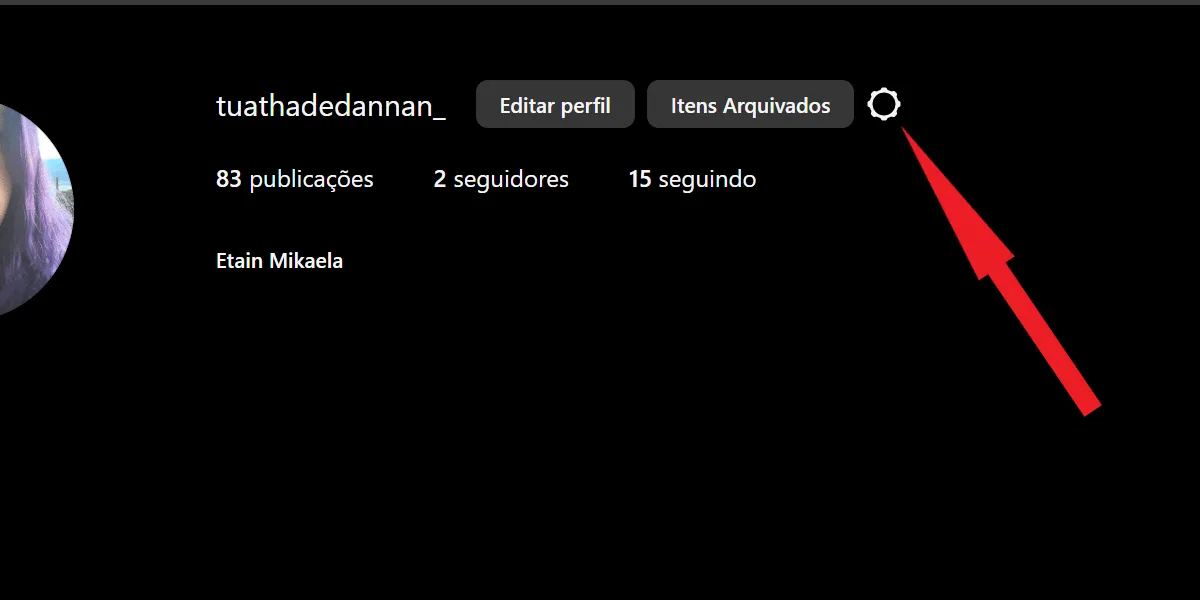 Next, select settings and privacy .
 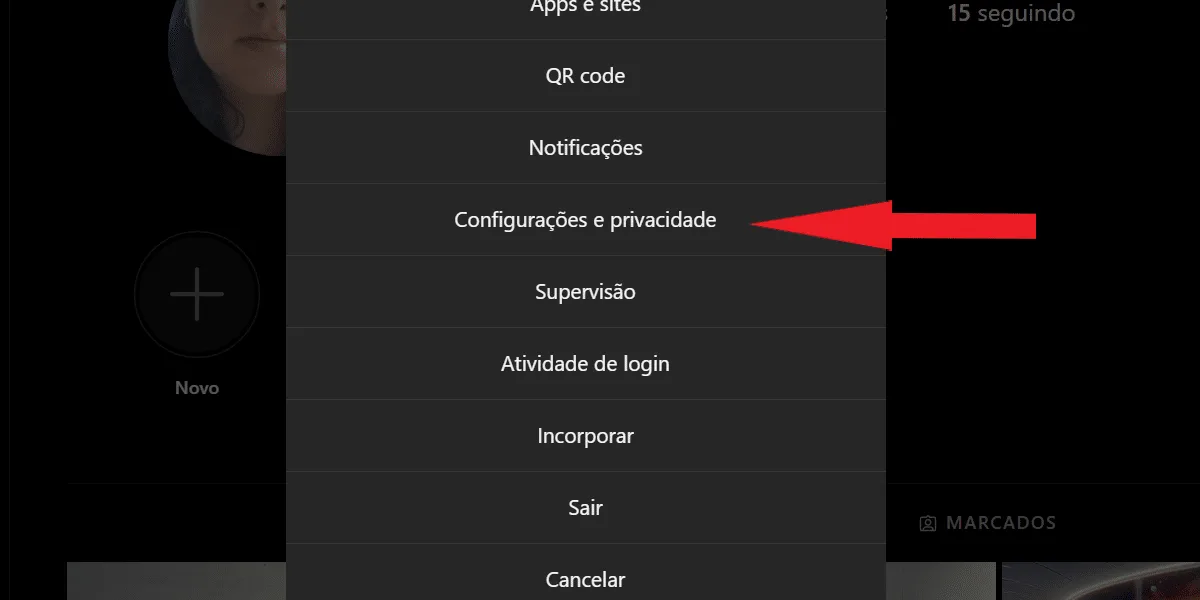 On the next page, tap on Account Center.
 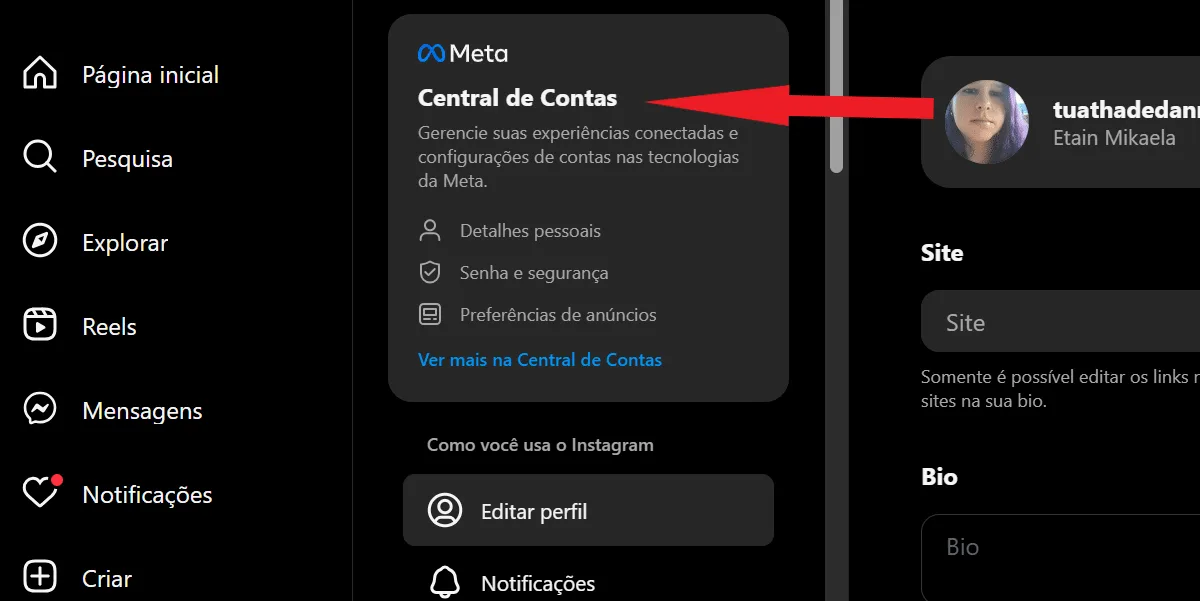 Select information and permissions .
 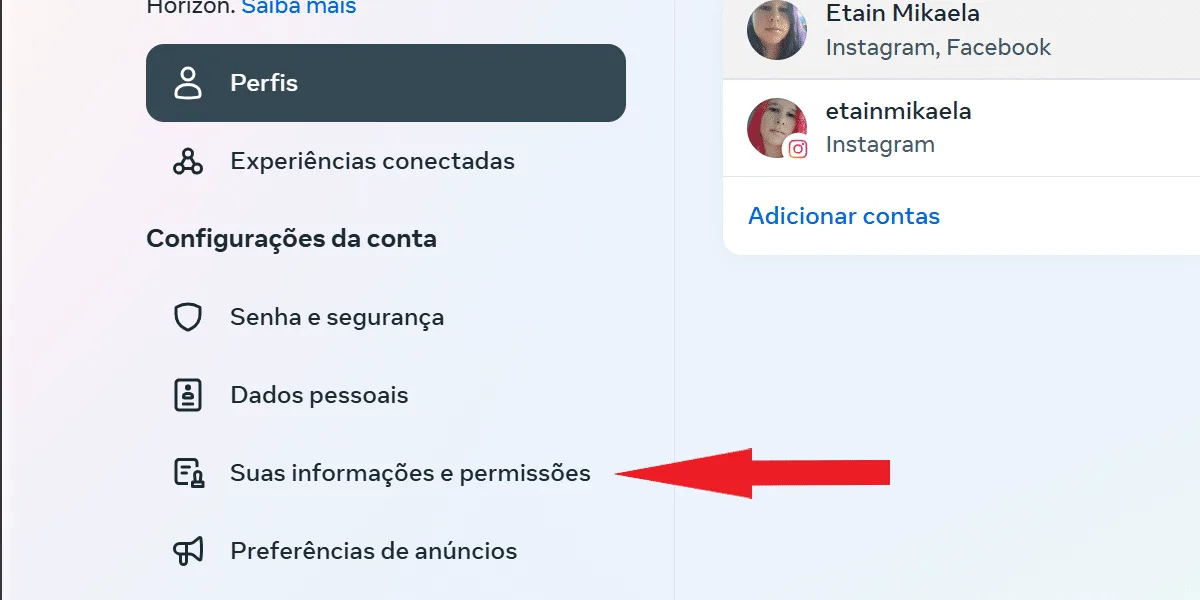 Then, tap on download information .
  Tap to download some of your information .
  Next, scroll down until you find messages , check the box, and click next .
  Now, select download on your device.
  Next, tap on date ranges, and select the period for which you want to download your data. Then, click save, similar to what was shown in the previous section, in the app. On the next page, click create files to finalize the process.
 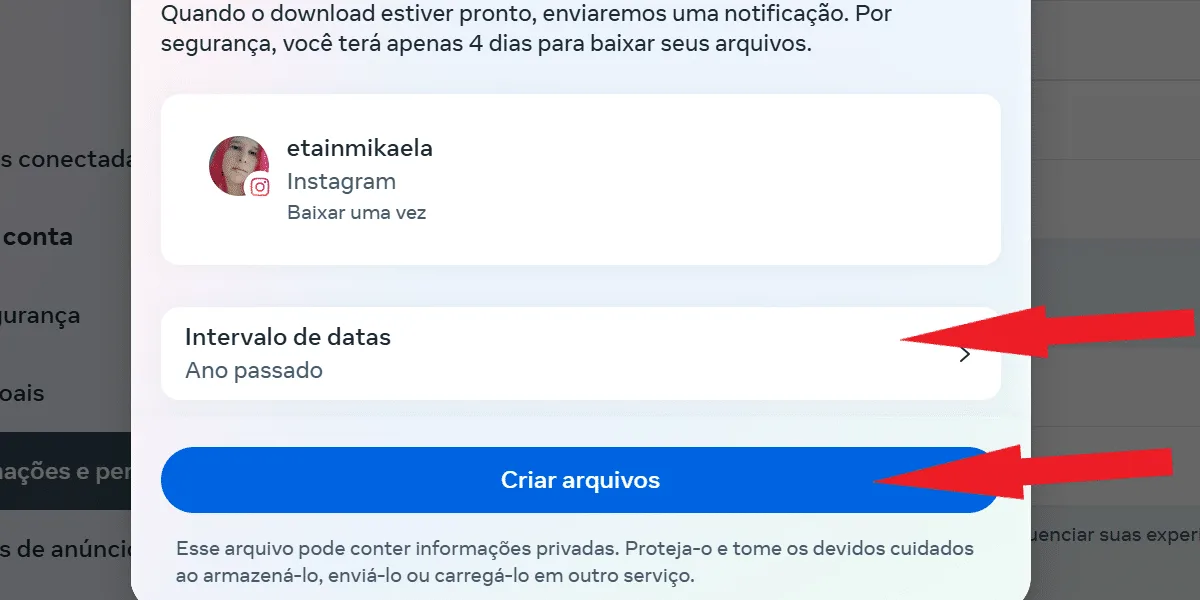 Just like in the Instagram app, your archive will be in the process of data collection in the current activity tab, which you access after tapping on download or transfer information . Then, just wait to recover deleted Instagram conversations.
  Want to easily save your shared Instagram files? Check out our tools for downloading audio, video, and images from Instagram – it's free!
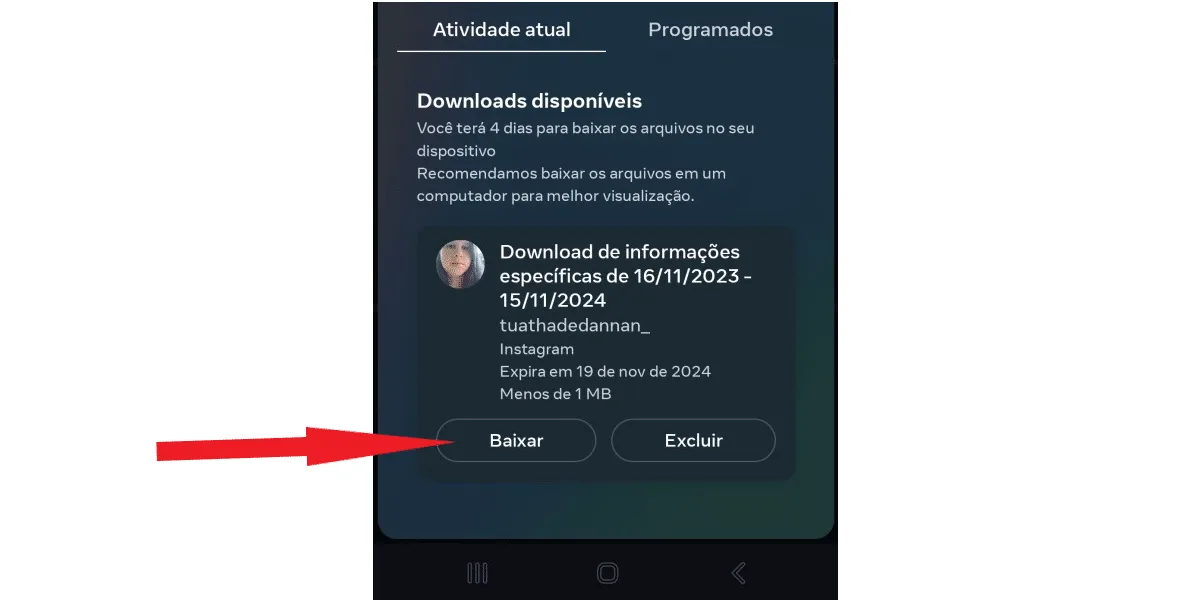 You will receive an email notification when the file is complete, so it's important that you have access to the email address you provided for notification. Otherwise, you won't receive the notification. Why does this matter? Simple: you have up to 4 days to download the file once it's ready. Therefore, if you forget to download it and miss the deadline, you will need to request a new download.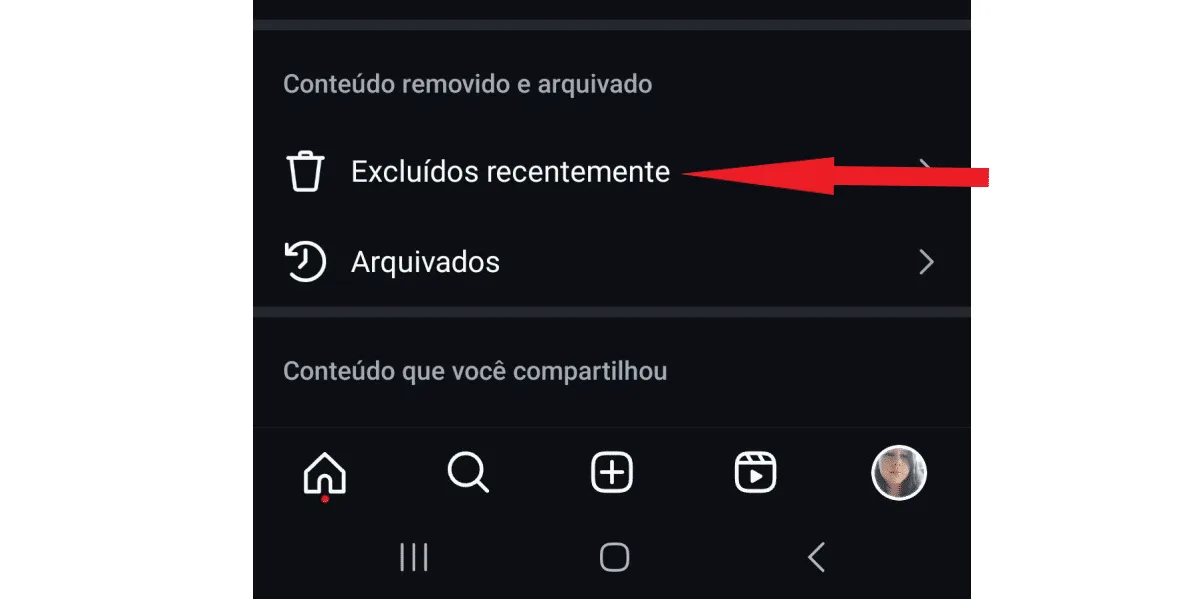
Is it possible to recover deleted Instagram conversations?
Anyone who goes to Instagram's direct chat looking to recover deleted conversations discovers that there's no native Instagram chat function to do so. In other words, if you deleted a conversation and regretted it later, it seems like everything is lost. But fortunately, that's not the case! So, if you invested in your Instagram, even bought Instagram followers for your account, published a lot of content, made valuable connections through Direct, and lost conversations with important information, don't worry! You can recover your complete conversations through a download containing your social network information. You will receive a file with all your data, including the messages exchanged in Direct, allowing you to access your conversations again, as you can see in the following section.Download your chat history to recover deleted Instagram conversations.
As we explained, Instagram doesn't have any tool within Direct itself that allows you to recover deleted conversations. On the other hand, the network has a feature that allows users to download all their Instagram activity data. To begin, log into your Instagram account through your Android or iOS app, and tap on your profile picture in the bottom right corner of the screen. Next, tap the three-line button to open Instagram's settings. Now, click on your activity . On the next tab, click on download your information . Then, on the next screen, tap download or transfer information . Select the profile from which you want to download your Direct conversations, and click the next button . Don't be surprised if your Facebook profile also appears here; after all, Meta owns both social networks, and with Meta's Account Center, it's possible to connect your Facebook and Instagram profiles. Just pay attention and check the box with the correct Instagram profile, as in the image below: Now, you can proceed in two ways, as you can choose to download all of your information , or just some of it . Click on "download some of your information" to speed up the download: On the next screen, select messages and click next . Next, you can choose between downloading to your device or transferring to the destination . The latter option allows you to save your file to Google Drive or Dropbox, if you have an account with one of these services and prefer that method of saving. To simplify, tap " Download to your device" as shown in the following screen: Now, you can choose the time range from which you want to download your information. If you don't need the deleted Instagram conversations from the beginning of your account, select the time range that best suits you and tap save . See: First, click on date range . Now, select your preferred time range and click save . On the next screen, you can still adjust some more attributes, such as notification email (1) , format (2) , and media quality (3). Regarding the email, you can only change it to another email registered to the account, and if you prefer, you can select the Jason data format instead of HTML. As for file quality, you can choose between low, medium, or high. The most recommended option is medium. This way, you will receive a file with good resolution to recover deleted Instagram conversations, but it won't be as large as downloading your data in high quality. See: After making the desired modifications, click save , as seen on the time interval adjustment screen. On the next screen, tap create files , as shown in the following image: Done! Now just wait, your file will be saved on Instagram itself, as shown in the next image. To access this screen again, simply return to your activity session and click on download your information .How to download your Instagram data using your browser.
If for any reason you don't have your phone to access the Instagram app, it's still possible to recover deleted Instagram conversations through your browser. To do this, simply follow these steps: Go to Instagram Web and log in to your account with your credentials. Then, tap on your profile picture in the upper right corner of the browser. On the next page, click on settings , on the gear-shaped icon, as shown in the image below. Next, select settings and privacy . On the next page, tap on Account Center. Select information and permissions . Then, tap on download information . Tap to download some of your information . Next, scroll down until you find messages , check the box, and click next . Now, select download on your device. Next, tap on date ranges, and select the period for which you want to download your data. Then, click save, similar to what was shown in the previous section, in the app. On the next page, click create files to finalize the process. Just like in the Instagram app, your archive will be in the process of data collection in the current activity tab, which you access after tapping on download or transfer information . Then, just wait to recover deleted Instagram conversations. Want to easily save your shared Instagram files? Check out our tools for downloading audio, video, and images from Instagram – it's free!How long do I need to wait for the file to be ready?
Instagram can take up to 48 hours to complete its data collection. It all depends on the final file size, which in turn is related to the volume of information needed. So, if you choose to download all your information, and not just your messages, to recover deleted Instagram conversations, the data processing will take longer.How do I download my file with my account information?
To download your file and recover deleted Instagram conversations, it's very simple: just go back to the current activity tab and click download when the file is ready, as in the image below: You will receive an email notification when the file is complete, so it's important that you have access to the email address you provided for notification. Otherwise, you won't receive the notification. Why does this matter? Simple: you have up to 4 days to download the file once it's ready. Therefore, if you forget to download it and miss the deadline, you will need to request a new download.How to recover deleted Instagram messages from a blocked contact
If the deleted Instagram messages you want to recover are from a blocked contact, then there's nothing you can do. As soon as you block someone on Instagram, all conversations between you are deleted for both of you. It's true that the blocked person won't be able to message you or find your profile. If this person was bothering you, then that's good. On the other hand, you won't be able to find their profile or send them messages anymore. And similarly, you won't be able to access your old conversations, even with your Instagram history.Restricting users might be a better option than blocking them on Instagram.
If you're having problems with someone on Instagram but still need access to your conversation history with that person—for example, if it's a family member or work contact— restricting them on Instagram is a more recommended option than blocking the user. This way, you won't have to worry about how to recover deleted Instagram conversations with that person. The restricted user will have their interactions with your profile limited. They will no longer be able to publicly comment on your posts or stories, see when you're online, or know if you've viewed their messages. However, your conversation history will remain accessible, including the option to download your Instagram information. This way, you avoid problems with people you know outside of social media and also prevent losing followers, likes, and comments. When you block someone, their likes and comments also disappear from your profile. This can be detrimental, especially for those who invest in buying Instagram comments , for example.Use the Facebook Messenger app.
If you also use Facebook and have your account synced with Instagram in the Messenger app, you can try to recover deleted Instagram conversations through the Facebook Messenger app. Simply log in to Messenger and check if your conversations are saved in the app. There's a chance they're there, especially if you already use Messenger to reply to your Instagram contacts as well. However, we need to say that this option may not be available to everyone. Access to Instagram messages through Facebook Messenger depends on:- Regarding account synchronization;
- From the Messenger and Instagram app versions;
- This feature is available in your region.
Where is the Instagram speedometer?
Instagram doesn't have a trash folder where you can recover deleted Instagram conversations. However, there is a folder called "recently deleted " where you can recover some content, including:- Deleted posts;
- IGTV videos;
- Stories;
- Videos from the reels.