Instagram
  by
by 
 10 min read

How to turn on silent mode on Instagram ? If you've arrived here today, it's because you have this question, right? Well, we're ready to help you clarify it with a complete guide that will teach you how to turn on silent mode step by step, with images! You'll also learn about the benefits of this feature and find answers to frequently asked questions. For example, whether Instagram's silent mode can activate automatically. Instagram's silent mode allows you to silence all notifications from the platform . You know those moments when you don't want to talk to anyone? Well, that's what this mode is for! To activate silent mode, you just need to access your Instagram settings. You can even choose what time you want to activate this feature. Despite being simple, many users don't know how to turn on silent mode on Instagram. With that in mind, we've created this post with practical tips for you to quickly configure your Instagram. Enjoy!
What does silent mode mean on Instagram?
Before learning how to put Instagram on silent mode, it's important to better understand this feature. Silent mode is a setting that allows you to temporarily silence all notifications from the social network. It's like a version of the famous "do not disturb" feature on smartphones, applied to Instagram. In other words, silent mode is a setting that allows you to reduce distractions from the social network while you dedicate yourself to other tasks. For example, when you are studying, sleeping, very tired, or even researching thebest strategies to grow on Instagram . After all, growing on Instagram also requires focus and planning. When you activate this feature, Instagram will not send notifications about anything, not even if someone sends you messages in your Instagram DMs . Therefore, be aware of this when learning how to put Instagram on silent mode, because if you are waiting for important news, it is not recommended to activate this setting.
How to put Instagram on silent mode step by step
Instagram has many interesting features. You've learned several interesting tips from us, from how to set the temperature on Instagram to how to delete comments step-by-step . If you've already read any of these articles, you know it's not that difficult to find the necessary settings, and silent mode is no different. To start learning how to put Instagram in silent mode step-by-step, first open your Instagram app on your Android or iOS device. This step-by-step guide isn't available on Instagram Web . So, with the app open:
-
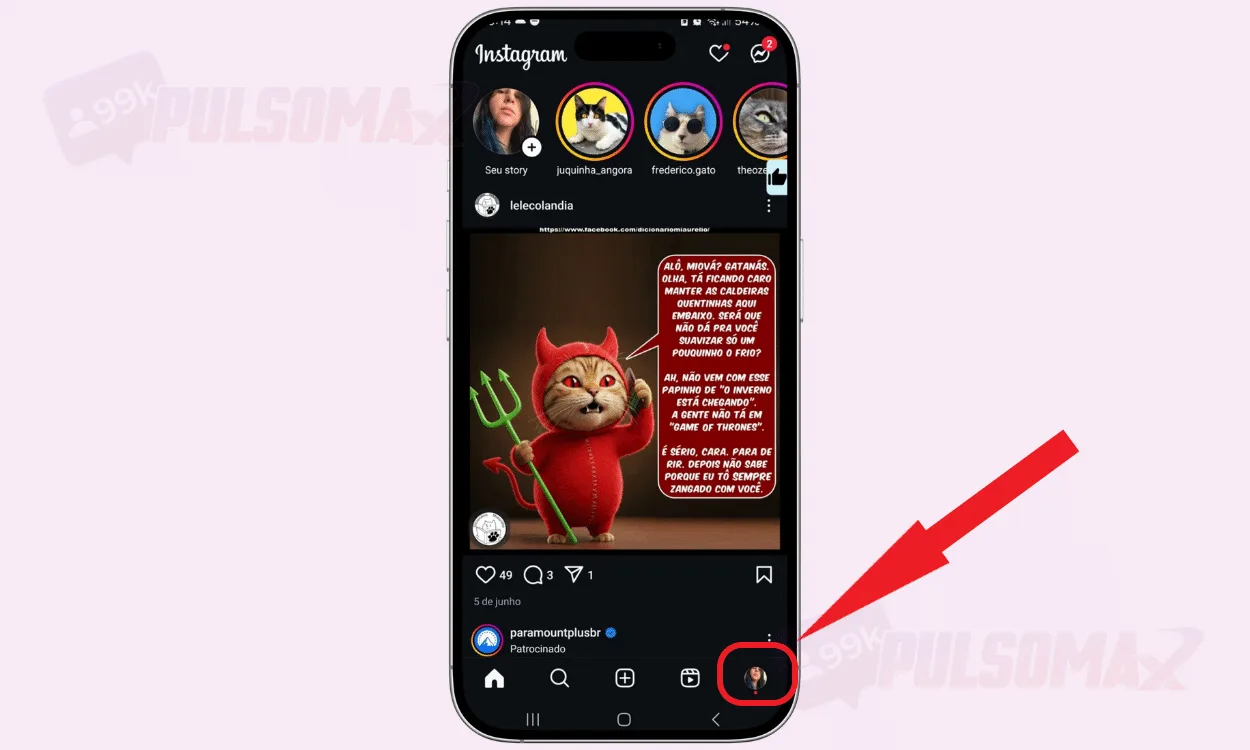
Tap on your profile picture thumbnail in the bottom corner of the screen.
-
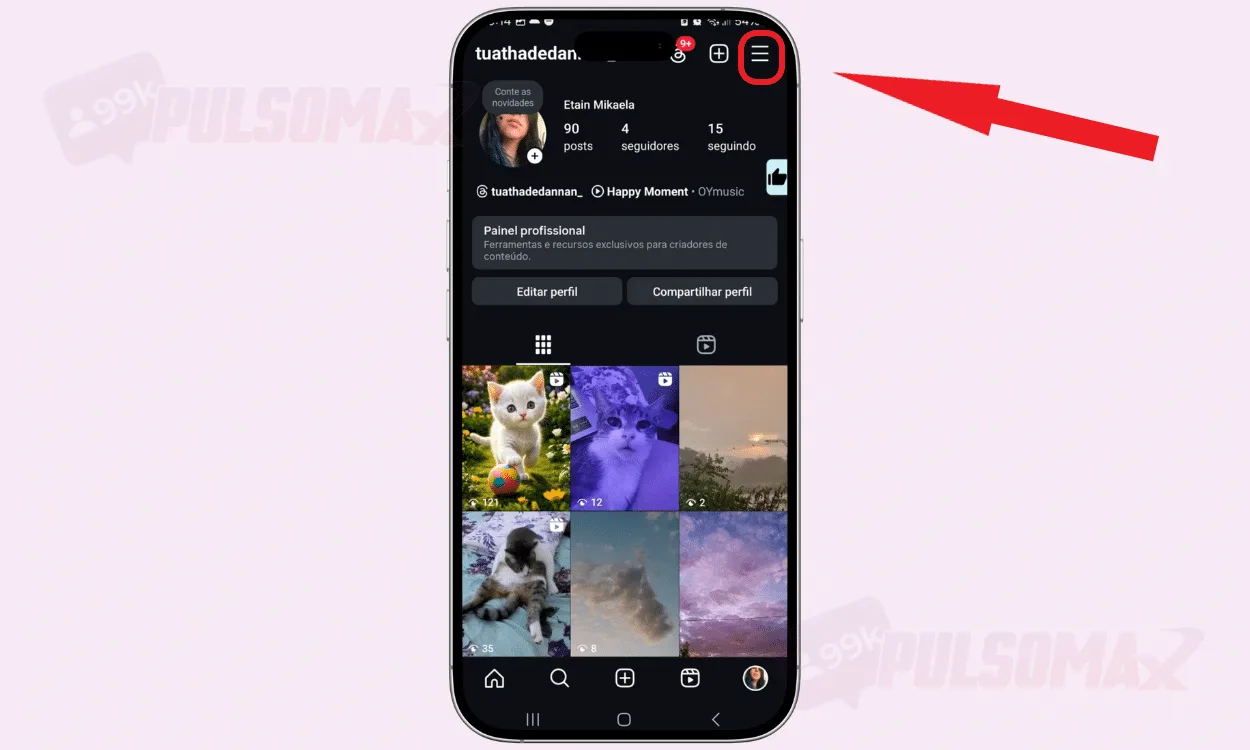
Now, tap the 3-line button to open the settings.
-
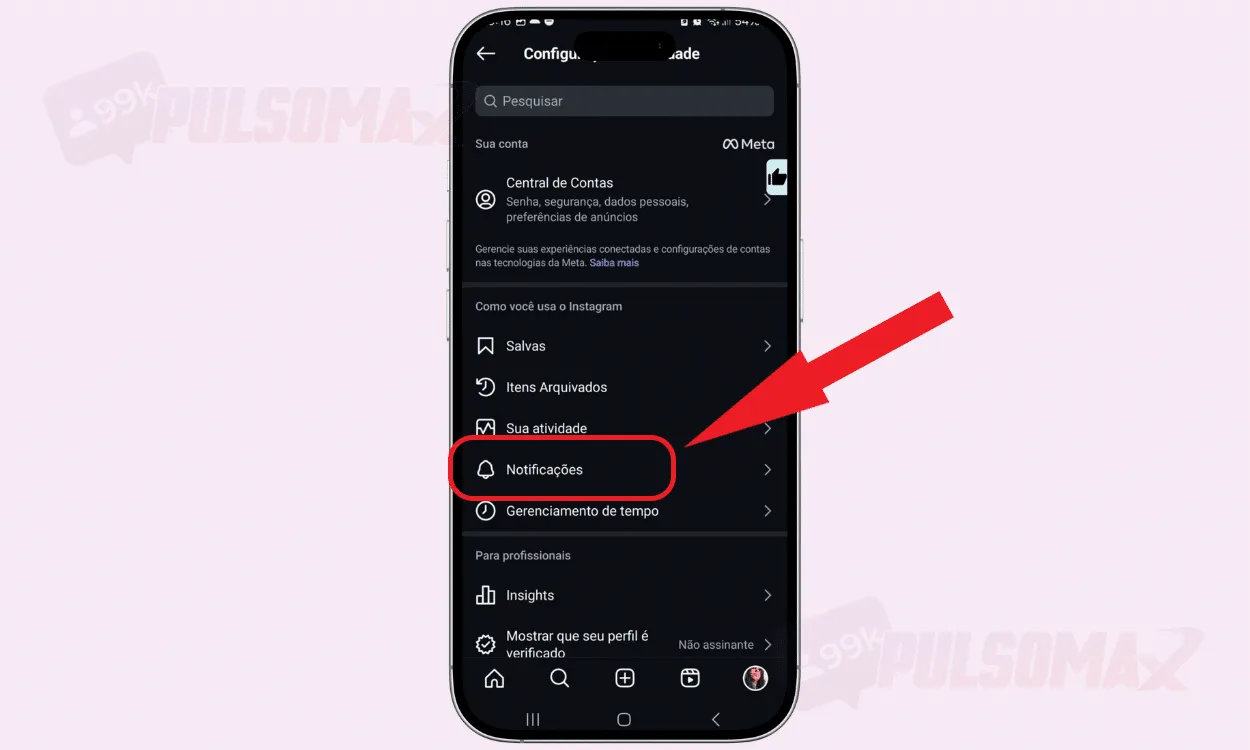
Next, click on notifications.
-
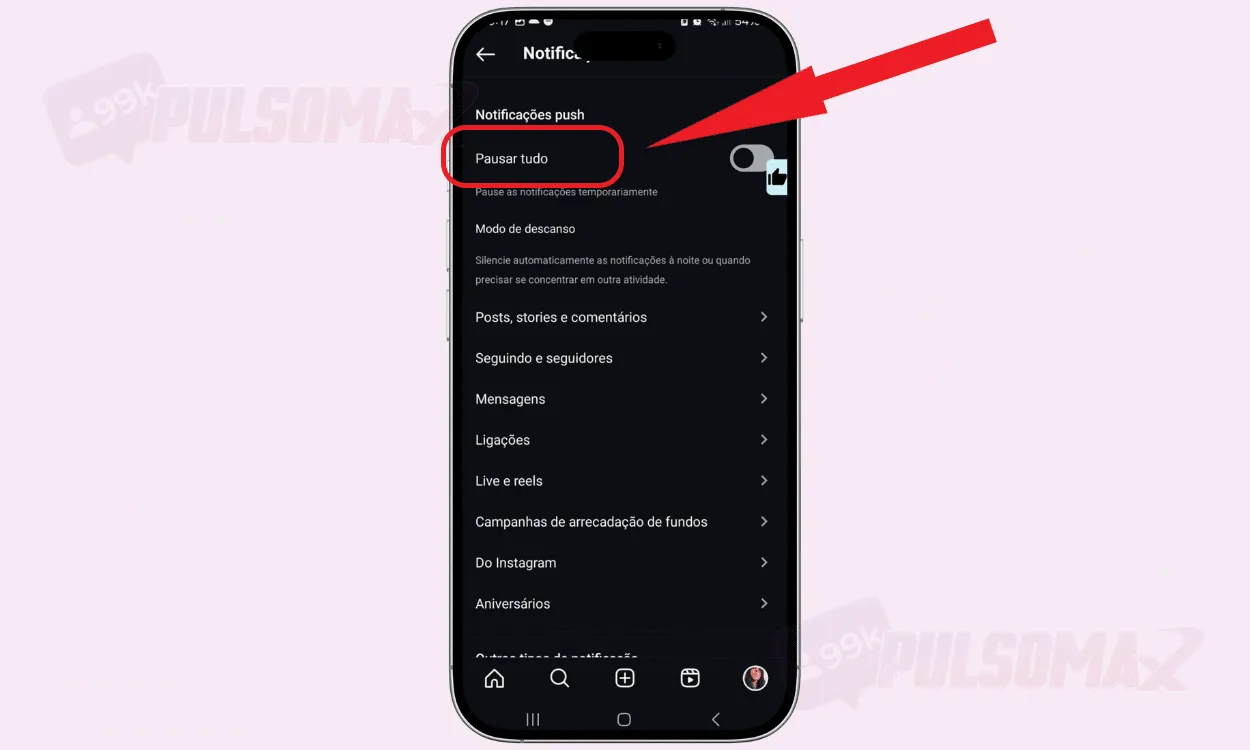
Tap pause all to silence completely.
-
Choose the desired silence time.
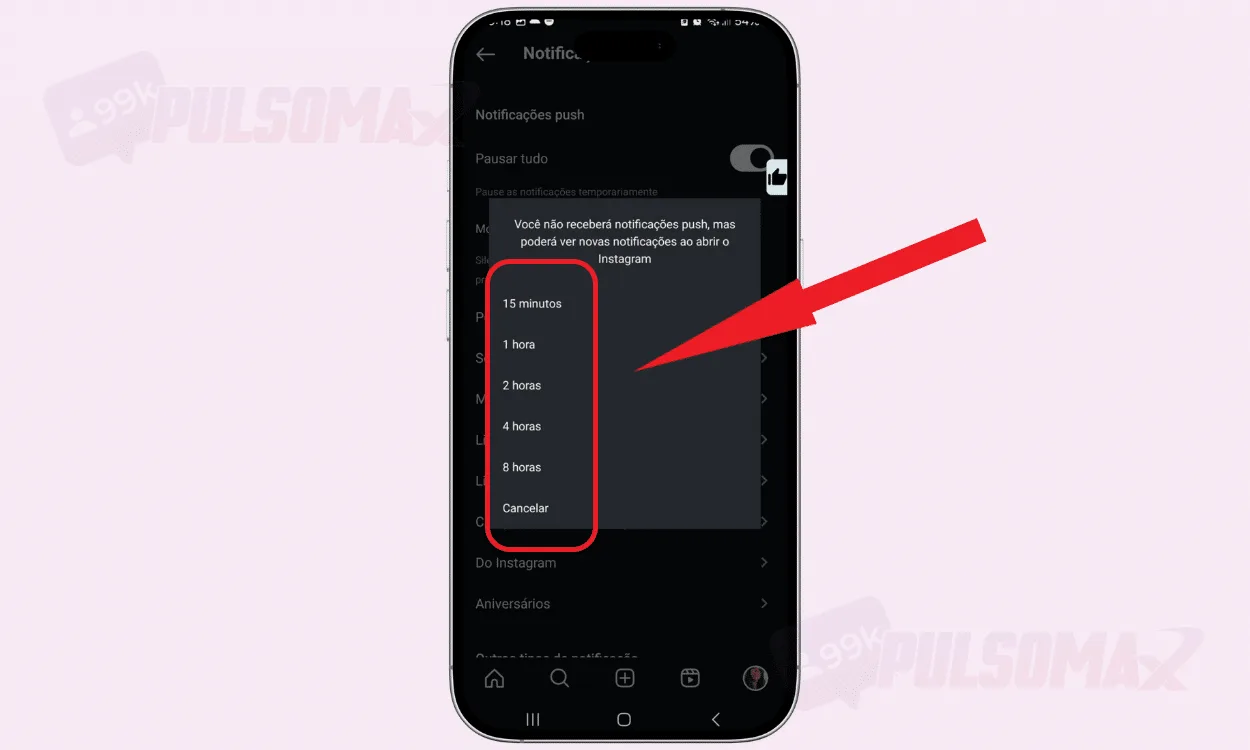 Done! You've learned how to put Instagram on silent mode. But if you prefer an even more personalized setting that doesn't require you to keep selecting the "pause all" function every time you want to silence notifications, check out the following.
-
Tap to enter sleep mode.
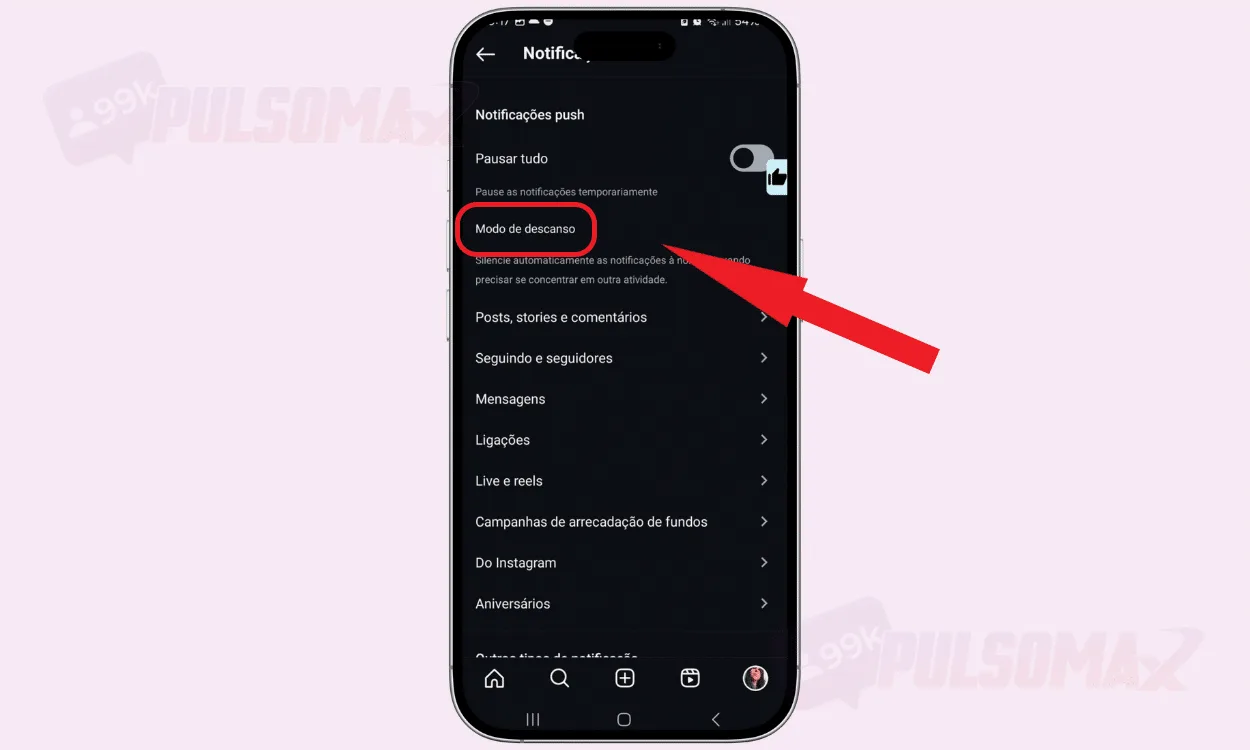
-
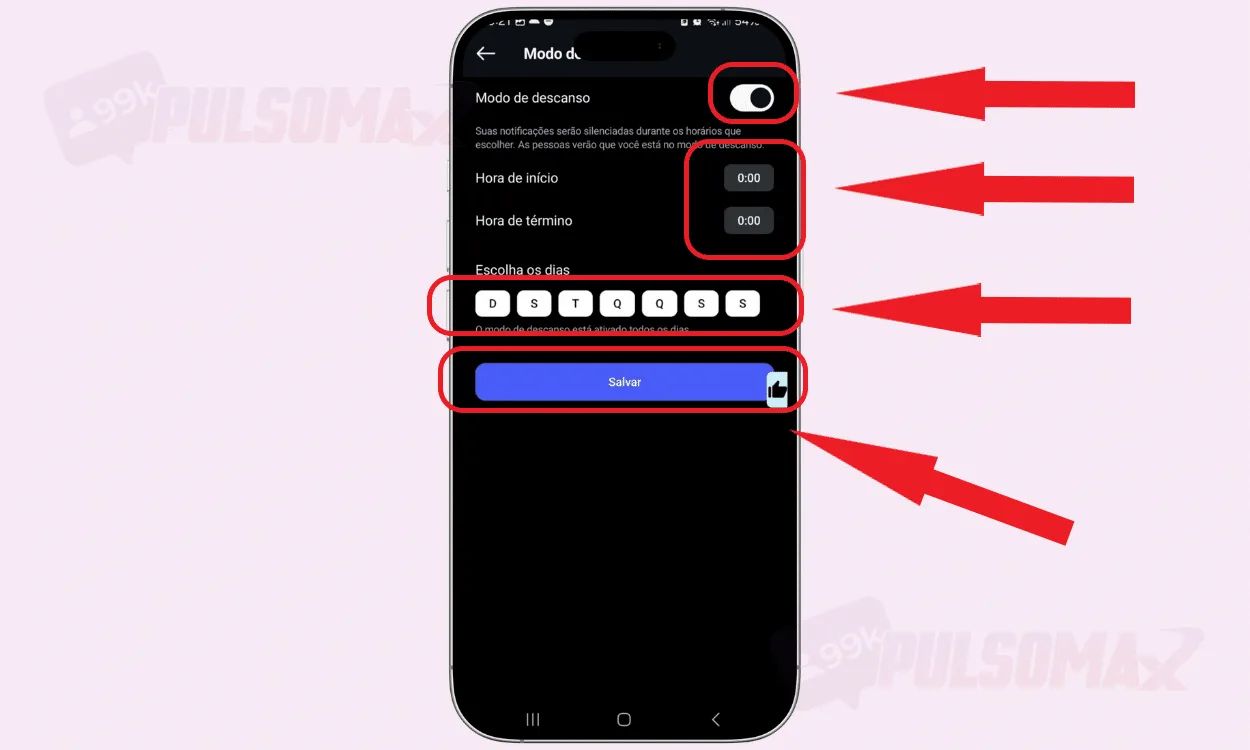
Activate the button. Configure by choosing the days and times. Click save.
 How about accelerating your growth on social media? Check out how to buy real Instagram followers and how to get more visibility on Instagram!
Can Instagram's silent mode activate on its own?
When learning how to enable silent mode on Instagram in the settings above, you should have seen that there's a position that allows you to schedule the activation of this function within the app. So, yes, Instagram's silent mode can activate automatically , as long as you schedule it to do so. Silent mode can remain active for up to 8 hours a day if you choose the automatic silencing options. Now, if you choose to schedule a specific time with the sleep mode , you can silence Instagram notifications for as long as you want, even 24 hours a day, 7 days a week. Of course, for influencers and brands seeking prominence on Instagram, this isn't highly recommended. After all, among the strategies to increase views on Instagram stories , videos, and feed posts, interacting with your followers is one of the most important. But, for users who don't use the social network much, or are bothered by the app's constant notifications, it can be a good idea.
Will people know I muted my Instagram?
Yes, people will know you've muted Instagram if you're using sleep mode . So, when figuring out how to put Instagram on silent mode, know that it's not possible to hide this from your followers if you choose this setting. Therefore, in addition to not receiving notifications from people interested in interacting or talking to you, with sleep mode active, you may also cause your followers on the platform to give up on contacting you at that moment. After all, when people realize you've activated sleep mode, they'll know you don't want to be bothered. For this reason, it's best to activate this setting only when you really don't care about it . As we mentioned, for people who are waiting for news, contact from someone, or expecting more interaction on the platform, leaving Instagram on silent for too long is not recommended. Did you know that comments are the most difficult interactions to obtain spontaneously? Take advantage and check out how buying Instagram comments can improve your performance on the social network.
Is silent mode the same as muting on Instagram?
Some users, when learning how to put Instagram on silent mode, wonder if this mode also prevents other users' posts from appearing on their profile. No, silent mode doesn't do that, because it's not the same as muting someone on Instagram . Therefore, when you mute your Instagram, the platform stops notifying you about interactions and messages that happen on your profile. This means you won't receive sound or vibration alerts on your phone when someone likes and comments on your content, mentions you in posts, or sends messages via Instagram's direct chat . But, when you return to the social network, the posts of the people you follow will continue to appear normally, even if you don't want to see them. To stop seeing posts from accounts you don't want to see, you need to learn how to mute them on Instagram . After that, the content of the muted accounts will stop appearing to you, and the profile owner will not know they have been muted.
Why use Instagram's silent mode?
Knowing how to put Instagram on silent mode is important knowledge. After all, no matter how much you want to grow on the social network, and even if you buy followers, comments, and views for Instagram reels , knowing when to take a break from screens is necessary for your mental, emotional, and physical health. After all, research indicates that excessive use of social media can lead to problems such as:
- Anxiety;
- Depression;
- Poor sleep quality;
- Problems in relationships outside of social media;
- Self-esteem issues.
This feature exists precisely to provide a better balance between users' screen time and other Instagram activities. By understanding how to put Instagram on silent mode, you can better control the time you spend online, ensuring a healthier experience on the social network.
Are notifications deleted during silent mode?
You've learned how to put Instagram on silent mode, so you might be thinking: but what will happen to the notifications I should receive during this period? Rest assured, your notifications won't be deleted . As soon as your silent mode ends, Instagram will send all the notifications you received during that time off. If there are many, you'll receive a summary of them. So, you can put your Instagram on silent mode without fear. You won't miss any content and you can stay updated later on everything that happened with your account. This way, you can reply to your friends, see the interactions received, and even delete comments on Instagram if necessary. Don't know what to do to make your videos go viral on Instagram? See how to buy free trial views for Instagram Reels and discover the secret to viral videos!
Does silent mode affect Instagram's algorithm?
For influencers and brands, in addition to learning how to mute Instagram, it's important to understand if this option affects the Instagram algorithm . Well, the answer is no, not directly. The Instagram algorithm takes into account factors such as engagement, interactions, and usage time. Therefore, muting Instagram reduces your time spent as an active user on the platform, but it doesn't affect the automatic reach of your content . So, setting Instagram to mute during occasional breaks won't affect your relevance to the platform's algorithm. Now, if you choose to mute Instagram for very long periods, especially during the day, and for several days a week, then the algorithm may interpret this as you being less active on the social network. And this could affect your performance, as the Instagram algorithm considers active profiles more relevant, giving them priority.
Benefits of using silent mode on Instagram
Learning how to put Instagram on silent mode is beneficial in several ways . For example, it allows users to gain more autonomy in how they manage their lives and interact with social media. Who hasn't picked up their phone automatically to check notifications and ended up on social media at an unplanned moment? With silent mode, you can focus on important tasks outside of social media, avoiding distractions that could delay you in any way. Similarly, you also avoid postponing important tasks due to excessive social media use. Thus, it's possible to continue increasing your engagement on Instagram without neglecting your offline life.
How do I turn off silent mode on Instagram?
Now that you know how to put Instagram on silent mode, if you want to disable the setting before the scheduled end time in the app, you can. Just go back to the notifications tab and turn off the switch-type button by flipping it the other way. When you do this, notifications will start being sent normally again by the app, regardless of the time you had previously scheduled. Is your post not getting many likes? See how to buy Brazilian Instagram likes and turn the tables, making your post much more popular!
How do I take Instagram offline?
Besides learning how to put Instagram on silent mode, you can also learn how to go offline , did you know? This means that other users of the social network will not see your status as online, even if you are logged into the social network. A perfect setting for when you just want to enjoy your time on the platform without talking or interacting with anyone. To do this, you just need to access your Instagram settings, click on messages and story replies , and then on show activity status , disabling the button. This way, people will no longer see you with the green dot that indicates you are online on Instagram. If you want to know more about this, read our guide: step-by-step how to turn off your online status on Instagram . But, we should point out that by choosing to turn off your online status on Instagram, you will also not be able to see the online status of other people. In other words, it will not be possible to know when your contacts are online on Instagram, which can be a problem for some users. That's it! We have reached the end of this content. Thank you for reading this far. We were able to learn how to put Instagram on silent mode with our step-by-step guide? We hope so! Before you go, take advantage and check out our essential Instagram download tools , it's free.