Instagram
  by
by 
 10 min read

Have you ever wondered how to tell if someone is online on Instagram ? Those who use Instagram daily and want to stay in touch with friends, family, and even work partners may need to know when someone is online. Checking this is simple: just access your Instagram DMs and see which contacts are active. But, as you'll discover in our guide, it's also possible to find out if someone has been online recently through their stories. Instagram implemented this online status feature to facilitate interactions between users. For example, if you need to talk to someone and notice they're online, you can simply start a conversation. However, as with other Instagram features, not everyone knows how to see if someone is online. After all, the feature isn't available just by accessing users' profiles. If this is your case, take advantage of this step-by-step guide on how to find out if someone is online on Instagram!
Why do I need to check Instagram's online status?
Many people ask how to know if someone is online on Instagram, and there's a reason for that. For example, brands and influencers who need to connect with others for business purposes may need this information, looking for the availability of specific contacts on the platform. This includes knowing if contacts are online during their working hours. Seeing if someone is online is one of those useful pieces of information in a practical way, just like knowing if it's possible to find someone's Instagram handle using their phone number . Even users who use Instagram only for personal purposes may want to see the online status of their contacts. For example, to talk to a family member or friend. For those who live far away, social media can be the main way to stay in touch. And, of course, there are the curious Instagram users. That is, all those people who are curious to see someone's status and follow their activity on the platform. This is common, for example, among fans of influencers on the social network, who love to know what their idols are doing at all times. Oh, if you're one of those people who loves to know everything about Instagram celebrities, be sure to also check out who has the most Instagram followers in 2025 – you'll like it!
How to know if someone is online on Instagram
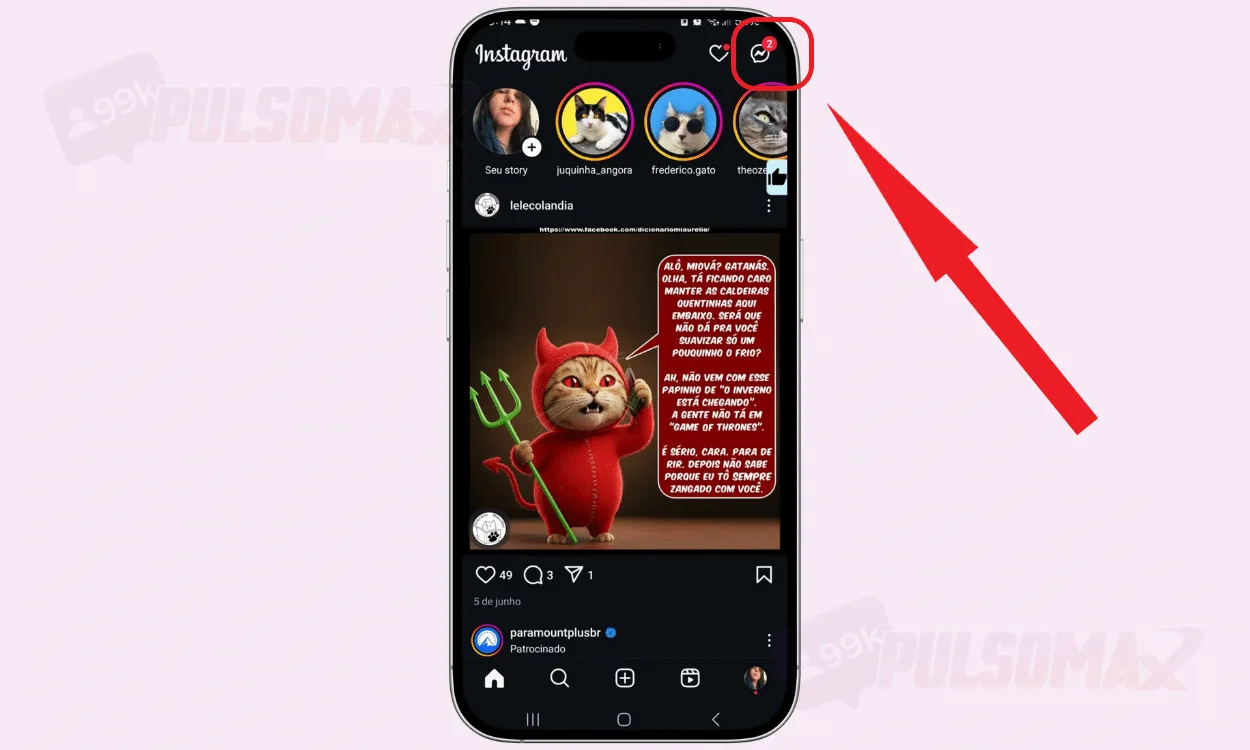
The quickest way to find out if someone is online on Instagram is to access their Instagram direct chat and check for the famous green dot, which indicates that the user is online on the platform. To begin, log in to the Instagram app on your Android or iOS phone. Then:
-
Tap the message icon in the upper corner of the screen.
-
Next, the app will show you who is online, see below.
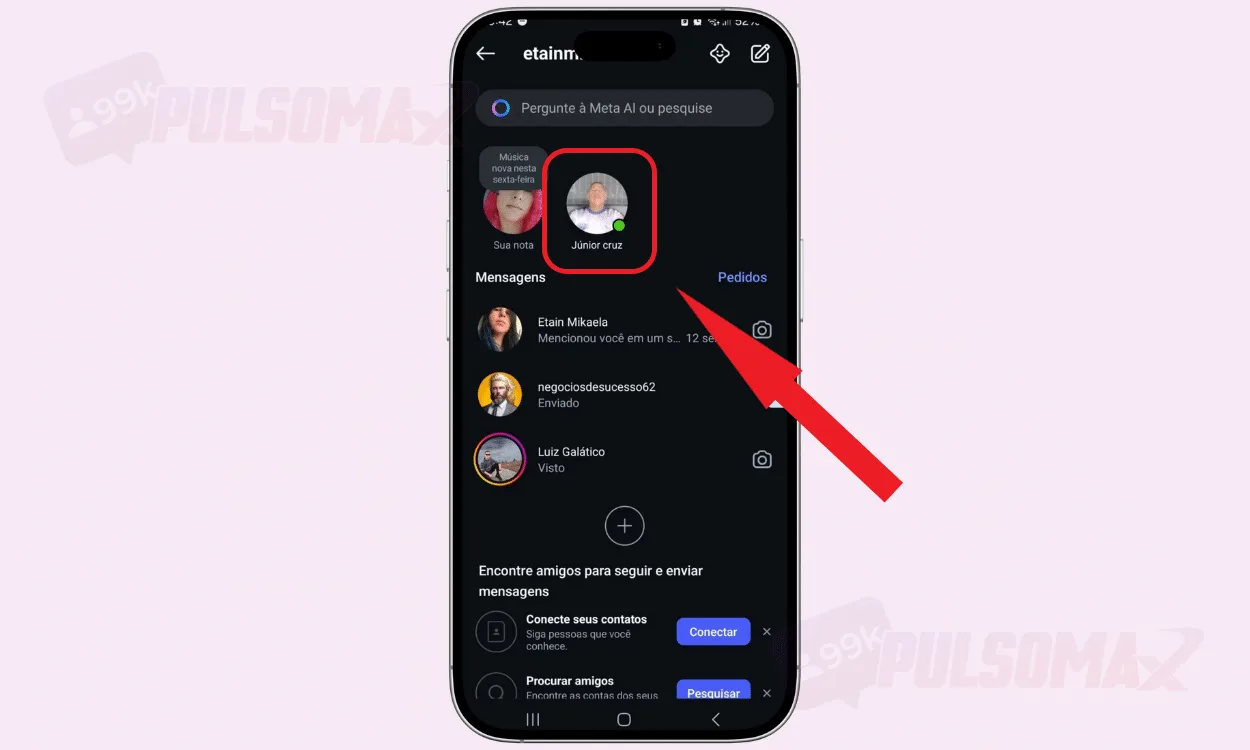 You can also search for a specific contact by typing their username in the search box at the top of your Instagram DMs. Searching for a specific contact is also a way to find out if someone is online on Instagram. Their contact will appear in the list below, so just look for them and see if there's a green dot next to their name. If there is, it means the person is online. Not getting many comments on your posts? Have you considered buying real Instagram comments to improve your engagement? Check it out!
How to tell if someone is online on Instagram through their stories.
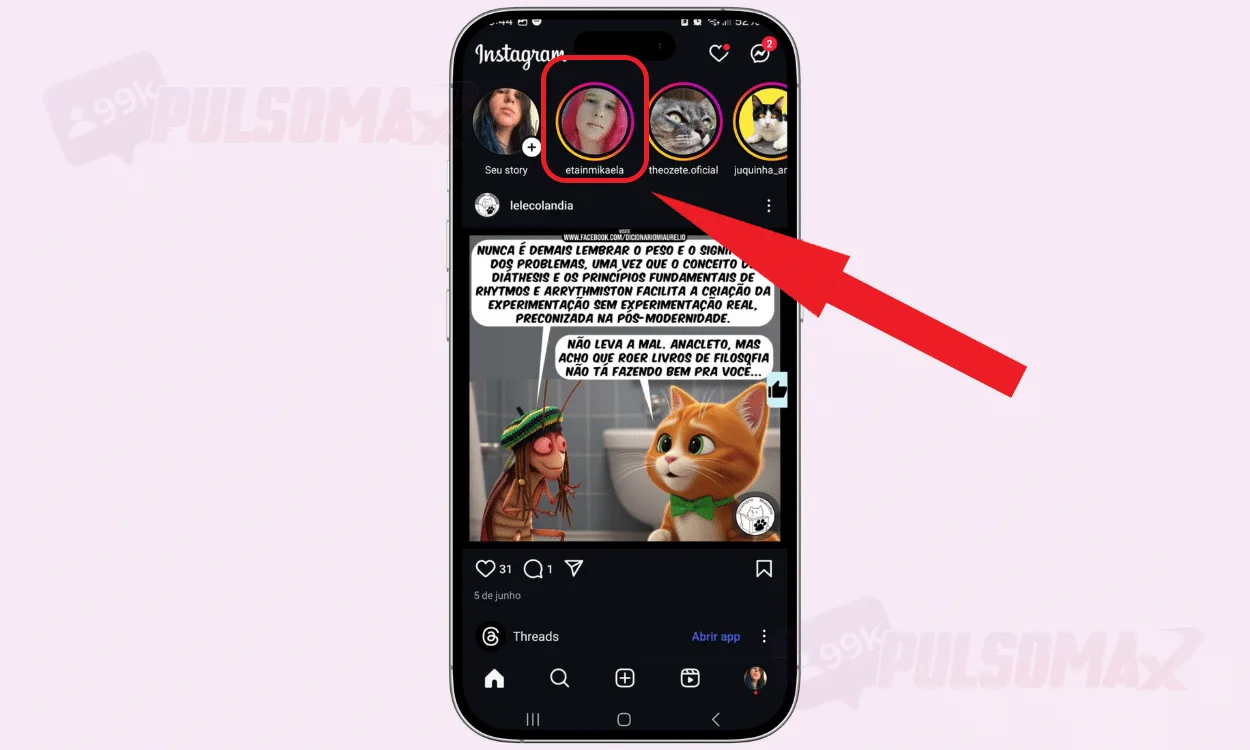
The Instagram Stories display doesn't show a green dot indicating that the person is online. Therefore, there's no direct way to know if someone is online on Instagram this way. However, it's possible to infer this information by checking the Story's publication time. To do this, log in to Instagram and:
-
Access the story of the person you want to know if they're online.
-
Check how long ago she posted it.
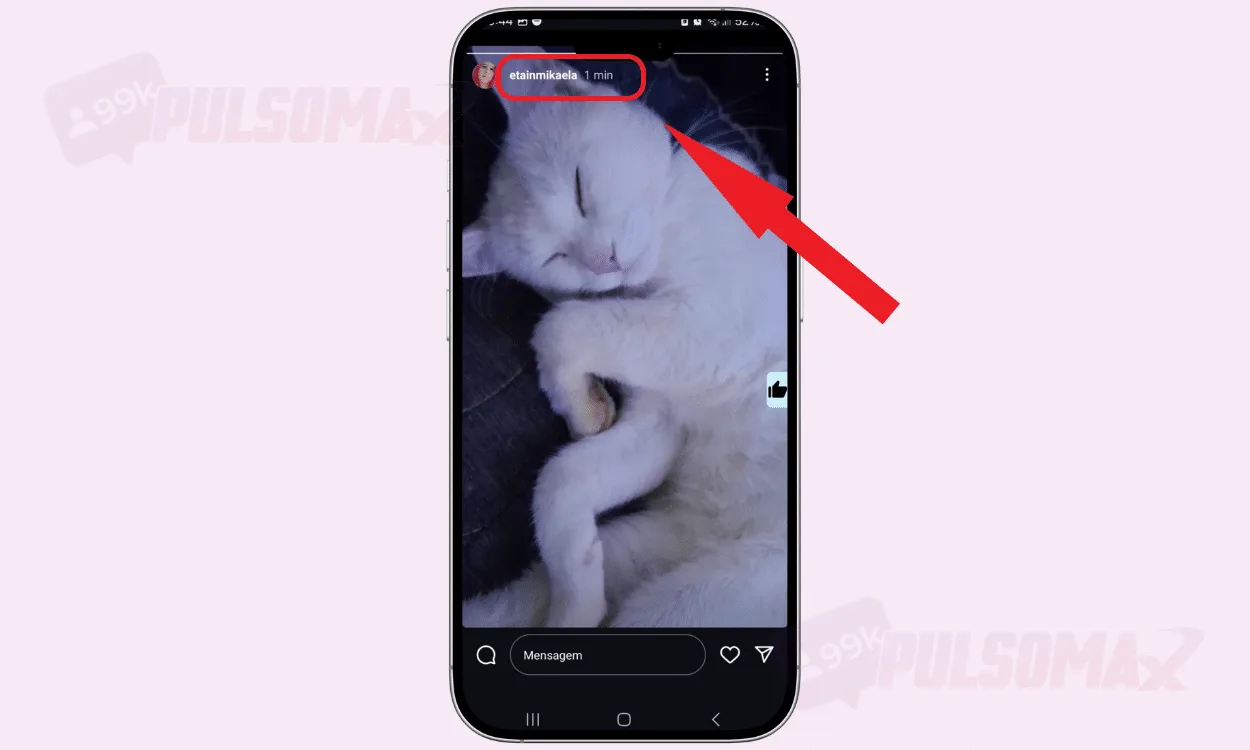 If the post was made recently, it's very likely the person is still online. So, if you need to talk to them, message them on Instagram; if they reply, you have confirmation, contact is on! Don't know how to accelerate your growth on Instagram? Try buying Brazilian Instagram followers and discover the benefits.
How can I see when someone was last online?
Besides finding out how to know if someone is online on Instagram, many people also want to know how to see when a user was last online on Instagram . This is a common function in the WhatsApp app, which is widely used by Brazilians, but it doesn't work the same way on Instagram. To see someone's "last seen" status on Instagram, you need to:
- That the person has already spoken to you via direct message;
- The person needs to have their online activity status active;
- The person couldn't have blocked you.
So, if the user meets all these conditions, you can access the chat between you in Instagram DMs and check their "last seen" status, right below their name, similar to what happens on WhatsApp. Remember that if you can see someone's "last seen," then that person can also see yours. Now, if the user has blocked you, even if the old direct messages remain there, it will not be possible to send new messages to that contact, nor see their online status or "last seen." To learn more about this, read our other article: how to know if I've been blocked on Instagram .
Why can't I see the online status on Instagram?
Discovering how to tell if someone is online on Instagram doesn't mean you can see everyone's online status on the social network. Instagram allows users to choose between leaving this feature active or turning their Instagram offline . That's right! It's possible to turn off your online status, and when a user does this, no one will be able to see if they are online or not on the social network. You can learn more about this in this article: how to turn off your online status on Instagram . Of course, there are always indirect ways to check if someone is online. For example, you can see the time since their stories were posted, or even chat with them. If they are online and don't mind you knowing, they will probably respond. Another way to find out if a user is online is by checking if they have recently posted something on their Instagram feed . If the post was made a few minutes ago, then it's likely that the person is still online. Don't forget that you also can't see the online status of people who don't follow you if you've never chatted with them in DMs before.
How long does Instagram stay online after a user logs out?
Another important point about knowing if someone is online on Instagram is that not everyone the app shows as online is actually online . This happens because Instagram has a delay of a few minutes and continues to show users as online who have actually closed the app. This delay lasts around 10 minutes, and only after this time does Instagram update the user's status, displaying their last seen status instead of the green dot. Therefore, if you talk to a contact that Instagram shows as online and the person doesn't respond, this is probably the problem. To be sure, just monitor their status for the next few minutes, because if they really left the social network, they should update it soon. Did you know that it's also possible to buy Brazilian likes for Instagram ? Learn about Pulsomax's service and start improving the performance of your posts.
How can I tell if someone is online on Instagram Web?
Discovering how to tell if someone is online on Instagram Web is quite simple. Just access your account at this link , log in with your credentials, and then click the messages button on the left side of the screen. You will access your inbox and will be able to see the green dot next to the names of your online contacts, as usual. Similarly, you can also see the last seen status of your contacts. But remember: Instagram Web doesn't have all the features of the app . This means that not all your chats will appear here. Instagram channels, for example, don't appear. Want to go viral with your Reels videos? See how to get free views for Instagram Reels videos , and get to know Pulsomax's service up close without fear!
Can I turn off my online status on Instagram without removing my "last seen" status?
It's not possible to turn off your online status on Instagram without also turning off your "last seen" status . The two functions are connected, and when you disable one, you also disable the other. Therefore, when looking for how to know if someone is online on Instagram, you should remember this: users who turn off their online status on Instagram cannot leave only the "last seen" function enabled, and vice versa. If the user has disabled their online status, it's probably because they want privacy. Now, if you still need to contact that person, the only alternative is to send your message and wait for the user to respond.
Is it possible to tell if a message has been read without being online?
Yes, even when a user turns off their online status on Instagram, the app still allows you to see if the message has been read. This won't happen only if you've been muted. See more about this in this post: how to mute on Instagram, step by step . Therefore, it's possible to send messages to someone who doesn't appear online and check later if they read the content. Even so, you won't know exactly when your message was read. Now, this only works in individual conversations, because in groups the read receipt status works differently. After all, in groups, not all members always receive all notifications of new messages. See how to buy views for Instagram reels from real users and choose the package with the engagement level you want!
How can you tell if someone is avoiding appearing online?
Although Instagram allows you to hide your online status, other behaviors can indicate that a person is avoiding appearing available. If you used to see someone's "last seen" status and suddenly that information disappeared, it's possible the user disabled that feature because they realized someone was monitoring their online status. Similarly, if a person views your messages, doesn't respond, doesn't appear online, or stops posting content on Instagram , especially stories, for a while , they may be seeking more privacy. Of course, these signs don't guarantee 100% that someone is avoiding appearing online, but they serve as clues. When thinking about how to know if someone is online on Instagram, remember: the truth is that some people simply like to use the social network without the pressure to respond or interact immediately. Also read: what is stalking, is it a crime, check it out .
Does silent mode affect your online status on Instagram?
No, silent mode does not affect your online status on Instagram . Now that you've discovered how to tell if someone is online on Instagram, know that they can appear as online even if silent mode is activated on their account. This is because silent mode prevents notifications like new likes, comments, and messages from being sent, and has no relation to the user's online status. This means that the person may have logged into Instagram even with silent mode active, for any reason, or that Instagram's online status may have activated automatically. This can happen, for example, if the Instagram app is running in the background. That's it! We've reached the end of this content. Did you like the tips on how to tell if someone is online on Instagram? We hope so! Before you go, take advantage and also check out our free Instagram download tools !