Instagram
  by
by 
 10 min read

Don't know what to post on Instagram? Full of posting features and with approximately 134.6 million users in Brazil, Instagram is one of the most popular social networks in the country, preferred by digital influencers and entrepreneurs seeking prominence. But to succeed on Instagram, you need to create a good content strategy. Of course, solutions like buying Brazilian Instagram followers help a lot, as they allow you to accelerate the organic growth of your profile. However, quality content remains the main basis of any successful strategy. Because it's your posts that will keep your followers engaged with your profile, liking, commenting, and following you. And Instagram really has many different features, allowing you to create a good variety of content, ranging from images and carousels to short videos in reels, as well as long videos in live streams and on theInstagram feed itself. But what to post on Instagram in all these formats? What content is most attractive? Keep reading and check out our content tips.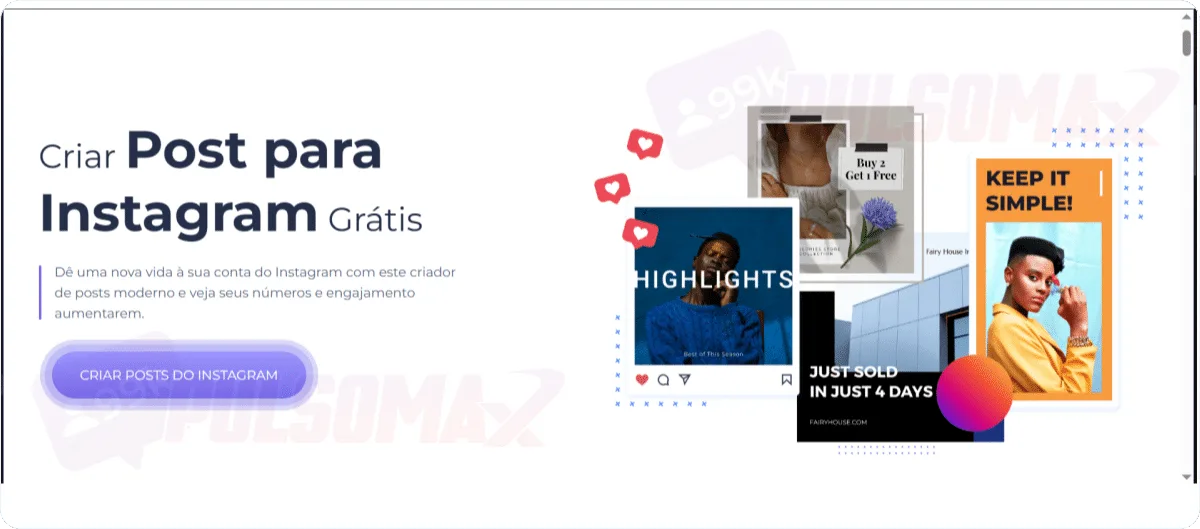 If you're unsure what to post on Instagram, especially regarding posting formats, or if you have limited time to create a lot of content, a smart solution is to use an Instagram content generator like RenderForest , which is the website you see in the image above. But there are others besides that, such as: With these tools, you can use ready-made and customizable templates to create your content, download it, and post it. However, some are even simpler; you just need to provide a brief text description of what you want to publish, and the tool will generate the complete content, with captions and even hashtags. To learn more about Instagram's posting formats, read: what is the size of an Instagram post, Story, and feed .
Why is it important to know what to post on Instagram?
You've just created or reactivated your Instagram profile, and now the question arises: what to post on Instagram? Those who want to keep their profile active on the social network need to invest in content regularly. In other words, it's not enough to post today and then go a week or more without posting. You need to publish at least 2 to 3 posts per week. And depending on your audience, this frequency may need to be a little higher. After all, with so much different content on the social network, people quickly forget about you if you disappear from their sight. And Instagram's own algorithm will consider your profile less relevant if you become inactive. This means that your new and old content will be recommended less frequently to Instagram users. In addition to posting regularly, you need to think about valuable content that grabs your audience's attention and has real potential to generate engagement for your profile. And the first step to doing this is discovering the different types of posts on the social network, so you can make the most of them!What should I post on my Instagram feed?
The Instagram feed is the gateway to the social network. It's the first and main tab of content that users see as soon as they open the app on their phone, or even on Instagram Web via computer. Therefore, knowing what to post on your Instagram feed is very important.Photos and images in the Instagram feed
For those who ask what to post on Instagram , photos or images are usually the first type of post that comes to mind. After all, this was the first type of post on Instagram, and it remains one of the most popular formats on the platform. Posting photos to your Instagram feed is always a good choice. It's a very easy type of post to make, and with a good caption, it can be very popular content. By posting well-chosen photos, you can create a visual identity for your profile, and with Instagram's own editing features, a simple image can be transformed into something fun and eye-catching.Video on Instagram feed
Videos also appear in the Instagram feed . Although, now, when you post short videos up to 3 minutes long, they are automatically converted into Reels videos. This doesn't mean that these videos will stop appearing as posts in users' feeds. But there's also the option to make longer videos , up to 60 minutes, depending on the type of content you create. Keep this in mind when thinking about what to post on Instagram, as long videos need to be well-planned, or they may not be a good strategy for you, since it's difficult to keep users paying attention to long content. Short videos are the most popular content format on Instagram, the type of content with the greatest potential to go viral on the network. Therefore, incorporating them into your strategy is simple, regardless of your niche.Carousels in the Instagram feed
Carousels are sets of images published sequentially in the Instagram feed. In other words, it's a way to create more eye-catching and slightly longer content without having to record a video. You can post from two to ten images at a time in an Instagram carousel. This strategy is widely used by brands and businesses, but also by personal account users, as it functions like a mini photo album. However, be aware that you cannot change the sequence of images in a carousel after it has been published.What should I post on my Instagram Story?
Instagram Stories are a feature of the social network that allows you to create temporary posts that last 24 hours and then disappear. But don't worry. All your stories are stored in your account, and you can access them later because these posts are automatically saved in the stories archive , which is located in the archived items tab of Instagram settings. The goal of Instagram Stories is to allow users to tell short stories daily. And the fact that stories are temporary allows them to be used in a variety of different strategies. For example, to publish content in "limited time" strategies or to publish information that people don't want to leave permanently on their profile.What to post on Instagram Reels?
Reels are short, vertical videos that combine image, voice, and music. You can either record a short video with your phone and then edit it using Instagram's comprehensive Reels tools, or edit a video with your computer or AI, depending on the content you want to create. If you choose to edit outside the Instagram app, simply pay attention to the Reels format, which should be 9:16, and not exceed 3 minutes in length. Keep this in mind when thinking about what to post on Instagram Reels. In both cases, you can also select a trending song on Instagram that matches your content and make the video even more appealing.What should I post on Instagram Live?
With Instagram Live, you can connect with your audience in real time by going live on Instagram. This is a strategy widely used by brands and content creators in various situations, such as keeping their audience informed about an event, presenting new products, or even planning content to be presented live, like a lecture, depending on their niche. Using Instagram Live is quite simple, but it's recommended to have a script of what you intend to present and content that is interesting enough to keep people watching for as long as possible.Use a content generator to create posts for Instagram.
If you're unsure what to post on Instagram, especially regarding posting formats, or if you have limited time to create a lot of content, a smart solution is to use an Instagram content generator like RenderForest , which is the website you see in the image above. But there are others besides that, such as: With these tools, you can use ready-made and customizable templates to create your content, download it, and post it. However, some are even simpler; you just need to provide a brief text description of what you want to publish, and the tool will generate the complete content, with captions and even hashtags. To learn more about Instagram's posting formats, read: what is the size of an Instagram post, Story, and feed .What to post on Instagram? Tips for content that works well.
Now that you know the different content formats that can be posted on Instagram, we've also prepared a list of tips on what to post on Instagram. These are simple content ideas, but with great potential to go viral, regardless of your niche. So, check out the ideas and take advantage of implementing your favorites! Want to increase engagement with your profile? Try buying Instagram likes and watch your engagement grow!Ask questions to your audience.
One of the best tips on what to post on Instagram is to ask direct questions to your audience . After all, nothing is better than a question to generate engagement, and you can even use this strategy to find out what content your audience likes best. One of the best places to ask questions is in Stories, since they remain pinned to your profile for 24 hours and are easy to find. But it's also possible to ask questions in posts directly on your Instagram feed. In both cases, the best approach is always to insert the question within a strategy that generates curiosity, to further encourage people to respond.Post memes on Instagram
Whether on Instagram or other social media platforms, people love to see memes . Memes are fun and authentic content that can even be part of the strategies of more serious profiles, depending on how they are used. A meme can also be a post that, in addition to being funny, is reflective, intelligent, and even critical. Investing in authentic memes that generate audience identification with your profile can be very worthwhile, increasing engagement, likes, and comments. Furthermore, a well-crafted meme has great viral potential, bringing even more prominence to your profile. So, add this to your list of ideas for what to post on Instagram!Share user and customer content.
Sharing content created by your users , within your niche, is one of the best ways to build an authentic and engaged community on Instagram. Sharing content created by customers is an excellent form of social proof, a very useful strategy for businesses, entrepreneurs, and advertising campaigns in general. Testimonials, short videos, comments—the possibilities are endless. To discover what to post on Instagram in this way, monitor your followers' profiles and keep an eye on what they usually publish. You can also encourage them to tag you in the post so you don't miss any content from your followers. Don't know how to repost content from your users? Then also read: how to repost on Instagram .Show your location with the Instagram map.
An interesting tip for those wondering what to post on Instagram is to show the location . This is useful for those with a physical or virtual store, and also for influencers, brands, and entrepreneurs who want to give visibility to their presence at an event. Do this in Instagram Stories, because when users view your story, they can visit the tagged locations. This is a strategy that can increase your sales by bringing more customers to your store, sparking curiosity, and creating anticipation, depending on the occasion.Other tips for creating viral content on Instagram
The three strategies above work very well, but the truth is that there are many others you can use in your daily life, depending on your content goals. Check out a list we've prepared:- Go live on a live stream to showcase products and offer promotions to viewers.
- Share a video demonstrating how your product or service works.
- Post photos and videos from behind the scenes of your content production (you can do this in your stories, record a reel, or even create a carousel on your Instagram feed).
- Repost fun or intelligent content that relates to your niche to broaden your profile's reach and generate more engagement.
- Follow viral content and current trends, and create content based on them, using the right hashtags to expand your reach and gain rapid engagement.
- Post funny audio clips if they're relevant to your field.
- Announce your business achievements or new milestones.
- Hold raffles.
- Publish video tutorials.
- Post about covering or participating in an event.