Learning how to post photos on Instagram is the first step to start using this photo and video social network. After all, that's precisely the goal: to share your photos, images, and videos with your followers. This makes Instagram much more fun, and you can personalize your social media, conveying your personality and identity to your audience. For companies, brands, and individuals interested in becoming digital influencers, learning how to effectively use Instagram's features is the first step to having a booming profile on the platform. Of course, there are other important strategies you can and should use, such as buying real Instagram followers to accelerate your growth. But, quality content posted frequently is always the most important thing. So, if you don't know how to post photos on Instagram, take advantage of our step-by-step guide with images!
How to post a photo on Instagram step by step.
Learning how to post photos on Instagram is easy and quick. Your photos and images can be published permanently on yourInstagram feed , or as temporary posts in your stories. The way you post is up to you! But be aware that stories disappear after 24 hours. If you prefer, you can also turn your photo into a Reels video, and even add music. To begin, first log into your Instagram account on your Android or iOS app. Then:
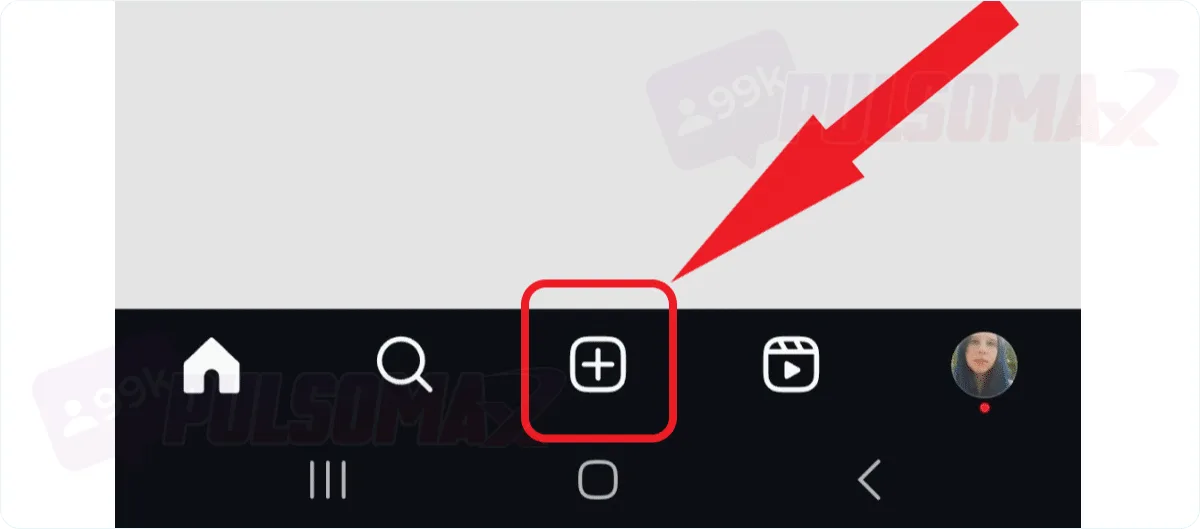
Tap the + button at the bottom of the screen and select post.
Important: If you want to post the photo to your stories, select "story"; if you want to turn it into a reels video, tap "reels" in the bottom bar.
Tap the camera button to take a photo, or use an image from your gallery.
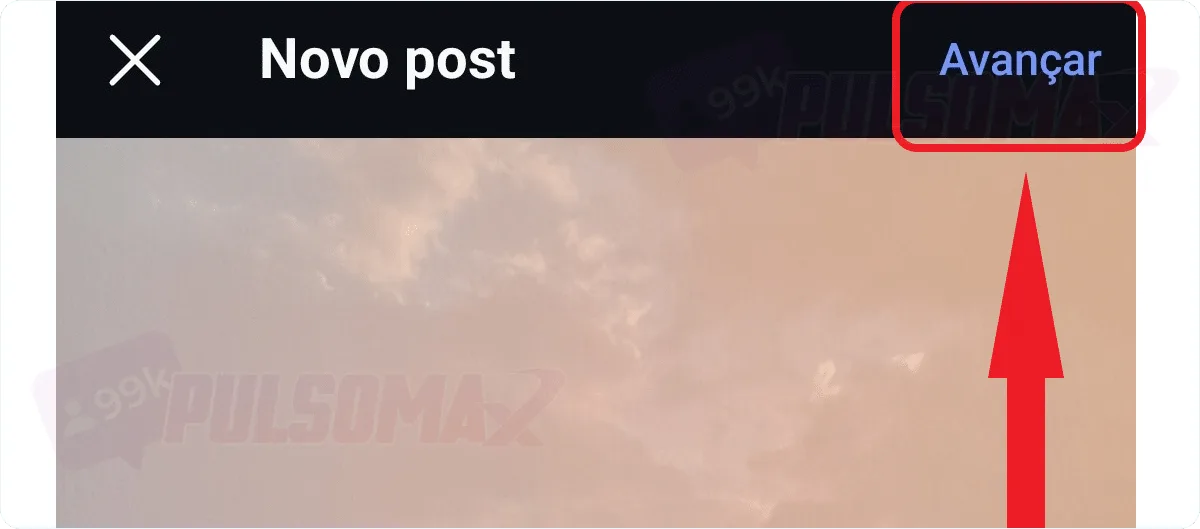
After selecting the photo, click next.
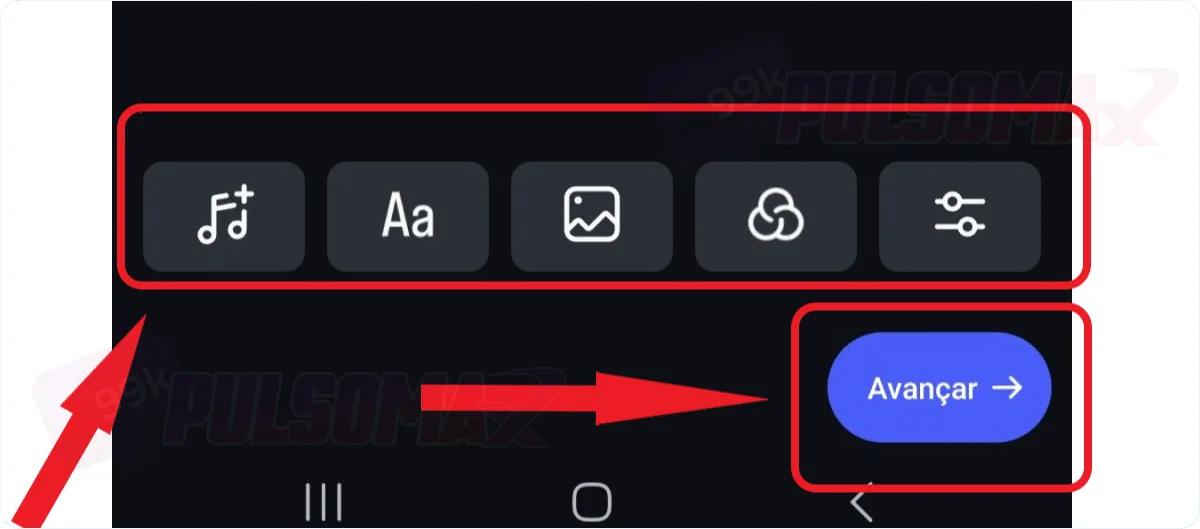
Make any necessary edits using the filters and click next again.
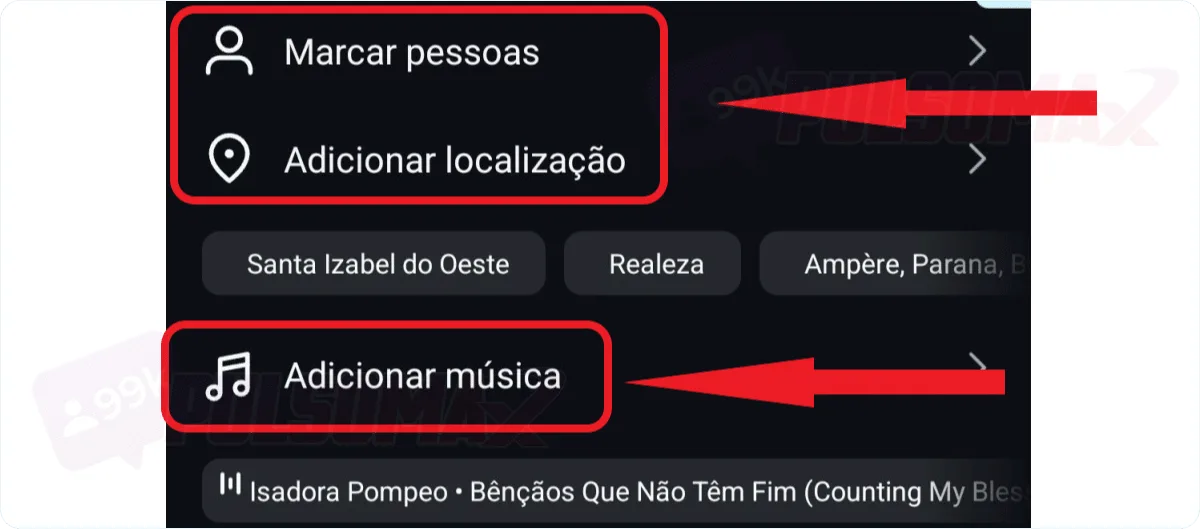
Now you can tag people, add music, or your location if you prefer.
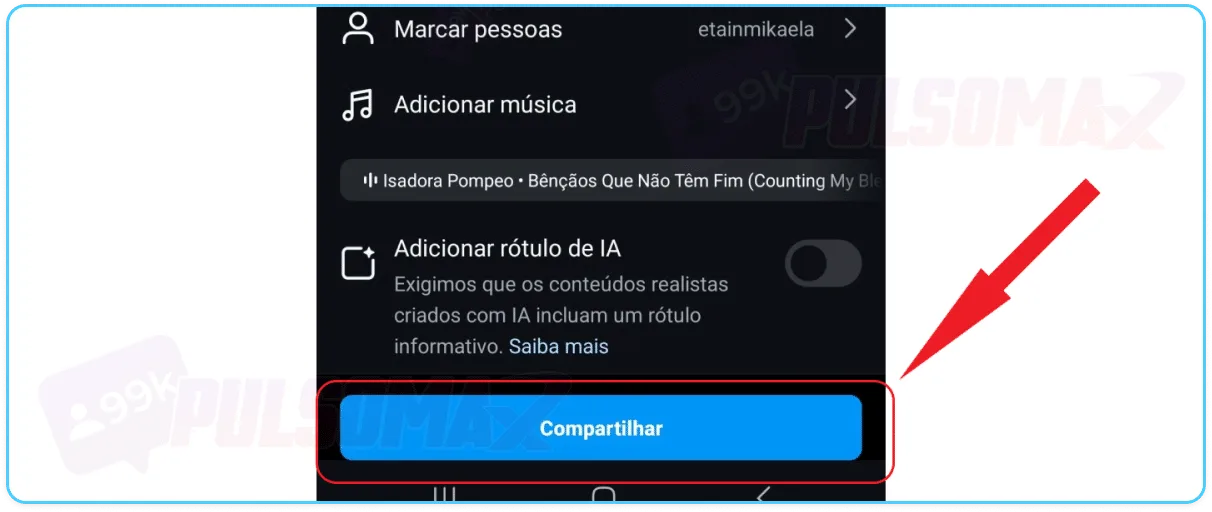
After completing the previous settings, click share.
Done! You've posted your photo on Instagram. If you chose to post it to your stories or reels, the process is very similar; just make the adjustments using the available tools, and finally, click share.
What resources can I use to post on Instagram?
One of the best things about posting photos on Instagram is that the social network has several native editing features . Users can customize their photos using the platform's tools, which include automatic filters, as well as adjusting settings like shadows, sharpness, saturation, color, temperature, and more. You can even add music to your post. But if you choose to post your photo to Stories or turn the content into a Reels video, you'll have even more resources available. In Stories, for example, you can add different types of stickers, GIFs, audio, and even display the current Instagram temperature . For Reels videos, the features are even more comprehensive, allowing you to edit video length, add voiceovers, and more. This variety of native video and image editing tools offered by Instagram makes the work of content creators easier. In many cases, depending on the content being created, it's not necessary to submit the photo or video to any external video editor , as the social network's own tools are sufficient for the entire editing process.
Choose who can see your post and add captions.
When learning how to post photos on Instagram, you'll also see that it's possible to choose who can see your post. To do this, you can select the "public" option, which allows everyone to see your photo, or choose "close friends only," so that only the people closest to you on the social network can see your post. Other features include tagging people, including in stories, adding your location, and sharing simultaneously on Facebook and Threads. This way, with a single post, you can post to two social networks at the same time. This is great for influencers, brands, and companies that want to manage all these profiles more quickly. When posting your photo to your Instagram story and feed, you also have another feature: the option to add a caption with different Instagram fonts ! Yes, there's a list of available fonts, and you can choose the one you like best to further highlight your post. But if you want to go even further, you can also choose to disable comments, hide the number of likes and shares on the post, among other settings. And if you're editing a Reels video, you can save it as a draft and finish the work later, from where you left off, if necessary.
Are there other ways to post on Instagram?
Now that you 've learned how to post photos on Instagram , you might be wondering if there are other ways to do it besides what you've seen so far. Yes, there are! For example, you can repost a photo or video to your story at any time, and as many times as you want. This way, your Instagram feed post becomes a story. But you can also do this with content from other profiles, as long as the post is from a public account. So, you can transform photos and videos from other users into posts on your Instagram story. If you want more details on how to do this, we have a complete article on how to repost on Instagram . If you prefer, you can also transform Instagram stories into feed posts, make posts through Instagram Web , and add Reels videos to your main feed.
What is allowed to be posted on the Instagram feed?
You can post photos, videos, and images in general, as long as the content doesn't violate Instagram's guidelines. So, now that you know how to post photos on Instagram, remember not to post explicit content, such as nudity and sex, nor very violent content or fake news. If you have any doubts, read Instagram's community guidelines . Why is this important? Because if you publish content that violates the community guidelines, you may suffer penalties from the social network. For example, you may have some functions of your account temporarily disabled, your access may be temporarily blocked, or, in more serious cases, your account may be banned from Instagram. The most common posts on Instagram are photos and videos showing the user's daily routine. However, influencers, brands, and companies make different kinds of posts, such as promotional content. In these cases, it's common to use the carousel feature, which shows several photos in sequence in the same post.
Can I add text to Instagram photos?
When learning how to post photos on Instagram, some users may have questions about accessibility . Yes, it is possible to add text to Instagram photos, and this feature exists so that visually impaired people can understand the visual content of images and videos in social media posts. To do this, simply click on "more options" above the share button on the last screen before finalizing your post. Then, select the "alternative text" option and add the text you want to the image, describing its content. By doing this, Instagram will provide an audio description of your image for visually impaired people using this option.
How do I post a full photo on Instagram?
The new standard for photos and images on Instagram is rectangular , with a maximum size of 1080 x 1350 px. This means that if you post an image that deviates from this aspect ratio or is larger, it will need borders on the sides, a feature available on the platform, mainly for users who want to post in the old Instagram feed format, which was 1080 x 1080. Therefore, to post a full photo on Instagram without cropping, you must respect the maximum size of 1080 x 1350 px for your image and the standard rectangular aspect ratio of the feed. If you publish in a size larger than this, the image will appear cropped. Now, if the size is smaller, the image will still be displayed in its entirety, but the background will be filled by Instagram so that the photo stays within the standards used on the social network. You can learn more about this in this article: what is the size of an Instagram post, feed, and story .
How many photos can I post on Instagram at once?
When learning how to post photos on Instagram, you might want to post a sequence of images. This is called a carousel, as we mentioned earlier in this post. For this option, you can select up to 10 images from your gallery. Then, when you publish, they will appear in the post in the sequence you add, in a single publication. Users viewing your post can swipe each image to see the next one. This feature is widely used in marketing strategies due to the versatility it allows in content creation.
What is the recommended caption length for Instagram photos?
When posting a photo on Instagram, you can write a caption for your followers. This caption will appear right below the photo and usually contains engaging text and hashtags to broaden the reach of the post. When users learn how to post photos on Instagram, they quickly discover this feature. However, this caption has a limit of 2,200 characters . In other words, it's not possible to write a longer caption. This is because Instagram focuses on images and videos, not longer texts like those on other platforms such as LinkedIn and Facebook. Now, you can circumvent this Instagram limitation with a simple but effective strategy: you can start your caption text and post the rest of the content in the first comment of the post, pinning that comment to the post so it appears first. Just remember to let users know that the caption text continues in the comments so they know where to finish reading your content. Have you ever thought about downloading your favorite photos, videos, and audio from Instagram but don't know how? So, check out our Instagram download tools !
How to post a photo on Instagram: final tips
When posting photos on Instagram, you can edit your post at any time , including changing the post settings to no longer display likes and comments, for example. Another possibility is to delete the post if you feel it's necessary. Editing also allows you to tag people, add location, music, and captions. Now, if you post a carousel and want to change the order of the images after publishing, it will no longer be possible to do so. Another point is stories, because if you post content in a story and it doesn't turn out the way you wanted in the end, there's no way to edit it after publishing. In these cases, the only solution is to delete the post and publish it again, making the necessary corrections. But don't forget: when you delete a post on Instagram, you also lose all the likes, comments, and shares of that post . So, depending on the case, you need to carefully assess the situation and decide if the errors in the post are really serious enough to need to delete the story or carousel that already has a good number of interactions. That's it! We've reached the end of this post. Now you know how to post photos on Instagram . We hope this content has been helpful and clarified your doubts. How about sharing your experience by leaving a comment? Thank you for reading this far!
 Instagram
  by
by 
 10 min read

 Important: If you want to post the photo to your stories, select "story"; if you want to turn it into a reels video, tap "reels" in the bottom bar.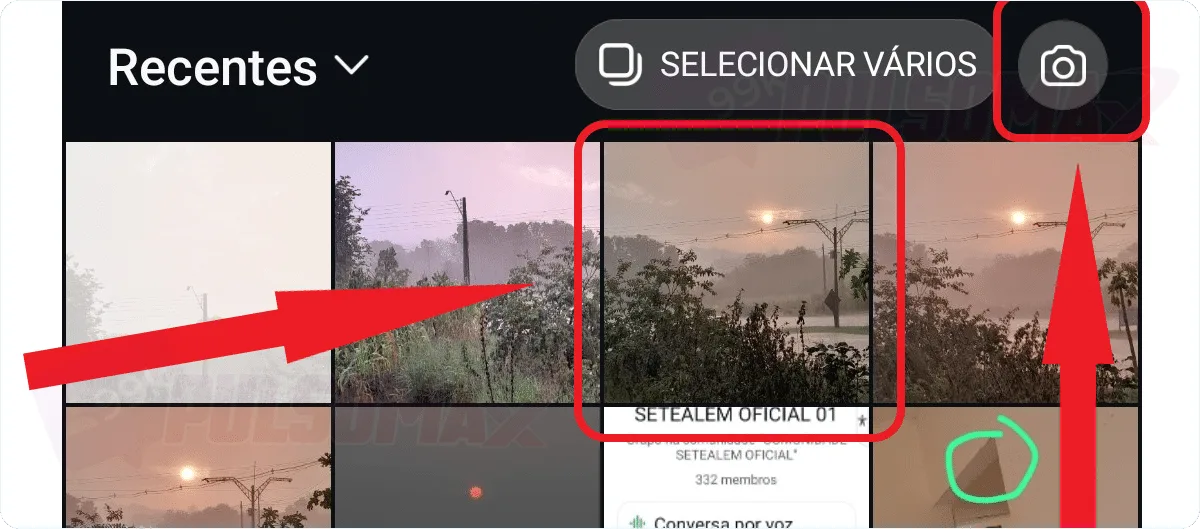
 Done! You've posted your photo on Instagram. If you chose to post it to your stories or reels, the process is very similar; just make the adjustments using the available tools, and finally, click share.