Is it possible to unarchive a photo on Instagram? Anyone who regularly creates content for Instagram knows that it's often necessary to remove some posts from their profile. For example, digital influencers may need to archive old posts to keep their content consistent with the current brands they work with. And Instagram is like that. You need to think carefully about each online action, invest in content, and even buy real Instagram followers to give your profile an upgrade from time to time. After all, to grow on social media, adopting strategic marketing actions is fundamental. But even ordinary users may want to archive and unarchive photos on Instagram. For example, many people choose to remove photos of ex-partners or even former workplaces from their profile for personal reasons. Whatever your reason, if you want to find out how to unarchive a photo on Instagram, take advantage of this post!
How do I unarchive a photo on Instagram?
Instagram allows users to archive photos and posts from theirInstagram feed , as well as archive videos from Reels, whenever they want. This way, there's no need to delete the posts, giving them the opportunity to restore these files later so they are visible on their profile again. However, many people don't know how to unarchive photos on Instagram when they need to retrieve these posts, and they get lost trying to find out how to bring the content back. But, as you'll see below, it's quite simple!
How to unarchive a photo on Instagram step by step.
To learn how to unarchive a photo on Instagram , first log into your Instagram account using your Android or iOS app. iPhone users don't need to worry, as this tutorial also applies to them; the method is the same for both operating systems. Oh, and if you're an iOS user and want more helpful tips, check out this one too: how to hide likes on Instagram iPhone .
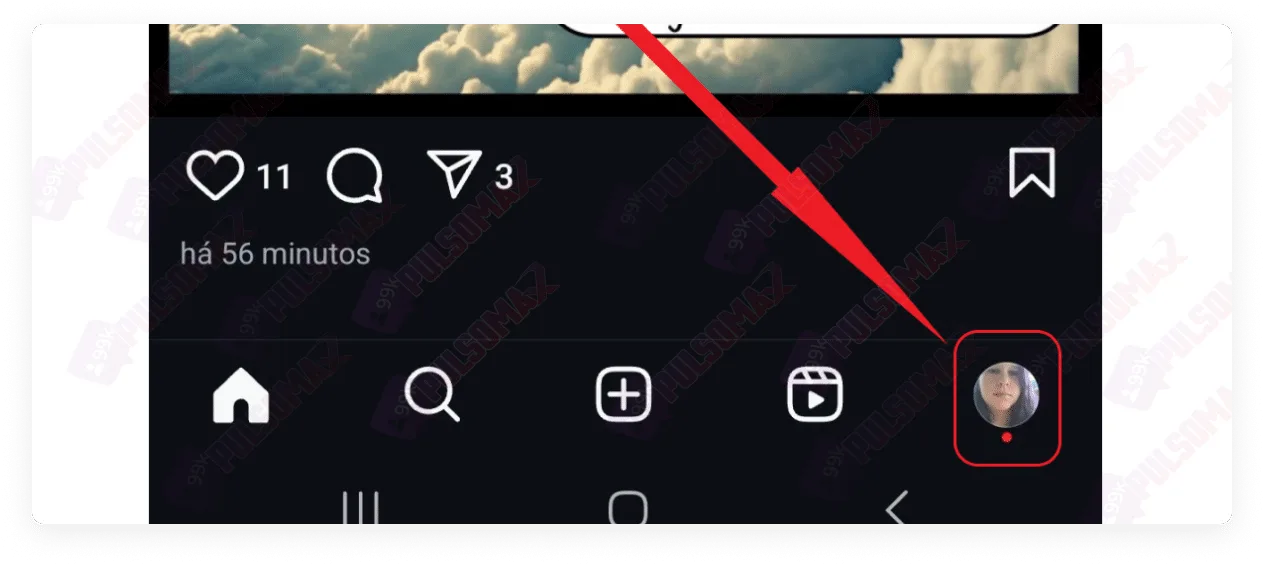
Click on your profile picture thumbnail in the bottom right corner of the screen.
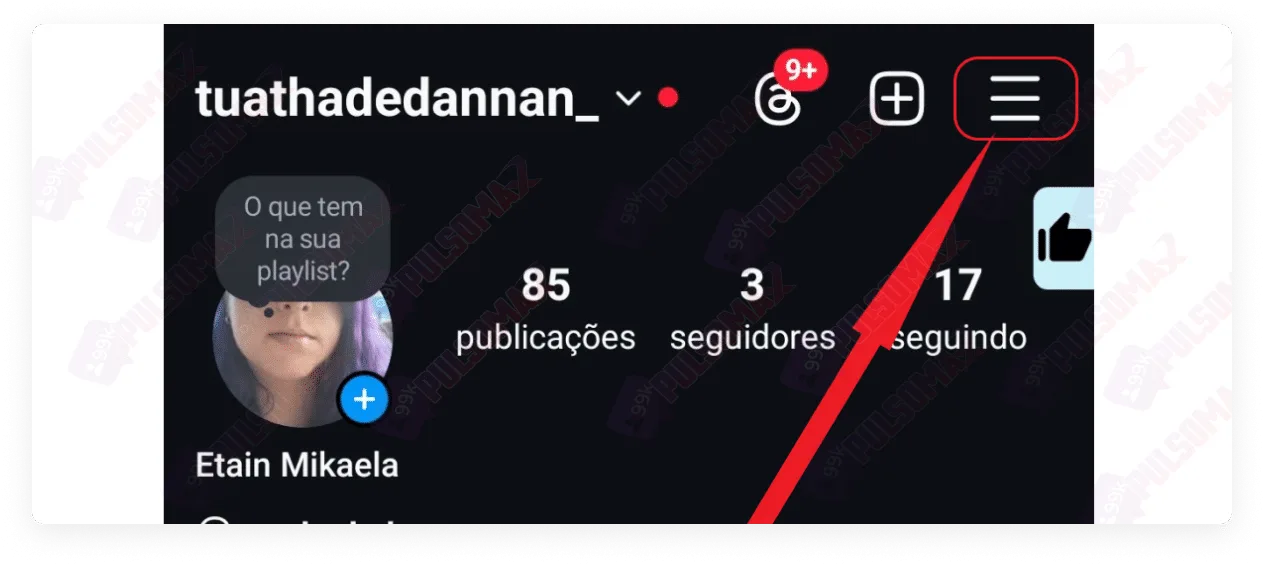
Next, click the three-line button in the upper right corner of the screen.
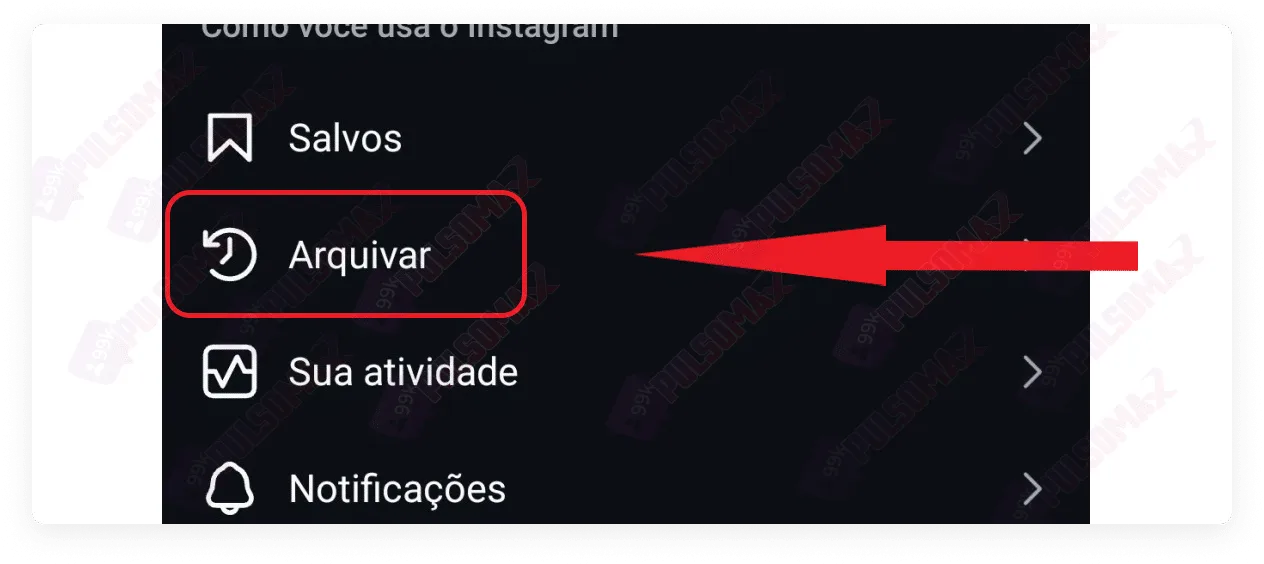
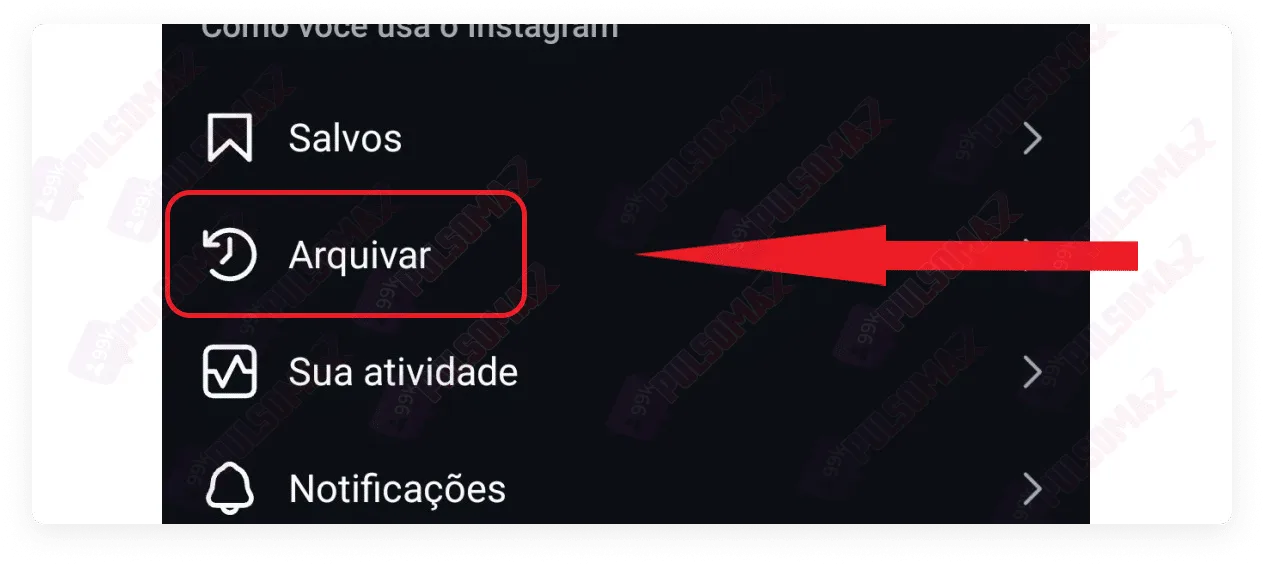
Next, select the archive option, as shown in the image below.
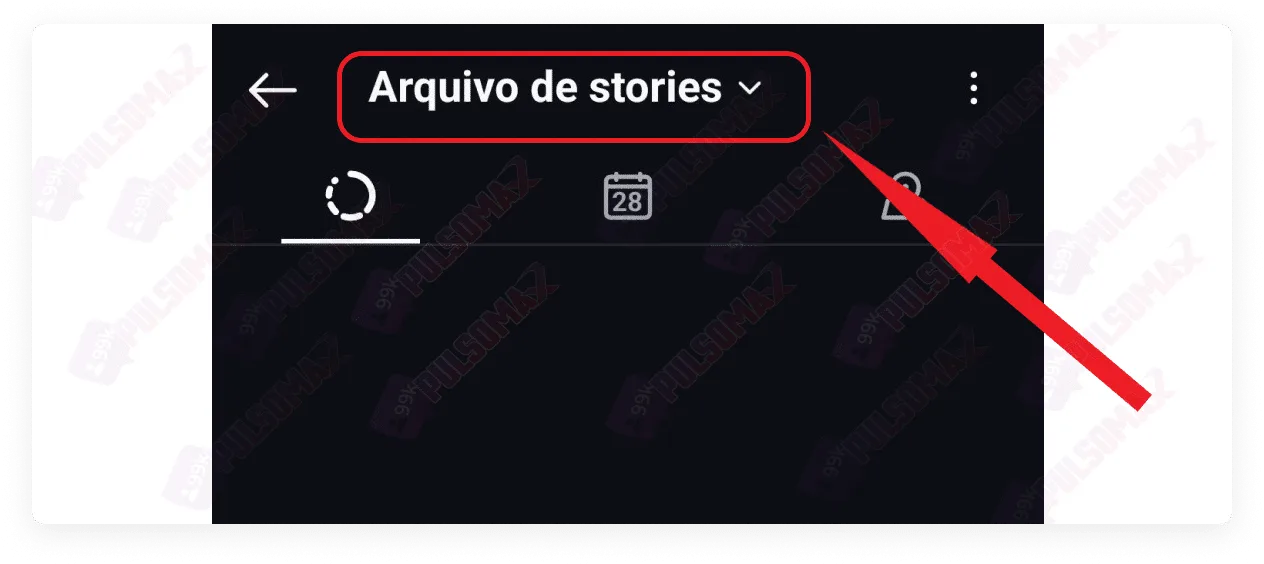
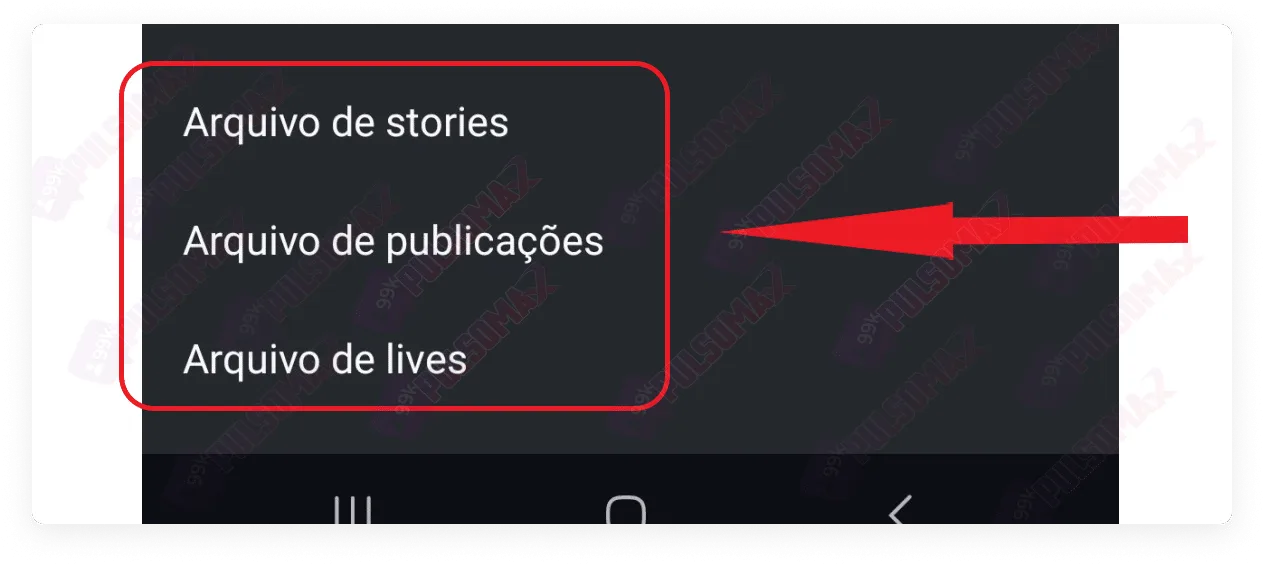
To continue, tap on the stories archive at the top of the screen to open the other options.
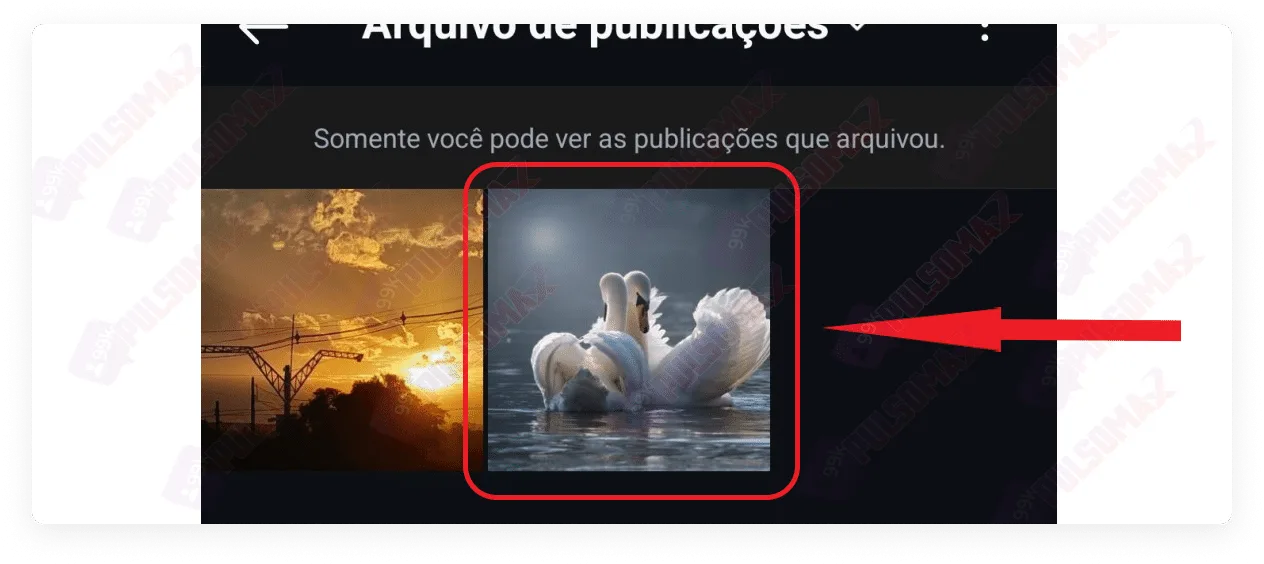
Next, tap on the section containing the post you want to unarchive.
Now, tap on the photo or video you want to restore.
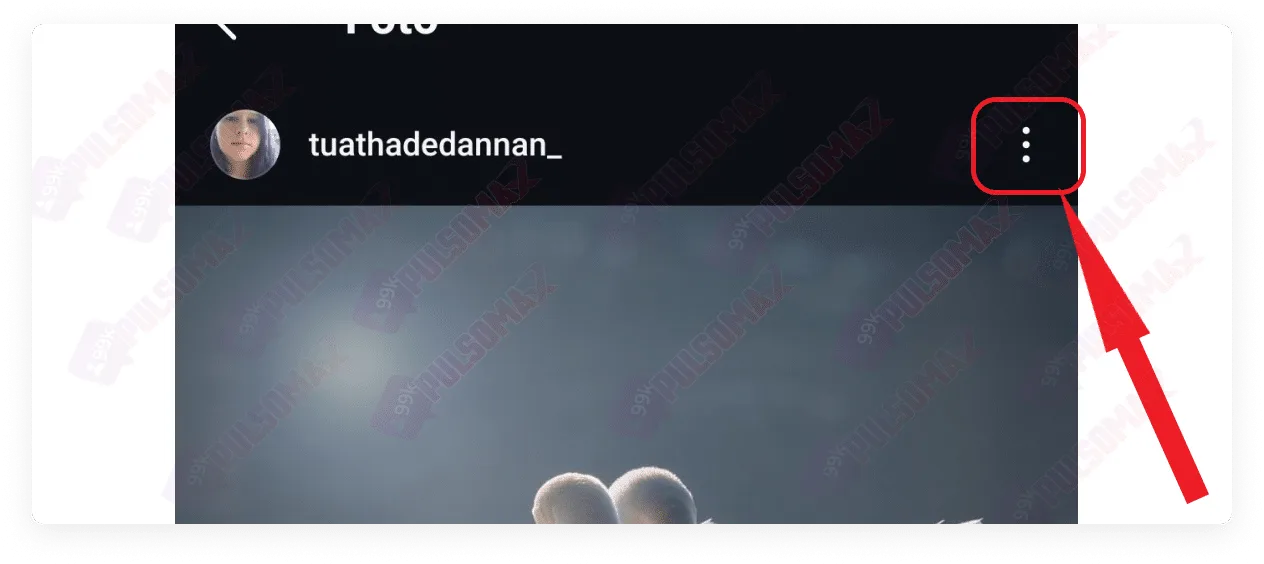
When you open the post, tap the 3-dot button in the upper right corner, as shown in the image below.
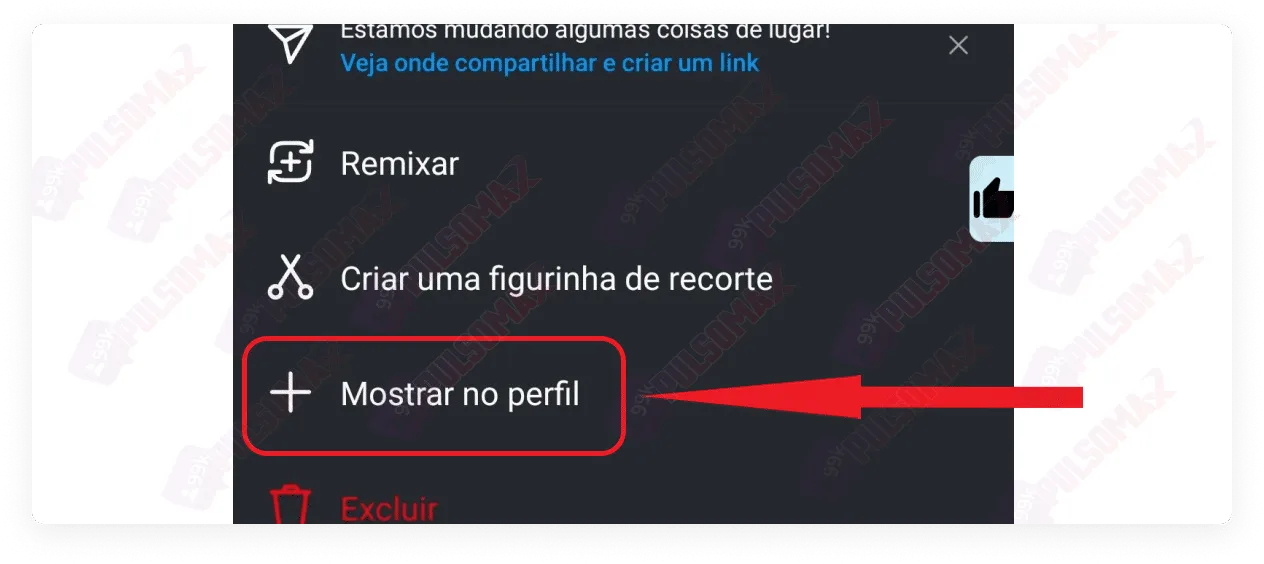
In the options that appear, tap on "show on profile" .
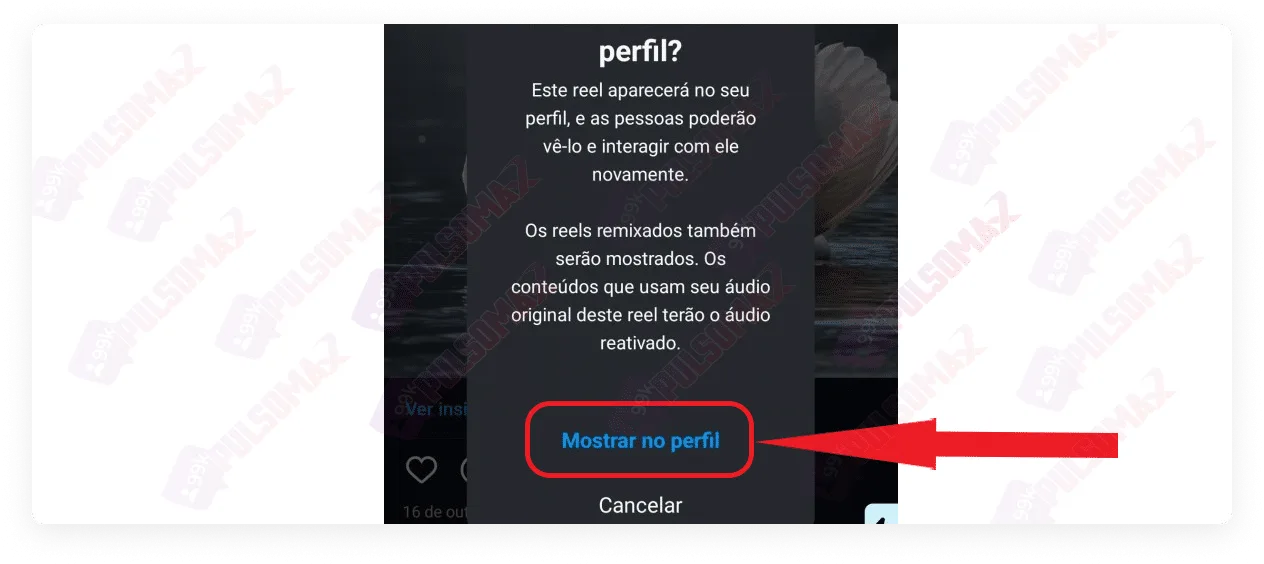
On the next screen, confirm your choice.
Done! You've learned how to unarchive a photo on Instagram! Now you can return to that section of Instagram whenever you want to restore any old posts on your profile.
How do I archive an Instagram photo?
Archiving a photo or any other post is much easier than learning how to unarchive a photo on Instagram. First, tap on your profile picture thumbnail as before, then scroll down to find the photo or video you want to archive, and tap on it.
When the photo opens, tap the three-dot button, like this:
Then, tap archive and you're done!
Regarding Instagram Stories, you don't need to worry. They are archived by default by the social network whenever their display time, which is 24 hours, ends!
Is it possible to unarchive all photos from Instagram at once?
No! Instagram doesn't have a function to unarchive all archived photos and posts at once. Therefore, now that you know how to unarchive photos on Instagram, the solution is to manually restore each desired post to your profile, using the step-by-step instructions you learned in this post.
Is it possible to unarchive a photo from Instagram using a PC?
Instagram Web is becoming increasingly popular among Instagram users. However, the browser version of the social network on computers doesn't have all the features of the app on Android or iOS. And the ability to unarchive Instagram photos is one of those features! So, now that you know how to unarchive photos on Instagram, you should also know that you need to access the app on your phone to do this. This feature isn't available through Instagram Web.
What happens when I unarchive a photo on Instagram?
When you learn how to unarchive a photo on Instagram and do so, the unarchived post returns to your feed on the social network and remains in the same position as it was originally published. Furthermore, recent posts that you unarchive may reappear in other people's feeds, along with all the likes, comments, and shares the post had received. Therefore, if you archived a photo because you no longer wanted to show it to other users, think carefully before deciding to unarchive the photo or video. Worried about the security of your Instagram? Learn how to set a password on Instagram step by step .
So, will any unarchived photo appear in my followers' Instagram feeds?
No! If you unarchive an older photo, it won't be displayed to other people on Instagram; it will simply remain in the same place where it was originally published on your timeline. Unarchiving the photo doesn't change the original publication date. There's no way to know the exact time the Instagram algorithm uses to calculate what's considered recent content on the platform. So, as a rule, when learning how to unarchive a photo on Instagram, consider that unarchiving posts less than 30 days old from their original publication date may still allow them to appear in other people's feeds. After unarchiving, you can also share the post normally again using Instagram's temporary mode .
Why archive photos on Instagram?
If you've reached this post about how to unarchive a photo on Instagram , you probably had at least one reason for archiving one of your photos, right? However, your reason, whatever it may be, is not the only one! In practice, the reasons that lead Instagram users to archive posts are quite diverse. For example, as we mentioned at the beginning of this post, many digital influencers need to archive old posts because this old content would conflict with their current business partnerships. Therefore, to keep their profile timelines cohesive with the current content they publish, influencers archive old photos and videos, including live streams, whenever necessary. Companies and business profiles may also archive posts for the same reason: because they need their content to adapt to new partnerships, or the new phase the company is experiencing, erasing from the memory of their followers and the company's public image moments from the past that no longer match the present.
From marketing campaigns to personal reasons: the motives vary!
But archiving posts can also be part of marketing strategies! To illustrate, we can cite actress Blake Lively, who archived all her photos and even unfollowed her own husband on the social network shortly before the release of her new film "A Simple Favor" (2018), whose story is precisely about disappearing. And any Instagram user, whether famous or not, can also archive posts for their own personal reasons. For example, some people may want to archive moments spent with ex-partners after ending a relationship, and others may want to archive old work photos when changing jobs. Some people archive posts simply because they're tired of them! Or because they understand that that photo or video no longer fits their current life. For example, because their values have changed, their lifestyle has changed, or even their beliefs are different now.
Can unarchived photos receive new interactions again?
Yes! After learning how to unarchive photos on Instagram and doing so, other users who follow your account will be able to like, comment on, and share the post normally. This applies to posts on the Instagram feed, as well as stories and reels videos. If your account is public, anyone who finds your unarchived post will be able to interact with it normally. This only doesn't apply to people you've restricted on Instagram . And, regardless of whether the post is old or recent, all the comments and likes that were already there when you archived the photo will be displayed normally again.
Can I re-archive a photo that was unarchived from Instagram?
Yes, you can! There's no limit to the number of times you can archive and unarchive the same post on Instagram. So, if you regret unarchiving any of your posts, just go back to the post and archive the photo or video again. This way, it will disappear from your profile on the social network, and only you will be able to find it again among the archived items in your account, using the step-by-step instructions on how to unarchive a photo on Instagram that you learned in this post. However, as we've explained in other posts on this blog, for example, in our post about how many people I can unfollow on Instagram per day , the social network limits the number of interactions a user can perform per day, per hour, and per minute. Therefore, if you repeatedly archive and unarchive the same photo in a short period, or archive/unarchive many posts at once, Instagram may interpret your action as spam and penalize your account.
How to download content from Instagram before it's archived?
You never know when content you like on Instagram will be archived by its owner, right? Maybe it's a video from an influencer you like, or an image you think is cool, or even an audio file. And now that you know how to unarchive a photo on Instagram, you also know that archived content will only become available again if the owner decides to unarchive it, right? Well, then, you might be wondering if there's any way to download this content. Unfortunately, Instagram doesn't offer any download tools, especially when it comes to content posted by other people. All you can do in these cases is use the save option, which appears when you click on the three dots next to the post or reel video. With this option, you can create a list of all your favorite Instagram posts. But if any of them are archived, they will disappear from your saved items as well. The solution, in this case, is to use our essential Instagram download tools . With these tools, you can download audio, video, and images from any public post, and you don't need to provide any confidential information like login and password. Just the post link. Try it, it's free! Thank you for your time reading! Did you enjoy learning how to unarchive photos on Instagram? Were you able to unarchive your posts? Comment and share your experience!
 Instagram
  by
by 
 10 min read
 Done! You've learned how to unarchive a photo on Instagram! Now you can return to that section of Instagram whenever you want to restore any old posts on your profile.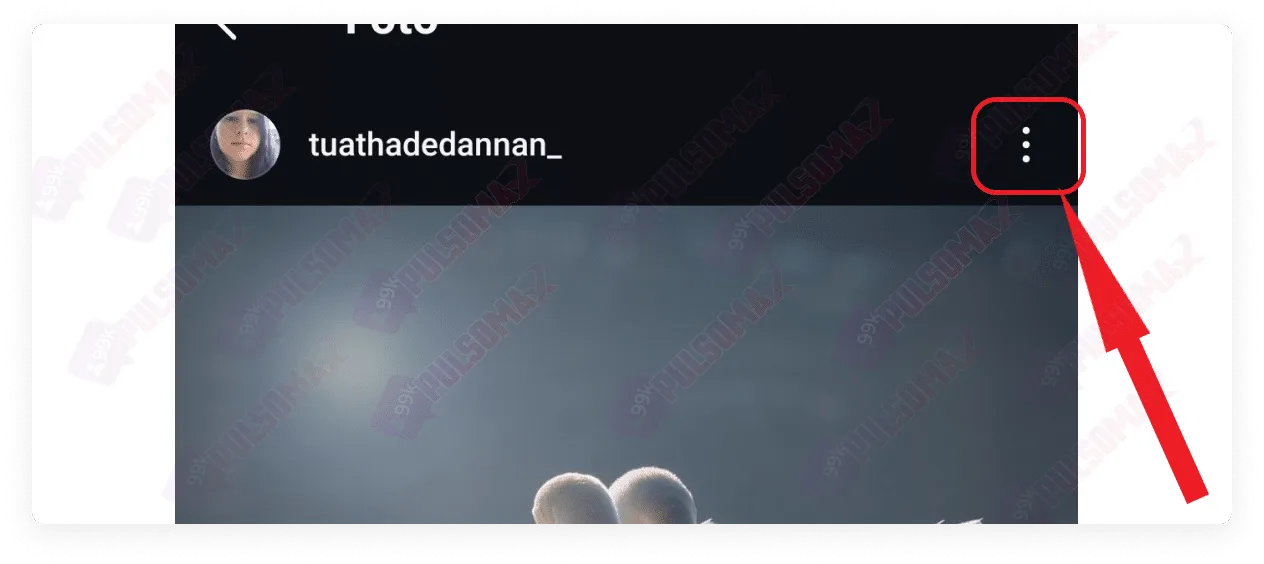
 Regarding Instagram Stories, you don't need to worry. They are archived by default by the social network whenever their display time, which is 24 hours, ends!