Learning how to turn off your online status on Instagram is a way for users to protect their privacy on the social network. After all, just because someone is on Instagram doesn't mean they're available to chat or interact with other users. On the contrary, they might be very busy and quickly checked Instagram to do something necessary, like scheduling a post. In other situations, Instagram users simply want to enjoy their time on the network without worrying about direct messages, for example. Therefore, discovering how to turn off your online status on Instagram can be very useful in all situations where you don't want to appear online on the social network. This function makes you invisible to other people, as if you were offline. Keep reading and see how to do it!
Is it possible to remove the online status from Instagram?
Yes, it's possible! It's important to say this because many people who wonder how to turn off their online status on Instagram aren't actually sure if it's possible. So, the good news for all these users is that they don't have to display their online status to their Instagram followers and direct messages when they don't want to.
How do I remove my online status from Instagram?
Instagram's online status feature shows other people when you are logged into the social network. It also shows the time elapsed since your last login. It's represented by a small green dot next to your profile picture, and also next to your name in direct chat. Of course, in some situations, this is very useful. For example, for people who want to interact with other users, or who want to resolve important matters with their contacts while they are online. On the other hand, this isn't always the case, and knowing how to turn off your online status on Instagram is a way to protect your privacy, just like learning how to activate anddeactivate Instagram's temporary status mode. However, many users don't know which settings to access on Instagram to turn off their online status. If this is your case, check it out below!
How to remove your online status from Instagram on your mobile phone, step by step.
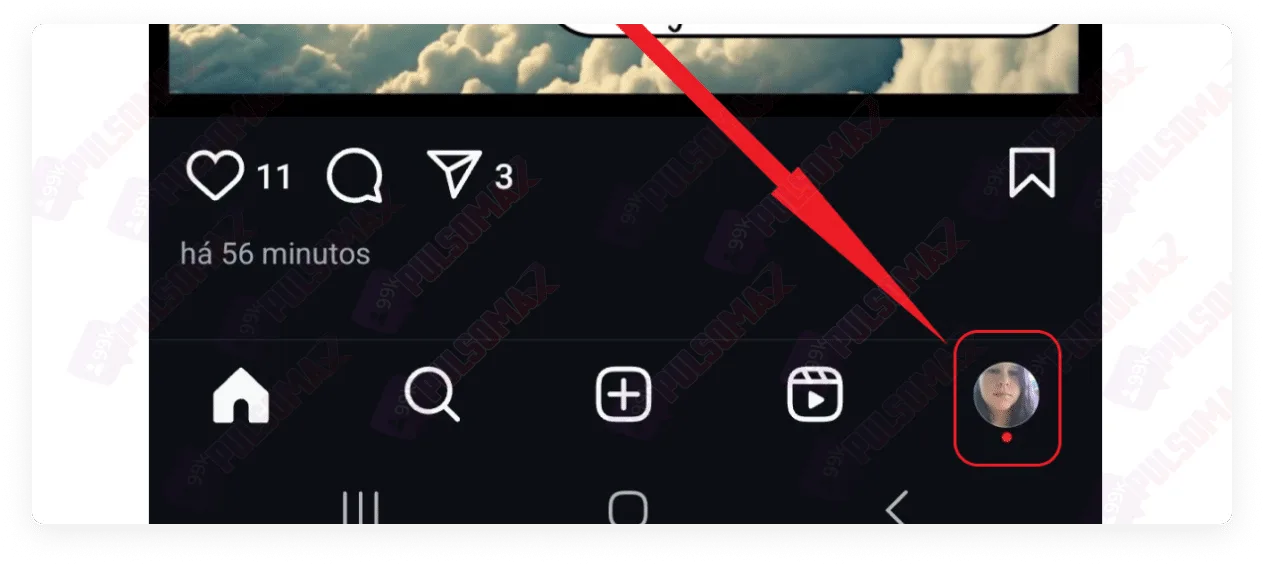
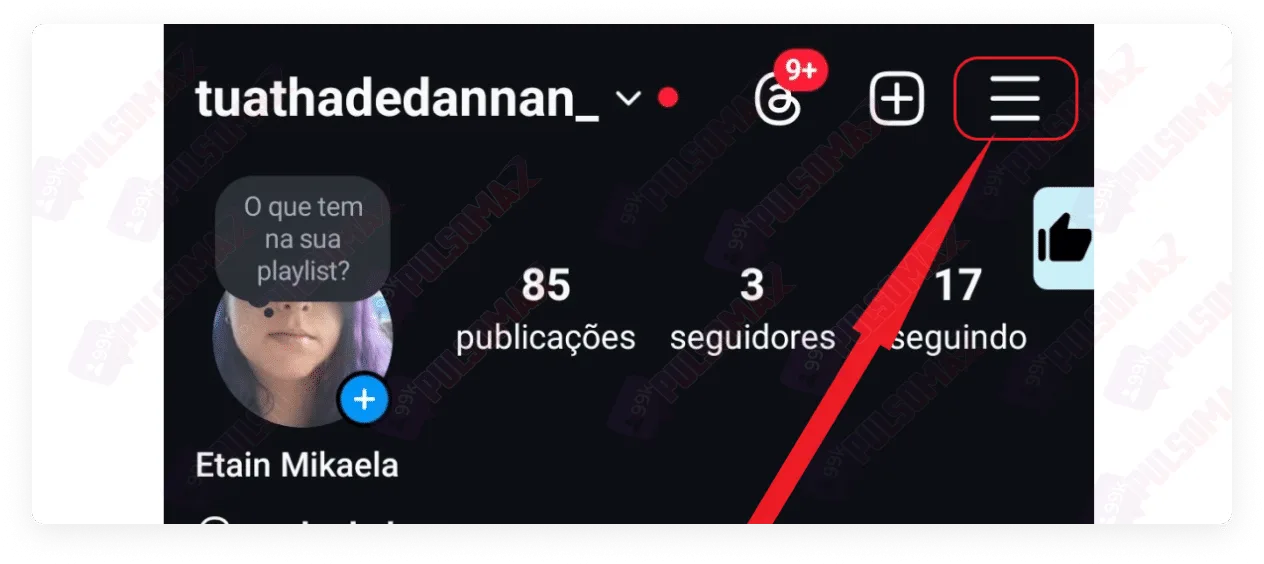
Learning how to turn off your online status on Instagram is simpler than most users imagine! To begin, first open the Instagram app on your Android or iOS phone. Then, tap on your profile picture thumbnail in the bottom right corner of the screen. Next, click the button with the 3 lines in the upper left corner, as shown in the image below. Now, tap on messages and replies to the story . Next, click on "show activity status ," located just below "who can see when you're online." On the next screen, disable the "show activity status" button. Done! You will no longer appear online on Instagram, not even in your stories. But pay attention: by disabling this option, you will also no longer be able to see the online status of other accounts, nor will you be able to see the "last seen" status of other users, showing when they last logged in.
How to remove your online status from Instagram on your computer, step by step.
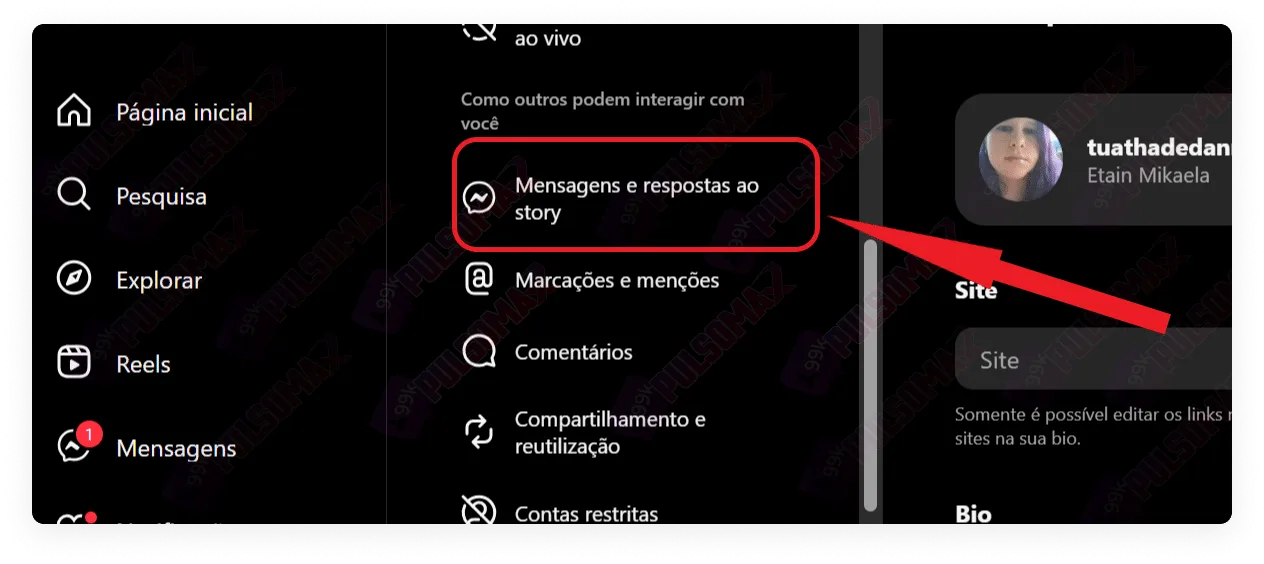
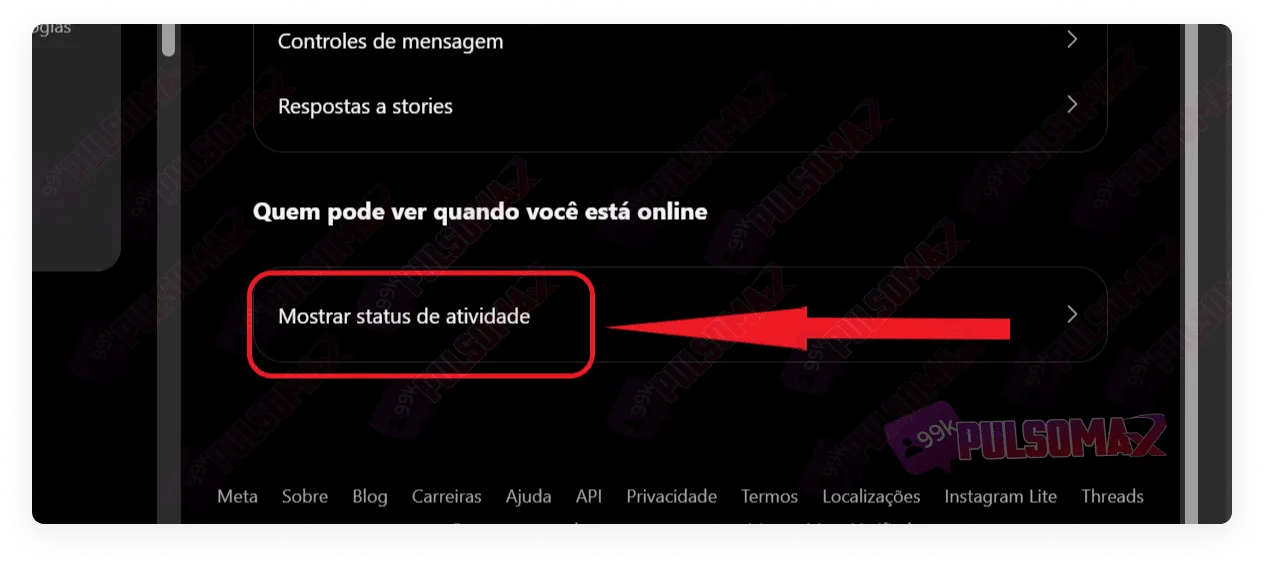
Many people also access Instagram via computer. In these cases, if Instagram's online status is active, other users who follow you or with whom you've chatted via direct message will also be able to see if you're online. Therefore, if you don't want this to happen, check out the step-by-step instructions below and learn how to turn off your online status on Instagram using a computer. First, log into your Instagram account via Instagram Web and tap on "More" in the bottom left corner of the screen. Among the options that will appear in the menu, tap on settings . Now, click on messages and replies to the story . Then, tap on "show activity status ". On the next screen, uncheck the "show activity status" button. Done! You've deactivated your online status on Instagram from your computer!
Can anyone see that I'm online on Instagram?
No! Only the people you follow on Instagram and your Direct messages can see that you're online, or the time since your last login. Therefore, don't worry about figuring out how to remove your online status from Instagram if your concern is other people, like accounts you don't follow. They can't see your online status.
Why does my Instagram keep coming online by itself?
Many users want to know how to remove their online status from Instagram for a different reason: they notice that their Instagram is showing their status as "on ," even when they are not using the social network. This happens because the app continues to run in the background on the smartphone after the app is closed. Therefore, Instagram continues to show that the user is online, which can lead other people to contact them, thinking that the person is available to chat and interact, when they are not.
If I turn off my online status on Instagram, will I be able to see other people online?
No! If you've learned how to turn off your online status on Instagram and decided to hide it , then you will no longer be able to see if other users are online on the social network. This is true even if these users are accounts you follow or people you chat with in direct messages. Instagram is a platform that offers many features to users, but it also cares about good relations between everyone. Therefore, when it comes to functions such as hiding your online status or hiding likes on Instagram , if the user chooses to activate these functions, they will also not be able to see the same details on other people's accounts. It's also worth mentioning that it's not possible to turn off your online status on Instagram and keep your last seen status. Because both are part of the user's activity status on the social network, and by disabling the first, the second is also automatically disabled.
Can other people see my profile if my online status is disabled?
Yes! Learning how to remove your online status from Instagram doesn't prevent other people from finding your profile normally on Instagram, regardless of whether your account is public or private. Even restricting access on Instagram doesn't prevent users from finding your profile on the social network. For people who don't want a specific user to be able to find their Instagram profile, there's only one solution: block that user. For everyone else, it will still be possible to find your profile on the social network.
How long after turning off my Instagram account will I appear offline again?
An important detail about how to remove your online status from Instagram is that the effect isn't immediate . The social network has a delay of approximately 10 minutes. This means it will take about 10 minutes for you to appear offline to other people. Similarly, you can't 100% trust the "last seen" time you see on other people's accounts. It's quite likely that those people left Instagram longer ago than the estimate shown by the social network.
Will my contacts know that I turned off my online status on Instagram?
No! Your contacts won't know that you learned how to remove your online status from Instagram and did it. The social network doesn't notify followers or accounts you follow about changes made to your own account, especially those related to privacy protection. Therefore, if you're someone who invests in growing your profile, publishes content regularly, buys Instagram followers , and is concerned about planning your actions on the social network, you don't need to worry. After all, nobody will know you did it. In fact, if you continue to publish content regularly, your followers will probably think it's just a coincidence that you're not online when they are. Similarly, if you're a regular user who just wants to avoid problems with some people you follow, or who follow your profile, you can rest easy. However, don't forget: people will still know you're on Instagram if you view their Direct messages or reply when they're online. Therefore, this could reveal to your contacts that you learned how to remove your online status from Instagram.
How can I tell if someone has turned off their online status on Instagram?
There's no direct way to find out if someone has turned off their online status on Instagram . After all, Instagram protects the privacy of all users, and each person has the right to configure their profile as they prefer, as we've explained before on our blog. But, if you want to investigate if someone has turned off their online status, the only way to do this is to send a direct message and wait. If the person replies or views it, even with their status showing them as offline, it's because they've figured out how to turn off their online status on Instagram and did it! Now, if you go offline while you wait, and then come back to see if the message has been seen, this may not work. Because you won't be able to be sure that the user wasn't online previously. The only indication of this is if their "last seen" status also disappears. So, if you want to test it, it's best to wait online! How about downloading your favorite Instagram content for free from any public post? Access and check out our essential Instagram download tools !
I can't turn off my online status on Instagram.
As you learned from our step-by-step guide, figuring out how to remove your online status from Instagram is quite simple. Therefore, for most people, the procedure is quick and doesn't usually cause any problems. However, if you can't remove your online status, first check if the app is up to date. If you don't know how to do this, take a look at our other post: how to update Instagram step by step . If your app is up to date, or updating the app doesn't solve the problem, the only way to find out what's happening is to contact Instagram support. To do this, go to the help section in the Instagram app's privacy settings, and then click on report a problem . To see other answers to specific questions about the social network, visit the Instagram Help Center .
Is it possible to reactivate Instagram's online status?
Yes! You can reactivate your online status on Instagram at any time after turning off your online status on your profile. Simply return to the same section in "show activity status" and reactivate this function. To do this, you can use the same step-by-step instructions from this post, both on your mobile phone and on your computer. We've reached the end of this article! So, did you learn how to turn off your online status on Instagram, or do you still have any questions? Comment and share your experience!Thank you for reading this far. Continue browsing our blog and check out other useful tips about Instagram, thoughtfully prepared for you!
 Instagram
  by
by 
 10 min read

 Next, click the button with the 3 lines in the upper left corner, as shown in the image below.
  Now, tap on messages and replies to the story .
 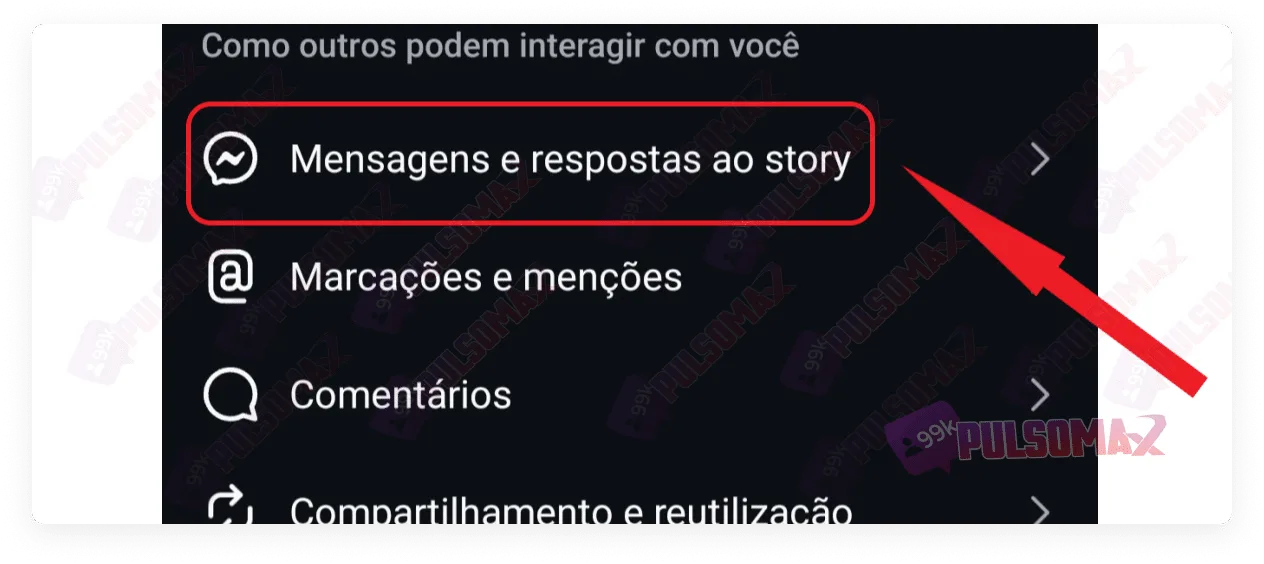 Next, click on "show activity status ," located just below "who can see when you're online."
 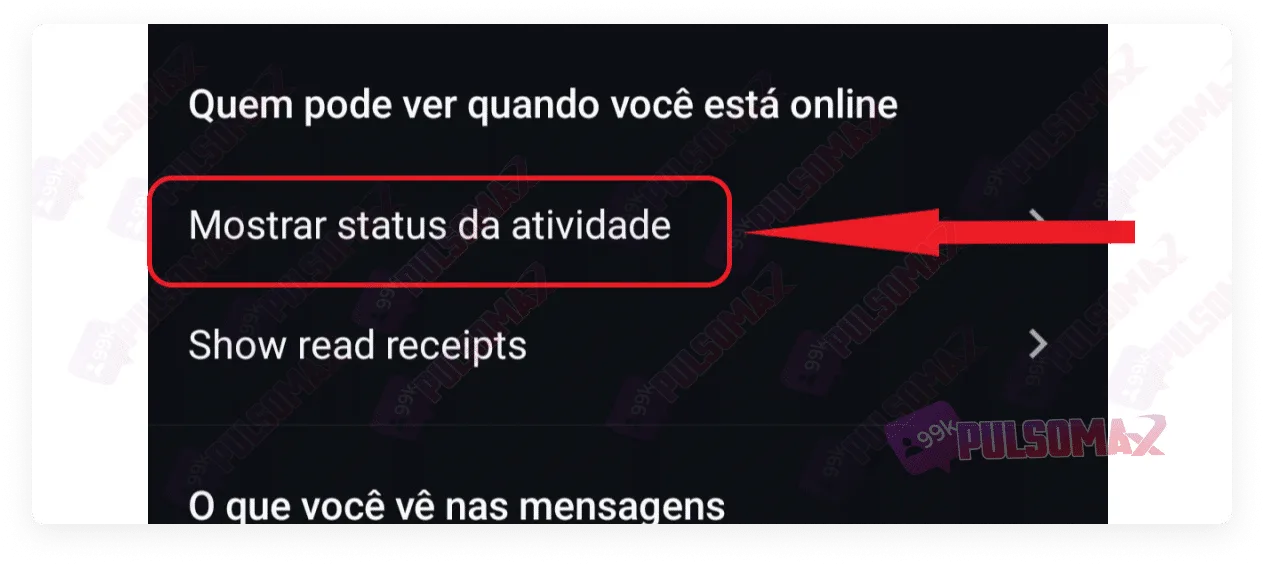 On the next screen, disable the "show activity status" button.
 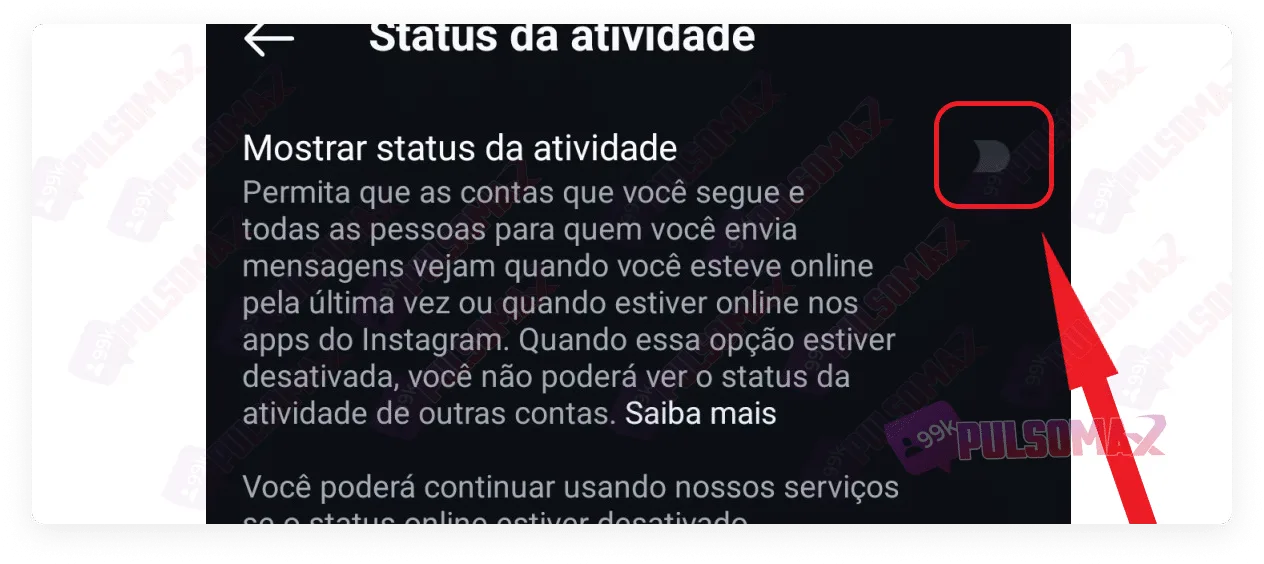 Done! You will no longer appear online on Instagram, not even in your stories. But pay attention: by disabling this option, you will also no longer be able to see the online status of other accounts, nor will you be able to see the "last seen" status of other users, showing when they last logged in.
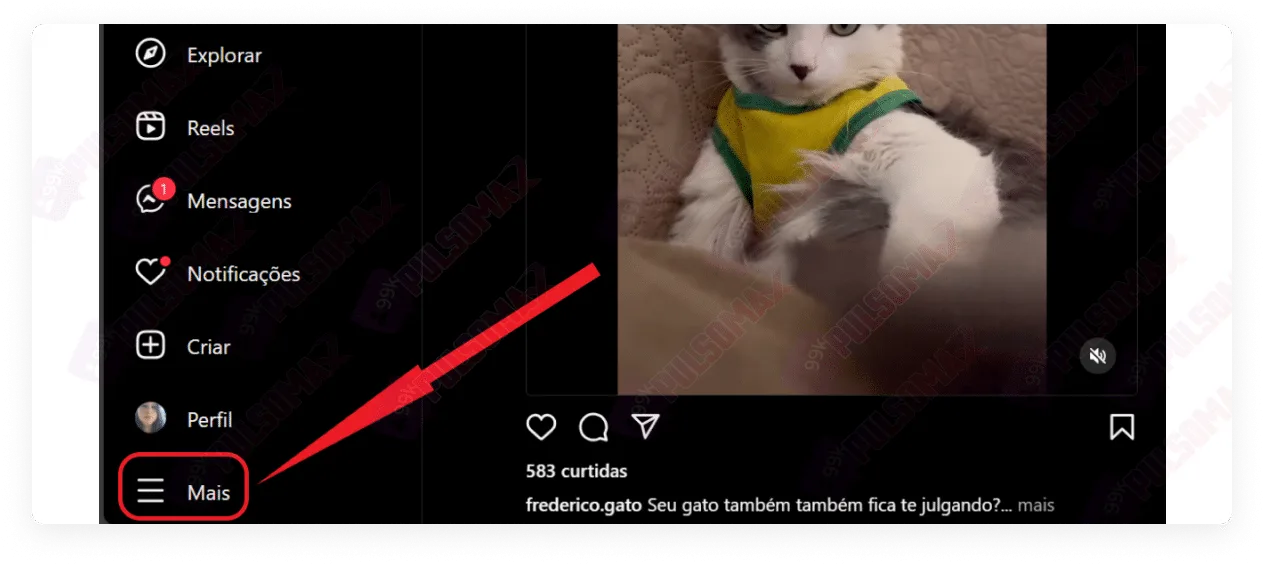 Among the options that will appear in the menu, tap on settings . Now, click on messages and replies to the story .
  Then, tap on "show activity status ".
  On the next screen, uncheck the "show activity status" button.
 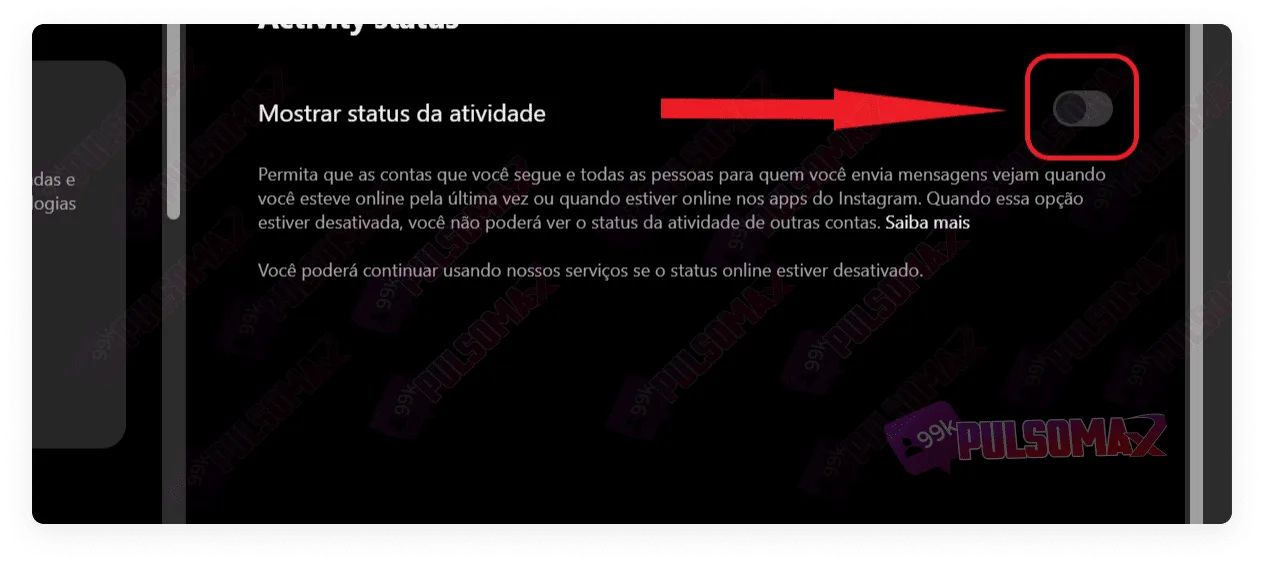 Done! You've deactivated your online status on Instagram from your computer!