Instagram
  by
by 
 11 min read
![Nao consigo seguir ninguém no Instagram [Resolvido]](https://pulsomax.com.br/assets/uploads/blog_ai/wordpress-featured-nao-consigo-seguir-ninguem-no-instagram-resolvido-ffb74d6313.webp)
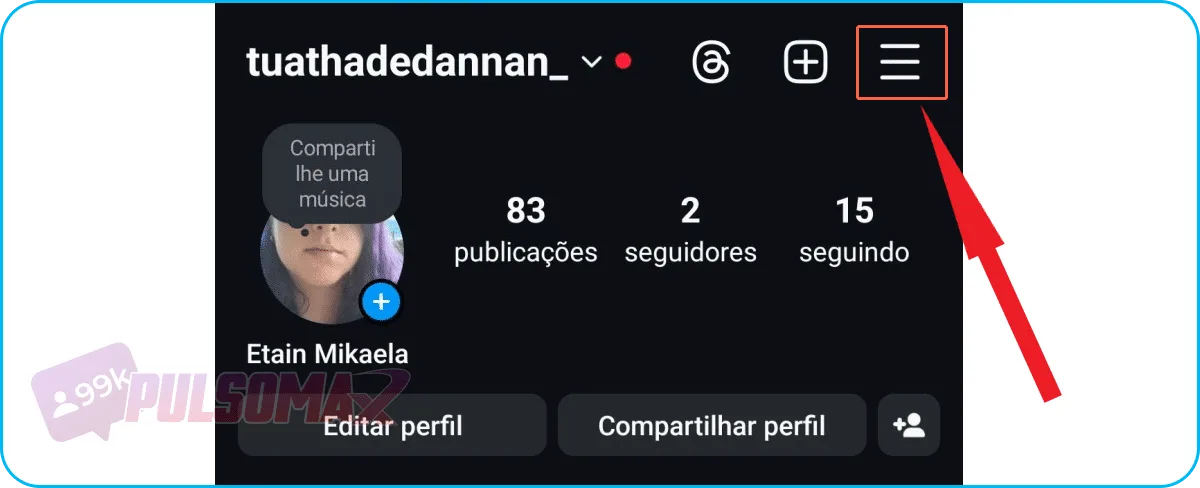
Some people have been complaining, saying " I can't follow anyone on Instagram ," even when other people follow their account first. And, of course, the owners of these profiles are very worried, after all, the problem makes no sense to them. Everything seems to be working perfectly for other users of the social network, so what's wrong with their account? Therefore, the complaint "I can't follow anyone on Instagram" catches many users by surprise. One day they are simply following accounts normally, the next, this is no longer possible. Many of these people even invest in Instagram, buy Instagram followers , publish quality content, and are always there, interacting with their audience. If this has happened to you, and you don't know what to do to solve the problem, keep reading! Because we have prepared this complete guide on how to solve the "I can't follow anyone on Instagram" problem quickly, and with screenshots!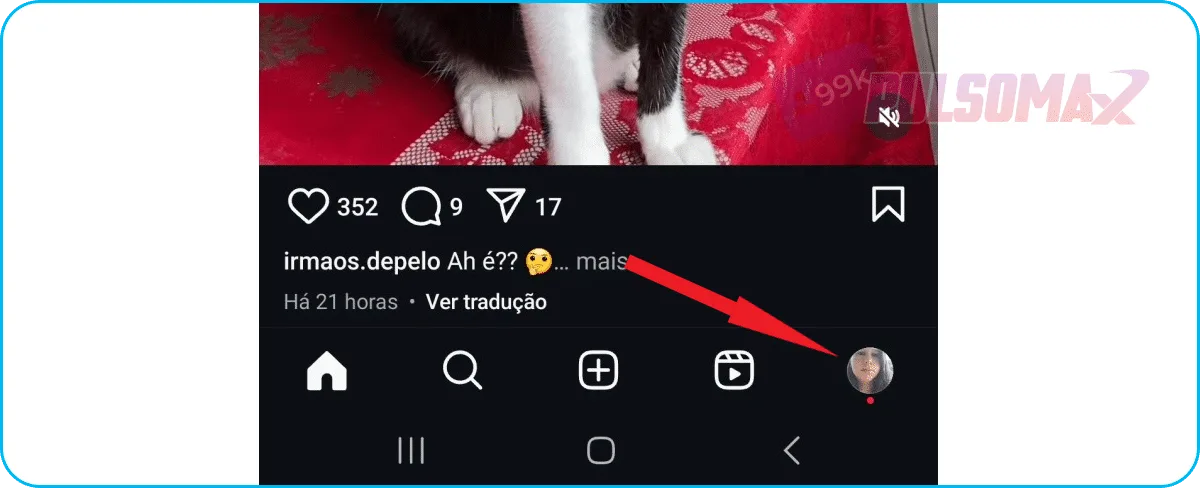 Next, tap the 3-line button in the upper left corner.
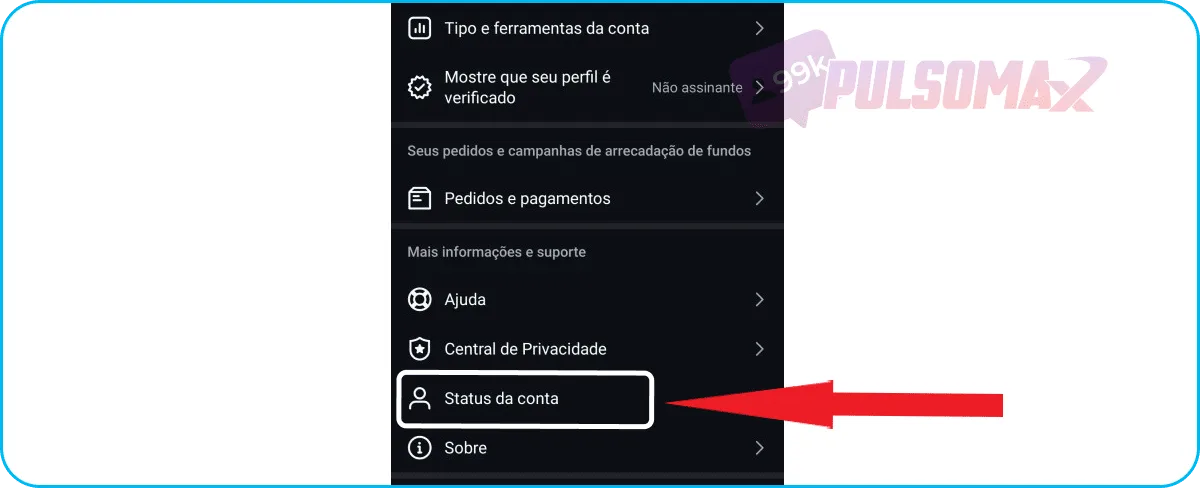
  Now, scroll down until you find the account status option and click on it.
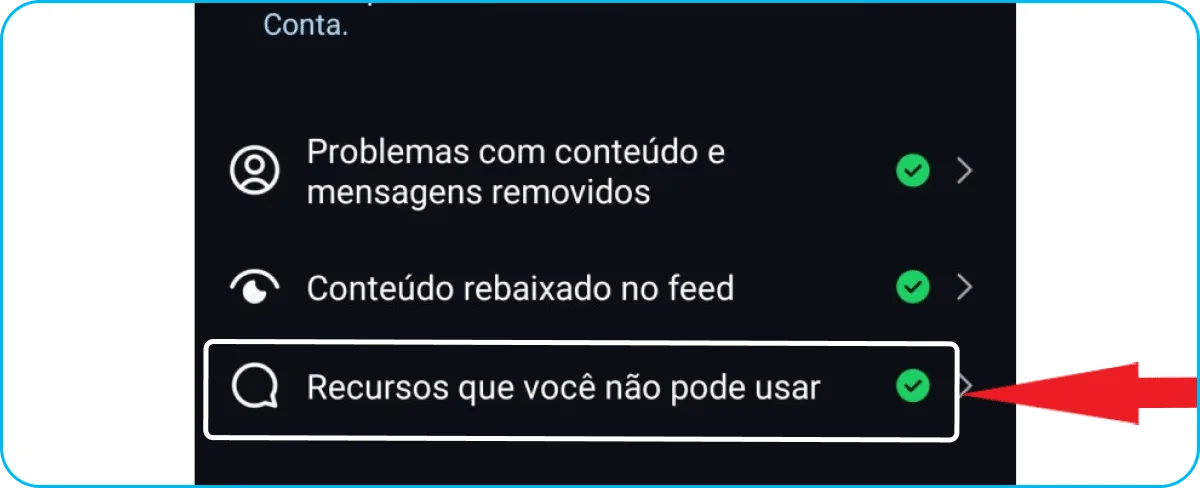
  Check the option for features you cannot use.
  If your account is blocked, Instagram will display in large letters that your account has been restricted, and will inform you below which features have been disabled from your profile and for how long . Now, if the account is normal, you will see a message like the one in the next image.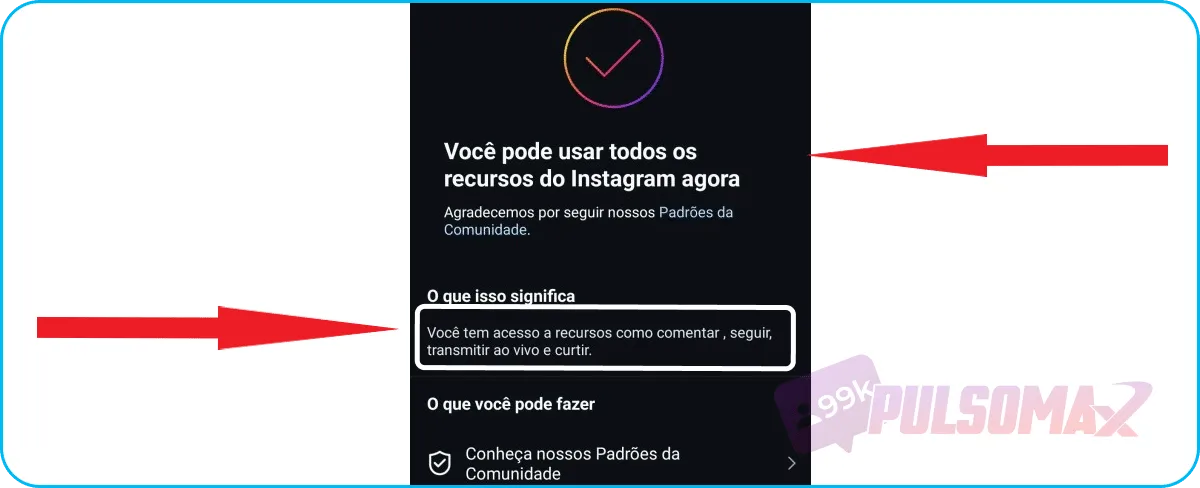
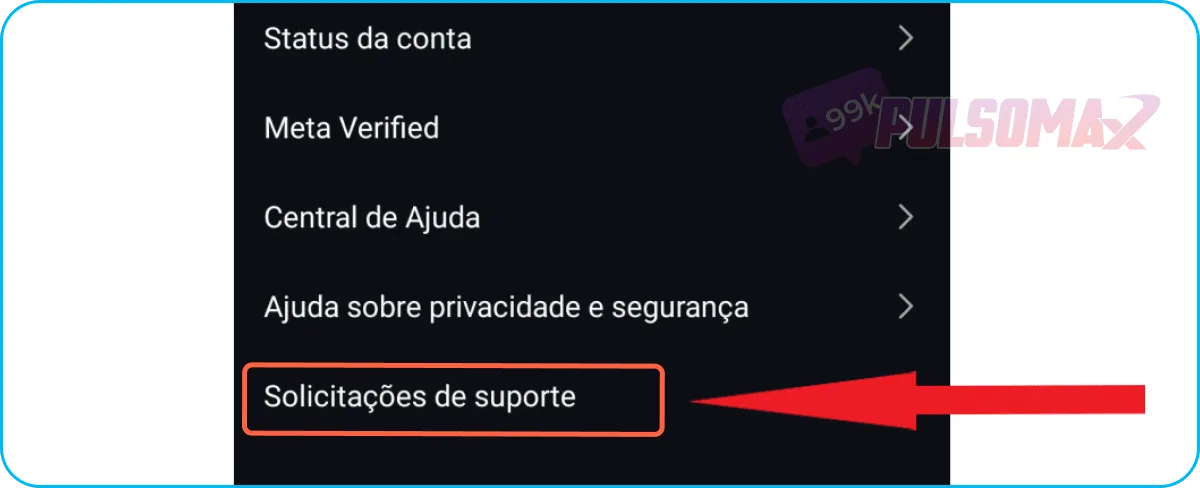
 Next, click on support requests .
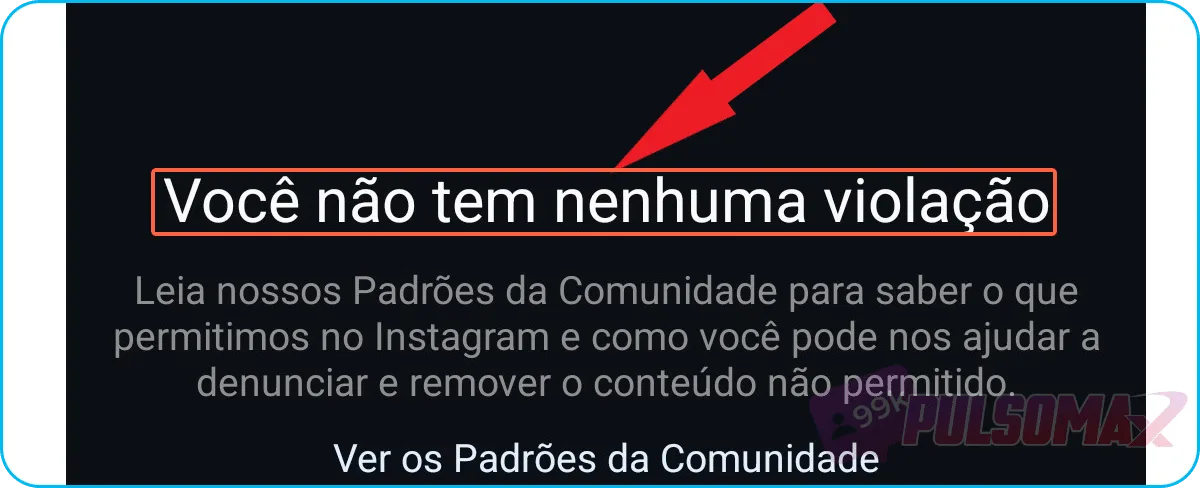
  Now, tap on violations . If your account has no violations, you will see a screen like the next screenshot.
  Now, if your account is blocked due to violations, you will see a notification from Instagram about the blocking decision. You will also see a reference number from the Instagram Oversight Board , which consists of the letters IG followed by 8 numbers. For example: IG98218900 (fictitious number). Click on it to fill in the necessary information and file your appeal. Once finished, you must wait for Instagram to review your case. You may even be asked to send photos of yourself and photos of your documents to prove that the account belongs to you. Important: if this number does not appear, there is nothing to be done. Because your case has been judged as not eligible for appeal. This can happen if the violation is very serious or if you have repeatedly violated Instagram's rules.
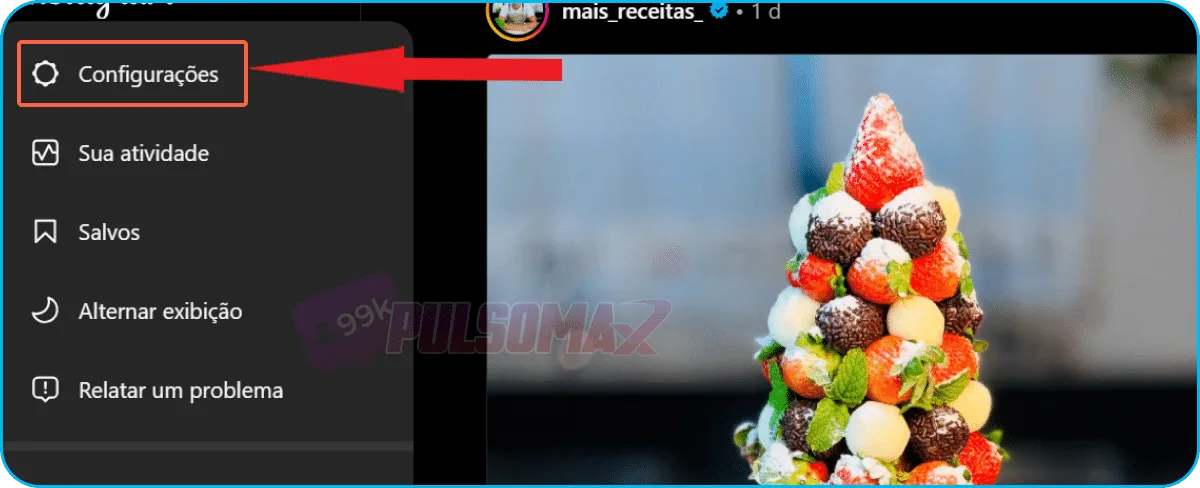
 Now, go to settings.
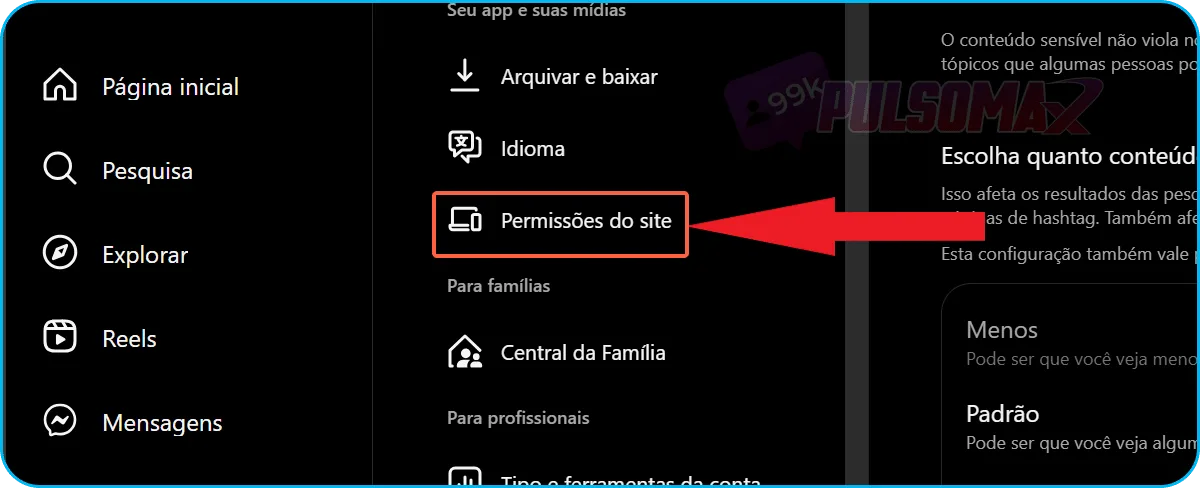
  Next, scroll down the page until you find the site permissions.
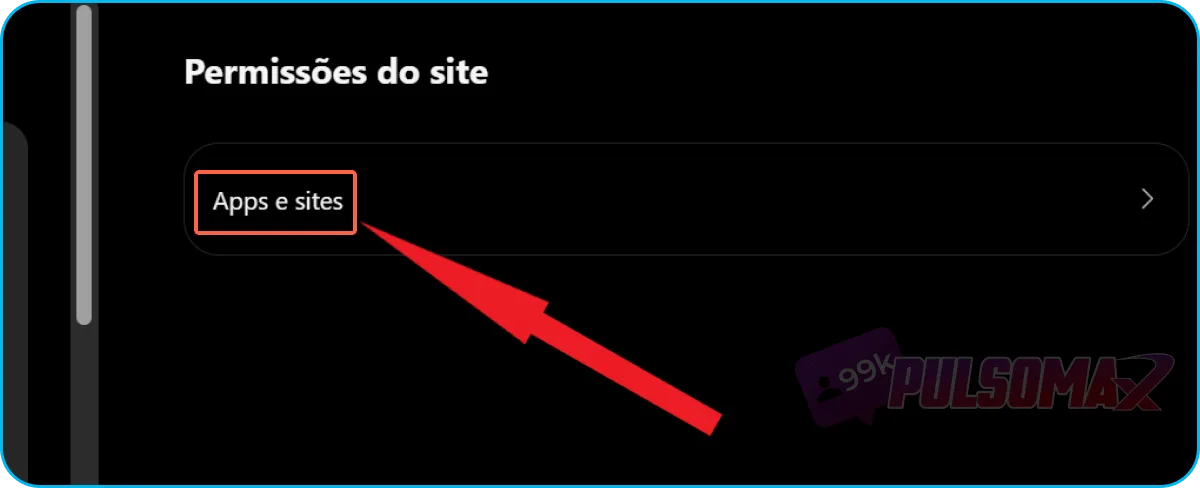
  Click on apps and websites .
  Okay. If you've authorized any app to access your Instagram, it will appear in a list on the next screen. Otherwise, you'll see an image like the screenshot below.
 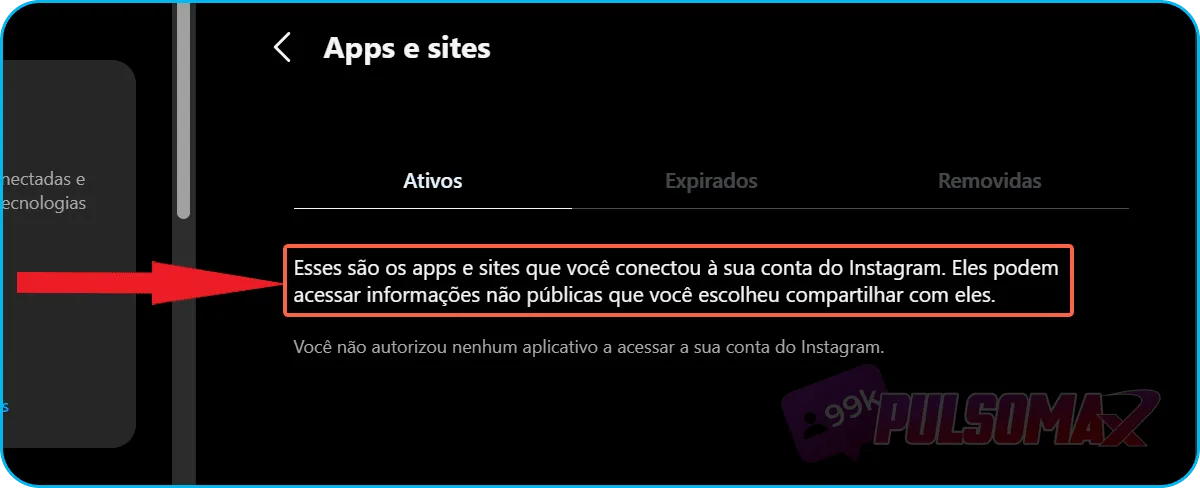 If you have authorized third-party applications to access your account, you will need to disable them one by one from the list that will appear. To do this, click on "revoke access" for each app you want to unlink from your Instagram. This will not cause Instagram to remove any existing restrictions on your account, but it will prevent your account from suffering more severe penalties for this reason. And, if no blocks have been placed on your profile, removing third-party applications may prevent this from happening.
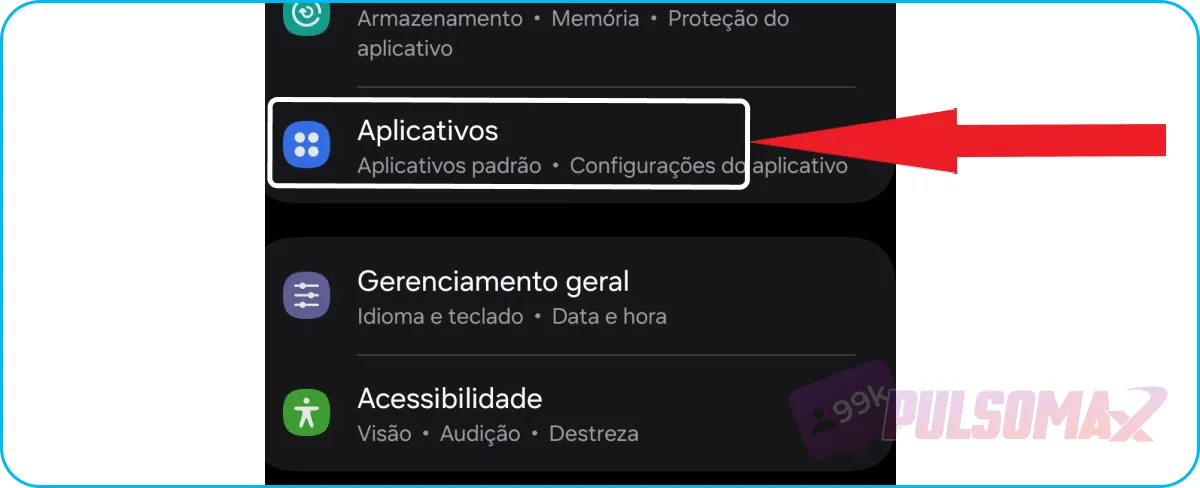
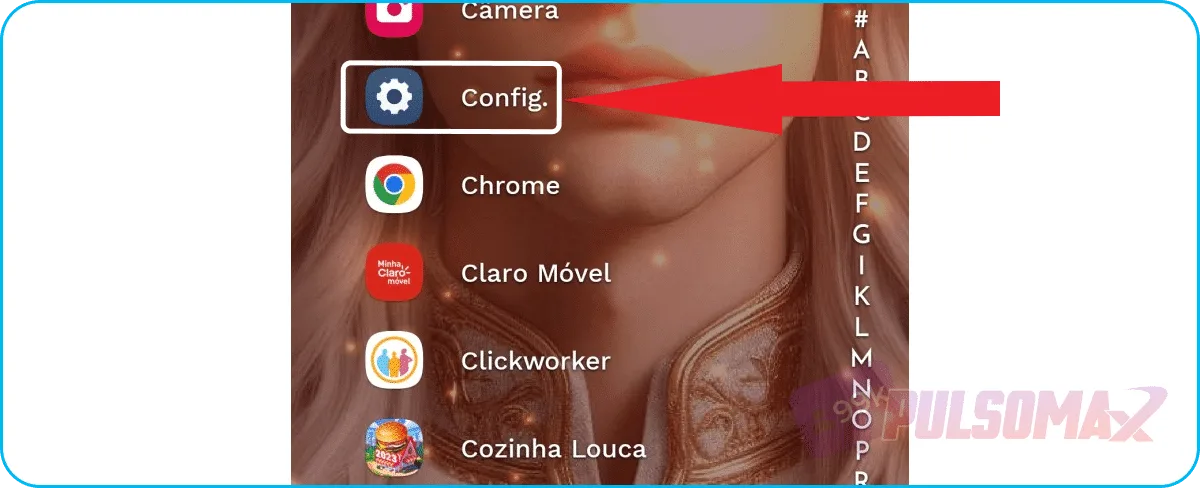 Next, look for the applications function , as shown in the next image.
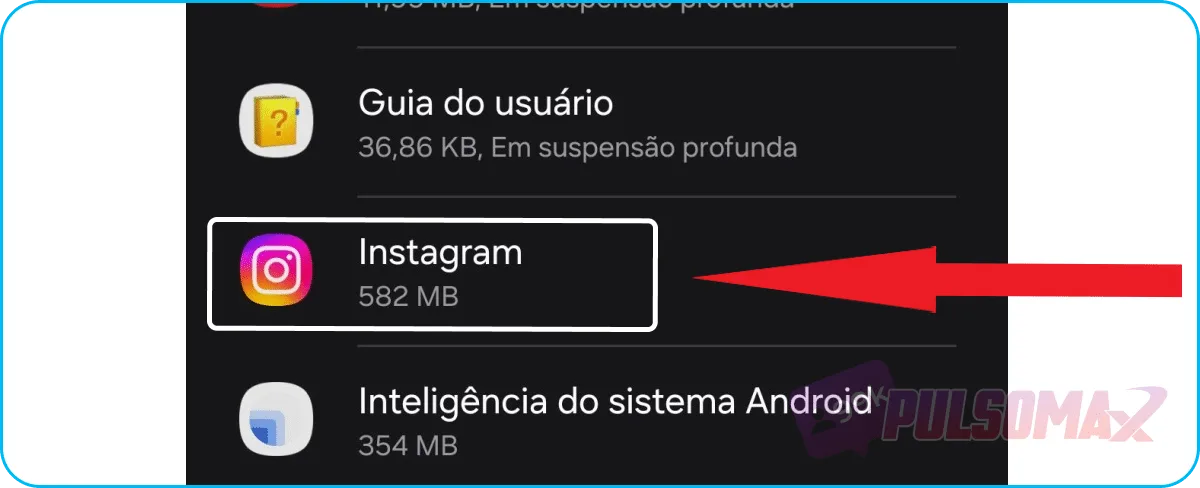
  Next, scroll down until you find the Instagram icon and click on it to access the app's settings.
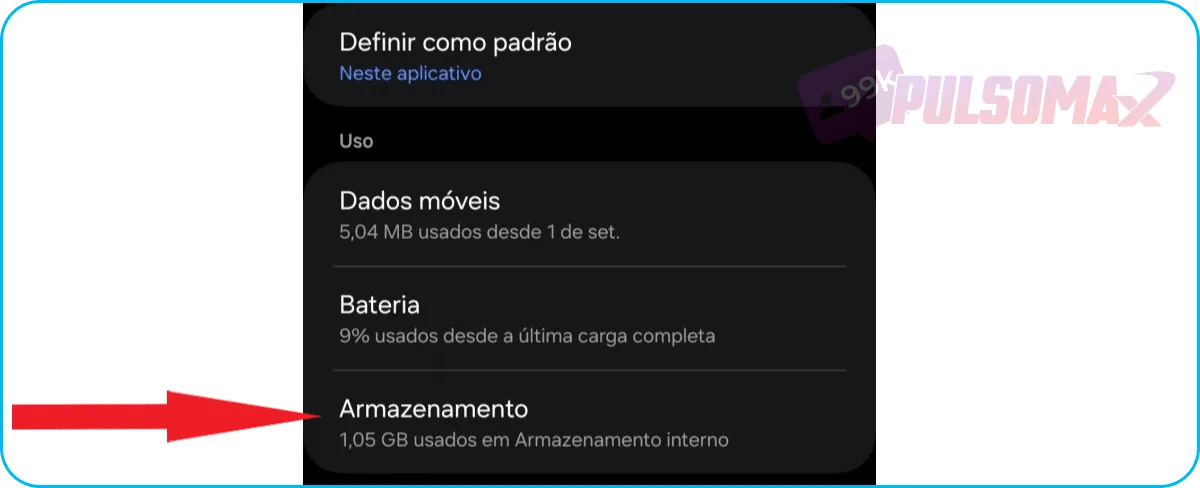
  Now, go into storage.
  In the bottom right corner, tap on clear cache . Be careful not to clear your data, only the cache, or you will erase all your app information and have to log in again, as if it were the first time accessing the app. See the image below.
 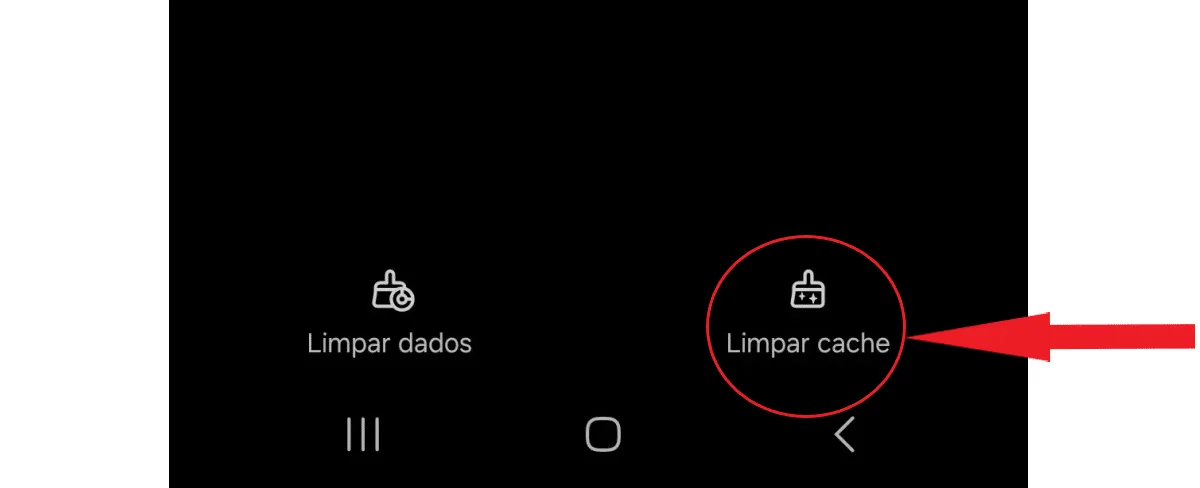 Okay, now your cache is cleared! Close the Instagram app and open it again. Try following someone; if you can, that was the problem.
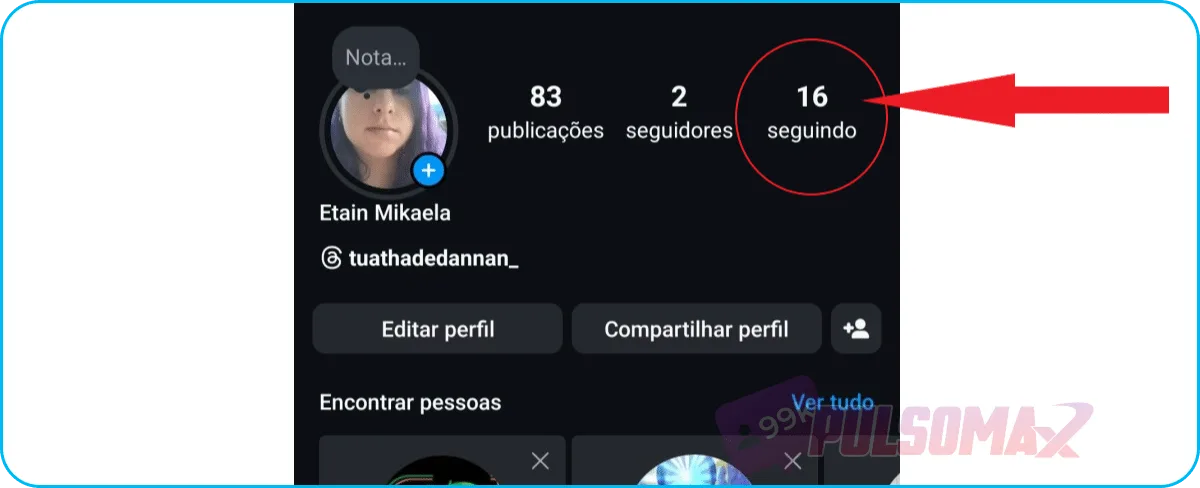 If you've reached your limit, you'll need to unfollow someone to be able to follow someone else. How about downloading your Instagram content, even if it's from other accounts? Check out our essential Instagram download tools and download music, audio, videos, and images for free. You only need the post link!
I can't follow anyone on Instagram, why is that?
If you're having trouble "I can't follow anyone on Instagram," it's important to know that there are several reasons why this might be the case, as you can see below.You have reached the maximum number of accounts to follow.
The most common reason, and probably the explanation for many of these cases, is that the user has reached the maximum limit of accounts they can follow on Instagram: 7500 people. Instagram limits the number of accounts each person can follow, and the social network's explanation for this approach is primarily security-related, mainly to prevent spam. So, when someone reaches the limit and tries to follow new accounts, the following message is displayed: "We restrict certain activities to protect our community.""You can't follow accounts right now."
This error message may have the same meaning as the previous item: you already follow 7500 accounts on Instagram and cannot follow anyone else. However, this error may also mean that you have been blocked on Instagram or have reached the maximum number of accounts you can follow per day. Instagram may block your account for several reasons. These include:- Spamming other profiles;
- Insults directed at other users in comments or direct messages;
- Violation of the community guidelines of Meta, the company that owns Facebook, Instagram, and WhatsApp;
- You performed the same action repeatedly in a short period of time, and the platform interpreted this as spam. For example, you followed many accounts in a few minutes.
You have reached the limit of 500 accounts to follow per day.
On average, it's not possible to follow more than 500 accounts per day on Instagram. This is because this number can vary slightly. For example, older users may follow more accounts per day than newer users on the platform. This also applies to users with more engagement on their profiles. Despite this, there is a limit to the number of accounts you can follow per minute without the practice of successively following multiple profiles being interpreted as spam. The limit is approximately 30 accounts every 5 minutes. If you exceed this limit, your ability to follow other profiles may be blocked for 24 hours. So, if you're complaining "I can't follow anyone on Instagram" after following many profiles at once on the social network, this is probably the reason. Lost your Instagram messages? Also read: where are deleted Instagram messages located .The cache is full.
The cache is a folder within the Instagram app that stores temporary files and copies of pages from the social network. If you're having the problem "I can't follow anyone on Instagram," and the app's cache is full, this is very likely the reason. To solve it, you need to clear the cache, open and close the app again, then try following someone to see if it worked.I can't follow anyone on Instagram because I've been blocked.
The complaint "I can't follow anyone on Instagram because I've been blocked" can have several explanations. There are various behaviors on the social network that violate community guidelines, and you'll only know the real reason when Instagram informs you. But, among the main causes of account blocking, we can mention:- Sharing sensitive content from other accounts without authorization;
- Sharing content containing nudity;
- Sharing pornography;
- Making comments or posting content that is classified as: xenophobia, racism, religious intolerance, incitement to crime, incitement to violence, or hate speech;
- Use of third-party applications;
- Recurring spam behavior (sending repeated comments on different profiles, liking many posts in a short period of time, etc.);
- Sharing fake news and spreading misinformation;
- Switching your account profile from personal to business account multiple times within a short period.
How long does the Instagram block last?
The duration of an Instagram account ban depends on the severity of the violations. However, it typically ranges from 24 to 72 hours for temporary bans. In some cases, especially when the account has violated the guidelines before, the ban can last up to 7 days. A so-called shadowban occurs when a user's actions are restricted on the social network, but the platform doesn't inform them. This can happen due to spam, using very similar hashtags (which also constitutes spam), using bots and other forms of automation, among other less serious actions. Now, in truly serious or very recurrent cases, the ban can be permanent, removing the user's account from the platform.I can't follow anyone on Instagram, how do I fix it?
The question of "I can't follow anyone on Instagram" and how to solve the problem of Instagram closing on its own is a concern for users, until they realize there's another solution. So, now that you know the possible reasons why you might be restricted from following accounts on Instagram, check out the solutions for each one!Check your account status to find out if it has been blocked by Instagram.
If your account is blocked by Instagram, then you won't be able to follow anyone, as we explained. To find out if this is the problem, you can check your account status by following these steps. First, go to your Instagram profile on your Android or iOS app, and tap on your profile picture thumbnail in the bottom right corner. Next, tap the 3-line button in the upper left corner. Now, scroll down until you find the account status option and click on it. Check the option for features you cannot use. If your account is blocked, Instagram will display in large letters that your account has been restricted, and will inform you below which features have been disabled from your profile and for how long . Now, if the account is normal, you will see a message like the one in the next image. What should I do if my account gets blocked?
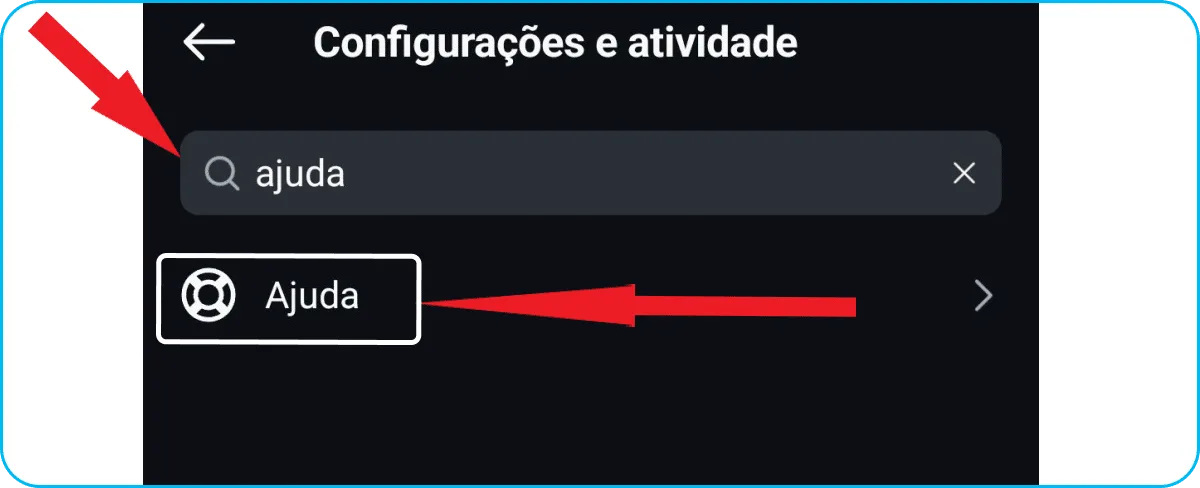
If you find that your account has been blocked, and that this is the reason for your complaint about not being able to follow anyone on Instagram, you can submit an appeal through a support form available on Instagram. To do this, first log into your account, tap again on your profile picture thumbnail in the bottom right corner, then on the 3-line button, as in the previous step-by-step instructions, then type "help" in the search bar, as in the image below, and click the help button . Next, click on support requests . Now, tap on violations . If your account has no violations, you will see a screen like the next screenshot. Now, if your account is blocked due to violations, you will see a notification from Instagram about the blocking decision. You will also see a reference number from the Instagram Oversight Board , which consists of the letters IG followed by 8 numbers. For example: IG98218900 (fictitious number). Click on it to fill in the necessary information and file your appeal. Once finished, you must wait for Instagram to review your case. You may even be asked to send photos of yourself and photos of your documents to prove that the account belongs to you. Important: if this number does not appear, there is nothing to be done. Because your case has been judged as not eligible for appeal. This can happen if the violation is very serious or if you have repeatedly violated Instagram's rules.Remove third-party apps from Instagram.
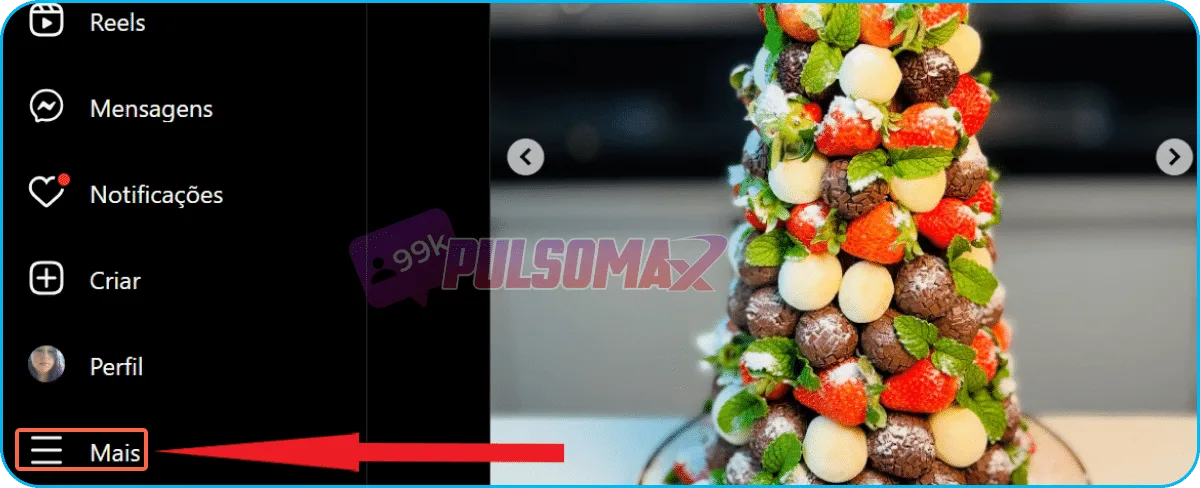
Removing access to third-party applications can also solve the " I can't follow anyone on Instagram" problem. To do this: Access Instagram Web through your PC's browser and log in, then click the plus button, as shown in the image below. Now, go to settings. Next, scroll down the page until you find the site permissions. Click on apps and websites . Okay. If you've authorized any app to access your Instagram, it will appear in a list on the next screen. Otherwise, you'll see an image like the screenshot below. If you have authorized third-party applications to access your account, you will need to disable them one by one from the list that will appear. To do this, click on "revoke access" for each app you want to unlink from your Instagram. This will not cause Instagram to remove any existing restrictions on your account, but it will prevent your account from suffering more severe penalties for this reason. And, if no blocks have been placed on your profile, removing third-party applications may prevent this from happening.Clear the app cache.
Another problem that can cause the question "I can't follow anyone on Instagram, how to solve it?" is the app's cache. If the cache is full or has a lot of accumulated information, it needs to be cleared, and if that's the problem, you'll be able to follow people normally on Instagram again. To do this, first go to your device's settings by clicking the gear icon. Next, look for the applications function , as shown in the next image. Next, scroll down until you find the Instagram icon and click on it to access the app's settings. Now, go into storage. In the bottom right corner, tap on clear cache . Be careful not to clear your data, only the cache, or you will erase all your app information and have to log in again, as if it were the first time accessing the app. See the image below. Okay, now your cache is cleared! Close the Instagram app and open it again. Try following someone; if you can, that was the problem.Check the number of accounts you follow.
To see if you've reached the 7500-account limit for following on Instagram, go to your profile by clicking on your profile picture thumbnail in the bottom left corner, then check the number that appears under "Following ," as in the next image. If you've reached your limit, you'll need to unfollow someone to be able to follow someone else. How about downloading your Instagram content, even if it's from other accounts? Check out our essential Instagram download tools and download music, audio, videos, and images for free. You only need the post link!