Have you heard of Instagram's invisible space , but don't know what it is or how to use it? Some aspects of using social media correctly go beyond the basics and the settings the platform itself provides. For example, to solve some app problems, you need to know how to update Instagram , something that goes beyond the internal functions of Instagram. In this context, buying real Instagram followers , investing in good content with attractive photos and videos, is part of the daily routine of digital influencers, and even companies present on Instagram. But for all this to be successful, you also need to know how to properly configure the posts made on the network. This is precisely where Instagram's invisible space comes in . So, if you want to know what this space is and how to use it to make your posts more attractive, read this article to the end!
So, what exactly is Instagram's invisible space?
Have you ever seen a post on Instagram with blank lines ? Well, those blank lines are Instagram's invisible spacing! This setting is also used by users on other social media platforms where it's not possible to skip lines in the traditional way. The whole idea behind invisible spacing is simple: people use invisible characters to fill the space and ensure adequate spacing between words or phrases in Instagram post captions. This is necessary because the photo and video social network was originally designed with the idea that captions forInstagram feed posts and other platforms should be simple. However, to improve the online reach of each post, many users utilize Instagram's invisible spacing, ensuring their posts are more pleasant to read, look at, and understand for other users. This also improves post optimization, making them easier to find and more favored by the platform's algorithm!
How to use Instagram's invisible space?
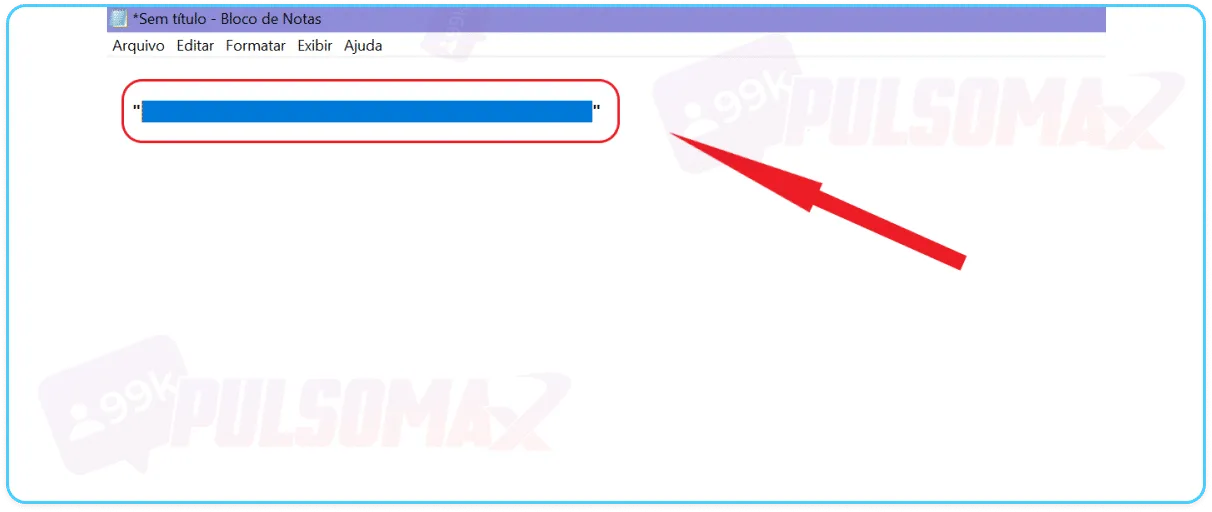
Learning how to use Instagram's invisible spacing is quite simple. First, you need to decide what your post will be about and the type of caption you'll use. Then, you determine how much invisible spacing you need to separate words or sentences in your post. After that, simply open your notepad, if you're on a computer, or even the notes app on your phone, and write anything, add several spaces, as many as needed, and copy that space! Tip: by default, most devices come with one of these note-taking apps installed, but you can download one for free from the Play Store or Apple Store if needed, such as Keep for Android or Notes on iOS.
Look at the image below:
So, paste this space into your post and you're done! You'll have an invisible Instagram space! Of course, the space can be larger or smaller, as you need. It's up to you!
Where can I use the Instagram invisible space?
Well, you can use the invisible Instagram space anywhere you can type and create content! The most common use, of course, is in the captions of photo and video posts. But, if you prefer, you can use this space in your Instagram bio, and even in your Direct chat conversations! The process is always the same: create the space in a notepad or notes app, copy and paste it where you want to skip a line/separate the content.
Why use Instagram's invisible space?
Anyone who invests their time on Instagram knows that organic growth requires time and dedication, and above all, good content! Of course, there are strategies that accelerate this process, such as buying Instagram likes , comments, and followers. But without quality and well-optimized content, growth is not sustained. This is precisely where the importance of Instagram's invisible space and its correct use comes in. Because, despite being something simple, this invisible feature is an important part of the SEO of publications. Yes, search engine optimization (SEO) also applies to social media! After all, SEO is not just a technical issue. It's about how the text is read, how fluid and organized it is, and above all, whether the content is clean and clear for the reader! And Instagram's invisible space helps create a more fluid text, with spaces and blank lines in the right places, facilitating reading and improving comprehension of the content. But there's another point here: nowadays, it's very difficult to capture people's attention. And almost no one likes to read long texts on social media. Instagram itself was designed so that the practice of creating long, drawn-out texts wouldn't be part of it. And this invisible space helps to "break up" the text into blocks, which encourages reading the entire content when it's longer.
Is it worth using the invisible space in my Instagram bio?
Yes, absolutely! As long as you do it in a planned way and strategically insert the invisible Instagram bio, according to your marketing strategy for profile growth . After all, the Instagram bio is a very important space for content creators and businesses. Therefore, you need to think about well-structured text that flows smoothly and doesn't have jumbled phrases or words that make it difficult to read. A messy, poorly written, and confusing bio is a very amateurish way to present yourself to your audience, indicating a lack of creativity and even a lack of care in setting up your profile. To understand better, consider this: if someone handed you a confusing, poorly made, and even sloppy business card, would you contact that person? Would you hire their services or buy their product? Probably your answer is no. For your followers and future followers on Instagram, the premise is the same, and your bio is your business card! And speaking of your bio, if you need inspiration to create an attractive bio for your account, read our post "367 Phrases for Instagram Bios" and choose yours!
Invisible spaces on Instagram Direct
If you know what Instagram Direct is and how it works, you probably understand that this channel is an excellent way to do marketing on the social network. Therefore, through Direct, it's possible to gain new partnerships and even new clients, which elevates the importance of this communication channel to something beyond making friends and keeping in touch with friends on the social network. To best use the invisible space on Instagram in your marketing, sales, and loyalty campaigns on Direct, or in any more formal contact you wish to make, the best way is to use a separate text editor, such as Notepad. This is because it's more difficult to ensure that your invisible space comes out the way you expect by typing directly into the Direct text box. So, you create your promotional text with all the necessary spaces, and then simply copy and paste it entirely into the message and send it. This way, the text will be formatted as you did in the editor, and will have a good presentation in your message.
Use the invisible space to insert links!
Another use for the invisible Instagram space is in placing links that are easily found and viewed by readers. After all, the link appears separated by white lines, thus facilitating its quick identification. And why is this important? Simple! The links you put in your Instagram captions are not clickable. So, they will appear as normal text, in black, and simply get lost in the middle of the rest of the content if you don't give them some previously planned highlighting. When the link is clearly visible, the user will hardly fail to notice that it is there, and can copy and paste that link into the browser, opening the content easily. How about downloading your favorite Instagram content for free? Check out our essential Instagram download tools !
Tips for creating a good Instagram caption
Now that you've learned what Instagram invisible space is and how to use this feature on the social network, we've also prepared some tips to help you improve the content of your captions on the social network and enhance the use of the invisible character, making your posts even more optimized. Check it out.
Write it in a word processor or notepad.
To create captions with correct spacing, inserting invisible spaces in the right places and the appropriate size, the best thing to do is create your caption in a text editor or notepad. Then, when everything is well written and configured, you just copy and paste it into Instagram, publishing the content afterwards.
Define a goal for your caption.
To create a caption that makes sense and captures readers' attention, and to make the best use of Instagram's invisible space, define your goal with your caption before you start writing. Writing with a goal in mind is necessary to direct your content and also to prioritize the reader's time, avoiding writing unnecessary things. Remember that the text of your caption should explain or relate to the content of your image/video in some way. For example, if you post a photo of a group of people at an event, you need to explain who these people are and what is happening in the photo, to situate the user who will read your content.
Write using short paragraphs and skip lines.
To ensure more people will read the entire content of your caption, avoid large blocks of text. Write paragraphs of two or three lines, and skip a line between them using Instagram's invisible space. This will make reading easier and lighter.
Use a CTA
If you created your caption with a specific promotional or sales purpose in mind, don't forget to include a call to action (CTA) at the end of your content. Typically, the CTA is an invitation to click the link in your profile bio. After all, the Instagram bio is the only place where you can put a clickable link on your profile. So, businesses and content creators use this space to promote sales websites, landing pages, and other links relevant to their content. But you can also use other types of CTAs, such as invitations for users to like and comment on your content.
Consider the user experience of visually impaired users on Instagram.
Users with visual impairments are common on Instagram. And for them, the experience on the platform is different: because the texts are not read, but heard . The feature of listening to the content allows these people to understand your post and use Instagram in their daily lives. So, when you add invisible space to Instagram, make sure there are no extraneous characters in that space. Because if that happens, people with visual impairments will hear nonsensical text in your post, and this will make the content confusing for them. This is especially important for content creators with this target audience. That's it! We've reached the end of the content and thank you for reading this far! Thank you for your time! Were you able to add invisible space to your Instagram post? Comment on your experience!
 Instagram
  by
by 
 9 min read

 So, paste this space into your post and you're done! You'll have an invisible Instagram space! Of course, the space can be larger or smaller, as you need. It's up to you!