Blog

Simple guide on how to delete a TikTok story.

Guia simples como apagar story do TikTok
So, how do you delete a TikTok story? Just like Instagram, TikTok allows its users to create and share stories. A story is a temporary post lasting 24 hours, which can be used in a variety of ways as part of a good social media marketing strategy. It's also an excellent resource for any user to share their moments with their followers. But, for various reasons, many users want to know how to delete a TikTok story. This is true even if the post is visible for a limited time and will disappear on its own afterward. For example, the person may have made a mistake when posting, or the post may have had a negative impact. Whatever the reason, with our simple step-by-step guide, you'll see how to quickly delete your TikTok stories. To do this, keep an eye on this post and read until the end!
Learn how to delete a TikTok story quickly and easily.

Whenever you regret posting a story on TikTok, there will be no more worries. The app allows you to delete stories at any time, quickly and easily, avoiding further hassle. To start learning how to delete a TikTok story, first open your TikTok app, then:
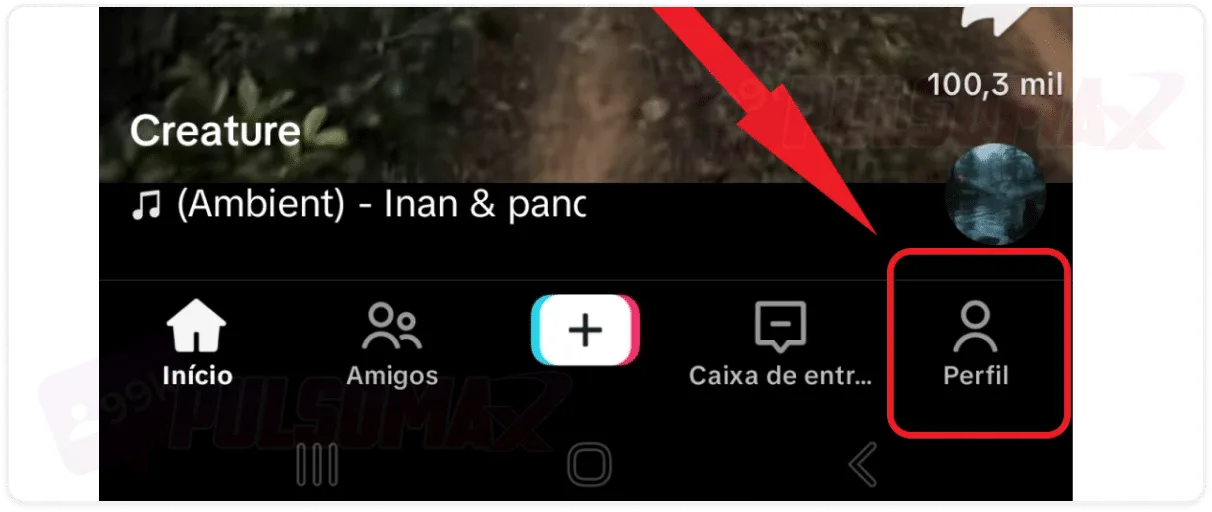
  • Tap on profile in the bottom right corner of the screen.

TikTok profile button
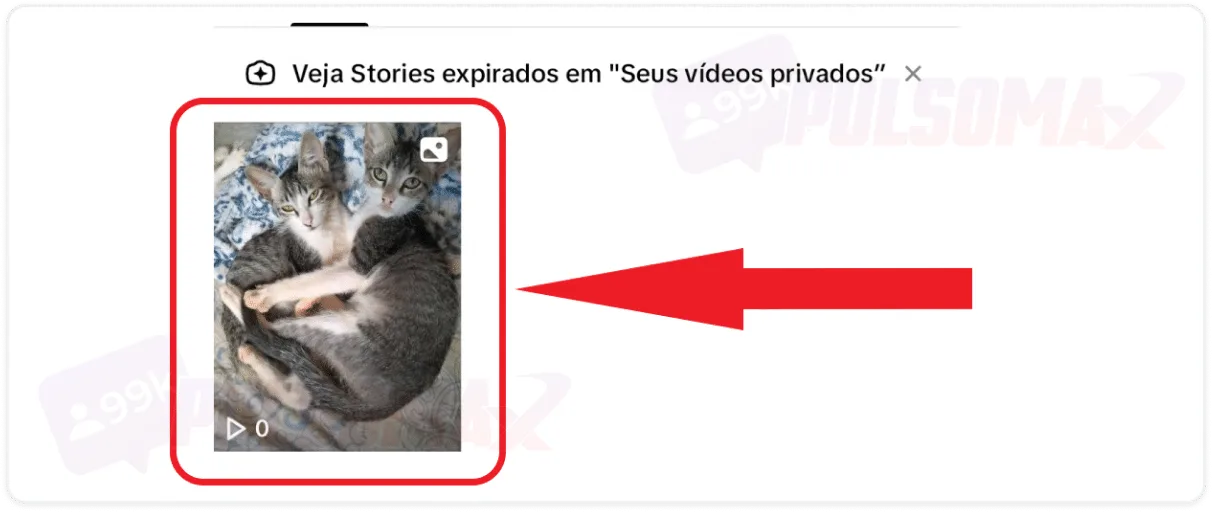
  • Now, tap on the story you want to delete.

Story selected for deletion on TikTok.
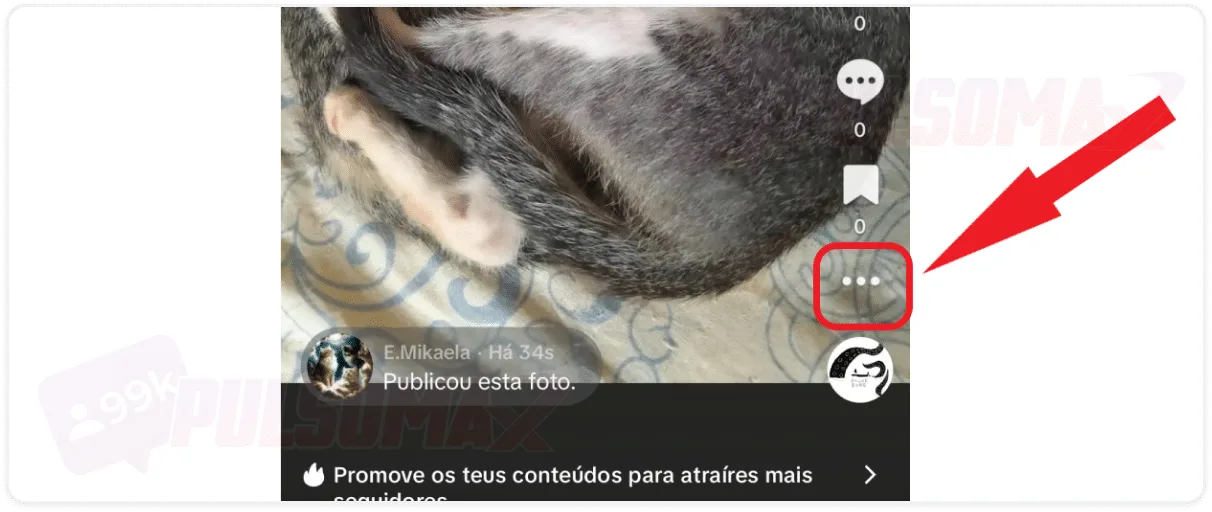
  • Click on the three-dot button in the upper right corner.

Three-dot button in TikTok story
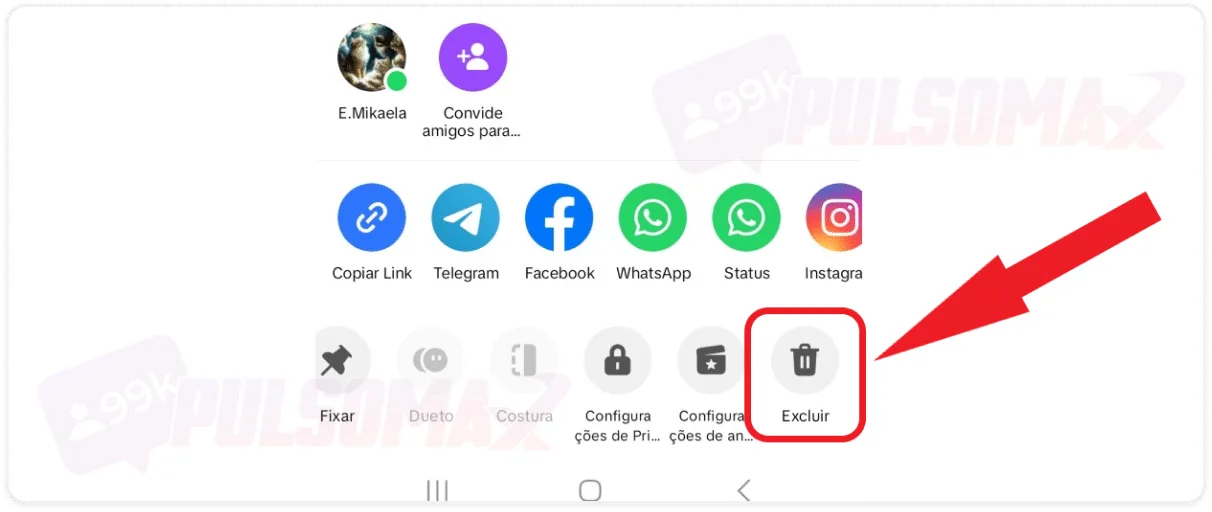
  • Scroll to the right and tap delete.

Delete option to delete a story on TikTok.
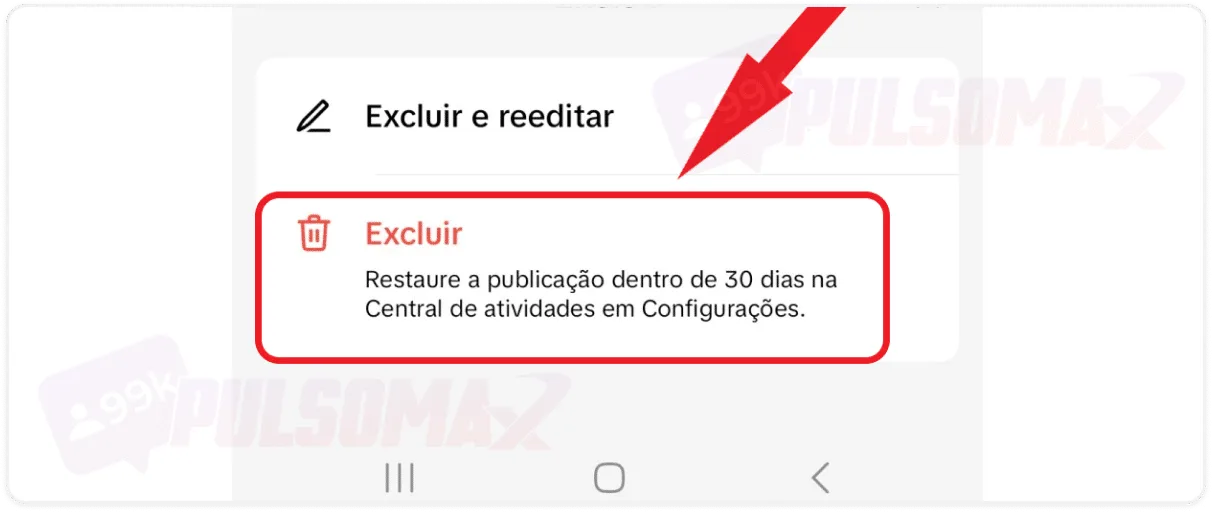
  • Confirm your decision by clicking delete again.

Confirmation to delete story on TikTok Done! You've learned how to delete a TikTok story! It's quite simple, isn't it? Now you can do this with any story you want. And, if you wish, you can restore the post, as long as it was deleted less than 30 days ago.
How to recover a deleted TikTok story?

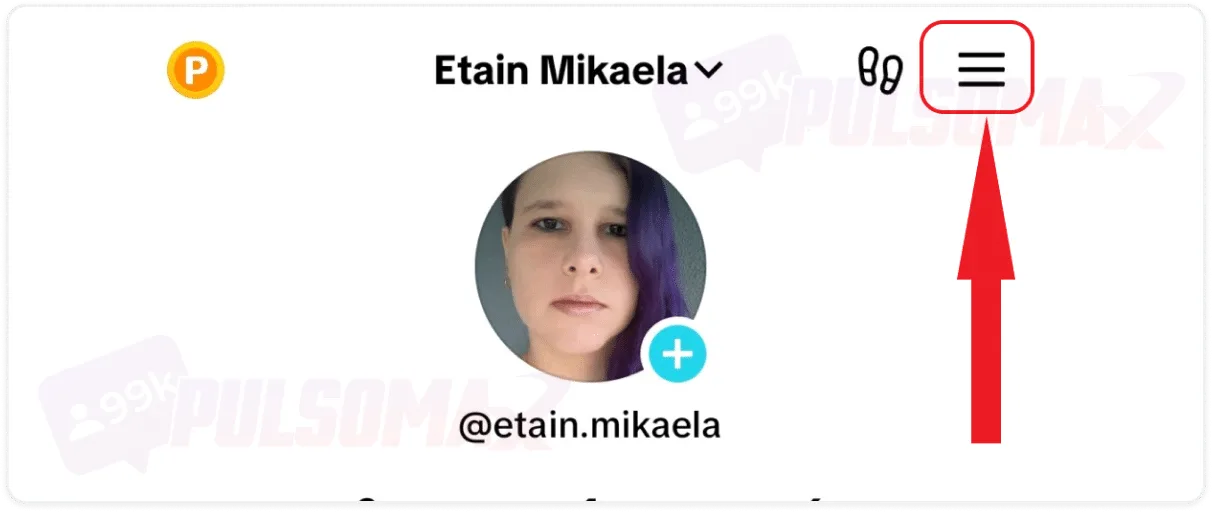
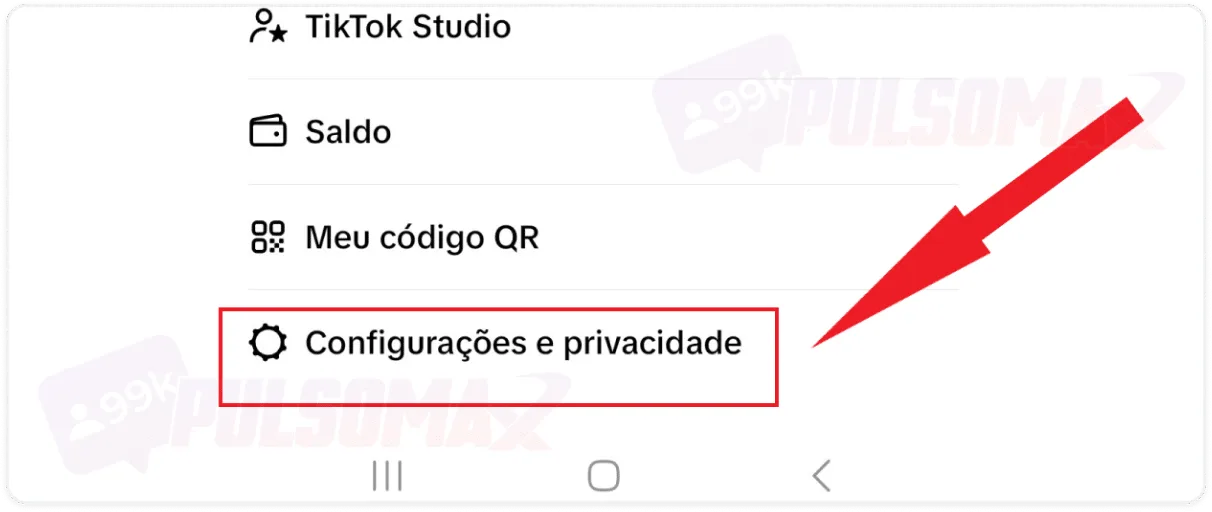
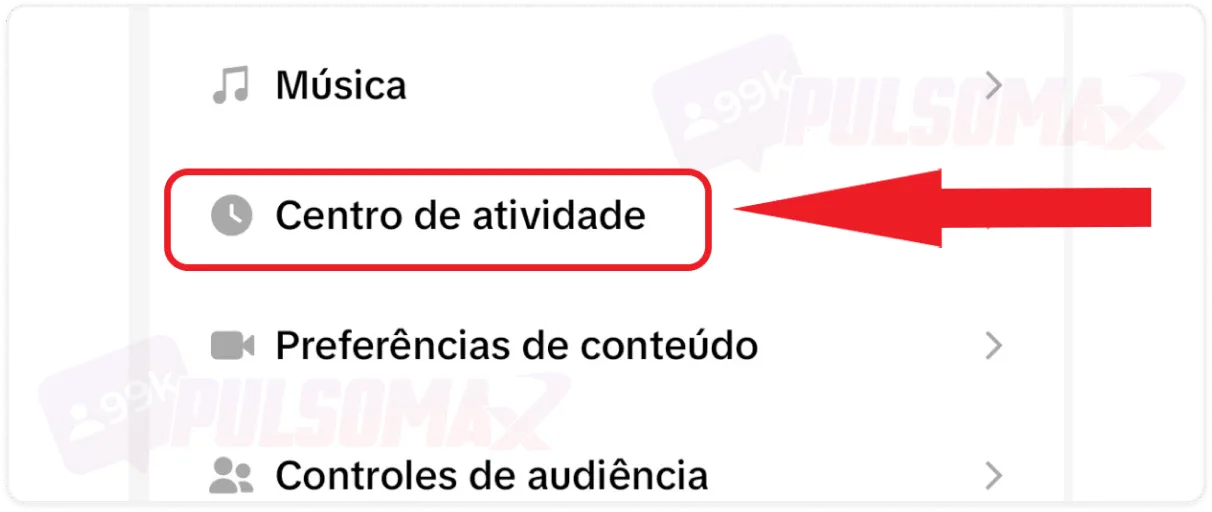
If for any reason, after learning how to delete a TikTok story, you decide to put your story back online, it's also very simple. To begin, tap the profile button, just like in the previous section, then:
  • Click the button with 3 bars.

3-bar button on TikTok
  • Select settings and privacy.

TikTok settings and privacy option
  • Tap on the activity center.

Activity center on TikTok
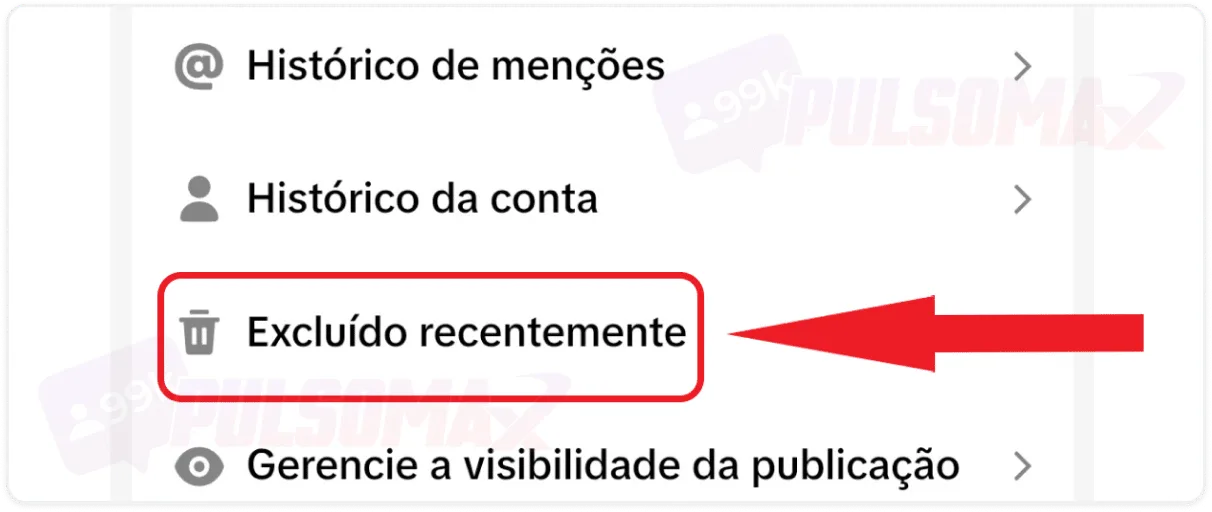
  • Now, tap on recently deleted.

Recently deleted from TikTok
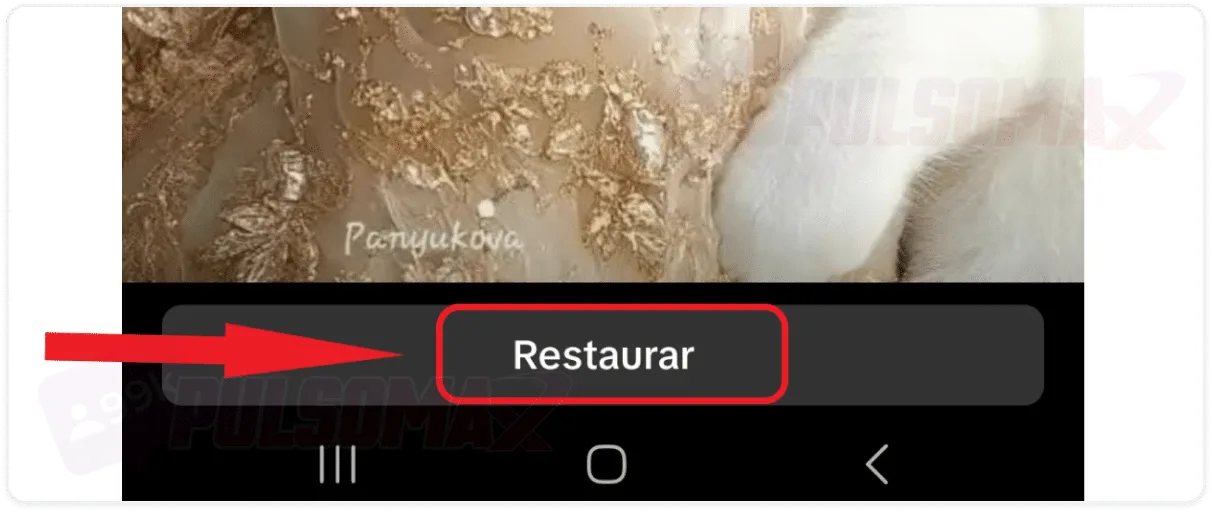
  • Tap on the story you want to restore, then click restore.

Restore Story on TikTok
  • Confirm your decision by clicking restore again.

Confirmation of restoring story on TikTok Done! Your story has been restored and will be visible to other TikTok users again.

Can I recover a deleted TikTok video?

No, unfortunately you can't. TikTok only allows you to recover deleted stories. Keep this in mind when learning how to delete a TikTok story. Other videos are permanently deleted. To get around this problem, a good solution is to make the video private. With this feature, other TikTok users won't be able to see the content, but the video will remain available on your profile if you need it. Many TikTok users are also on Instagram. If you are one of them and would like to download your favorite content from there, check out our essential TikTok download tools – it's free!

How do TikTok Stories work?

TikTok Stories are an excellent way to maintain daily contact with your followers, which is very important for growth on the platform, as is investing in your profile by publishing quality content and even choosing tobuy TikTok followers to accelerate this process. Therefore, in addition to learning how to delete a TikTok story, understanding how TikTok Stories work is something you need to know to improve your performance on the platform. Check out the tips:
  • On TikTok, stories are short clips of up to 15 seconds that last only 24 hours;
  • To create your stories, you can upload a ready-made video, an image (which will be transformed into a video), or use your camera to record content at the time of publishing;
  • You can use sounds, effects, and filters in your stories, just like in videos recorded for your feed;
  • You can edit your story however you like, just like you do with other longer videos;
  • Once you have a short video of up to 15 seconds ready, you can publish it by tapping the three-dot button and selecting the "add to story" option.

If your goal is to engage as many people as possible with your story, learning the best times to post on TikTok will help increase interactions and views of your content.

Can I use Stitch and Duet in content posted to my TikTok story?

Yes, you can! And if you regret this choice, simply use our step-by-step tutorial on how to delete a TikTok story to remove content created with Stitch or Duet whenever you want. Stitch is a collaboration tool on TikTok. With it, users can join or combine their videos to create a longer video. This is a widely used strategy to expand the reach of content and improve audience engagement, benefiting both users' profiles. Duet is a similar feature, but instead of joining the videos into one, the two pieces of content are displayed side-by-side. This way, both content creators share the screen at the same time, giving equal visibility to both creators. To make your video even better when creating a Stitch or Duet, you can use one of the best free video editors for mobile , making any final adjustments to your content before publishing.

What can you share on TikTok Stories to improve engagement?

If you don't use our tutorial on how to delete a TikTok story, the best thing to do is think carefully about the content you intend to publish in your story. To improve engagement, authentic and original stories are always the best choice. To do this, think of content that will be attractive to your audience and further increase your audience's interest in your creations. Check out the tips below to learn how to create good stories on TikTok.

Share moments from your day-to-day life.

Sharing everyday moments is a viable strategy for most TikTok content creators. For example, if you create cooking videos, you can take the opportunity to share a moment where you finish a dish, organize your cupboard, or buy fresh ingredients at the market. Fashion creators can share stories showing quick outfits or favorite pieces, travel content creators can show a special place in a particular destination, and so on. But, of course: think carefully about which moments you want to share with your followers, or you may need to learn how to delete a TikTok story to remove content that didn't get a positive response from your audience.

Share your opinion on a given topic.

If you have an interesting and quick topic to comment on, stories are a good place to post that content. Especially if it's a comment about a current situation that's important now but won't be recurring in the future. After all, the duration of a story is limited. And to increase engagement with this type of video, you can learn what POV means and how to use this hashtag, popular on TikTok and Instagram. And, if your video has a negative impact, which sometimes happens, you already know how to delete a TikTok story.

Invest in interactive content.

On TikTok Stories, users can also like, comment, and interact with you through direct messages. Therefore, investing in engaging content that encourages audience participation is a good strategy. For example, you can ask users questions to answer, ask for their opinions after mentioning yours, create challenges and polls to increase engagement.

Promote products from partner brands.

If you already have a good TikTok profile and work with a partner brand, you can leverage the app's stories to create quick content promoting your brand's products or services. After all, even though the story space is short, it can be used successfully in a well-planned marketing strategy. Are you also on Instagram and want to become a successful influencer? See how to buy real Instagram followers and increase your profile's reach to attract the attention of brands!

Share important moments, achievements, or something you enjoy.

Even if you're not a content creator looking to learn how to monetize your TikTok account , Stories are a space you can use in your daily life. For example, to share important moments, such as birthday celebrations, weddings, graduations, etc., to showcase achievements, like a photo of your diploma, your first day at work, etc. Or simply to share anything you want. After all, your TikTok profile is also an expression of your personality and identity, and Stories are an excellent way to show a little more about yourself to your followers on the platform. And, if you want, you've learned how to delete a TikTok Story and you can do that with this content too!

What should you avoid posting on your TikTok story?

Just because you know how to delete a story on TikTok doesn't mean you should do it all the time, right? After all, if you're deleting a story, it's because there's something wrong with it. So, it's important to think about what not to share in your story.

Do not post content that violates TikTok's guidelines and terms of use.

To begin, never post any content that violates TikTok's community guidelines , or you may end up receiving penalties from the platform, and your video will be taken down without you having to worry about how to delete a TikTok story, as TikTok will do it automatically. Another important point is TikTok's terms of service . It's important to read them to be aware of the platform's policies and avoid posting prohibited content. Furthermore, a negative history of recurring violations can prevent you from monetizing your TikTok account.

Do not publish artificial content.

To generate genuine engagement on TikTok, your content must convey authenticity. Learning how to delete TikTok stories is useful for removing videos that have generated negative feedback, but to avoid this from the start, it's important to focus on being sincere and authentic when creating content. For example, if you're going to share an opinion in your stories, be honest about the topic. Believe me, your followers can easily tell when your opinion isn't sincere.

Do not publish content from other creators without permission.

Publishing other users' content without their permission can lead to serious penalties from TikTok. Therefore, invest in creating your own content on TikTok, even if it takes longer. That way, you won't need to learn how to delete TikTok stories for that reason.

Download your story before deleting it!

After learning how to delete a TikTok story, you can learn how to download TikTok videos and store that content in your phone's gallery before deleting them. In fact, you can do this with any TikTok video, allowing you to keep the content, which is very useful for videos that aren't stories, since there's no way to recover deleted long videos. That's it, we've reached the end of this post! We hope our tutorial on how to delete a TikTok story has been helpful. How about sharing your experience in the comments? Thank you for reading this far!
Como ativar monetização TikTok passo a passo Previous post How to enable TikTok monetization step by step Saiba quanto o TikTok paga por 1 milhão de visualizações Next post Find out how much TikTok pays per 1 million views.