Tiktok
  by
by 
 9 min read
Don't know how to add a link to your TikTok bio? Just like Instagram, TikTok also has a bio, a space where users can introduce themselves and include information they consider important. And those who use social media for work know that properly setting up their profile is a basic step to stand out and grow. However, especially for those who are just starting out, finding certain settings can be complicated. So, if you don't know how to add a link to your TikTok bio, don't worry, that's normal. And we're here to help you! In today's article, we've prepared a step-by-step tutorial, with images, to teach you how to add a link to your TikTok bio, as well as other tips on how to use this feature to enhance your profile. Enjoy!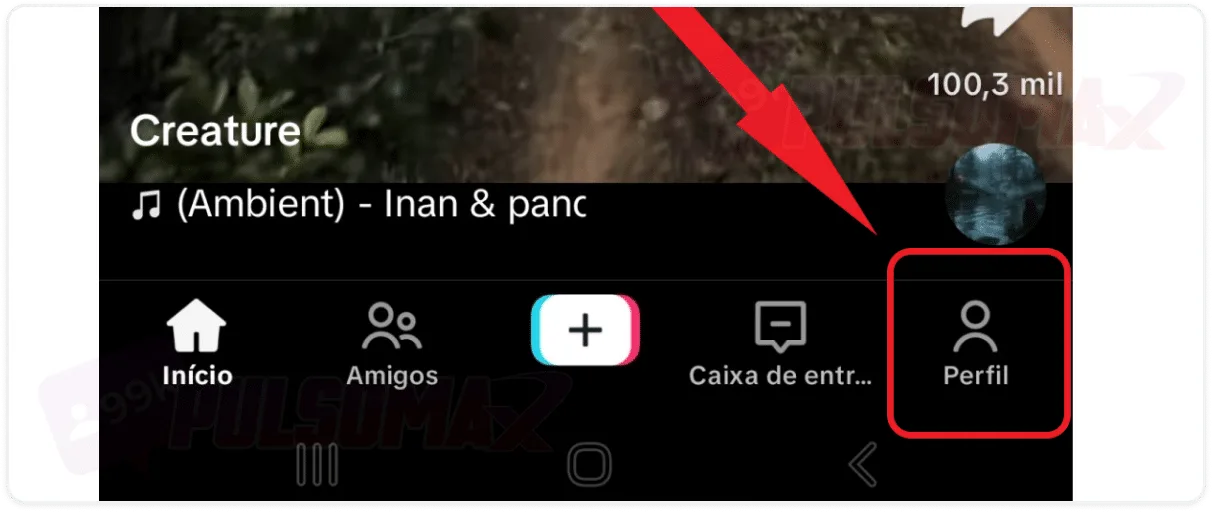
 Important: Only users with more than 1000 followers can add a clickable link to TikTok's bio. So, if you don't have that many followers, the link will still be saved, but as plain text.
How to add a link to your TikTok bio step by step.
Growing on social media requires consistency, and even some investment, such asbuying TikTok followers to give your profile a boost. But, among all the things needed to have a good experience and stand out on social networks like TikTok, learning how to handle settings like your bio is a fundamental step. After all, among other information, the TikTok bio allows you to insert a clickable link, which is very useful for promoting a website, sales page, online store, or anything else the user wants. And as you will see, learning how to put a link in your TikTok bio is no mystery! To begin, first open your TikTok app on your Android or iOS phone, then:Click the profile button in the bottom right corner of the screen.
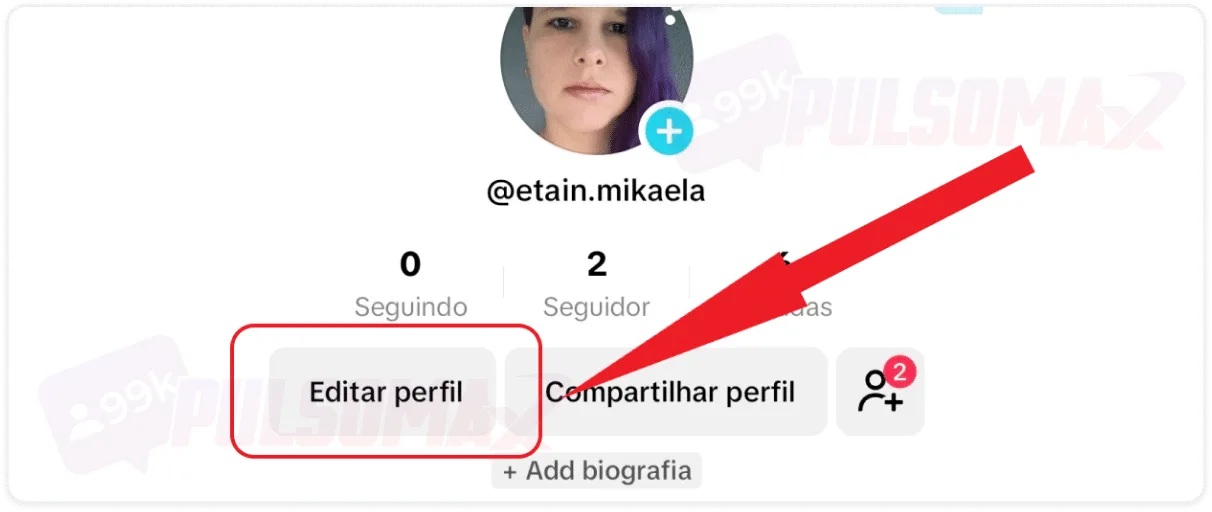
Then tap on edit profile.
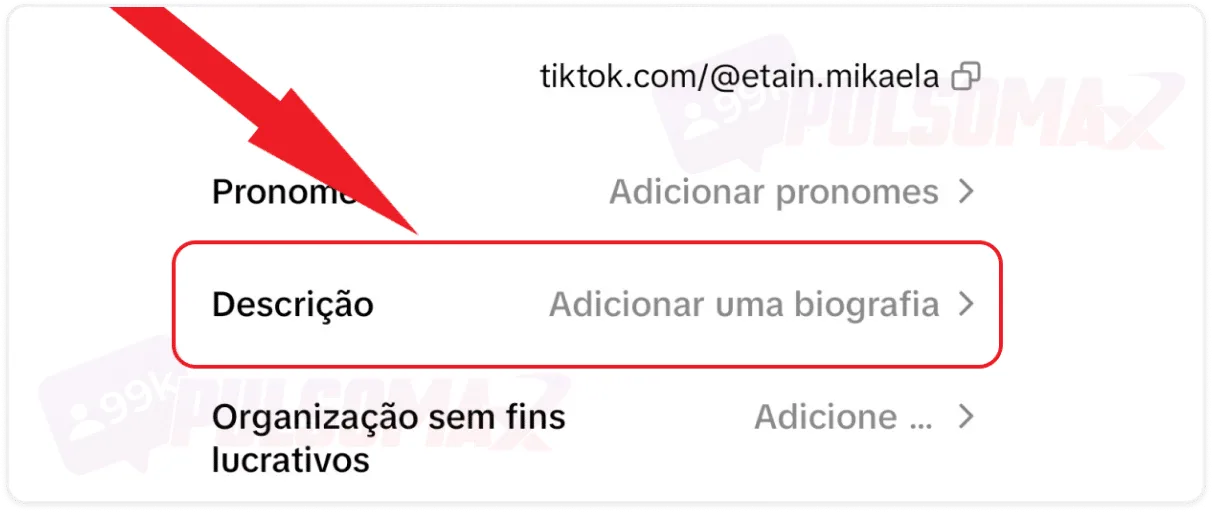
Now, click on description: add a biography.
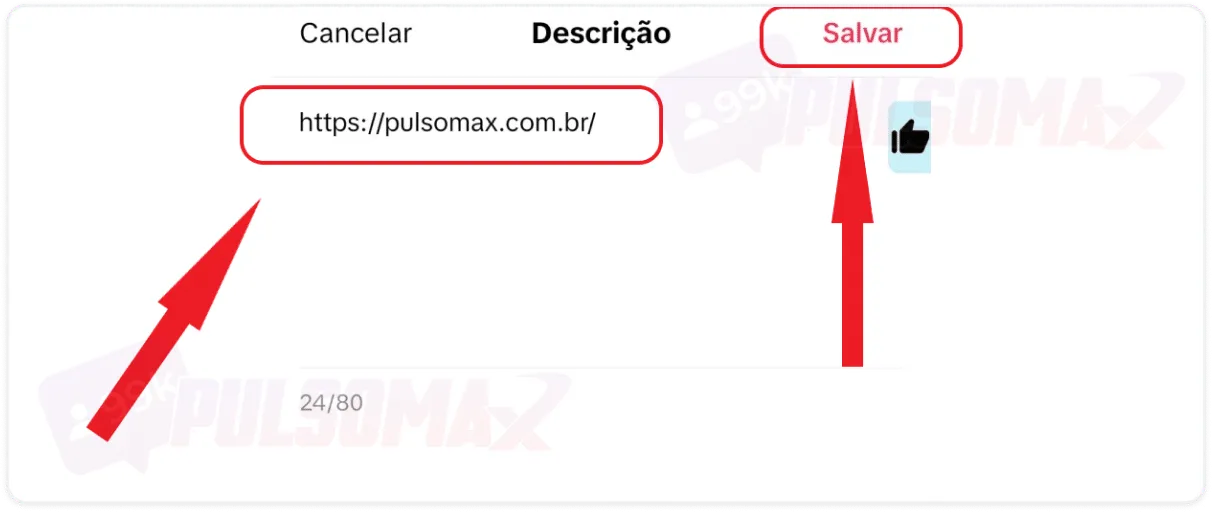
In the text box, type or paste the desired link, and click save.
Important: Only users with more than 1000 followers can add a clickable link to TikTok's bio. So, if you don't have that many followers, the link will still be saved, but as plain text.How do I add a link to my TikTok profile on business accounts?
If you have a business account on TikTok, know that the process for adding a link to your profile is as simple as learning how to add a link to your TikTok bio on a personal account. To begin, log into your account on the app, then: Tap on profile in the bottom right corner of the screen.- Click on edit profile.
- Go to the website option.
- Now, simply type or paste the URL of the link you want;
- When finished, tap save so that the link remains on your profile.
How do I add my Instagram link to my TikTok bio?
Now that you've learned how to add a link to your TikTok bio, adding an Instagram link to your bio on the short video app is a breeze. Just follow the steps above, and it will work for any link, including links to other social media platforms. Are you on Instagram and want to grow there too? Take advantage of this opportunity and see how to buy real Instagram followers – it's fast, safe, and with guaranteed delivery!Can I put a WhatsApp link on TikTok?
Yes, you can, as long as you do it in your profile bio. There isn't a specific place to put WhatsApp links on TikTok. Other social media platforms, like Facebook and Instagram, already offer this option, and users can choose to add a WhatsApp button, making it easier to redirect followers to the messaging app. This feature is especially useful for businesses and digital influencers. After all, with this link, followers interested in products, services, or partnerships can easily contact the account in question. Therefore, if it's important for you to put a WhatsApp link on TikTok, take advantage of our step-by-step guide on how to add a link to your TikTok bio to do it!My link to my TikTok bio is too long.
One important point about adding a link to your TikTok bio is its length. Users must respect the 80-character limit for TikTok bios. Therefore, longer links cannot be included in their entirety, meaning they won't be clickable, right? Well, there's a solution! Simply use a link shortener, like Abrir Link , to shorten the URL you put in your bio. This way, the link will still redirect the user to the same web page, but it will be shorter, fitting within the 80-character limit of your TikTok bio.How do I add multiple links to my TikTok bio at once?
Generally, you can only add one link to your bio, a fact that became clear in our tutorial on how to add a link to your TikTok bio. However, there is a way to add multiple links to your bio using a link aggregator tool like Linktree . To use the platform, you need to register, creating an account with your email and choosing a password. You will also need to provide some other information when filling out your profile. The tool has paid plans, but offers a limited free plan option. With your account created, you can create a link with the text you prefer to be displayed to your followers. Then, add several links that will be part of this main link you created, but without changing its wording or size. When the user clicks on your link made with Linktree, they will be redirected to a page with options to click on all the links included in the main link. You can also customize the order of these links and the text that will be displayed in each of them! Read also: what is a bio? Learn how to use it to improve your profile.Why put a link in your TikTok bio?
Learning how to add a link to your TikTok bio and how to do it can be useful in various outreach and engagement strategies. So, now that you've learned how to use this feature, but are still unaware of its full potential, check out the tips below and understand why, and when, to add a link to your TikTok bio.Use links for direct monetization.
As we explained in our guide on how to activate TikTok monetization , you need to meet mandatory requirements to start earning money through video monetization or the platform's brand partnership program. But before you complete all these requirements, you can take advantage of sharing links in your bio and selling directly. For example:- You can include a link to your online store;
- Affiliate program links;
- Links to sell courses or classes;
- Add links to capture leads;
- Promote your company's website;
- Promote other profiles on social media platforms where you have more followers.
Make it easier to close partnerships.
Learning how to add a link to your TikTok bio is also useful for increasing brand interest in partnering with you. It's not uncommon for influencers with many followers on other social media platforms, like Instagram, to have a small audience on TikTok. This could be because they started earlier on Instagram or because they implemented more strategies to increase engagement there . In any case, if brands see your link and realize you're an influencer on other platforms, they may want to partner with you, even if their target isn't advertising on TikTok. Meanwhile, you can take advantage of this time to invest more in your profile on the short-video platform and grow there as well.Highlighting campaigns and launches
You can change the links in your bio whenever you want. And that's another positive point for learning how to add links to your TikTok bio. So, when your brand is launching something, or you want to highlight a specific campaign to increase audience interest and sales, you can use this feature to your advantage. You can even use this space to promote videos you want your audience to see and emphasize specific content you've created. Learn how to download TikTok videos without tools and download your favorite content whenever you want!The link in the TikTok bio is accessible and convenient.
When viewing your profile, all users can see or click on the link you've placed in your TikTok bio. Therefore, this is a very accessible and convenient way to share any type of information without people having to search for it. For your followers, it's especially easy to access your profile and click on the links you share. You can even comment on these links in a video, further increasing people's interest in finding and clicking on the link.Showcase your portfolio.
If you're a freelance professional looking to secure projects or partnerships on the platform , you can learn how to add a link to your TikTok bio and use this space to showcase your portfolio. This way, people interested in hiring you or forming a partnership can click the link and check out your strengths, increasing your chances of success. After all, TikTok's audience is very broad, with users interested in different niches and profiles. Therefore, you can publish content regularly, gain more followers, tell them about your activities, promote your link, and become better known in your field. How about downloading your favorite Instagram videos too? Check out our Instagram download tools – it's free!I can't add a link to my TikTok bio, what could be the problem?
If you've learned how to add a link to your TikTok bio but can't do it on your profile, check your follower count. As we explained, you need more than 1000 followers for this feature to be enabled. Therefore, that's the most likely reason. However, if you have more than 1000 followers and still can't do it, then the reason might be something else, including:- You violated the community guidelines or app terms of use, and TikTok placed restrictions on your profile.
- TikTok is experiencing a temporary outage, and we need to wait for the situation to normalize.
- The app is outdated, so updating it might solve the problem.
- There is a bug in this version of TikTok, and it is necessary to wait for an update that fixes the problem.