Tiktok
  by
by 
 9 min read
Don't know how to download TikTok videos? Many people get frustrated when they enter the short video app and try to download a video, only to find the download function is off. However, in this post, we'll teach you how to download your videos with a step-by-step guide with images, so you'll never forget how to do it again! Anyone who uses TikTok daily knows that there's a great diversity of content there. After all, many content creators invest in TikTok,buying real TikTok followers and creating quality content daily. All of this results in a wide variety of videos for different tastes and ages. Therefore, it's natural that many users want to download their favorite videos so they can watch the content whenever they want, even offline. With that in mind, we've created this quick and easy step-by-step guide to learning how to download TikTok videos! Enjoy!
 Additionally, if you prefer, simply:

 Done! You've just learned how to download TikTok videos without a watermark. Note that the app has an option to download in HD, if you prefer. Oh, and if you want to quickly edit your video on your phone, check out: the 5 best free video editors for mobile .
How to download TikTok videos without tools?
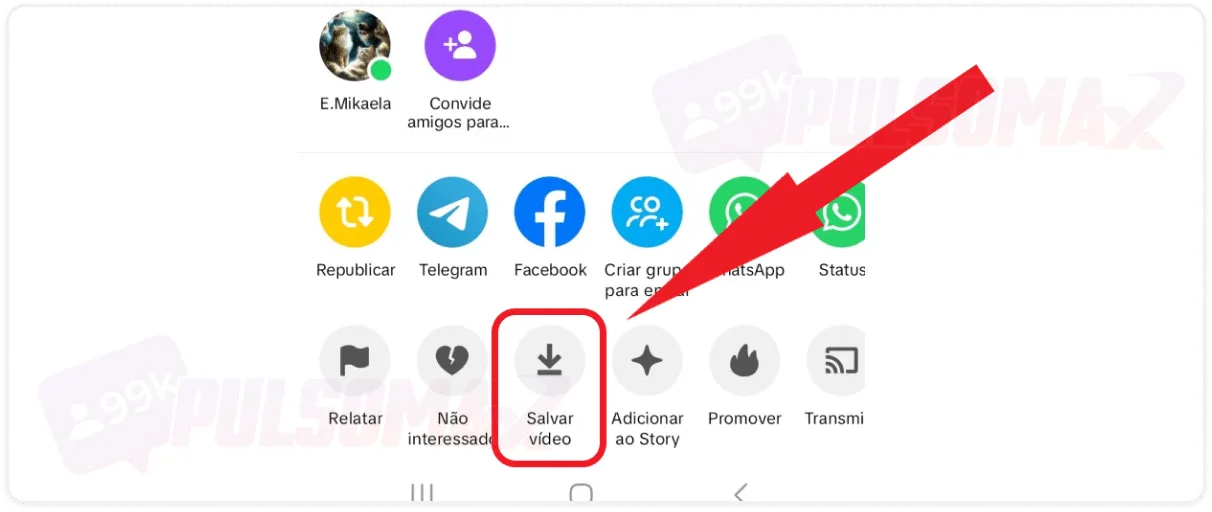
Downloading videos from some social media platforms requires the use of external tools, but with TikTok this isn't necessary, as you can download videos directly from the app to your gallery without any external resources. Pretty great, right? After all, with this feature, users can have their favorite videos on their phone to watch, show to friends, and easily forward to others. However, you should pay attention to an important detail: when downloading TikTok videos without tools, the videos will come with the social network's watermark. That said, let's see how to download them. To begin, open your TikTok app on your Android or iOS device, then:Select the video and click the arrow button (share).
Tap "save video" and wait for the download to complete.
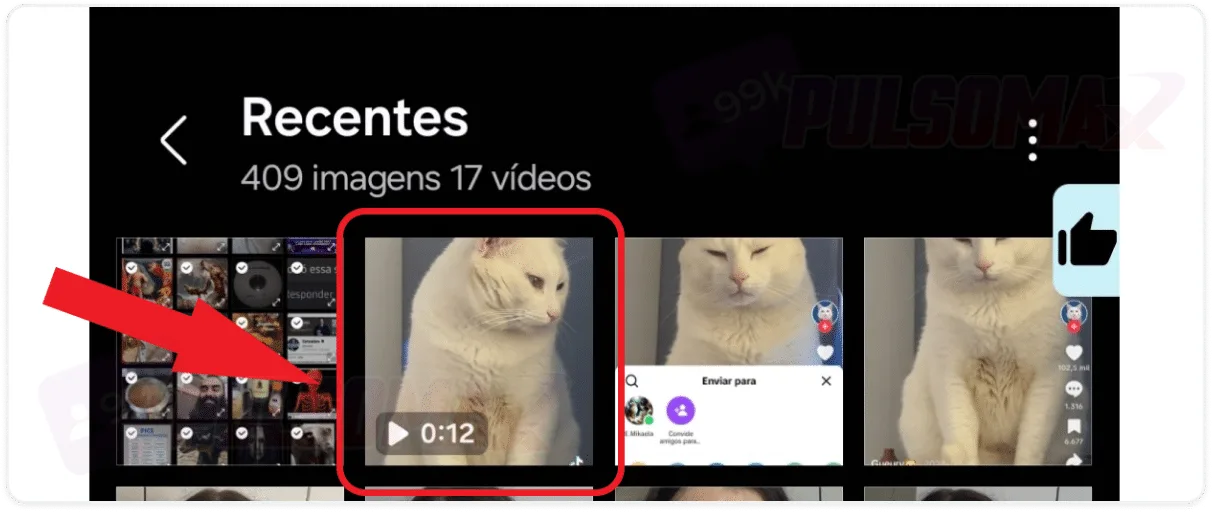
View the video saved in your phone's gallery.
Additionally, if you prefer, simply:Press and hold the video screen, then tap "save video".
How to download TikTok videos without a watermark?
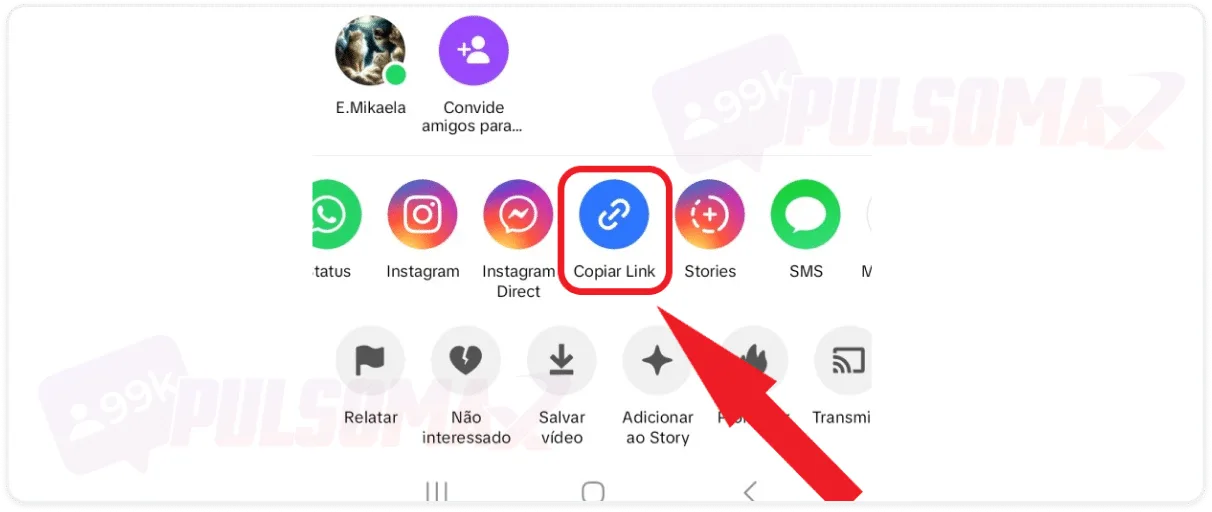
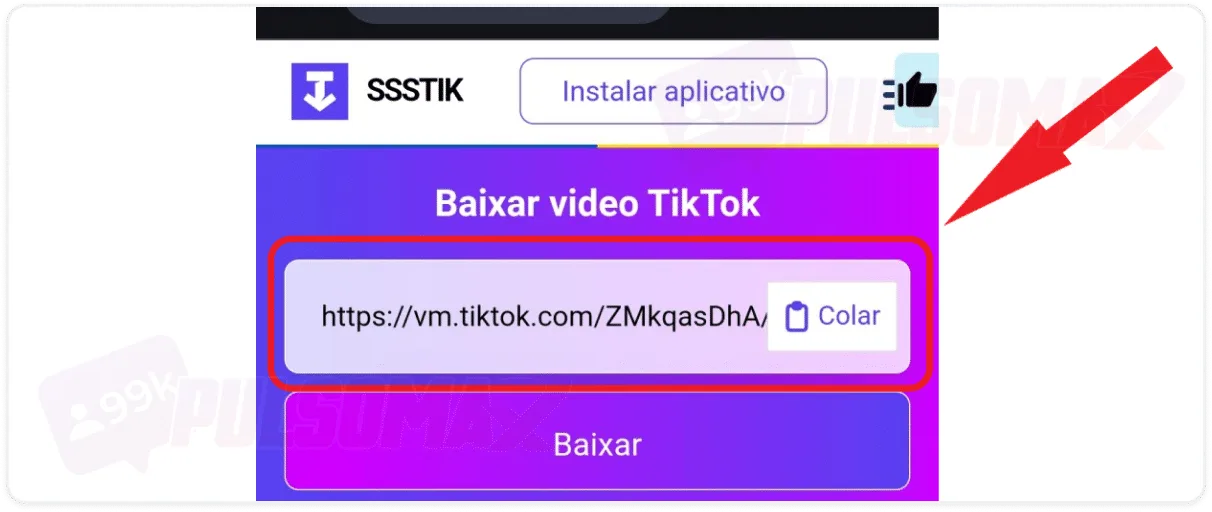
If you need to download TikTok videos without a watermark , the previous step-by-step instructions won't work for you. For that, you need an external tool. So, if you're a content creator who wants to download your own videos for editing, or simply a user who doesn't like watermarks, you need to know about sssTikTok, the simplest and most intuitive app for downloading TikTok videos. To begin, first open your TikTok app and find the video you want to download. Then:Tap on share, the button shaped like an arrow.
Select "copy link".
Open sssTikTok in your mobile browser, paste the link, and click download.
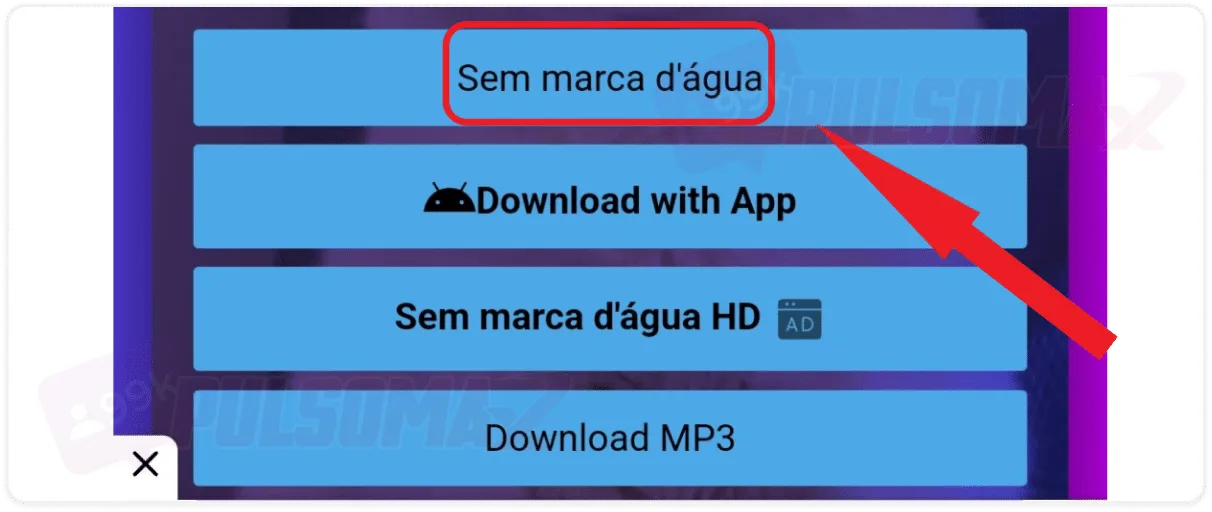
Choose the option without a watermark.
Done! You've just learned how to download TikTok videos without a watermark. Note that the app has an option to download in HD, if you prefer. Oh, and if you want to quickly edit your video on your phone, check out: the 5 best free video editors for mobile .Other tools for downloading TikTok videos
If you prefer, there are other tools you can use to download TikTok videos. These are websites that function similarly to sssTikTok. They are:- TikTok Downloader;
- TikTok Video Download;
- TikTok;
- SaveTT.cc;
- Download TikTok Video (a Chrome extension that also works on Microsoft Edge).
Where are the downloaded TikTok videos stored on my phone?
After learning how to download TikTok videos, finding the content is quite simple. Your videos will be saved in your phone's gallery. The path to access downloaded TikTok videos may vary slightly depending on the phone's brand and model, but simply access your gallery app and look through the available folders; the videos will be in one of them. Usually, you can easily find them in the recent videos folder (or something similar), but they might also be in a folder called downloads (or something similar).Can I remove the watermark from a video?
Yes, that's possible. If you prefer, you can download TikTok videos without external tools and then edit the video to remove the logo using a video editor. However, the best option for those who want to simplify the process and skip this editing step is to download the videos using one of the external tools we present in this article. And if you also want to download your favorite videos, audios, and images from Instagram, check out our essential Instagram download tools ; it's free, and all you need is the link to the post.Can I save a video without downloading it?
Yes, you can! If you don't want to fill up your phone's memory with downloaded TikTok videos, you can simply favorite your videos, and you can access them whenever you want in the app's favorite videos tab. Another way to keep your content saved in the app is by liking the videos you enjoy, as they will be saved in the liked videos tab of your profile. But don't forget: when you save a video in the app and don't download it, you will lose access to the video if the profile owner deletes it. So, if it's a really important video for you, it's best to download it. Is someone on TikTok bothering you? Then check out this other post here: step-by-step guide on how to block someone on TikTok.How to download TikTok videos on your PC?
Although not as common, it's also possible to download TikTok videos to your computer if you're accessing the social network that way. To do this:- Go to the official TikTok website and log in with your credentials;
- Next, find the video you want and click on it;
- Copy the video link that appears highlighted just below the like and save options;
- Choose one of the apps to download TikTok videos and paste the link;
- Click to download;
- Choose the location where the video will be saved;
- And download it.
Check out also: Buy TikTok Views Starting at 1 Real Instantly