Instagram
  by
by 
 9 min read
Curious to know who your non-followers are on Instagram? It's very easy to check who follows you back on Instagram. Just access your profile, and you'll have a list of your followers and another list of all the profiles you follow. However, finding out who doesn't follow you on Instagram is a little more difficult. The strategy of following profiles to receive the famous "follow back" is very common on Instagram and usually works well. Combining this strategy with others, such as buying Instagram followers , interacting with followers, and publishing quality content, it's possible to maintain good performance and achieve significant growth. Now, not everyone you follow on Instagram will follow you back. How do you find out? As you will see in this article, there are different ways to find out who your non-followers are on Instagram. Enjoy!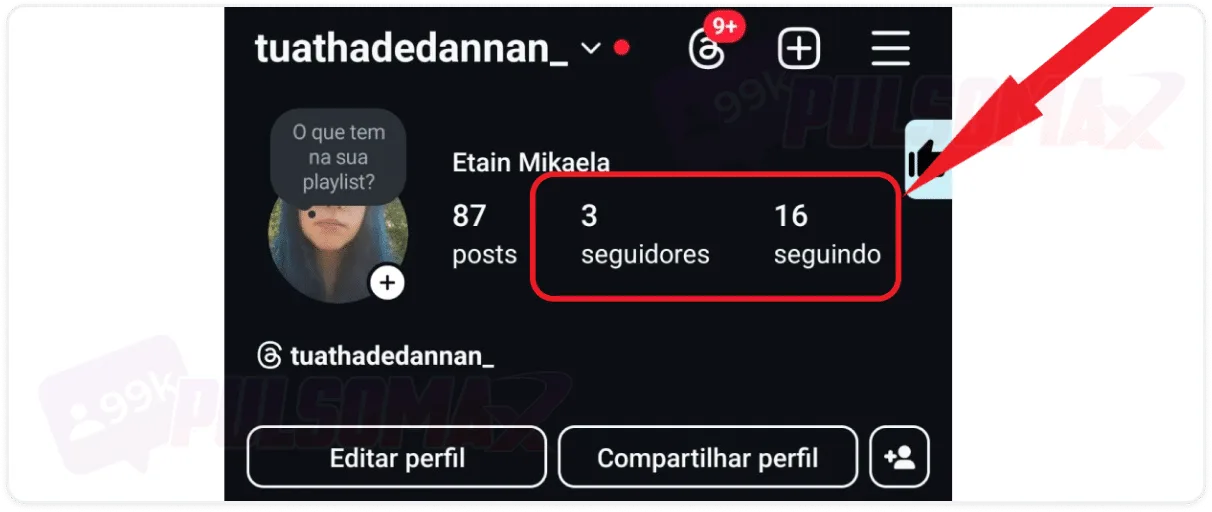 To find out who unfollowed you on Instagram, you can monitor your follower count. Whenever someone unfollows you, that number decreases. But don't forget to also pay attention to the number of new followers you gain. Basically, you should add the number of new followers to your previous number of followers and see if the result is less than it should be. For example, if you had 51 followers and gained 7, you should have 58 followers in total. But if your profile is showing 56 followers, then two people unfollowed your profile. Using the "unfollowers" extension to monitor which accounts you follow and who you follow, making comparisons, is one of the best ways to find out who no longer follows you. You can learn more in our complete guide on how to find out who unfollowed me on Instagram .
How can I find out who my Instagram followers are not?
Of course, people use Instagram on their cell phones, and theInstagram feed itself is designed to provide the best possible experience on these devices. However, one of the simplest ways to find out who doesn't follow you on Instagram is via computer. For this, there's an extension you can install on your computer to access Instagram Web . So, even if you don't usually use Instagram on your PC, it might be a good idea to have this extension installed for those times when you want to check who doesn't follow you on the social network. And using this extension is very simple, as you'll see below.No followers Instagram Chrome extension
The Google Chrome browser has an extension called "Instagram Unfollowers". It's a quick solution for any Instagram user to find out who isn't following them back. This tool compares the list of accounts you follow on the social network with who follows you, automatically detecting your unfollowers. To start using the extension is very simple, just:- Open your Google Chrome browser and access the Chrome Web Store (you can also search for the extension on Google, which will be among the first results);
- To find the Chrome Web Store, tap the 6-dot icon in the upper right corner of the screen, or type chromewebstore.google.com into your search bar;
- Find the "non-followers" extension on Instagram and click on it;
- Next, tap " Use in Chrome";
- Now, tap on add extension to confirm the installation.
- Access your Instagram account through the Chrome browser on the device where you installed the extension;
- Look for a pink button next to the address bar (that's the extension);
- Click on it, then tap load to see the list of unfollowers on Instagram.
What to do if the "no followers" extension on Instagram doesn't appear?
You might install the "No Followers" extension on Instagram , and when you try to use it, you won't find the pink extension button next to the Chrome address bar. If this happens, tap the extensions button in the upper right corner, next to the navigation bar, and look for the "No Followers" extension in the list. If you don't find it, you need to try installing it again, as it wasn't installed correctly. If you do find it, click on it so that Chrome displays the extension button normally.How to find out who unfollowed me on Instagram
To find out who unfollowed you on Instagram, you can monitor your follower count. Whenever someone unfollows you, that number decreases. But don't forget to also pay attention to the number of new followers you gain. Basically, you should add the number of new followers to your previous number of followers and see if the result is less than it should be. For example, if you had 51 followers and gained 7, you should have 58 followers in total. But if your profile is showing 56 followers, then two people unfollowed your profile. Using the "unfollowers" extension to monitor which accounts you follow and who you follow, making comparisons, is one of the best ways to find out who no longer follows you. You can learn more in our complete guide on how to find out who unfollowed me on Instagram .Can I unfollow someone who doesn't follow me back on Instagram?
Yes, that's possible. And you can use the Chrome extension itself to instantly unfollow people who don't follow you back on the social network. Just click the "following" button that appears next to the user's profile. You can also unfollow the person at any time in your Instagram app and manually check your follower list by comparing it to the accounts you follow to identify potential unfollowers on Instagram. But doing this with the Chrome extension is easier and faster.How to unfollow in bulk on Instagram?
There is no native Instagram mechanism that allows for mass unfollowing on the social network. However, with the "Unfollowers" extension on Instagram, this is possible, provided you purchase the pro version. This is an interesting option for accounts with thousands of followers, where unfollowing many people at once would take a long time. But be careful, as Instagram limits the number of actions you can perform per minute, per hour, and per day. Exceeding this limit may result in penalties from the social network, as Instagram may identify this mass activity as spam or suspicious activity. We've already discussed this on the blog in other articles, such as the guide on how many people I can unfollow on Instagram per day.Can I use apps to see who I don't follow on Instagram?
Yes, you can use third-party apps for this purpose. However, it's important to know that Instagram discourages the use of these types of apps. So, if you choose to use them, the advice remains the same: respect the maximum number of interactions allowed for actions such as following and unfollowing people, to avoid penalties on your account.Apps to find out who doesn't follow you on Instagram
There are several apps that allow you to see who you don't follow on Instagram. One of the best known and most used is the Reports+ app , which is available for Android and iOS . With this app you can:- Check the number of posts on your account and the number of accounts you follow;
- Check out your friends' stories;
- Knowing how many followers your account has and how many accounts you follow;
- Check who doesn't follow you back on Instagram;
- See which accounts follow you, but you don't follow them back;
- See who unfollowed you on Instagram.
Other apps to find out who doesn't follow you on Instagram
Besides Reports+, there are also some other similar apps you might prefer to use to find out who your Instagram followers are not following you. Check them out:iOS apps:
- Analyzer Plus;
- Followers Reports & Trackers;
- Reports Followers Unfollowers.
Android apps:
- Followers + Stalker;
- Followers & Unfollowers;
- Reportly – Follower Tracker.
Tips for using third-party apps safely
If you choose to use an app to find out who isn't following you on Instagram, there are some security tips that can help protect your account and your personal information:- Thoroughly research the reputation of the chosen app before entering your data into it;
- Prefer only apps available in official app stores (Play Store and Apple Store);
- Always be wary of exaggerated promises, such as "knowing which users viewed your profile".